I'm having an issue validating integers. I'd like '15' to be valid, whereas '15,6' should be invalid. If I use { strict: false }, '15' is fine but '15,6' gets coerced to 15 and is thus valid, even though I'd like it to be invalid. If I use { strict: true } every string input is invalid.
Is there another way to achieve this? 🤔
 eahlberg
All 9 comments
ideally we need to split the integer test into two istinct methods that coerce and test separately (like toInteger, and isInteger or something). IF you'd like to help with that please jump in :) otherwise you can make just the number part strict like number().integer().strict()
 jquense
on 28 May 2018
jquense
on 28 May 2018
@jquense thanks for the prompt response 🙇♂️
I'll take a look and see if I can understand what's going on and help.
I cannot get your solution to work though, if I change the schema to use number().integer().strict(), both '15' and '15,6' throws a validation error. Did I misunderstood something? 🤔
eahlberg
on 28 May 2018
Is this a duplication of #177
@eahlberg can you clarify if this is a localisation issue since some cultures use comma as a decimal place.
 edkongx
on 29 May 2018
edkongx
on 29 May 2018
@kongdigital hmm, I'm using comma as a separator so maybe you're right that this is a localisation issue. If I use number().integer() in non-strict mode, the validation correctly marks '15.6' as invalid, whereas '15,6' is incorrectly marked as valid. If that would be resolved it would also fix this.
eahlberg
on 30 May 2018
yup isn't gonna be able to handle localization issues unfortunately. To do that properly you really need to use a library with the right locale data, and that's way out of scope for us here. You could integrate it tho into something that does handle these cases (like Globalize.js) by adding your own localeNumber schema or something (one that extends number and adds locale aware parsing)
jquense
on 30 May 2018
@jquense ok, good to know. Thanks for the suggestion, I'll look into it!
eahlberg
on 30 May 2018
Or you could have a config property to indicate the decimal separator
 avin-kavish
on 2 Mar 2020
avin-kavish
on 2 Mar 2020
@eahlberg
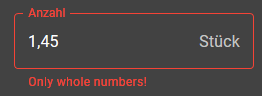
Just in case you or anyone else is still looking for a solution to this problem: Essentially, the input is still a string, regardless of localisation. So instead of defining it as number() in the Yup.object(), how about we treat it as a string and simply check with a regex if it's an Integer?
Without leading zeroes and without + and - (positive/negative), it works like this:
Yup.object().shape({
  amount: Yup.string()
    .matches(/^(?<=\s|^)\d+(?=\s|$)/, "Only whole numbers!")
  })
Works like a charm, no matter if you use commas, points or type in anything else!
 DangerousDetlef
on 6 Aug 2020
DangerousDetlef
on 6 Aug 2020
@DangerousDetlef thanks for the suggestion! I haven't looked at this for a good while, but I'll have this in mind for next time.
eahlberg
on 10 Aug 2020
Related issues
 the-daniel-rothig
·
4Comments
the-daniel-rothig
·
4Comments
 you-fail-me
·
4Comments
you-fail-me
·
4Comments
 haddyo
·
3Comments
haddyo
·
3Comments
 klvfn
·
4Comments
klvfn
·
4Comments
 RobBednark
·
3Comments
RobBednark
·
3Comments
Most helpful comment
Or you could have a config property to indicate the decimal separator