Ypimagepicker: Pod depends on XCode 10 - swift 4.2
How can I solve this?
YPImagePicker was resolved to 3.4.1, which depends on
      SteviaLayout (~> 4.2.0)
With Branch XCode10:
YPImagePicker (from `https://github.com/Yummypets/YPImagePicker`, branch `Xcode10`) was resolved to 3.4.1, which depends on
      PryntTrimmerView (~> 2.0)
But SteviaLayout 4.2.0 with swift 4.2 not working
XCode 10 - swift 4.2
 Coppola-Aleandro
All 17 comments
Pretty much stuck here as well. I have tried the following combination and the pod installation fails with the PryntTrimmerView related error.
What I have tried:
pod 'SteviaLayout', :git => 'https://github.com/freshOS/Stevia.git', :tag => '4.4.0'
pod 'PryntTrimmerView', :git => 'https://github.com/HHK1/PryntTrimmerView.git', :tag => '3.0.0-beta.1'
pod 'YPImagePicker', :git => 'https://github.com/Yummypets/YPImagePicker.git', :branch => 'Xcode10'
Error:
[!] CocoaPods could not find compatible versions for pod "PryntTrimmerView":
  In snapshot (Podfile.lock):
    PryntTrimmerView (from `https://github.com/HHK1/PryntTrimmerView.git`, tag `3.0.0-beta.1`)

  In Podfile:
    PryntTrimmerView (from `https://github.com/HHK1/PryntTrimmerView.git`, tag `3.0.0-beta.1`)

    YPImagePicker (from `https://github.com/Yummypets/YPImagePicker.git`, branch `Xcode10`) was resolved to 3.4.1, which depends on
      PryntTrimmerView (~> 2.0)
 5fcgdaeb
on 23 Sep 2018
5fcgdaeb
on 23 Sep 2018
@Coppola-Aleandro @5fcgdaeb Sorry about that :/ This is being fixed in here: https://github.com/Yummypets/YPImagePicker/pull/222 will keep you posted as soon as it's fixed :)
 s4cha
on 24 Sep 2018
s4cha
on 24 Sep 2018
Hey, after some research, it looks like the last issue comes from our PryntTrimmerView dependency.
I opened an issue here https://github.com/HHK1/PryntTrimmerView/issues/37
to have this sorted.
As much as we all love new swift versions, it's always an extra workload for us to update all projects and make sure everything works fine. I'll do my best to solve that asap. Thanks a ton for being so patient 🙏
s4cha
on 25 Sep 2018
In the meantime, Carthage integration is up in 3.5.0 https://github.com/Yummypets/YPImagePicker/releases/tag/3.5.0
s4cha
on 25 Sep 2018
Any updates? When will version 3.5.0 be available with CocoaPods?
 Zyoma108
on 28 Sep 2018
Zyoma108
on 28 Sep 2018
I have no idea how it is possible, but also updating the operating system to Mojave, xCode 10, swift 4.2 also works with version 3.4
This is my Pod.lock:
YPImagePicker (3.4.0)
PryntTrimmerView (~> 2.0)
SteviaLayout (~> 4.2.0)
Coppola-Aleandro
on 28 Sep 2018
@Coppola-Aleandro the mysteries of Cocoapods I guess xD
s4cha
on 29 Sep 2018
@Coppola-Aleandro @5fcgdaeb @Zyoma108
This should be fixed by now, 3.5.1 is available on Cocoapods "
https://github.com/Yummypets/YPImagePicker/releases/tag/3.5.1
http://cocoapods.org/pods/YPImagePicker
Let me know if that works,
Cheers!
s4cha
on 1 Oct 2018
All is ok! Thanks!
Zyoma108
on 2 Oct 2018
Working well, thanks for the quick fix!
5fcgdaeb
on 6 Oct 2018
@Coppola-Aleandro @Zyoma108 @5fcgdaeb Thanks for your patience 🙏 :)
s4cha
on 9 Oct 2018
Hi there, I updated the pods and am still getting some 33 errors. Although my Swift version is also set to 4.2, Mojave and have xCode 10. I don't know how to proceed, please help.
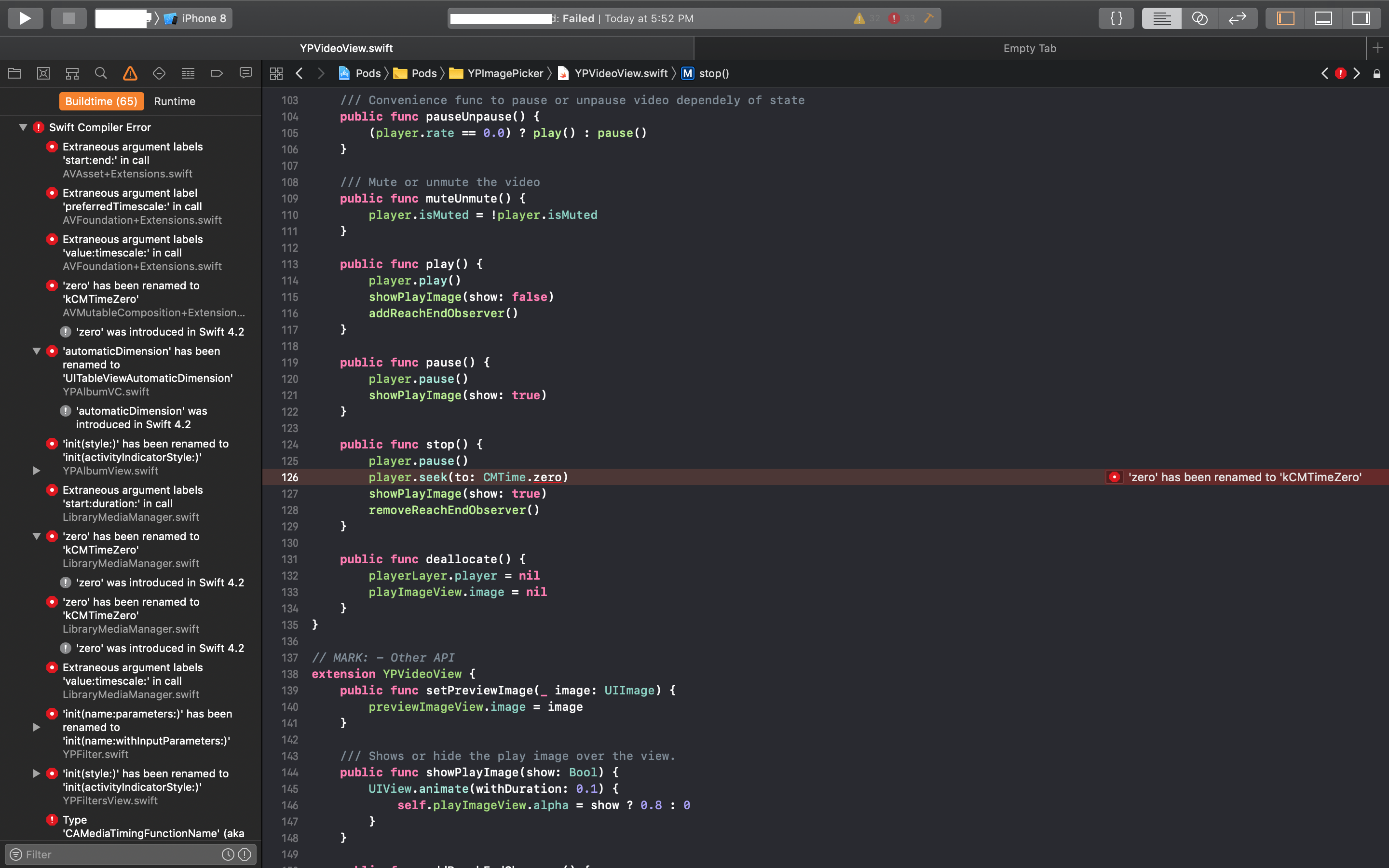
 mohsinka
on 15 Oct 2018
mohsinka
on 15 Oct 2018
@mohsinka I'm having the exact same issue, with 33 errors related to YPImagePicker. Tried everything, can't figure out a fix.
 jewell86
on 22 Oct 2018
jewell86
on 22 Oct 2018
@mohsinka and @jewell86 , Are you sure you use the correct build settings?
What's in your Podfile.lock ?
It should be like
  - YPImagePicker (3.5.2):
    - PryntTrimmerView (~> 3.0.0)
    - SteviaLayout (~> 4.4.0)
if not , delete the podfile like from your folder and delete the pods folder too, let only Podfile be in your folder.
then run pod update
if that doesnt work it means your settings are not 4.2 either in your xcode or in your podfile.
You can try following at the end of your podfile
post_install do |installer|
    installer.pods_project.targets.each do |target|

    if  target.name == 'PryntTrimmerView' || target.name == 'SteviaLayout' || target.name == 'YPImagePicker'
            target.build_configurations.each do |config|
                config.build_settings['SWIFT_VERSION'] = '4.2'
            end
        end
    end

 installer.pods_project.build_configurations.each do |config|
      config.build_settings.delete('CODE_SIGNING_ALLOWED')
      config.build_settings.delete('CODE_SIGNING_REQUIRED')
    end
end
 ugenlik
on 23 Oct 2018
ugenlik
on 23 Oct 2018
Thank you, I will try these things. YPImagePicker was working perfectly for
me until I updated to Xcode 10, and then it no longer worked (along with
some other things, I had a ton of issues to figure out and that was the
last one I was working on). I will let you know when I try it, and I really
appreciate your quick response, it is super helpful!!
Jewell
On Tue, Oct 23, 2018 at 9:50 AM ugenlik notifications@github.com wrote:
@mohsinka https://github.com/mohsinka and @jewell86
https://github.com/jewell86 , Are you sure you use the correct build
settings?What's in your Podfile.lock ?
It should be like
- YPImagePicker (3.5.2):
- PryntTrimmerView (~> 3.0.0)
- SteviaLayout (~> 4.4.0)
if not , delete the podfile like from your folder and delete the pods
folder too, let only Podfile be in your folder.then run pod update
if that doesnt work it means your settings are not 4.2 either in your
xcode or in your podfile.You can try following at the end of your podfile
post_install do |installer|
installer.pods_project.targets.each do |target|if target.name == 'PryntTrimmerView' || target.name == 'SteviaLayout' || target.name == 'YPImagePicker' target.build_configurations.each do |config| config.build_settings['SWIFT_VERSION'] = '4.2' end end endinstaller.pods_project.build_configurations.each do |config|
config.build_settings.delete('CODE_SIGNING_ALLOWED')
config.build_settings.delete('CODE_SIGNING_REQUIRED')
end
end—
You are receiving this because you were mentioned.
Reply to this email directly, view it on GitHub
https://github.com/Yummypets/YPImagePicker/issues/224#issuecomment-432327436,
or mute the thread
https://github.com/notifications/unsubscribe-auth/AfTSKxpf0IFOemqmnmEDSvqzu6FAQWNGks5un0jpgaJpZM4Wvywh
.
jewell86
on 23 Oct 2018
@jewell86 When I updated to Swift 4.2 I had a lot of problems too , it was because some frameworks still use swift 3 like Alamofire and Firebase, some of them use Swift 4.0 and some of them use Swift 4.2
You need to adjust your podfile's post installer for each target , like in my previous reply
config.build_settings['SWIFT_VERSION'] = '4.2'
It is a painful process to find what each project uses in terms of Swift Version, but you will figure it out eventually....
ugenlik
on 23 Oct 2018
Heh okay cool, thank you. I have learned Swift on my own and built my
project all on my own, so when this happened I had NO idea how to fix it! I
was actually going to an interview with an employer & couldn't get my app
to build because of the updates, it was pretty embarrassing! I think your
tips will help a lot, I'll try them out asap & seriously appreciate the
help!
On Tue, Oct 23, 2018 at 10:07 AM ugenlik notifications@github.com wrote:
@jewell86 https://github.com/jewell86 When I updated to Swift 4.2 I had
a lot of problems too , it was because some frameworks still use swift 3
like Alamofire and Firebase, some of them use Swift 4.0 and some of them
use Swift 4.2You need to adjust your podfile's post installer for each target , like in
my previous replyconfig.build_settings['SWIFT_VERSION'] = '4.2'
It is a painful process to find what each project uses in terms of Swift
Version, but you will figure it out eventually....—
You are receiving this because you were mentioned.
Reply to this email directly, view it on GitHub
https://github.com/Yummypets/YPImagePicker/issues/224#issuecomment-432333777,
or mute the thread
https://github.com/notifications/unsubscribe-auth/AfTSK5hG--jITrq5-Whiw4yFpI6hjuv_ks5un0zIgaJpZM4Wvywh
.
jewell86
on 23 Oct 2018
Related issues
 DamascenoRafael
·
5Comments
DamascenoRafael
·
5Comments
 fukemy
·
6Comments
fukemy
·
6Comments
 esabunor
·
5Comments
esabunor
·
5Comments
 jonnyarc
·
3Comments
jonnyarc
·
3Comments
 twinkalH
·
4Comments
twinkalH
·
4Comments
Most helpful comment
Hey, after some research, it looks like the last issue comes from our PryntTrimmerView dependency.
I opened an issue here https://github.com/HHK1/PryntTrimmerView/issues/37
to have this sorted.
As much as we all love new swift versions, it's always an extra workload for us to update all projects and make sure everything works fine. I'll do my best to solve that asap. Thanks a ton for being so patient 🙏