yowsup_new $ ./yowsup-cli registration --requestcode sms --phone xxxx --cc 505 --mcc 710 --mnc 30
yowsup-cli v2.0.15
yowsup v2.5.7
Copyright (c) 2012-2016 Tarek Galal
http://www.openwhatsapp.org
This software is provided free of charge. Copying and redistribution is
encouraged.
If you appreciate this software and you would like to support future
development please consider donating:
http://openwhatsapp.org/yowsup/donate
INFO:yowsup.common.http.warequest:{"login":"xxxxxx","status":"fail","reason":"old_version"}
status: fail
reason: old_version
 ronaldoats
All 13 comments
I fixed the issue while digging around some old posts.
Go to the yowsup/env folder and find the env_android.py and env.py files.
In env.py change the line:
default = "s40" to default = "android"
In env_android.py find the the lines:
_MD5_CLASSES = "xxxxxxxxxxxxxxxxxxxxxx"
_VERSION = "x.xx.xxx"
Change them to the data found at this link, more specifically the parameters A and D.
A is for the _MD5_CLASSES and D is for the _VERSION.
For the current version to work, you need to set them up like this:
_MD5_CLASSES = "0R9F4U5fzdwVvn06wLe1JA=="
_VERSION = "2.18.255"
Hope for the best.
 MatijaNovosel
on 29 Aug 2018
MatijaNovosel
on 29 Aug 2018
thank you very much for the solution, it was instantaneous,
I think that this should already be included in the official repository
ronaldoats
on 30 Aug 2018
I fixed the issue while digging around some old posts.
Go to the yowsup/env folder and find the env_android.py and env.py files.
In env.py change the line:
default = "s40"todefault = "android"In env_android.py find the the lines:
_MD5_CLASSES = "xxxxxxxxxxxxxxxxxxxxxx"
_VERSION = "x.xx.xxx"Change them to the data found at this link, more specifically the parameters A and D.
A is for the _MD5_CLASSES and D is for the _VERSION.
For the current version to work, you need to set them up like this:
_MD5_CLASSES = "0R9F4U5fzdwVvn06wLe1JA=="
_VERSION = "2.18.255"Hope for the best.
works great!
 pinox1
on 18 Sep 2018
pinox1
on 18 Sep 2018
i change this but i can not login
say :
[offline]:/L
general: Disconnected: Connection Closed
or say this error :
   recv(node)
  File "/usr/lib/python2.7/site-packages/yowsup2-2.5.7-py2.7.egg/yowsup/layers/protocol_ib/layer.py", line 27, in recvIb
    raise ValueError("Unkown ib node %s" % node)
ValueError: Unkown ib node <ib from="s.whatsapp.net">
<fbip>
18.197.16.210|5222|1542630379|90000|false|false,18.207.176.81|5222|1542630379|90000|false|false
HEX:31382e3139372e31362e3231307c353232327c313534323633303337397c39303030307c66616c73657c66616c73652c31382e3230372e3137362e38317c353232327c313534323633303337397c39303030307c66616c73657c66616c7365
``

in debug mode say :
DEBUG:yowsup.layers.logger.layer:tx:
▒Y▒▒▒L▒Oi▒\▒NC▒)▒bawGLؐ▒▒▒▒▒▒▒▒Ϥ,▒t▒▒r▒G▒▒ʓ▒▒_a▒▒<▒▒▒▒▒S▒?
HEX:b559b5d1d64cdf4f6990195ce6154e43c329ac0f626177474cd890baac0fa29b8bff7708c1bcbdcfa42cd1748bf372cb47307ffb9e18a6ca9396bc5f2d1508610e8ca73cadf1f8b4cafe0753d43f
DEBUG:yowsup.layers.network.layer:Disconnected, reason: Connection Closed
general: Disconnected: Connection Closed
```

 parsibox
on 19 Nov 2018
parsibox
on 19 Nov 2018
I fixed the issue while digging around some old posts.
Go to the yowsup/env folder and find the env_android.py and env.py files.
In env.py change the line:
default = "s40"todefault = "android"In env_android.py find the the lines:
_MD5_CLASSES = "xxxxxxxxxxxxxxxxxxxxxx"
_VERSION = "x.xx.xxx"Change them to the data found at this link, more specifically the parameters A and D.
A is for the _MD5_CLASSES and D is for the _VERSION.
For the current version to work, you need to set them up like this:
_MD5_CLASSES = "0R9F4U5fzdwVvn06wLe1JA=="
_VERSION = "2.18.255"Hope for the best.
Work For me , thanks A lot :)
 langkahbisnis
on 12 Jan 2019
langkahbisnis
on 12 Jan 2019
Step 1 :
git clone git://github.com/tgalal/yowsup.git
Step 2 :
cd yowsup
sudo pip install yowsup2
Step 3 :
vi yowsup/env/env.py
change fault = "s40" to default = "android"
then save (push :wq for write n quit )
Step 4 :
vi yowsup/env/env_android.py
change :
_MD5_CLASSES = "xxxxxxxxxxxxxxxxxxxxxx"
_VERSION = "x.xx.xxx"
to
_MD5_CLASSES = "0R9F4U5fzdwVvn06wLe1JA=="
_VERSION = "2.18.255"
don't forget save again
step 5 :
running registration with this code :
python yowsup-cli registration --requestcode sms --phone 62xxxxxxxxxx --cc 62 --mcc 510 --mnc 01
enter
source step 5 : https://www.instructables.com/id/WhatsApp-on-Raspberry-Pi/
mcc is Mobile Country Code check your here
mnc is Mobile Network Code check your here
if status display sent , you get SMS from server Whats App
next finnaly you can Register for get Password with this code :
python yowsup-cli registration --register xxx-xxx --phone 62xxxxxxxxxx --cc 62
thanks :)
langkahbisnis
on 12 Jan 2019
Thank you @MatijaNovosel
However, it wasn't working even after doing the changes mentioned by him. I just needed to re-install with this command (after making the changes as suggested by him):
sudo python setup.py install
Then it worked and my phone number got registered successfully.
 nikunjbhatt
on 15 Mar 2019
nikunjbhatt
on 15 Mar 2019
@nikunjbhatt @langkahbisnis Sir, I tried multiple solutions from above - one you mentioned and @MatijaNovosel 's. Can't get it running. Last step error is this when I sudo python setup.py install.
Processing dependencies for yowsup==3.2.3
error: cryptography 2.1.4 is installed but cryptography>=2.5 is required by set(['dissononce'])
And when I register my number the error is
2020-04-18 01:30:51,513 yowsup.common.http.warequest - b'{"login":"91xxxxxxxxxx","status":"fail","reason":"old_version"}\n'
status: b'fail'
reason: b'old_version'
Any suggestions ?
 hamzahkhan
on 18 Apr 2020
hamzahkhan
on 18 Apr 2020
For me, it worked only after seting the lastest Whatsapp version at yowsup/env/env_android.py
_VERSION = "2.20.142"
 danielsouzasp
on 28 Apr 2020
danielsouzasp
on 28 Apr 2020
For me, it worked only after seting the lastest Whatsapp version at yowsup/env/env_android.py
_VERSION = "2.20.142"
Can I know _MD5_CLASSES value?
 ronaldtx
on 3 May 2020
ronaldtx
on 3 May 2020
For me, it worked only after seting the lastest Whatsapp version at yowsup/env/env_android.py
_VERSION = "2.20.142"Can I know _MD5_CLASSES value?
Same here Can you post the MD5_CLASSES?
Thanks
 Lotykun
on 6 May 2020
Lotykun
on 6 May 2020
Hi, my value is: _MD5_CLASSES = "aIiTbnlq1G2jxLKYgZI5Xw=="
danielsouzasp
on 6 May 2020
Hi, my value is: _MD5_CLASSES = "aIiTbnlq1G2jxLKYgZI5Xw=="
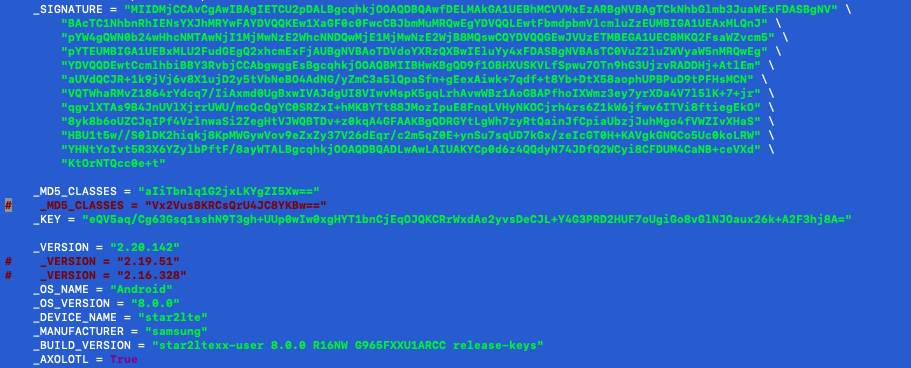
already change to your setting but still get error
_status: fail
reason: bad_token_
ronaldtx
on 7 May 2020
Related issues
 darode
·
4Comments
darode
·
4Comments
 gabrieldesousah
·
4Comments
gabrieldesousah
·
4Comments
 qvs5010
·
4Comments
qvs5010
·
4Comments
 bzero
·
4Comments
bzero
·
3Comments
bzero
·
4Comments
bzero
·
3Comments
Most helpful comment
I fixed the issue while digging around some old posts.
Go to the yowsup/env folder and find the env_android.py and env.py files.
In env.py change the line:
default = "s40"todefault = "android"In env_android.py find the the lines:
_MD5_CLASSES = "xxxxxxxxxxxxxxxxxxxxxx"_VERSION = "x.xx.xxx"Change them to the data found at this link, more specifically the parameters A and D.
A is for the _MD5_CLASSES and D is for the _VERSION.
For the current version to work, you need to set them up like this:
_MD5_CLASSES = "0R9F4U5fzdwVvn06wLe1JA=="_VERSION = "2.18.255"Hope for the best.