Yowsup: Old Version Error status: fail reason: old_version
Any One Here Can help me out Trying from 3 day still the same error nothing is working i tryed https://github.com/tgalal/yowsup/issues/2090 also not working
` python yowsup-cli registration -E android --requestcode sms --env android --phone 91**--cc 91 --mcc 405 --mnc 025
INFO:yowsup.common.http.warequest:{"login":"91**","status":"fail","reason":"old_version"}
yowsup-cli v2.0.15
yowsup v2.5.2
Copyright (c) 2012-2016 Tarek Galal
http://www.openwhatsapp.org
This software is provided free of charge. Copying and redistribution is
encouraged.
If you appreciate this software and you would like to support future
development please consider donating:
http://openwhatsapp.org/yowsup/donate
status: fail
reason: old_version
login: 91***
`
 tomriddle54
All 17 comments
Use this with the latest version of WhatsApp APK, you have to write that in the env_android.py (replacing _MD5_CLASSES and _VERSION vars) then run:
python setup.py build
python setup.py install
If you have installed yowsup using pip, you shuold uninstall it first (pip uninstall yowsup) then run build and install.
 victor141516
on 7 Sep 2017
victor141516
on 7 Sep 2017
still not working even with _VERSION = "2.17.329"
Any ideas?
 jnoam
on 9 Sep 2017
jnoam
on 9 Sep 2017
@jnoam After following the steps mentioned by @victor141516 try following:
open file: yowsup/env/__init__.py
Comment the third line:
#from .env_s40 import S40YowsupEnv
This will force registration to use android_env file.
I think this issue can be closed now.
 dezember
on 9 Sep 2017
dezember
on 9 Sep 2017
@syedmustafa54 Try this:
file: env_android.py
class: AndroidYowsupEnv
_SIGNATURE = "MIIDMjCCAvCgAwIBAgIETCU2pDALBgcqhkjOOAQDBQAwfDELMAkGA1UEBhMCVVMxEzARBgNVBAgTCkNhbGlmb3JuaWExFDASBgNV" \
"BAcTC1NhbnRhIENsYXJhMRYwFAYDVQQKEw1XaGF0c0FwcCBJbmMuMRQwEgYDVQQLEwtFbmdpbmVlcmluZzEUMBIGA1UEAxMLQnJ" \
"pYW4gQWN0b24wHhcNMTAwNjI1MjMwNzE2WhcNNDQwMjE1MjMwNzE2WjB8MQswCQYDVQQGEwJVUzETMBEGA1UECBMKQ2FsaWZvcm5" \
"pYTEUMBIGA1UEBxMLU2FudGEgQ2xhcmExFjAUBgNVBAoTDVdoYXRzQXBwIEluYy4xFDASBgNVBAsTC0VuZ2luZWVyaW5nMRQwEg" \
"YDVQQDEwtCcmlhbiBBY3RvbjCCAbgwggEsBgcqhkjOOAQBMIIBHwKBgQD9f1OBHXUSKVLfSpwu7OTn9hG3UjzvRADDHj+AtlEm" \
"aUVdQCJR+1k9jVj6v8X1ujD2y5tVbNeBO4AdNG/yZmC3a5lQpaSfn+gEexAiwk+7qdf+t8Yb+DtX58aophUPBPuD9tPFHsMCN" \
"VQTWhaRMvZ1864rYdcq7/IiAxmd0UgBxwIVAJdgUI8VIwvMspK5gqLrhAvwWBz1AoGBAPfhoIXWmz3ey7yrXDa4V7l5lK+7+jr" \
"qgvlXTAs9B4JnUVlXjrrUWU/mcQcQgYC0SRZxI+hMKBYTt88JMozIpuE8FnqLVHyNKOCjrh4rs6Z1kW6jfwv6ITVi8ftiegEkO" \
"8yk8b6oUZCJqIPf4VrlnwaSi2ZegHtVJWQBTDv+z0kqA4GFAAKBgQDRGYtLgWh7zyRtQainJfCpiaUbzjJuhMgo4fVWZIvXHaS" \
"HBU1t5w//S0lDK2hiqkj8KpMWGywVov9eZxZy37V26dEqr/c2m5qZ0E+ynSu7sqUD7kGx/zeIcGT0H+KAVgkGNQCo5Uc0koLRW" \
"YHNtYoIvt5R3X6YZylbPftF/8ayWTALBgcqhkjOOAQDBQADLwAwLAIUAKYCp0d6z4QQdyN74JDfQ2WCyi8CFDUM4CaNB+ceVXd" \
"KtOrNTQcc0e+t"
_MD5_CLASSES = "ox998VW0nBTueMVfjuZkmQ=="
_KEY = "eQV5aq/Cg63Gsq1sshN9T3gh+UUp0wIw0xgHYT1bnCjEqOJQKCRrWxdAe2yvsDeCJL+Y4G3PRD2HUF7oUgiGo8vGlNJOaux26k+A2F3hj8A="

_VERSION = "2.17.212"
_OS_NAME = "Android"
_OS_VERSION = "4.3"
_DEVICE_NAME = "armani"
_MANUFACTURER = "Xiaomi"
_BUILD_VERSION = "JLS36C"
_AXOLOTL = True
Get the sms cod and registre yow number with env android, but, the yowsup login change env for s40.
 brunaoalx
on 12 Sep 2017
brunaoalx
on 12 Sep 2017
BRNALX thx bro, you saved me some time :-)
Works for me👍
Thx to victor and dezember as well
 oxydaemon
on 16 Sep 2017
oxydaemon
on 16 Sep 2017
@syedmustafa54 works for you?
Please close this issue.
brunaoalx
on 16 Sep 2017
need some help regarding the axolotl curve.
I'm getting the error as
NoModuleFoundError : No Module named 'Axolotl_Curve25519'
anyone please help me?
 hmrasi
on 20 Nov 2017
hmrasi
on 20 Nov 2017
@hmrasi
It worked normal and this error started to appear now?
This seems to be a problem in the installation. Problems we faced when we started working with YowSup
Please tell us more about your problem.
brunaoalx
on 20 Nov 2017
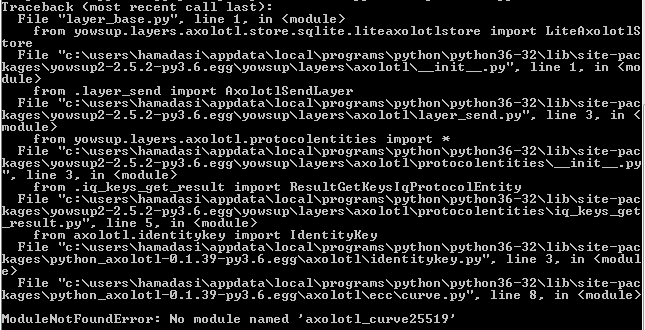
this is what i'm getting.
i have tried it in many ways to resolve. I installed the axolotl_curve25519 again and then started doing the steps in the readme file. Even i'm getting the same error.
How can i login again with the same code and send a message?
hmrasi
on 24 Nov 2017
@hmrasi
in your console, execute pip install yowsup2.
How is return?
brunaoalx
on 24 Nov 2017
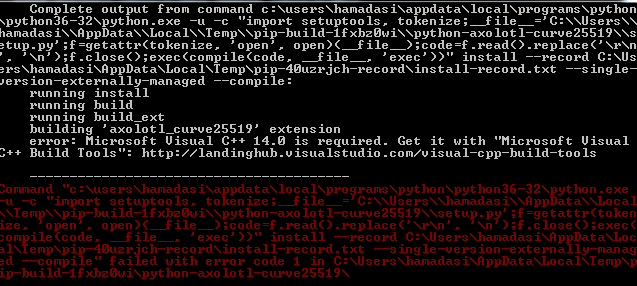
Yeah i already did the same. getting the same after doing so. Here is the error while i'm trying to install Yowsup2 using pip.
hmrasi
on 27 Nov 2017
@hmrasi
The problem is very clear, install Microsoft Visual C ++ 14.0.
And rerun pip install yowsup2
brunaoalx
on 27 Nov 2017
Can u give me the steps to follow?
Or any path i have to mention for that one? I mean environmental path
Or directly i have to place in the python folder?
hmrasi
on 27 Nov 2017
@hmrasi
your problem is not yowsup or python. Your problem is install prereqs for yowsup work.
steps to follow? Well, install Microsoft Visual C ++ 14.0., and after install yowsup with (pip install yowsup2).
brunaoalx
on 27 Nov 2017
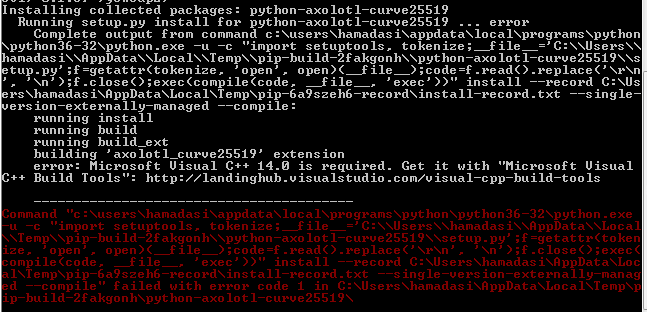
still getting the same error while installing yowsup2.
Help me with that!
I have installed the Microsoft Visual C++ 14.0
hmrasi
on 28 Nov 2017
@BRNALX
Help me with that!!!!
hmrasi
on 4 Dec 2017
@hmrasi
Do you have this dll (msvcp140.dll) in your folder system32?
Try again step by step for install yowsup.
brunaoalx
on 4 Dec 2017
Related issues
 qvs5010
·
4Comments
qvs5010
·
4Comments
 bzero
·
3Comments
bzero
·
3Comments
 ikuraj
·
5Comments
ikuraj
·
5Comments
 darode
·
4Comments
darode
·
4Comments
 cyberp1983
·
3Comments
cyberp1983
·
3Comments
Most helpful comment
BRNALX thx bro, you saved me some time :-)
Works for me👍
Thx to victor and dezember as well