Yowsup: Unable to register reason old_version
Hello,
I'm unable to register whatsupp number, I did the same steps like yesturday, but today I'm unable to register number.
yowsup-cli v2.0.15
yowsup v2.5.0
Copyright (c) 2012-2016 Tarek Galal
http://www.openwhatsapp.org
This software is provided free of charge. Copying and redistribution is
encouraged.
If you appreciate this software and you would like to support future
development please consider donating:
http://openwhatsapp.org/yowsup/donate
INFO:yowsup.common.http.warequest:{"status":"fail","reason":"old_version"}
status: fail
reason: old_version
What now ?
 nedimhx
All 20 comments
I have same issue
 danjesus
on 3 Dec 2016
danjesus
on 3 Dec 2016
me too.
 deepanz017
on 4 Dec 2016
deepanz017
on 4 Dec 2016
Have the same problem here.
 gokugiant
on 5 Dec 2016
gokugiant
on 5 Dec 2016
any fix for this ?
 mariuschicinas
on 5 Dec 2016
mariuschicinas
on 5 Dec 2016
I have fix problem doing this
Changed yowsup/env/env.py
DEFAULT = "Android"
and changed yowsup/env/env_android.py
_MD5_CLASSES = "1I2weuZmVg+uL50+HXeSJw=="
_VERSION = "2.16.328"
From the https://github.com/tgalal/yowsup/issues/1824
Thanks everyone on help!
nedimhx
on 5 Dec 2016
@tgalal can you please explain me how to send image trough run.py and layer.py from wiki page.
Everything is ok when I write "Temperature" and get temperature result from temerature sensors, "LED" I can turn on and off LED, But how to get image if I write "snap me" from folder /home/pi/images/IPcam.jpg
Please help me.
nedimhx
on 5 Dec 2016
thanks for your help 
 spiritbrother1
on 6 Dec 2016
spiritbrother1
on 6 Dec 2016
@tgalal I managed to fix the old version issue by changing the version to the latest Whatsapp version. However I am getting the bad token error. What is the process for resolving this?
Thanks
 edgarsampson
on 17 Jul 2017
edgarsampson
on 17 Jul 2017
@tgalal Also failing to register with the 'old version' error. Have tried every combination of fixes/alterations to env.py, env_s40.py and/or env_android.py as per users' posts in #1824, #1869, #1875 (...and the rest), i.e. changing default envs, Version nos. and associated MD5 nos. All files re-pulled. Nothing doing. Is reg. suspended or something? Any help greatly appreciated.
 Zer0ne83
on 28 Jul 2017
Zer0ne83
on 28 Jul 2017
same here in centos 6 - try all changes - no luck. It doesnt matter if I set android or s40 as Default env.
yowsup-cli v2.0.15
yowsup v2.5.2
INFO:yowsup.common.http.warequest:{"login":"49xxxxxxxxx","status":"fail","reason":"old_version"}
 plepps
on 3 Aug 2017
plepps
on 3 Aug 2017
Wondering if the project has been abandoned given the 3rd party application drama/bans in March? @tgalal ?
Zer0ne83
on 3 Aug 2017
I dont knpow why, but I got it running. I try a lot of hints and put them together:
mkdir tmp
cd tmp
wget https://github.com/tgalal/yowsup/archive/master.zip
unzip master.zip
cd yowsup-master
cp yowsup/env/env_android.py yowsup/env/env_android.py_org
wget https://raw.githubusercontent.com/colonyhq/yowsup/master/yowsup/env/env_android.py
cp env_android.py yowsup/env/env_android.py
vi yowsup/env/env.py
DEFAULT = "Android"
python setup.py install
then I was able to register the client:
./yowsup-cli registration --requestcode voice -p 49xxxxxxxxxx -C 49 --env android
./yowsup-cli registration --register xxx-xxx-p 49xxxxxxxxxx -C 49 --env android
put the recieved password and phone number in my config file.
Now I try to logon the client, but always stay offline. The solution for this is switch back env to s40 for sending messages:
./yowsup-cli demos -s 49xxxdestinationxxx "bla bla" -c /root/config.yowsup --env s40
works!
plepps
on 3 Aug 2017
Omg. DAMN good work, plepps. I am actually struggling to isolate what in your 'recicpe' above differs from what I already tried but there must be something because, as you say, works! Bless you man. Thank you so much for sharing :1st_place_medal:
Zer0ne83
on 10 Aug 2017
Are you sure @Zer0ne83 it works. I am still facing issues.
This software is provided free of charge. Copying and redistribution is
encouraged.
If you appreciate this software and you would like to support future
development please consider donating:
http://openwhatsapp.org/yowsup/donate
INFO:yowsup.common.http.warequest:{"login":"91XXXXXXXXXX","status":"fail","reason":"old_version"}
status: fail
reason: old_version
login: 91XXXXXXXXXX
 pyVarad
on 14 Aug 2017
pyVarad
on 14 Aug 2017
Yep, @pyVarad, deffo sure. I just registered another account on a different AU mobile phone number like 3 minutes ago just to make sure @plepps 'recipe' was still working and...
This software is provided free of charge. Copying and redistribution is
encouraged.If you appreciate this software and you would like to support future
development please consider donating:
http://openwhatsapp.org/yowsup/donateINFO:yowsup.common.http.warequest:{"status":"ok","login":"61432296","type":"new","pw":"37JEQouNRLT*****=","expiration":4444444444.0,"kind":"free","price":"$0.99","cost":"0.99","currency":"AUD","price_expiration":1505965840}
status: ok
kind: free
pw: 37JEQouNRLT****=
price: $0.99
price_expiration: 1505965840
currency: AUD
cost: 0.99
expiration: 4444444444.0
login: 61432296203
type: new
root@kalipi2:~/tmp/yowsup-master#
And, even though I already had yowsup installed (obviously) as per @plepps recipe on my primary machine, I did a brand new install from scratch on my Kali 2.0 RPi using exactly the commands that @plepps provided. As per my last post, I honestly couldn't figure out what in @plepps' recipe/steps was different to what I had already tried - still can't. I just rm'd everything, rebooted and blindly followed @plepps' recipe and it worked... and still does for me.
Zer0ne83
on 15 Aug 2017
I believe its all about the changes in env_android.py and the fact, that you have made the whole registration process with the android env settings, but the message sending with the env s40
diff env_android.py_org env_android.py
20c20
< _MD5_CLASSES = "1I2weuZmVg+uL50+HXeSJw=="
_MD5_CLASSES = "ox998VW0nBTueMVfjuZkmQ=="23c23
< _VERSION = "2.16.328"
_VERSION = "2.17.212"
plepps
on 15 Aug 2017
@pyVarad / @plepps - Yeah, I agree. What I was doing was madly editing/updating the VERSION numbers and MD5 hashes in the env_android.py and env_s40.py files after I had already run the 'python setup.py install' command. Rather, in @plepps recipe, we switch out (replace) the shoddy env files with the good ones (thanks @colonyhq) THEN run the setup. Perhaps this is where you are going wrong, like I was, @pyVarad ?
Oh and @plepps, I'm sure you have figured this out, but if I run:
root@kalipi2:~# yowsup-cli demos -y -c /root/config.yowsup <- no -env switch at all and with -y
_. . ._
then at the Cli Client Interface run /L (quick login)
Yowsup Cli client
Type /help for available commands
[offline]: /L
**Auth: Logged in!
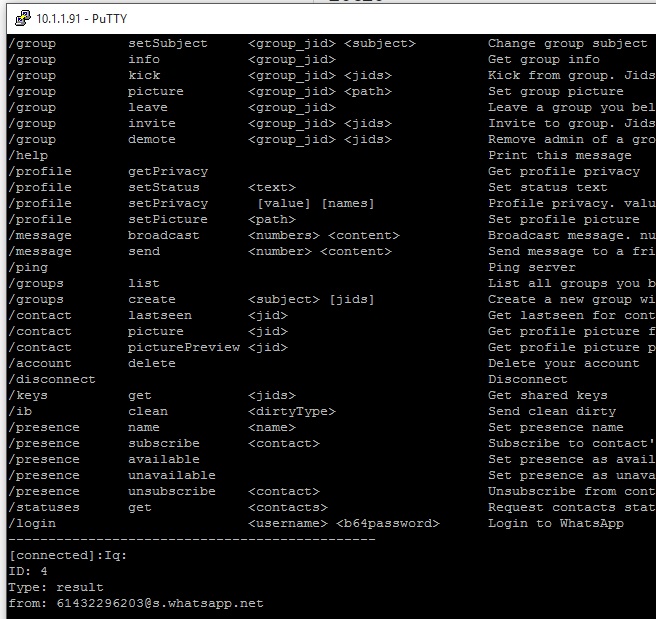
Weeeeee!!! So many commands to play with and they all work! Only additional work I needed to do was apt install python-pillow to handle sending messages with pictures/images and updating/uploading/changing the account profile picture. Otherwise, good to go :D Thanks again!
Zer0ne83
on 16 Aug 2017
I think you did not change the DEFAULT ENV in yowsup/env/env.py right?
In this case I would understand, that you can reach the demo shell without setting s40 env. Because thats the default ENV in the original setup. Otherwise I dont know why. I try it several times with diffrent ENV settings, always the same result:
The original env_s40.py is fine for sending messages an demo so there is no need to modify.
You only need the patched env_android.py for the registration process.
After modifying the py files, there is alwas "python setup.py install" necessary.
plepps
on 16 Aug 2017
I get this error while regstering -
Traceback (most recent call last):
File "./yowsup-cli", line 5, in
from yowsup.env import YowsupEnv
File "/home/ubuntu/tmp/yowsup-master/yowsup/env/__init__.py", line 1, in
from .env import YowsupEnv
File "/home/ubuntu/tmp/yowsup-master/yowsup/env/env.py", line 17, in
class YowsupEnv(with_metaclass(YowsupEnvType, object)):
File "/usr/lib/python2.7/abc.py", line 87, in __new__
cls = super(ABCMeta, mcls).__new__(mcls, name, bases, namespace)
TypeError: Error when calling the metaclass bases
metaclass conflict: the metaclass of a derived class must be a (non-strict) subclass of the metaclasses of all its bases
Any help?
 kirthiss
on 28 Oct 2019
kirthiss
on 28 Oct 2019
INFO:yowsup.common.http.warequest:b'{"login":"xxxxxxxxx","status":"fail","reason":"old_version"}n
any help?
 nonna2010
on 25 Jan 2020
nonna2010
on 25 Jan 2020
Related issues
 ikuraj
·
5Comments
ikuraj
·
5Comments
 mannemvamsi
·
4Comments
mannemvamsi
·
4Comments
 dickbutt2
·
3Comments
dickbutt2
·
3Comments
 rroqueCoddera
·
3Comments
rroqueCoddera
·
3Comments
 darode
·
4Comments
darode
·
4Comments
Most helpful comment
I have fix problem doing this
Changed yowsup/env/env.py
DEFAULT = "Android"
and changed yowsup/env/env_android.py
_MD5_CLASSES = "1I2weuZmVg+uL50+HXeSJw=="
_VERSION = "2.16.328"
From the https://github.com/tgalal/yowsup/issues/1824
Thanks everyone on help!