Youtubeexplode: Download only a part of video
Is there a way by which I can download only a part of the video, maybe by mentioning start & end time?
 KrSiddharth
All 5 comments
Hi!
There is a way to download a part of the video stream but it's pretty low-level.
You need to use GetMediaStreamAsync and use the stream's seeking functionality to read a specific part. You will have to calculate the byte offset by multiplying bitrate and the offset duration.
For example, if you have a stream that has 4000 kbps bitrate and you want to download the part that starts at 1:30 and lasts for 3 minutes, you will need an offset of 4000 kbps * 1.5 min * 0.0075 = 45 mb = 45000000 bytes. Seek to this position, read the following 4000 kbps * 3 min * 0.0075 = 90 mb = 90000000 bytes of content and then close the stream.
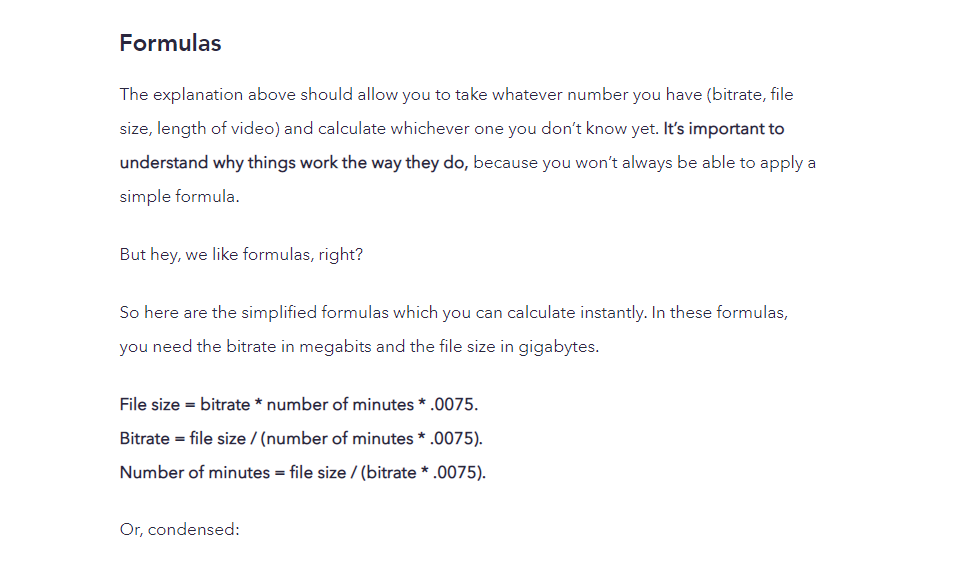
Source: https://blog.frame.io/2017/03/06/calculate-video-bitrates/#formulasTarget
 Tyrrrz
on 12 Feb 2020
Tyrrrz
on 12 Feb 2020
@Tyrrrz Can you please write a short snippet for that? I'm having a hard time implementing that since I'm new to .NET & C#. TIA
KrSiddharth
on 27 Feb 2020
Something like this works, but the video is not playable unless it starts at the beginning. My guess is that there headers in the first few bytes of data, which you will have to copy regardless or recreate yourself somehow, according to Mp4/WebM spec. Also, the cut off time doesn't seem to be very accurate, it stops at around 2min50 instead of 3 minutes.
Anyway, this turned out to be a non-trivial task. Hopefully this snippet would help you somehow.
await using var output = File.Create(fileName);
await using var input = await client.GetMediaStreamAsync(streamInfo);

var startTime = TimeSpan.Zero;
var duration = TimeSpan.FromMinutes(3);

var bytesStartTime = (long) (streamInfo.Bitrate * startTime.TotalMinutes * 0.0075 * 1000 / 2);
var bytesDuration = (long) (streamInfo.Bitrate * duration.TotalMinutes * 0.0075 * 1000 / 2);

var bytesRemaining = bytesDuration;
input.Seek(bytesStartTime, SeekOrigin.Begin);

var buffer = new byte[82960];
var bytesRead = 0;
while ((bytesRead = await input.ReadAsync(buffer, 0, buffer.Length)) > 0)
{
    var bytesCopy = Math.Min((int) bytesRemaining, bytesRead);
    await output.WriteAsync(buffer, 0, bytesCopy);
    bytesRemaining -= bytesCopy;

    if (bytesRemaining <= 0)
        break;
}
@KrSiddharth , Have you ever figured this out? The above code sample was very helpful, but the video is not playable unless it starts at the beginning. Thanks
 tuhin24
on 13 Jul 2020
tuhin24
on 13 Jul 2020
It is actually very easy.
var ffmpeg = @"\PATH_TO_FFMPEG\ffmpeg.exe";
var arguments = $"-ss 00:00:00.00 -i \"{streamInfo.Url}\" -t 00:00:10.00 -c copy \"\\DOWNLOAD_PATH\\{videoId}.mp4\"";

using (Process p = new Process())
{
    p.StartInfo.FileName = ffmpeg;
    p.StartInfo.Arguments = arguments;
    p.StartInfo.UseShellExecute = false;
    p.StartInfo.CreateNoWindow = true;
    p.StartInfo.RedirectStandardOutput = true;
    p.Start();
    p.WaitForExit();

    var output = p.StandardOutput.ReadToEnd();
}
 alexrainman
on 14 Sep 2020
alexrainman
on 14 Sep 2020
Related issues
 D0vid
·
5Comments
D0vid
·
5Comments
 NoobInTraining
·
5Comments
NoobInTraining
·
5Comments
 DavidBarishev
·
8Comments
DavidBarishev
·
8Comments
 VahidN
·
8Comments
VahidN
·
8Comments
 SlowLogicBoy
·
7Comments
SlowLogicBoy
·
7Comments
Most helpful comment
Something like this works, but the video is not playable unless it starts at the beginning. My guess is that there headers in the first few bytes of data, which you will have to copy regardless or recreate yourself somehow, according to Mp4/WebM spec. Also, the cut off time doesn't seem to be very accurate, it stops at around 2min50 instead of 3 minutes.
Anyway, this turned out to be a non-trivial task. Hopefully this snippet would help you somehow.