Youtube_player_flutter: The package example does not work correctly in fullscreen mode [BUG]
In the first screen with a single video the fullscreen mode works fine, but in the video_list screen where it shows a list of videos when you activate the fullscreen mode it does not work.
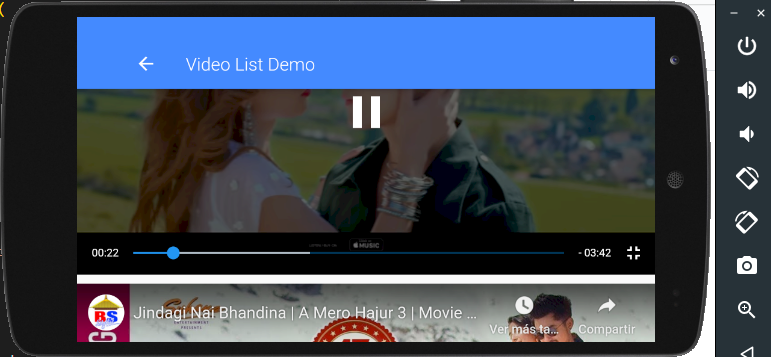
Technical Details:
- Device: [Nexus 5]
- OS: [Android]
- Version [22]
How should I do to put a list of videos (player and controller) that depend on a YoutubePlayerBuilder so that the fullscreen mode works?
 juanabelita
All 2 comments
Looks like only openning every video on a different screen
 Shakle
on 13 Jul 2020
Shakle
on 13 Jul 2020
Hi,
I was also facing the same issue for full screen of list of videos. I forked the library and made some minor modifications and eureka full screen works for list of videos. You can check out the code here.
https://github.com/pranavkpr1/youtube_player_flutter_latest
The only thing is when you press full screen button, controller needs to reload as platform views can't be shared among multiple screens in flutter.
and one last issue remaining would be that the full screen press gives invalid video id when user presses full screen button during controller initialization but one could easily solve that issue by showing fullscreen button only once video starts playing by adding listener on controller.
void listener(){
if(_youTubecontroller.value.playerState==PlayerState.playing &&!showYouTubeFullScreenButton) {
setState(() {
showYouTubeFullScreenButton=true;
});
}
}
Hope it solves the issue.
Thanks @sarbagyastha for the amazing package :)
 pranavkpr1
on 13 Jul 2020
pranavkpr1
on 13 Jul 2020
Related issues
 SayaGames
·
3Comments
SayaGames
·
3Comments
 channdara
·
4Comments
channdara
·
4Comments
 jimmyff
·
3Comments
jimmyff
·
3Comments
 snoopdoggy322
·
4Comments
snoopdoggy322
·
4Comments
 Ayman-Kortobaa
·
4Comments
Ayman-Kortobaa
·
4Comments
Most helpful comment
Hi,
I was also facing the same issue for full screen of list of videos. I forked the library and made some minor modifications and eureka full screen works for list of videos. You can check out the code here.
https://github.com/pranavkpr1/youtube_player_flutter_latest
The only thing is when you press full screen button, controller needs to reload as platform views can't be shared among multiple screens in flutter.
and one last issue remaining would be that the full screen press gives invalid video id when user presses full screen button during controller initialization but one could easily solve that issue by showing fullscreen button only once video starts playing by adding listener on controller.
void listener(){
if(_youTubecontroller.value.playerState==PlayerState.playing &&!showYouTubeFullScreenButton) {
setState(() {
showYouTubeFullScreenButton=true;
});
}
}
Hope it solves the issue.
Thanks @sarbagyastha for the amazing package :)