Describe the bug
I'm having the problem using SSL, I saw that other users had problems too, but have been resolved. But, my problem I could not solve using HTTPS. I can not generate short URLs or access existing ones.
I use a server that does not have standard HTTPS, so I use Cloudflare to enable HTTPS.
Only the admin and all the rest shows in the pages (a part):
..
Mixed Content: The page at 'https: //
..
What do you suggest you do to work without server switching? Only change the code.
Expected behavior
I thought HTTPS would function normally.
I have tried a test, I have added a PHP file test.php in the admin folder and I normally entered using HTTPS, now with YOURLS it does not work because it changes all the URLs. Even forcing HTTPS in the code does not run.
Screenshots

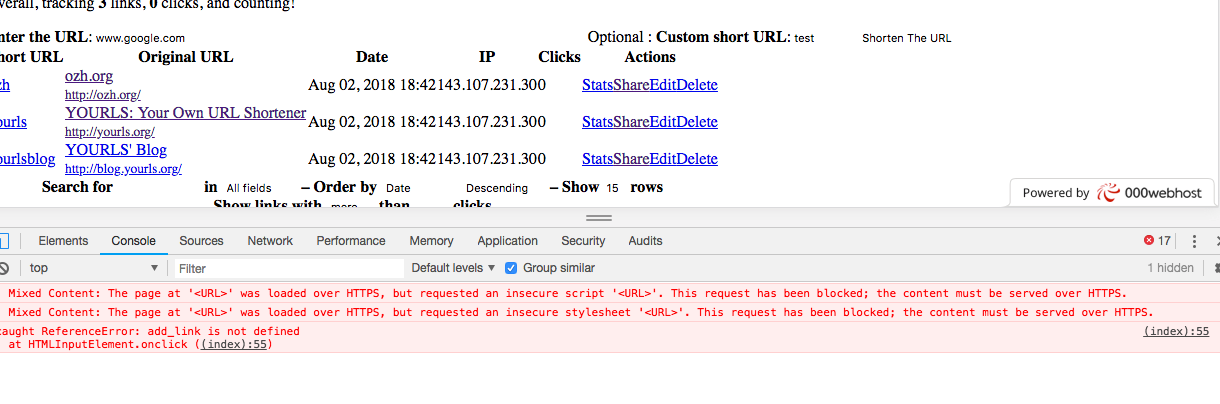
Environment (please complete the following information):
- YOURLS version: YOURLS v 1.7.3
- Plugins enabled: None
- PHP version: PHP 7.1
Additional context
I use a server that does not have standard HTTPS, so I use Cloudflare to enable HTTPS.
 gazzola
All 7 comments
Hey @gazzola, thanks for opening an issue!
Unfortunately, it seems you are missing information from the issue template.
Make sure it has all the necessary details as described in our contribution guidelines.
 ghost
on 2 Aug 2018
ghost
on 2 Aug 2018
I assume by "CloudFire", you mean Cloudflare, which I also use with YOURLS just fine.
My YOURLS instance defines the YOURLS_SITE as https://sho.rt, and as script & stylesheet URLs are built from that value you will get insecure content warnings if it still uses http://.
On my instance, nginx serves up a self-signed certificate when Cloudflare sends requests to the origin, but I don't believe that's required. (I do that because it lets me use a stricter setting on Cloudflare's end.)
PS: Next time, please amend or add comments to your initial issue, rather than closing it and opening a new one. It generates a fair bit of email noise when you do that. :smile_cat:
 dgw
on 3 Aug 2018
dgw
on 3 Aug 2018
Yes, Cloudflare. Sorry for the mistakes.
I changed the file (user/config.php)
/* YOURLS installation URL -- all lowercase, no trailing slash at the end.
* If you define it to "http://sho.rt", don't use "http://www.sho.rt" in your browser (and vice-versa) */
define( 'YOURLS_SITE', 'https://mysite.com' );
define('YOURLS_ADMIN_SSL', true);
I changed, but continue with the problem.
1) I tried to change the Cloudflare to development version to remove cache
2) I used other browsers and other machines to run the test but it still did not work
What can it be?
gazzola
on 3 Aug 2018
I solved the problem. Thank you ;)
The problem was in .htaccess that mixing HTTP and HTTPS.
gazzola
on 4 Aug 2018
@gazzola can you please share the .htaccess file that solved the problem?
Thanks
 PNZ20
on 6 Jun 2019
PNZ20
on 6 Jun 2019
I solved setting in the CPanel a 301 redirect (with/without www) of homepage.com to https://homepage.com
I DO NOT select “wildcards” in order to redirect only the homepage. So the previous shortened links still working, and so you do not need to put https:// before the shortened link.
Any other way of making it works breaks the service.
My 2 cents
PNZ20
on 10 Jun 2019
I can fixed using:
define( 'YOURLS_SITE', 'http://mysite.com' ); ; I Don´t use 's' in https
define('YOURLS_ADMIN_SSL', true) ; add this line
I hope it can help.
 anamaya7
on 5 Jul 2020
anamaya7
on 5 Jul 2020
Related issues
 sshcli
·
3Comments
sshcli
·
3Comments
 ploedman
·
4Comments
ploedman
·
4Comments
 jonathandhn
·
6Comments
jonathandhn
·
6Comments
 schapsl
·
4Comments
schapsl
·
4Comments
 Noiden
·
7Comments
Noiden
·
7Comments
Most helpful comment
I solved the problem. Thank you ;)
The problem was in .htaccess that mixing HTTP and HTTPS.