We should probably move from utf8 to utf8mb4 for yourls_url at least, to support emojis and other 💩
However this will make the upgrade routine more complex because maximum length of columns and index keys will be affected. See migration notes on https://mathiasbynens.be/notes/mysql-utf8mb4
At least we should probably decrease the maximum length of yourls_url.keyword to something like 150 instead of 200, to make sure folks on InnoDB without innodb_large_prefix are not affected.
Background story on this issue: #2115 and #2125
 ozh
ozh
All 16 comments
I already use utf8mb4 with no problem, but not tested with emoji
 Showfom
on 18 Apr 2017
Showfom
on 18 Apr 2017
I am running yourls latest version with utf8mb4_unicode_ci
0 problems.
 master3395
on 14 May 2017
master3395
on 14 May 2017
A couple stats & facts for later
- utf8mb4 requires MySQL 5.5.3 (released in early 2010)
- 5.9% of installs used over the 6 months use an older mysql engine (6,5% over the last 12 months, 16,8% of all installs since the beginning, but only 3.7% of installs running 1.7.2, which is latest stable as of writing, and presumably used by folks who are keen to update their install)
ozh
on 19 Aug 2017
Ponder this option : enforce charset utf8mb4 is the engine has the capability, enforce utf8 otherwise. See wpdb::has_cap() for instance.
ozh
on 19 Aug 2017
@ozh I assume this issue causes yourls to hang when attempting to create a long link whose title includes an emoji, etc? Is there any sort of workaround for this? This is for a new installation so there's no issue with migrating old data.
Yourls 1.7.4
Ubuntu 18.04
MySQL 5.7.25
php 7.2.15
Thanks!
 cjstone
on 26 Feb 2019
cjstone
on 26 Feb 2019
I went ahead and followed the steps in
https://mathiasbynens.be/notes/mysql-utf8mb4 and things seem to be working fine. The only yourls code needing change was line 31 of includes/class-mysql.php, from
$charset = yourls_apply_filter( 'db_connect_charset', 'utf8' );
to
$charset = yourls_apply_filter( 'db_connect_charset', 'utf8mb4' );
cjstone
on 28 Feb 2019
@cjstone Exactly. But actually, prefer using a plugin to apply the filter instead of editing core files.
 LeoColomb
on 28 Feb 2019
LeoColomb
on 28 Feb 2019
It indeed works with @cjstone 's patch in https://github.com/YOURLS/YOURLS/issues/2226#issuecomment-468067075 but I also like to keep custom changes in plugins, so here is my solution. Add it to user/plugins/utf8mb4-charset/plugin.php, based on the example plugin included in Yourls:
<?php
/*
Plugin Name: MySQL utf8mb4 Charset Plugin
Plugin URI: https://github.com/YOURLS/YOURLS/issues/2226
Description: Change the default MySQL charset from utf8 to utf8mb4 on includes/class-mysql.php:31
Version: 0.1
Author: Immánuel Fodor
Author URI: https://fodor.it
*/

// No direct call
if( !defined( 'YOURLS_ABSPATH' ) ) die();

/*
 * We're going to modify the default charset of Yourls DB connection
 *
 * Notice the following call on includes/class-mysql.php:31
 * $charset = yourls_apply_filter( 'db_connect_charset', 'utf8' );
 * This means: give charset the value "utf8", unless a
 * filter modifies this value.
 *
 * We're going to hook into this filter and modify this value.
 */

yourls_add_filter( 'db_connect_charset', 'fodor_mysql_charset' );
/* This says: when filter 'db_connect_charset' is triggered, send its value to function 'fodor_mysql_charset'
 * and use what this function will return.
 */

function fodor_mysql_charset( $value ) {
        return 'utf8mb4'; // a filter *always* has to return a value
}
/* And that's it. Activate the plugin and notice the accented characters and emojis are supported */
 immanuelfodor
on 24 Sep 2019
immanuelfodor
on 24 Sep 2019
Hello.
Reproducing what cjstone said, I am able to add a long url that has emoji in the page title.
But, installing the plugin that immanuelfodor provided, I am not able to do that.
Doing some debug, whit the following code:
<?php
/*
Plugin Name: MySQL utf8mb4 Charset Plugin
Plugin URI: https://github.com/YOURLS/YOURLS/issues/2226
Description: Change the default MySQL charset from utf8 to utf8mb4 on includes/class-mysql.php:31
Version: 0.1
Author: Immánuel Fodor
Author URI: https://fodor.it
*/
echo "Debug1 ";
if( !defined( 'YOURLS_ABSPATH' ) ) die();
echo "Debug2 ";
yourls_add_filter( 'db_connect_charset', 'fodor_mysql_charset' );
echo "Debug3 ";
function fodor_mysql_charset( $value ) {
        echo "Debug4 ";
        return 'utf8mb4'; // a filter *always* has to return a value
}
With this code, I could detect that the function fodor_mysql_charset is never called!
The result of this code can be seen in the image attached (check the top of the page, where Debug1, Debug2 and Debug3 are shown, but not Debug4).
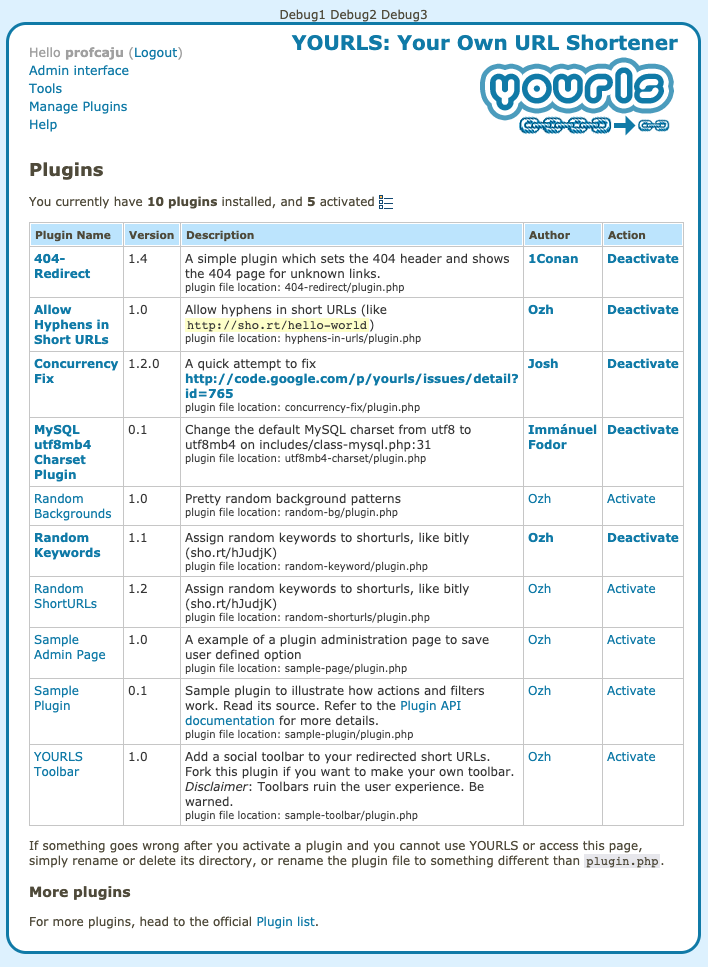
Is there something I am missing?
Kind regards,
 profcaju
on 3 Mar 2020
profcaju
on 3 Mar 2020
Well, it seems when the db_connect_charset filter is called, there are no plugins loaded at all. It seems when I created the plugin, I left the charset in the mysql class as well, that's why it seemed to work. :(
Debug with these lines:
# add to yourls_apply_filter @ includes/functions-plugins.php
# after the global $yourls_filters; line
var_dump($hook);
var_dump($yourls_filters);
string(18) "db_connect_charset"
array(1) {
  ["plugins_loaded"]=>
  array(1) {
    [10]=>
    array(1) {
      ["yourls_kses_init"]=>
      array(3) {
        ["function"]=>
        string(16) "yourls_kses_init"
        ["accepted_args"]=>
        int(1)
        ["type"]=>
        string(6) "action"
      }
    }
  }
}


md5-8a1afe824fd3b0e7c763c80c79b864d8


string(25) "get_option_active_plugins"
array(1) {
  ["plugins_loaded"]=>
  array(1) {
    [10]=>
    array(1) {
      ["yourls_kses_init"]=>
      array(3) {
        ["function"]=>
        string(16) "yourls_kses_init"
        ["accepted_args"]=>
        int(1)
        ["type"]=>
        string(6) "action"
      }
    }
  }
}
string(14) "plugins_loaded"
array(10) {
  ["plugins_loaded"]=>
  array(1) {
    [10]=>
    array(1) {
      ["yourls_kses_init"]=>
      array(3) {
        ["function"]=>
        string(16) "yourls_kses_init"
        ["accepted_args"]=>
        int(1)
        ["type"]=>
        string(6) "action"
      }
    }
  }
....
  ["db_connect_charset"]=>
  array(1) {
    [10]=>
    array(1) {
      ["fodor_mysql_charset"]=>
      array(3) {
        ["function"]=>
        string(19) "fodor_mysql_charset"
        ["accepted_args"]=>
        NULL
        ["type"]=>
        string(6) "filter"
      }
    }
  }
}
If you check the source code where it's located, it seems that the enabled plugins list is itself loaded from the database, so the db_connect_charset filter will inevitably run first.
We need a way to create "system" plugins by specifying a list of "always-on" plugins, e.g., in config.php that will be loaded before the DB connection is ever made. Until such happens (or somebody tells how it can be achieved without modifying core yourls files), it seems the only way is to manually edit the charset in the mysql class (and so modifying the core which we wanted to avoid in the first place).
immanuelfodor
on 3 Mar 2020
Indeed, plugins are loaded from the DB, so code in class-mysql.php (and the db_connect_charset filter) have to be loaded first.
A clean workaround is to use YOURLS' ability to load a custom DB engine : make a a db.php file in /users, define the charset, then require_once YOURLS_INC.'/class-mysql.php' and call yourls_db_connect();. See https://github.com/YOURLS/YOURLS/blob/master/includes/Config/Init.php#L139-L151
So, not a "plugin" per se (you won't find it listed in the "Plugins" admin page), but still a very valid user file, requiring no core file editing
ozh
on 3 Mar 2020
Okay, so just copypaste the original db engine file and replace the utf8 to utf8b4 in it, seems easy. Then what's the meaning of the db_connect_charset filter or any other filter in the file? 😃
immanuelfodor
on 4 Mar 2020
Either to be used internally, or used by drop ins
ozh
on 4 Mar 2020
The solution described in https://github.com/YOURLS/YOURLS/issues/2226#issuecomment-594176298 indeed works, thanks!
One small remark is that after copying the mysql class file, a yourls_db_connect(); call is needed at the end according to https://github.com/YOURLS/YOURLS/blob/master/includes/Config/Init.php#L139-L151 as it's never called in the custom db driver case.
immanuelfodor
on 7 Mar 2020
@immanuelfodor nice catch. I've updated my comment accordingly for easier searching.
ozh
on 7 Mar 2020
For the record, maybe I'll use this later: https://github.com/YOURLS/YOURLS/issues/2500#issuecomment-626739620
ozh
on 11 May 2020
Related issues
 ChrisChiera
·
5Comments
ChrisChiera
·
5Comments
 ploedman
·
4Comments
ploedman
·
4Comments
 sirtet
·
6Comments
sirtet
·
6Comments
 uusijani
·
3Comments
uusijani
·
3Comments
 infotek
·
7Comments
infotek
·
7Comments
Most helpful comment
I went ahead and followed the steps in
https://mathiasbynens.be/notes/mysql-utf8mb4 and things seem to be working fine. The only yourls code needing change was line 31 of includes/class-mysql.php, from
$charset = yourls_apply_filter( 'db_connect_charset', 'utf8' );to
$charset = yourls_apply_filter( 'db_connect_charset', 'utf8mb4' );