Youcompleteme: Installation issue: macOS Catalina 10.15 compile failed due to missing headers
Issue Prelude
Please complete these steps and check these boxes (by putting an x inside
the brackets) _before_ filing your issue:
- [x] I have read and understood YCM's [CONTRIBUTING][cont] document.
- [x] I have read and understood YCM's [CODE_OF_CONDUCT][code] document.
- [x] I have read and understood YCM's [README][readme], especially the
[Frequently Asked Questions][faq] section. - [x] I have searched YCM's issue tracker to find issues similar to the one I'm
about to report and couldn't find an answer to my problem. ([Example Google
search.][search]) - [x] If filing a bug report, I have included the output of
vim --version. - [x] If filing a bug report, I have included the output of
:YcmDebugInfo. - [ ] If filing a bug report, I have attached the contents of the logfiles using
the:YcmToggleLogscommand. - [x] If filing a bug report, I have included which OS (including specific OS
version) I am using. - [x] If filing a bug report, I have included a minimal test case that reproduces
my issue, including what I expected to happen and what actually happened. - [x] If filing a installation failure report, I have included the entire output
ofinstall.py(orcmake/make/ninja) including its invocation - [x] I understand this is an open-source project staffed by volunteers and
that any help I receive is a selfless, heartfelt _gift_ of their free time. I
know I am not entitled to anything and will be polite and courteous. - [x] I understand my issue may be closed if it becomes obvious I didn't
actually perform all of these steps.
Thank you for adhering to this process! It ensures your issue is resolved
quickly and that neither your nor our time is needlessly wasted.
Issue Details
- What did you do?
I read the instruction and wanna comiple Ycm with./install.py --all
Include steps to reproduce here.
./install.py --all
- What did you expect to happen?
Compilation is successful, at least for the core part.
- What actually happened?
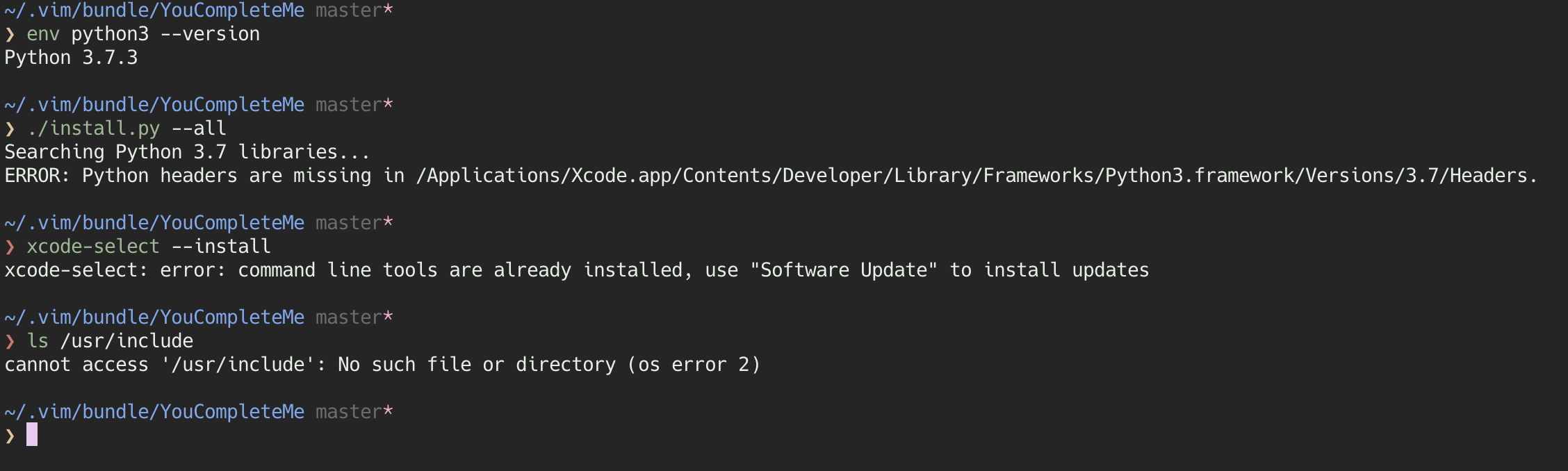
Searching Python 3.7 libraries...
ERROR: Python headers are missing in /Applications/Xcode.app/Contents/Developer/Library/Frameworks/Python3.framework/Versions/3.7/Headers.
Include description of the observed behaviour, including actual output,
screenshots, etc.

I've done quite a lot Googling. It seems to be the problem of missing header directory in macOS 10.15. I've tried to set env variable CFLAG but no luck. I posted it here and wanna see if someone has similar issue. Sorry to bother.
Lots of my research indicated the problem could be caused by the missing header directory but I'm not sure. Hints are welcomed.
Diagnostic data
Output of vim --version
VIM - Vi IMproved 8.1 (2018 May 18, compiled Oct 30 2019 23:05:43)
macOS version
Included patches: 1-2234
Compiled by Homebrew
Huge version with MacVim GUI.  Features included (+) or not (-):
+acl               +file_in_path      +mouse_urxvt       -tcl
+arabic            +find_in_path      +mouse_xterm       +termguicolors
+autocmd           +float             +multi_byte        +terminal
+autochdir         +folding           +multi_lang        +terminfo
-autoservername    -footer            -mzscheme          +termresponse
+balloon_eval      +fork()            +netbeans_intg     +textobjects
+balloon_eval_term +fullscreen        +num64             +textprop
+browse            -gettext           +odbeditor         +timers
++builtin_terms    -hangul_input      +packages          +title
+byte_offset       +iconv             +path_extra        +toolbar
+channel           +insert_expand     +perl              +transparency
+cindent           +job               +persistent_undo   +user_commands
+clientserver      +jumplist          +postscript        +vartabs
+clipboard         +keymap            +printer           +vertsplit
+cmdline_compl     +lambda            +profile           +virtualedit
+cmdline_hist      +langmap           -python            +visual
+cmdline_info      +libcall           +python3           +visualextra
+comments          +linebreak         +quickfix          +viminfo
+conceal           +lispindent        +reltime           +vreplace
+cryptv            +listcmds          +rightleft         +wildignore
+cscope            +localmap          +ruby              +wildmenu
+cursorbind        +lua               +scrollbind        +windows
+cursorshape       +menu              +signs             +writebackup
+dialog_con_gui    +mksession         +smartindent       -X11
+diff              +modify_fname      -sound             -xfontset
+digraphs          +mouse             +spell             +xim
+dnd               +mouseshape        +startuptime       -xpm
-ebcdic            +mouse_dec         +statusline        -xsmp
+emacs_tags        -mouse_gpm         -sun_workshop      -xterm_clipboard
+eval              -mouse_jsbterm     +syntax            -xterm_save
+ex_extra          +mouse_netterm     +tag_binary
+extra_search      +mouse_sgr         -tag_old_static
-farsi             -mouse_sysmouse    -tag_any_white
   system vimrc file: "$VIM/vimrc"
     user vimrc file: "$HOME/.vimrc"
 2nd user vimrc file: "~/.vim/vimrc"
      user exrc file: "$HOME/.exrc"
  system gvimrc file: "$VIM/gvimrc"
    user gvimrc file: "$HOME/.gvimrc"
2nd user gvimrc file: "~/.vim/gvimrc"
       defaults file: "$VIMRUNTIME/defaults.vim"
    system menu file: "$VIMRUNTIME/menu.vim"
  fall-back for $VIM: "/Applications/MacVim.app/Contents/Resources/vim"
Compilation: clang -c -I. -Iproto -DHAVE_CONFIG_H -DFEAT_GUI_MACVIM -Wall -Wno-unknown-pragmas -pipe  -DMACOS_X -DMACOS_X_DARWIN  -g -O2 -U_FORTIFY_SOURCE -D_FORTIFY_SOURCE=1
Linking: clang   -L. -fstack-protector-strong -L/usr/local/lib -L/usr/local/opt/libyaml/lib -L/usr/local/opt/[email protected]/lib -L/usr/local/opt/readline/lib -L. -fstack-protector-strong -L/usr/local/lib -L/usr/local/opt/libyaml/lib -L/usr/local/opt/[email protected]/lib -L/usr/local/opt/readline/lib  -L/usr/local/lib -o Vim -framework Cocoa -framework Carbon       -lm  -lncurses -liconv -framework AppKit  -L/usr/local/opt/lua/lib -llua5.3 -fstack-protector  -L/System/Library/Perl/5.18/darwin-thread-multi-2level/CORE -lperl  -L/usr/local/opt/python/Frameworks/Python.framework/Versions/3.7/lib/python3.7/config-3.7m-darwin -lpython3.7m -framework CoreFoundation  -lruby.2.6
Output of YcmDebugInfo
Printing YouCompleteMe debug information...
-- Client logfile: /var/folders/fh/8d21vq896zz16xcbmf4j2cq80000gn/T/ycm_4pzjaz80.log
-- Server errored, no debug info from server
-- Server running at: http://127.0.0.1:51022
-- Server process ID: 47414
-- Server logfiles:
--   /var/folders/fh/8d21vq896zz16xcbmf4j2cq80000gn/T/ycmd_51022_stdout_ifor8nkt.log
--   /var/folders/fh/8d21vq896zz16xcbmf4j2cq80000gn/T/ycmd_51022_stderr_250d19lb.log
Press ENTER or type command to continue
Contents of YCM, ycmd and completion engine logfiles
Add
let g:ycm_log_level = 'debug'to vimrc, restart Vim, reproduce the
issue, and include link here to a [gist][] containing the entire logfiles for
ycm, ycmd and any completer logfiles listed by:YcmToggleLogs.
OS version, distribution, etc.
macOS 10.15.3
❯ uname -a
Darwin MacBook-Pro.local 19.3.0 Darwin Kernel Version 19.3.0: Thu Jan  9 20:58:23 PST 2020; root:xnu-6153.81.5~1/RELEASE_X86_64 x86_64
Output of build/install commands
 wx-Yao
All 8 comments
Try to do the following:
import sysconfig, os
print(sysconfig.get_config_var( 'INCLUDEPY' ))
print(os.path.isfile(os.path.join(sysconfig.get_config_var('INCLUDEPY'), 'Python.h')))
Basically, you will see that message if Python.h doesn't exist in the directory returned by sysconfig.get_config_var('INCLUDEPY').
 bstaletic
on 14 Feb 2020
bstaletic
on 14 Feb 2020
By the way, you can come to gitter for a more interactive discussion.
bstaletic
on 14 Feb 2020
Alry cool. Switching to Gitter now. And btw, the Python.h doesn't exist. I'll update the fix here once the problem is resolved.
wx-Yao
on 14 Feb 2020
Update:
The issue MIGHT be resolved by brew reinstall python or brew resintall python3 depending on your installation. The reasoning behind is unclear. Chance is that the reinstallation kinda reset some environment variables pointing to the "include" path and YCM can figure it out.
I post the gitter chat message here and if someone really wanna figure out why it works/doesn't work, feel free to do that.
Ben Jackson @puremourning 21:07
Use homebrew python or install the system headers. There’s a little package for the sys headers somewhere you can install from command line. But homebrew also easier
Boris Staletic @bstaletic 21:08
@puremourning Why isn't that mentioned in the installation guide?
We mention python-dev in the linux section.
Ben Jackson @puremourning 21:22
He’s on macOS. In fairness Apple have been systematically removing developer and system headers for the last few releases. It’s hard to keep up
But google has the answer.
Boris Staletic @bstaletic 21:23
Fair enough. What did you google? "python.h missing on macos" wasn't very helpful.
Ben Jackson @puremourning 21:24
Missing headers macOS Catalina
Actually the user issue is unusual. The framework headers should be there.
Oh crap. macOS has deprecated system python and ruby
Boris Staletic @bstaletic 21:30
Why is macOS so hostile to developers?
Ben Jackson @puremourning 21:30
Python, ruby and Perl all deprecated
close issue as it's ... sort of resolved.
wx-Yao
on 15 Feb 2020
Aftrer running brew doctor, I got the following error:
Warning: /usr/bin occurs before /usr/local/bin
This means that system-provided programs will be used instead of those
provided by Homebrew. The following tools exist at both paths:

Consider setting your PATH so that /usr/local/bin
occurs before /usr/bin. Here is a one-liner:
  echo 'export PATH="/usr/local/bin:$PATH"' >> ~/.zshrc
So, after doing echo 'export PATH="/usr/local/bin:$PATH"' >> ~/.zshrc, my problem got solved.
Hope, it will help someone else.
 the-redback
on 19 Feb 2020
the-redback
on 19 Feb 2020
had the same problem.
solved after reinstalling python
 EyalEngel
on 30 Jun 2020
EyalEngel
on 30 Jun 2020
Just adding to the "brew reinstall python fixed it for me" pile 👍
 Tigh-Gherr
on 24 Jul 2020
Tigh-Gherr
on 24 Jul 2020
Related issues
 vbextreme
·
4Comments
vbextreme
·
4Comments
 samfux84
·
3Comments
samfux84
·
3Comments
 Jzarecta
·
4Comments
Jzarecta
·
4Comments
 pprzetacznik
·
4Comments
pprzetacznik
·
4Comments
 beojan
·
4Comments
beojan
·
4Comments
Most helpful comment
Aftrer running
brew doctor, I got the following error:So, after doing
echo 'export PATH="/usr/local/bin:$PATH"' >> ~/.zshrc, my problem got solved.Hope, it will help someone else.