YouCompleteMe unavailable: requires Vim 7.4.1578+
Issue Details
When I run the vim command I am given:
[user@server]$ vim
YouCompleteMe unavailable: requires Vim 7.4.1578+
Press ENTER or type command to continue
vim --version gives:
VIM - Vi IMproved 7.4 (2013 Aug 10, compiled Dec 21 2016 17:00:20)
Included patches: 1-160
The opening screen of vim shows:
version 7.4.160
:echo v:version shows:
704
I have tried completely removing YCM and re-installing using vundle, as well as running :PluginUpdate
I have also run yum upgrade recently
In my .bashrc file I have the following:
alias vi=vim
My computer is running CentOS 7
 KroniK907
All 15 comments
Vim versioning is stupid. I need to upgrade. Please close this.
Also, its too bad that YCM doesnt work with the most recent version of vim on CentOS 7... I'm going to have to spend an hour trying to get this stupid thing upgraded.
KroniK907
on 20 Jul 2017
Your Vim is too old, as the message says :)
 puremourning
on 20 Jul 2017
puremourning
on 20 Jul 2017
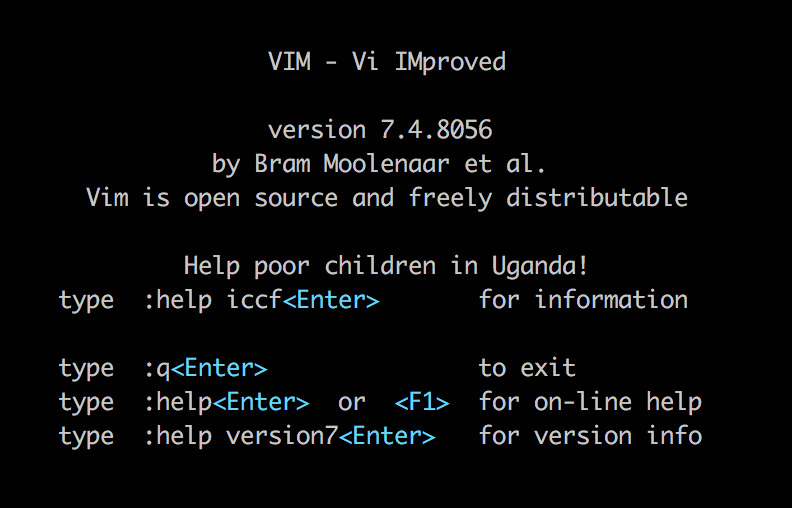
I have the same issue.
YouCompleteMe unavailable: requires Vim 7.4.1578+.
Press ENTER or type command to continue
But My VI version is newer. I really don't know the problem.
 mrmign
on 23 Jul 2017
mrmign
on 23 Jul 2017
@mrmign you can see here https://github.com/Valloric/YouCompleteMe/blob/master/plugin/youcompleteme.vim#L30 what we do to check the vim version, so can you try to run those commands one by one and see which one is failing?
echo v:version
echo has('patch1578')
also the output of :version would be helpful.
 vheon
on 23 Jul 2017
vheon
on 23 Jul 2017
Seems multiple reports of the issue with 7.4.8056 https://github.com/Valloric/YouCompleteMe/issues/549#issuecomment-317272203. Vim bug?
puremourning
on 23 Jul 2017
7.4.8056 is a very odd version number. There's no tag for it in Vim repo.
puremourning
on 23 Jul 2017
Exactly. 7.4.8056 never existed. This is most likely something distribution patched. I wonder what v:version has to say.
On July 23, 2017 8:32:49 PM GMT+02:00, Ben Jackson notifications@github.com wrote:
7.4.8056 is a very odd version number. There's no tag for it in Vim
repo.--
You are receiving this because you are subscribed to this thread.
Reply to this email directly or view it on GitHub:
https://github.com/Valloric/YouCompleteMe/issues/2721#issuecomment-317272618
--
Sent from my Android device with K-9 Mail. Please excuse my brevity.
 bstaletic
on 23 Jul 2017
bstaletic
on 23 Jul 2017
Yes. I can reproduce. It's the system Vim version on macOS
puremourning
on 23 Jul 2017
Echo v:version returns 704
As expected has() doesn't say it has the patch. And :version says it is patches 1-898, 8056. So apple have patched Vim and made it incompatible.
Solution: Do what the README.md says: use the latest MacVim. Or use a homebrew Vim or build it yourself.
puremourning
on 23 Jul 2017
Same problem. Did a clean brew install vim and which vimmoved as intended from /usr/bin/vim to /usr/local/bin/vim. However, still get the error
YouCompleteMe unavailable: requires Vim 7.4.1578+.
Info: You appear to be running the default system Vim on macOS. It reports as patch 8056, but it is really older than 1578. Please consider MacVim, homebrew Vim or a self-built Vim that satisfies the minimum requirement.
Press ENTER or type command to continue
output from vim --version
VIM - Vi IMproved 7.4 (2013 Aug 10, compiled Apr  4 2017 18:14:54)
Included patches: 1-898, 8056
Compiled by [email protected]
Normal version without GUI.  Features included (+) or not (-):
+acl             -farsi           -mouse_netterm   +syntax
-arabic          +file_in_path    -mouse_sgr       +tag_binary
+autocmd         +find_in_path    -mouse_sysmouse  +tag_old_static
-balloon_eval    +float           -mouse_urxvt     -tag_any_white
-browse          +folding         +mouse_xterm     -tcl
+builtin_terms   -footer          +multi_byte      +terminfo
+byte_offset     +fork()          +multi_lang      +termresponse
+cindent         -gettext         -mzscheme        +textobjects
-clientserver    -hangul_input    +netbeans_intg   +title
-clipboard       +iconv           +path_extra      -toolbar
+cmdline_compl   +insert_expand   -perl            +user_commands
+cmdline_hist    +jumplist        +persistent_undo +vertsplit
+cmdline_info    -keymap          +postscript      +virtualedit
+comments        -langmap         +printer         +visual
-conceal         +libcall         -profile         +visualextra
+cryptv          +linebreak       +python/dyn      +viminfo
+cscope          +lispindent      -python3         +vreplace
+cursorbind      +listcmds        +quickfix        +wildignore
+cursorshape     +localmap        +reltime         +wildmenu
+dialog_con      -lua             -rightleft       +windows
+diff            +menu            +ruby/dyn        +writebackup
+digraphs        +mksession       +scrollbind      -X11
-dnd             +modify_fname    +signs           -xfontset
-ebcdic          +mouse           +smartindent     -xim
-emacs_tags      -mouseshape      -sniff           -xsmp
+eval            -mouse_dec       +startuptime     -xterm_clipboard
+ex_extra        -mouse_gpm       +statusline      -xterm_save
+extra_search    -mouse_jsbterm   -sun_workshop    -xpm
   system vimrc file: "$VIM/vimrc"
     user vimrc file: "$HOME/.vimrc"
 2nd user vimrc file: "~/.vim/vimrc"
      user exrc file: "$HOME/.exrc"
  fall-back for $VIM: "/usr/share/vim"
Compilation: gcc -c -I. -Iproto -DHAVE_CONFIG_H     -g -O2 -U_FORTIFY_SOURCE -D_FORTIFY_SOURCE=1
Linking: gcc   -L/usr/local/lib -o vim        -lm -lncurses  -liconv
output from :version
VIM - Vi IMproved 7.4 (2013 Aug 10, compiled Apr  4 2017 18:14:54)
Included patches: 1-898, 8056
Compiled by [email protected]
Normal version without GUI.  Features included (+) or not (-):
+acl             +cmdline_info    -emacs_tags      -hangul_input    +menu            +mouse_xterm     -python3         +syntax          +virtualedit     -xsmp
-arabic          +comments        +eval            +iconv           +mksession       +multi_byte      +quickfix        +tag_binary      +visual          -xterm_clipboard
+autocmd         -conceal         +ex_extra        +insert_expand   +modify_fname    +multi_lang      +reltime         +tag_old_static  +visualextra     -xterm_save
-balloon_eval    +cryptv          +extra_search    +jumplist        +mouse           -mzscheme        -rightleft       -tag_any_white   +viminfo         -xpm
-browse          +cscope          -farsi           -keymap          -mouseshape      +netbeans_intg   +ruby/dyn        -tcl             +vreplace
+builtin_terms   +cursorbind      +file_in_path    -langmap         -mouse_dec       +path_extra      +scrollbind      +terminfo        +wildignore
+byte_offset     +cursorshape     +find_in_path    +libcall         -mouse_gpm       -perl            +signs           +termresponse    +wildmenu
+cindent         +dialog_con      +float           +linebreak       -mouse_jsbterm   +persistent_undo +smartindent     +textobjects     +windows
-clientserver    +diff            +folding         +lispindent      -mouse_netterm   +postscript      -sniff           +title           +writebackup
-clipboard       +digraphs        -footer          +listcmds        -mouse_sgr       +printer         +startuptime     -toolbar         -X11
+cmdline_compl   -dnd             +fork()          +localmap        -mouse_sysmouse  -profile         +statusline      +user_commands   -xfontset
+cmdline_hist    -ebcdic          -gettext         -lua             -mouse_urxvt     +python/dyn      -sun_workshop    +vertsplit       -xim
   system vimrc file: "$VIM/vimrc"
     user vimrc file: "$HOME/.vimrc"
 2nd user vimrc file: "~/.vim/vimrc"
      user exrc file: "$HOME/.exrc"
  fall-back for $VIM: "/usr/share/vim"
Compilation: gcc -c -I. -Iproto -DHAVE_CONFIG_H     -g -O2 -U_FORTIFY_SOURCE -D_FORTIFY_SOURCE=1
Linking: gcc   -L/usr/local/lib -o vim        -lm -lncurses  -liconv
echo v:version is 704 & echo has('patch1578')is 0.
 TMorville
on 15 Nov 2017
TMorville
on 15 Nov 2017
Heh, MacOS fixed the display of Included patches.
@TMorville As the message suggests, your vim is still the default one. Its actual version is 7.4.898.
I've never used macs, but I think you should have ran brew install vim --override-system-vim.
As far as I know, you need to uninstall the brew version and install it again with that switch.
bstaletic
on 15 Nov 2017
What @bstaletic said.
puremourning
on 16 Nov 2017
Ran brew remove vim followed by brew install vim --override-system-vim.
The problem remains, same output as above.
TMorville
on 16 Nov 2017
It is because you are still running the wrong vim. This is clearly not a YCM issue.
I actually use macvim (I recommend that) and make an alias.
Try running your correct vim binary with it’s full absolute path to satisfy yourself that this isn’t a YCM bug.
puremourning
on 16 Nov 2017
Try set the following in your ~/.bashrc
- [ ] alias vi="vim"
- [ ] export EDITOR=/usr/local/bin/vim
$ bash ~/.bashrc
 yantaq
on 8 Dec 2017
yantaq
on 8 Dec 2017
Related issues
 toy-crane
·
4Comments
toy-crane
·
4Comments
 blackode
·
3Comments
blackode
·
3Comments
 sittim
·
4Comments
sittim
·
4Comments
 jsdevel
·
4Comments
jsdevel
·
4Comments
 d0u9
·
4Comments
d0u9
·
4Comments
Most helpful comment
Try set the following in your ~/.bashrc
$ bash ~/.bashrc