Yolov5: The exported label txt seems have problem
Hi, @glenn-jocher i manage to use python detect.py --save-txt to semi-auto label images, but when i set Open Dir and Change Save Dir in labelImg,the labelImg can not display the exported bbox, and its command line window appears error:
Traceback (most recent call last):
  File "<string>", line 1268, in openNextImg
  File "<string>", line 1035, in loadFile
  File "<string>", line 1427, in loadYOLOTXTByFilename
  File "Z:\home\darrenl\tmp\labelImg\build-tools\build\labelImg\out00-PYZ.pyz\libs.yolo_io", line 112, in __init__
  File "Z:\home\darrenl\tmp\labelImg\build-tools\build\labelImg\out00-PYZ.pyz\libs.yolo_io", line 142, in parseYoloFormat
ValueError: too many values to unpack
If i set Change Save Dir to another empty folder, it will not occur error, so i doubt it is the problem of exported label txt, could you have a try ?
 wwdok
wwdok
All 18 comments
@glenn-jocher, i found the reason ! Because the exported txt has a whitespace at the end of each line, if you delete this whitespace, everything is normal !
wwdok
on 11 Nov 2020
Just change the code to f.write((('%g ' * len(line)).rstrip() + '\n') % line) solved ~

wwdok
on 11 Nov 2020
@wwdok ah I see, very interesting, thank you for raising this issue. Your fix looks good. Would you like to submit a PR for this update?
 glenn-jocher
on 11 Nov 2020
glenn-jocher
on 11 Nov 2020
@glenn-jocher Yeah, it is my first time to submit a PR, so i must carefuly learn how to do it, i will do it tomorrow😄
wwdok
on 11 Nov 2020
Hello @wwdok , How to get bounding box coordinates in YOLO object detection and store them in variable?
 carloslopezjoya
on 11 Nov 2020
carloslopezjoya
on 11 Nov 2020
@carloslopezjoya You can use python detect.py --save-txt to generate a txt file, inside it, it contains the class id, four coordinates fraction, just like the one you prepared for training. If you want to get coordinates in python codes, they are named xyxy, you can search them in detect.py.
wwdok
on 12 Nov 2020
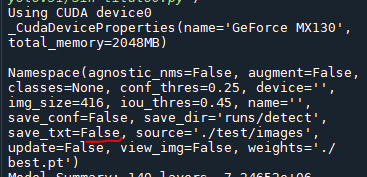
@wwdok thanks for your answer, In my case I am running it in an IDE 'spyder' I added return xyxy and it does not return anything, it does not even save the txt
These are my configurations

carloslopezjoya
on 12 Nov 2020
@wwdok In itself I need to store bounding box coordinates in YOLO object detection and store them in a variable
carloslopezjoya
on 12 Nov 2020
@carloslopezjoya python detect.py --save-txt saves labels.
glenn-jocher
on 12 Nov 2020
@glenn-jocher I know, in my case I use this python detect.py --weights best.pt --img 416 --conf 0.4 --source test\images --save-txt and it works, I just need to run it from my IDE and I can't store xyxy in a variable and load in ram
carloslopezjoya
on 12 Nov 2020
@glenn-jocher I am creating an object counter, if I need to store the xyxy coordinates in a variable to manipulate them at the same time
carloslopezjoya
on 12 Nov 2020
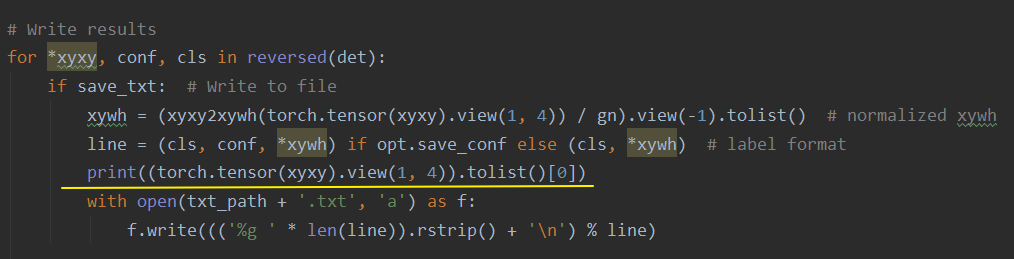
@carloslopezjoya you could try out (torch.tensor(xyxy).view(1, 4)).tolist()[0] and print out to verify it.

wwdok
on 14 Nov 2020
Hi, @glenn-jocher , I found a place that could be improved, that is adding assert out != source, 'Please set --save-dir to be different from --source ' , if someone set them the same, then the program will delete all the images in the source folder, because the name of the image to be generated is the same as the name in the source folder, if he/her didn't backup the images, that will be an accident ~

wwdok
on 14 Nov 2020
@wwdok thanks for the warning! The recent PR below from a few days ago created a new common saving structure across all the 3 main files (train, test, detect). The repo will now not overwrite an existing directory unless --exist-ok is passed as an argument. If the project/name directory already exists it will be incremented to project/name2 automatically.
- Unified '/project/name' results saving #1377
glenn-jocher
on 14 Nov 2020
@wwdok in the case of detect.py, --output is now --project/--name
glenn-jocher
on 14 Nov 2020
@glenn-jocher Glad to see the file structure becomes more organized and robust !
wwdok
on 14 Nov 2020
@carloslopezjoya , podrías probar
(torch.tensor(xyxy).view(1, 4)).tolist()[0]e imprimir para verificarlo.
thanks @wwdok
carloslopezjoya
on 14 Nov 2020
Removing TODO, original issue resolved by PR.
glenn-jocher
on 22 Nov 2020
Related issues
 ShreshthSaxena
·
4Comments
ShreshthSaxena
·
4Comments
 jaqub-manuel
·
4Comments
jaqub-manuel
·
4Comments
 hktxt
·
3Comments
hktxt
·
3Comments
 Alex-afka
·
3Comments
Alex-afka
·
3Comments
 milind-soni
·
3Comments
milind-soni
·
3Comments