Yolov5: Weights & Biases with YOLOv5 🌟
🚀 This guide explains how to use Weights & Biases (W&B) with YOLOv5.
About Weights & Biases
Think of W&B like GitHub for machine learning models. With a few lines of code, save everything you need to debug, compare and reproduce your models — architecture, hyperparameters, git commits, model weights, GPU usage, and even datasets and predictions.
W&B’s lightweight integrations work with any Python script, and you can sign up for a free account and start tracking and visualizing models in 5 minutes.
Used by top researchers including teams at OpenAI, Lyft, Github, and MILA, W&B is part of the new standard of best practices for machine learning. How W&B can help you optimize your machine learning workflows:
- Debug model performance in real time
- GPU usage, visualized automatically
- Custom charts for powerful, extensible visualization
- Share insights interactively with collaborators
- Optimize hyperparameters efficiently
- Track datasets, pipelines, and production models
Before You Start
Clone this repo and install requirements.txt dependencies, including Python>=3.8 and PyTorch>=1.6. Also install the W&B pip package wandb.
$ git clone https://github.com/ultralytics/yolov5  # clone repo
$ cd yolov5
$ pip install wandb -qr requirements.txt  # install dependencies
First-Time Setup
When you first train, W&B will prompt you to create a new account. Afterwards you are given an API key (you can retrieve your key from https://wandb.ai/authorize), and then this key is used to tell W&B where to log your data. You only need to supply your key once, and then it is remembered on the same device.
W&B will create a cloud Project called YOLOv5 for your training runs, and each new training run will be provided a unique run name. You can also set a run name manually using
$ python train.py --logdir my_run_name

Viewing Runs
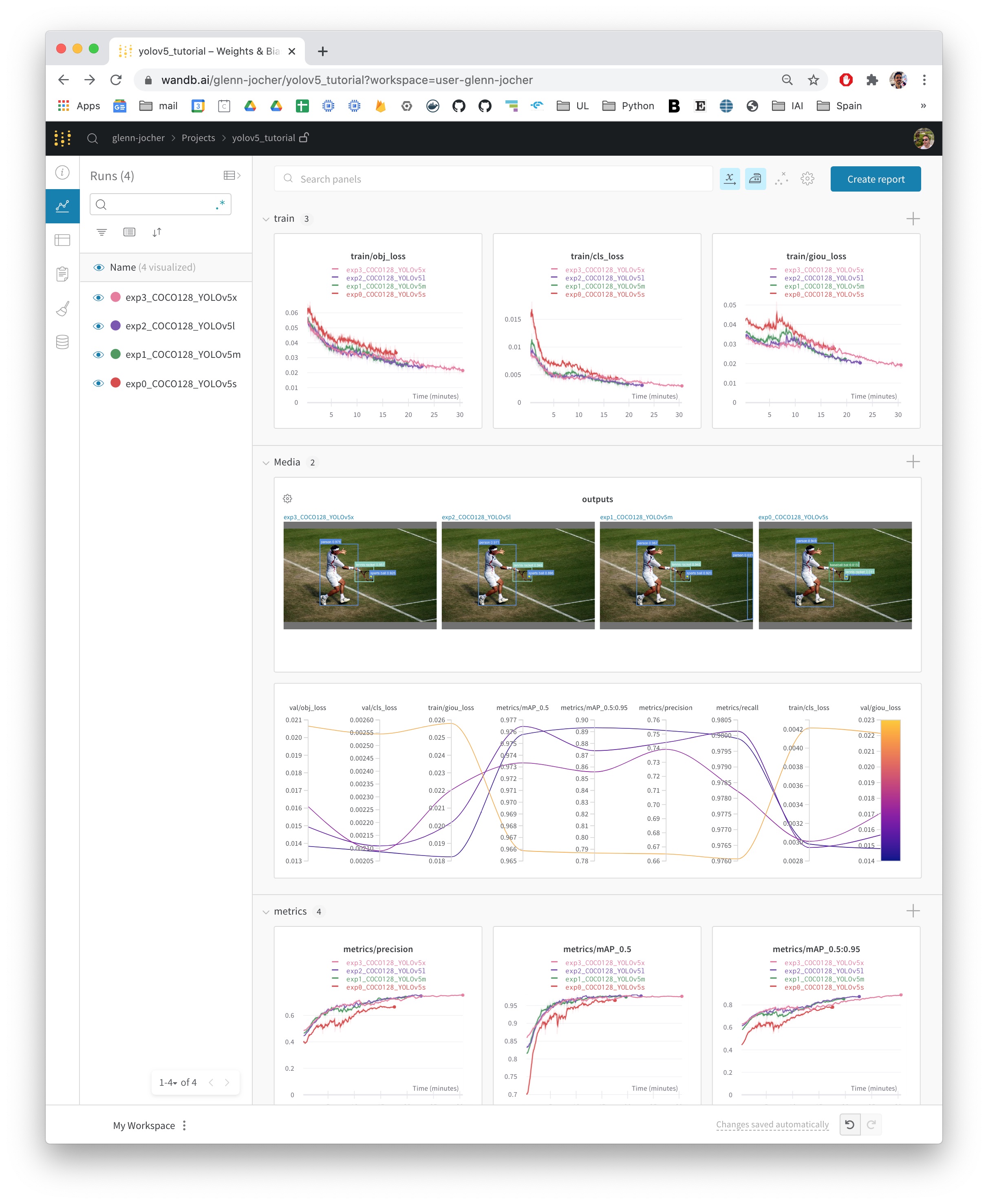
Run information streams from your environment to the W&B cloud console as you train. This allows you to monitor and even cancel runs in realtime. All important information is logged:
- Training losses
- Validation losses
- Metrics: Precision, Recall, [email protected], [email protected]:0.95
- Learning Rate over time
- GPU: Type, GPU Utilization, power, temperature, CUDA memory usage
- System: Disk I/0, CPU utilization, RAM memory usage
- Environment: OS and Python types, Git repository and state, training command
Reports
W&B Reports can be created from your saved runs for sharing online. Once a report is created you will receive a link you can use to publically share your results. Here is an example report created from the COCO128 tutorial trainings of all four YOLOv5 models (link).

Environments
YOLOv5 may be run in any of the following up-to-date verified environments (with all dependencies including CUDA/CUDNN, Python and PyTorch preinstalled):
- Google Colab Notebook with free GPU:

- Kaggle Notebook with free GPU: https://www.kaggle.com/ultralytics/yolov5
- Google Cloud Deep Learning VM. See GCP Quickstart Guide
- Docker Image https://hub.docker.com/r/ultralytics/yolov5. See Docker Quickstart Guide

 glenn-jocher
All 7 comments
Really cool, I suffer from delaying update due to the google drive file system on Colab. Can't wait to try this method.
 ChristopherSTAN
on 5 Nov 2020
ChristopherSTAN
on 5 Nov 2020
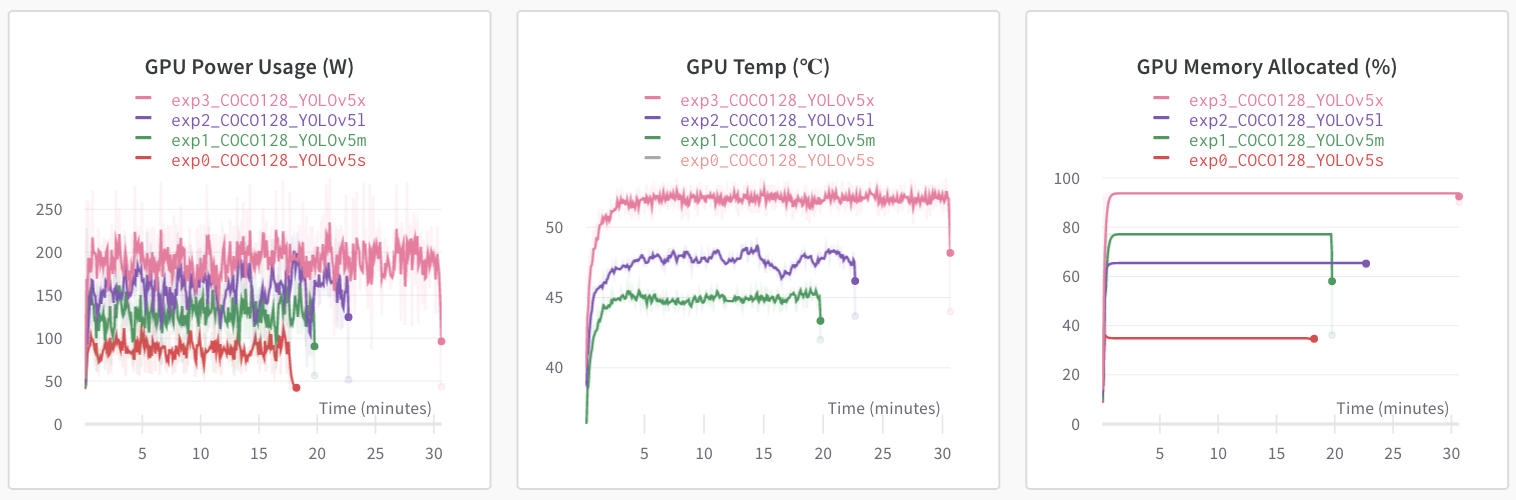
@ChristopherSTAN yes, this is similar to the Google Drive with Colab trick you discovered earlier. It adds a few useful features also like public sharing of your runs, and GPU monitoring:
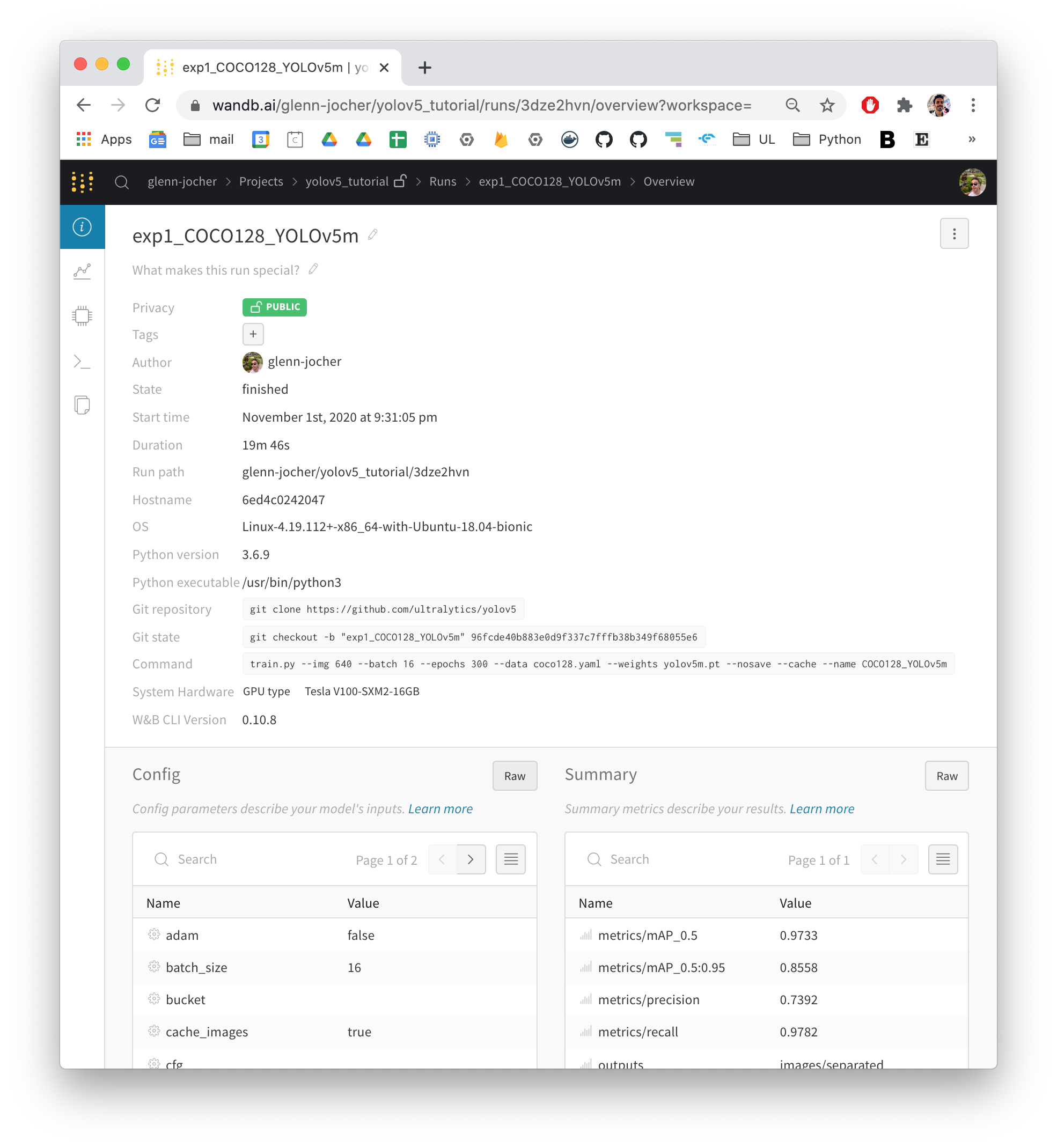
And also good metadata saving, allowing for better reproducibility:
glenn-jocher
on 5 Nov 2020
@ChristopherSTAN yes, this is similar to the Google Drive with Colab trick you discovered earlier. It adds a few useful features also like public sharing of your runs, and GPU monitoring:
And also good metadata saving, allowing for better reproducibility:
A stupid question. How can you produce the picture with shadow, it looks elegant.
 bamboosdu
on 6 Nov 2020
bamboosdu
on 6 Nov 2020
@bamboosdu It is a screenshot with extra white background. Shadow is already included.
 sithu31296
on 12 Nov 2020
sithu31296
on 12 Nov 2020
@sithu31296 yes, you to take the screenshot at just the right time of day to get the correct shadow.
glenn-jocher
on 12 Nov 2020
Hello @glenn-jocher, and thanks for this really useful tool.
I face two issues though :
- i don't see any parser for the --logdir argument in train.py, so even after having pulled the last YOLOv5 version this way of launching a training yields an error
- is it intended that the default run save paths are different than with a native YOLOv5 run (./yolov5/runs/train/ vs ./yolov5/runs/ before) ?
The only think i could think of regarding these issues is that i am still running my trainings under Python 3.6.5 that, if i'm not mistaken, was still recent enough a few weeks back.
What do you think ?
Thanks in advance !
J.
 codename5281
on 17 Nov 2020
codename5281
on 17 Nov 2020
@codename5281 default directories have been updated in _Unified '/project/name' results saving_ #1377. See Custom Training Tutorial and Colab notebook for new examples.
https://github.com/ultralytics/yolov5#tutorials
glenn-jocher
on 17 Nov 2020
Related issues
 lisa676
·
3Comments
lisa676
·
3Comments
 abhiksark
·
3Comments
abhiksark
·
3Comments
 DucTaiVu
·
3Comments
DucTaiVu
·
3Comments
 dereyly
·
4Comments
dereyly
·
4Comments
 we1pingyu
·
3Comments
we1pingyu
·
3Comments
Most helpful comment
@sithu31296 yes, you to take the screenshot at just the right time of day to get the correct shadow.