I create a conda env as your requirements:
cuda: 10.1
python 3.8.0
pytorch 1.6.0
torchvision: 0.7.0
but I can't use the cuda.
import torch
print(torch.cuda.is_available())   # False
 liguoyu666
All 7 comments
Hello @liguoyu666, thank you for your interest in our work! Please visit our Custom Training Tutorial to get started, and see our Jupyter Notebook  , Docker Image, and Google Cloud Quickstart Guide for example environments.
If this is a bug report, please provide screenshots and minimum viable code to reproduce your issue, otherwise we can not help you.
If this is a custom model or data training question, please note Ultralytics does not provide free personal support. As a leader in vision ML and AI, we do offer professional consulting, from simple expert advice up to delivery of fully customized, end-to-end production solutions for our clients, such as:
- Cloud-based AI systems operating on hundreds of HD video streams in realtime.
- Edge AI integrated into custom iOS and Android apps for realtime 30 FPS video inference.
- Custom data training, hyperparameter evolution, and model exportation to any destination.
For more information please visit https://www.ultralytics.com.
![github-actions[bot] picture](https://avatars2.githubusercontent.com/in/15368?v=4&s=40) github-actions[bot]
on 31 Aug 2020
github-actions[bot]
on 31 Aug 2020
My previous cuda version was 10.0,today I install cuda 10.1, conda environments are OK such as yolov4, except yolov5.
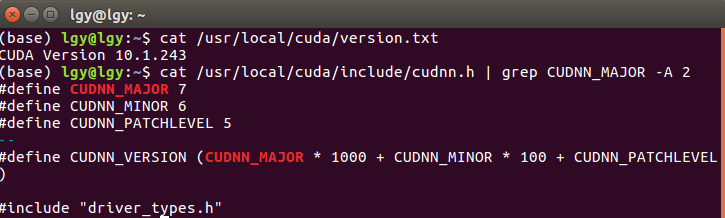
docker pull ultralytics/yolov5, In the docker environment,the cuda can't be used either.

liguoyu666
on 31 Aug 2020
You can check whether the configuration path of cuda is correct? I remember that you need to add the path of the new version of cuda10.1 to .bashrc (in fact, you only need to modify the original cuda10.0 to 10.1).
 learncrazy
on 31 Aug 2020
learncrazy
on 31 Aug 2020
You can check whether the configuration path of cuda is correct? I remember that you need to add the path of the new version of cuda10.1 to .bashrc (in fact, you only need to modify the original cuda10.0 to 10.1).
In fact, I installed cuda 10.0 and cuda10.1, and I modify the original cuda 10.0 to 10.1.
yolov3 and yolov4 can use cuda in their environment.
This seems to be caused by a mismatch between the cuda version and the pytorch version.

liguoyu666
on 1 Sep 2020
In the yolov5 environment, I change pytorch 1.6.0 to 1.4.0, torch.cuda.is_available() is True.
I uninstall cuda 10.0 and 10.1, then reinstall cuda 10.1, the same problem remains: in pytorch 1.6.0, torch.cuda.is_available() is False; in pytorch 1.2.0 and 1.4.0, torch.cuda.is_available() is True.
My driver version is 430.40.
liguoyu666
on 1 Sep 2020
You can try it and download torch again. Use the command pip install torch==1.6.0+cu101, which may be useful.
learncrazy
on 1 Sep 2020
You can try it and download torch again. Use the command pip install torch==1.6.0+cu101, which may be useful.
Because I changed the source of pip, using pip install torch==1.6.0+cu101 can't install, so I installed it according to the official Python installation:
pip install torch==1.6.0+cu101 torchvision==0.7.0+cu101 -f https://download.pytorch.org/whl/torch_stable.html,
the cuda can be cused. Thank you!
liguoyu666
on 1 Sep 2020
Related issues
 FSNStefan
·
4Comments
FSNStefan
·
4Comments
 krishnam3065
·
4Comments
krishnam3065
·
4Comments
 lisa676
·
3Comments
lisa676
·
3Comments
 ShreshthSaxena
·
4Comments
ShreshthSaxena
·
4Comments
 Alex-afka
·
3Comments
Alex-afka
·
3Comments
Most helpful comment
Because I changed the source of pip, using pip install torch==1.6.0+cu101 can't install, so I installed it according to the official Python installation:
pip install torch==1.6.0+cu101 torchvision==0.7.0+cu101 -f https://download.pytorch.org/whl/torch_stable.html,the cuda can be cused. Thank you!