Yolov5: The train.py and test.py can not run in "20200810-yolov5" when I set batch-size>1
@glenn-jocher Thank you very much for your work And I I think it's very great !
My env is: one 2080 GPU, ubuntu 16.04.
#
Now I have a problem, when I use the train.py (newest yolov5 in 2020.08.10) to train ( or test.py with the pretrained model ), if I set the batch-size>1, like this:
' python train.py --data coco.yaml --cfg yolov5s.yaml --weights '' --batch-size 4 ',
the training will always show like this:
...
Analyzing anchors... anchors/target = 4.44, Best Possible Recall (BPR) = 0.9936
Image sizes 640 train, 640 test
Using 4 dataloader workers
Starting training for 300 epochs...
Epoch gpu_mem GIoU obj cls total targets img_size
0%| | 0/1250
No matter how long I wait, the train would not go on ! If I use "ctrl+c" to stop the train, will show :
[00:00
Traceback (most recent call last):
File "train.py", line 440, in
train(hyp, opt, device, tb_writer)
File "train.py", line 231, in train
for i, (imgs, targets, paths, _) in pbar: # batch -------------------------------------------------------------
File "/home/d/anaconda3/envs/py36/lib/python3.6/site-packages/tqdm/std.py", line 1129, in __iter__
for obj in iterable:
File "/home/d/anaconda3/envs/py36/lib/python3.6/site-packages/torch/utils/data/dataloader.py", line 363, in __next__
data = self._next_data()
File "/home/d/anaconda3/envs/py36/lib/python3.6/site-packages/torch/utils/data/dataloader.py", line 974, in _next_data
idx, data = self._get_data()
File "/home/d/anaconda3/envs/py36/lib/python3.6/site-packages/torch/utils/data/dataloader.py", line 931, in _get_data
success, data = self._try_get_data()
File "/home/d/anaconda3/envs/py36/lib/python3.6/site-packages/torch/utils/data/dataloader.py", line 779, in _try_get_data
data = self._data_queue.get(timeout=timeout)
File "/home/d/anaconda3/envs/py36/lib/python3.6/queue.py", line 173, in get
self.not_empty.wait(remaining)
File "/home/d/anaconda3/envs/py36/lib/python3.6/threading.py", line 299, in wait
gotit = waiter.acquire(True, timeout)
KeyboardInterrupt
It looks like the code is wait “ gotit = waiter.acquire(True, timeout) ” and cannot finish waiting, I think there is somethings wrong in " dataloader ", but I am not sure and also do not find how to fix the problem.
#
If I set ' batch-size=1 ', train could go on:
Epoch gpu_mem GIoU obj cls total targets img_size
0/299 1.31G 0.1095 0.06575 0.1013 0.2765 46 640: 1%|▌ | 35/5000 [00:06<10:34, 7.83it/s]
#
A few days ago I noticed that that run test.py have the same situation, but that time I think I do not set the right parameters. My test results (batch=1) is same as your table shows, so I think I maybe the problem is not on my side.
Today I also try yolov5 some time ago, I found that the yolov5 which I git on 20200715 is ok (batch=4 can be trained) , 20200803 cannot !
So, could @glenn-jocher help me check this and find where is the problem ?
My Eglish is not good, I hope you can understand my question.
 xueqianxun
All 11 comments
Hello @xueqianxun, thank you for your interest in our work! Please visit our Custom Training Tutorial to get started, and see our Jupyter Notebook  , Docker Image, and Google Cloud Quickstart Guide for example environments.
If this is a bug report, please provide screenshots and minimum viable code to reproduce your issue, otherwise we can not help you.
If this is a custom model or data training question, please note Ultralytics does not provide free personal support. As a leader in vision ML and AI, we do offer professional consulting, from simple expert advice up to delivery of fully customized, end-to-end production solutions for our clients, such as:
- Cloud-based AI systems operating on hundreds of HD video streams in realtime.
- Edge AI integrated into custom iOS and Android apps for realtime 30 FPS video inference.
- Custom data training, hyperparameter evolution, and model exportation to any destination.
For more information please visit https://www.ultralytics.com.
![github-actions[bot] picture](https://avatars2.githubusercontent.com/in/15368?v=4&s=40) github-actions[bot]
on 10 Aug 2020
github-actions[bot]
on 10 Aug 2020
At now I think the code maybe do not work as @glenn-jocher expected , at present I just want to validate the author's work on a single GPU, when I run train.py, the train and val dataset both is coco-val2017 ( because the coco-val2017 have less images than coco-train2017 and I can check the code very quickly ).
Again, I think your work is very great .
xueqianxun
on 10 Aug 2020
it appears you may have environment problems. In order to run YOLOv5 correctly your environment must meet the minimum version requirements for the dependencies described in https://github.com/ultralytics/yolov5#requirements. You can either update your local environment to bring it into compliance or you can use one of our verified environment options below.
Environments
YOLOv5 may be run in any of the following up-to-date verified environments (with all dependencies including CUDA/CUDNN, Python and PyTorch preinstalled):
- Google Colab Notebook with free GPU:
- Kaggle Notebook with free GPU: https://www.kaggle.com/ultralytics/yolov5
- Google Cloud Deep Learning VM. See GCP Quickstart Guide
- Docker Image https://hub.docker.com/r/ultralytics/yolov5. See Docker Quickstart Guide

 glenn-jocher
on 10 Aug 2020
glenn-jocher
on 10 Aug 2020
Thanks for @glenn-jocher 's help, my environment is "Python 3.8 or later with all requirements.txt dependencies installed, including torch>=1.6" and "pycharm + anconda python 3.8" , but the problem is still exist.
I search from "Issues" and not foud others had the same problem, so I have to find out the problem by myself.
I annotate the code to find out which code is causing the problem,final I found that " import numpy as np " cause the problem.
So I modify the code:
train.py
line8 # import numpy as np
line22 from utils.datasets import create_dataloader, np
test.py
line8 # import numpy as np
line14 from utils.datasets import create_dataloader, np
The problem is disappeared and set "batch-size>1" is ok.
At now I don't know why "import numpy" will cause the problem, maybe my environment have some problems, if glenn-jocher interest in this question, maybe you can find out why.
xueqianxun
on 11 Aug 2020
@xueqianxun hey buddy, you definitely have environment problems if the numpy import is causing you problems. Suggest you use one the ones we've made available, such as google colab or the docker image.
glenn-jocher
on 11 Aug 2020
@glenn-jocher thanks for your suggestion and I will try.
xueqianxun
on 11 Aug 2020
I have the same issue. @xueqianxun
Env: 2080Ti GPU, ubuntu 16.04, anaconda3 , cuda10.1 cudnn7.6.3 python3.8 pytorch1.6 numpy 1.19.1 ...
all packages installed by requriment.txt
when I use python train.py --img 640 --batch 16 --epochs 5 --data ./data/coco128.yaml --cfg ./models/yolov5s.yaml --weights '' ,same as @xueqianxun .
If I set ' batch-size=1 ' , train go on.
 unclepeterwang
on 14 Aug 2020
unclepeterwang
on 14 Aug 2020
@unclepeterwang conda environments are not recommended. Just create a normal python 3.8 venv and install requirements and you should be fine.
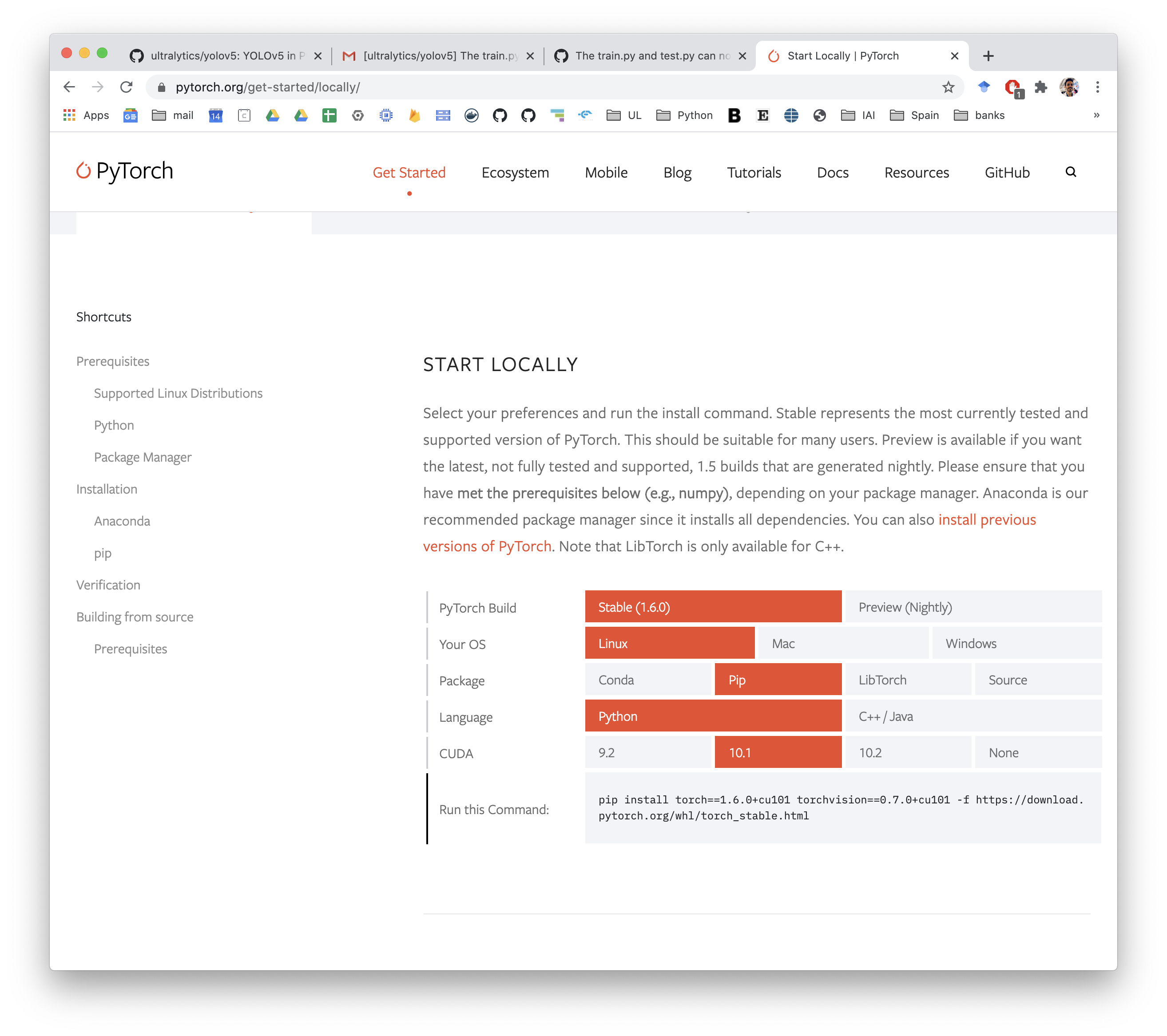
Make sure you use the exact pytorch install command you need though for cuda 10.1, you can find it under the Getting Started Tab in PyTorch.
glenn-jocher
on 14 Aug 2020
Thanks a lot, i will try .
unclepeterwang
on 17 Aug 2020
CUDA: 10.1
Driver: nvidia-418
Just use plain env and follow requirements fixed this issue for me:
sudo add-apt-repository ppa:deadsnakes/ppa
sudo apt update
sudo apt -y install software-properties-common python3.8 python3.8-venv python3.8-distutils

python3.8 -m venv my_env_name
source my_env_name/bin/activate

git clone [email protected]:ultralytics/yolov5.git
cd yolov5
pip install -r requirements.txt
pip install torch==1.6.0+cu101 torchvision==0.7.0+cu101 -f https://download.pytorch.org/whl/torch_stable.html
 terminalkitten
on 18 Aug 2020
terminalkitten
on 18 Aug 2020
This issue has been automatically marked as stale because it has not had recent activity. It will be closed if no further activity occurs. Thank you for your contributions.
github-actions[bot]
on 19 Sep 2020
Related issues
 xinxin342
·
3Comments
xinxin342
·
3Comments
 milind-soni
·
3Comments
milind-soni
·
3Comments
 dereyly
·
4Comments
dereyly
·
4Comments
 KangHoyong
·
3Comments
KangHoyong
·
3Comments
 Single430
·
4Comments
Single430
·
4Comments
Most helpful comment
Thanks for @glenn-jocher 's help, my environment is "Python 3.8 or later with all requirements.txt dependencies installed, including torch>=1.6" and "pycharm + anconda python 3.8" , but the problem is still exist.
I search from "Issues" and not foud others had the same problem, so I have to find out the problem by myself.
I annotate the code to find out which code is causing the problem,final I found that " import numpy as np " cause the problem.
So I modify the code:
train.py
line8 # import numpy as np
line22 from utils.datasets import create_dataloader, np
test.py
line8 # import numpy as np
line14 from utils.datasets import create_dataloader, np
The problem is disappeared and set "batch-size>1" is ok.
At now I don't know why "import numpy" will cause the problem, maybe my environment have some problems, if glenn-jocher interest in this question, maybe you can find out why.