Yolov5: Wrong bounding boxes after 1000 images on custom and coco dataset.
Hello! first of all, thank you so much for sharing such amazing work!
I was playing with the custom dataset training notebook, but my network was not learning anything in my dataset, so my first thought was that I messed up in the dataset labeling somehow, but after playing a little bit with it, I started to notice that the ground truth image (test_batch0_gt.jpg) was not showing the correct bounding box for each image, the weird thing is that sometimes showed the correct bounding box, and sometimes not, depending on the size of the dataset.
less than 1000 images -> bounding boxes are showed correctly
more than 1000 -> bounding boxes are not showed correctly
so I created a new notebook, and just tried to train coco128, and the ground truth image was good :) (just as your notebook)
but if you try the same thing with a bigger dataset, for example downloading the validation part of the coco dataset,
and then you train the network with this validation part, you can see that the bounding boxes are not correct.
Google Colab Netbook to reproduce, and you can see the ground truth images.
https://colab.research.google.com/drive/1lWXa0YVyGtKVgJYLdxxSZM-w32bYYHG6?usp=sharing
coco.yaml file which designates val slice coco to train and val.
https://drive.google.com/file/d/1z00w0kgX1ONd7ThGNqVu3wx-v7kdzFZp/view?usp=sharing
So, might be is just an issue generating that image, but as I was unable to train a custom network of more than 1000 images, I was wondering if I am messing somewhere, or is just a little issue.
Thank you so much for your time in advance!
 MarioDuran
All 19 comments
Hello @MarioDuran, thank you for your interest in our work! Please visit our Custom Training Tutorial to get started, and see our Jupyter Notebook  , Docker Image, and Google Cloud Quickstart Guide for example environments.
If this is a bug report, please provide screenshots and minimum viable code to reproduce your issue, otherwise we can not help you.
If this is a custom model or data training question, please note that Ultralytics does not provide free personal support. As a leader in vision ML and AI, we do offer professional consulting, from simple expert advice up to delivery of fully customized, end-to-end production solutions for our clients, such as:
- Cloud-based AI systems operating on hundreds of HD video streams in realtime.
- Edge AI integrated into custom iOS and Android apps for realtime 30 FPS video inference.
- Custom data training, hyperparameter evolution, and model exportation to any destination.
For more information please visit https://www.ultralytics.com.
![github-actions[bot] picture](https://avatars2.githubusercontent.com/in/15368?v=4&s=40) github-actions[bot]
on 8 Jul 2020
github-actions[bot]
on 8 Jul 2020
@MarioDuran you should follow the format of coco128 with your custom dataset. You can inspect the dataset here:
https://www.kaggle.com/ultralytics/coco128
Training operates correctly any dataset size, including up to coco 2017 with 120k images.
 glenn-jocher
on 8 Jul 2020
glenn-jocher
on 8 Jul 2020
Hi Glenn! thank you so much for your answer and time!
but the weird thing is that is not working with the COCO dataset either.
I am going to describe exactly what I did in Google Colab.
First. I downloaded the yolov5 repository as in the tutorial.
!git clone https://github.com/ultralytics/yolov5 # clone repo
!pip install -r yolov5/requirements.txt # install dependencies
%cd yolov5
import torch
from IPython.display import Image, clear_output # to display images
from utils.google_utils import gdrive_download # to download models/datasets
Then I downloaded the two reduced COCO datasets that we can find in the yoloV5 tutorial.
Download COCO val2017
gdrive_download('1Y6Kou6kEB0ZEMCCpJSKStCor4KAReE43','coco2017val.zip') # val2017 dataset
!mv ./coco ../ # move folder alongside /yolov5Download tutorial dataset coco128.yaml
gdrive_download('1n_oKgR81BJtqk75b00eAjdv03qVCQn2f','coco128.zip') # tutorial dataset
!mv ./coco128 ../ # move folder alongside /yolov5
Now I just created this yaml file in order to train the network, which is the same as the coco.yaml but with this modification.
so we have 128 Images in validation, and around 5k to train.
train: ../coco/images/val2017/
val: ../coco128/images/train2017/
And that is basically it, now we train the network with the help of the pretrained yolov5s.
!python train.py --img 416 --batch 16 --epochs 300 --data ./data/coco_c1.yaml --cfg ./models/yolov5s.yaml --weights yolov5s.pt
But as weird as it seems, the network is not learning, but getting worse.
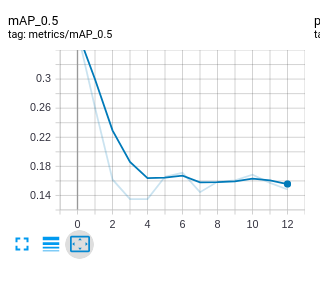
And if you display the ground truth image of the training dataset, you can see that some weird bounding boxes, which might be causing the issue during training.
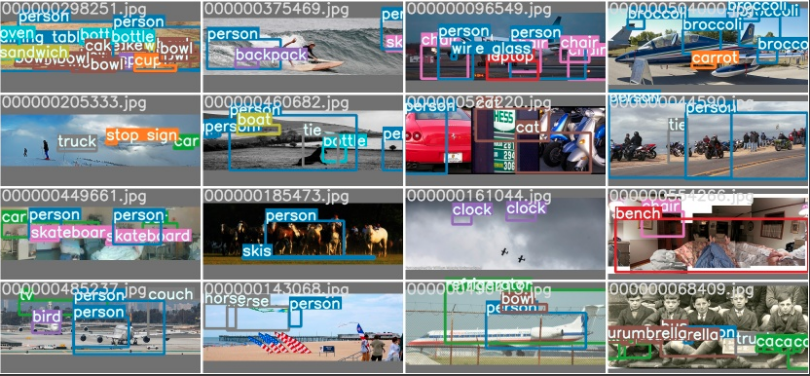
And if you want to replicate this, I leave you the notebook and the yaml file.
Notebook
https://colab.research.google.com/drive/1i8PwD1rr7OFiusLDqov0YozVOzbMGwjr?usp=sharing
yaml
https://drive.google.com/file/d/1fdMIgquWwiXO8ZAHasU-2Jbaja2oI-fB/view?usp=sharing
Thank you so much in advance for any comment.
MarioDuran
on 9 Jul 2020
@MarioDuran train.jpg and test_gt.jpg are provided to help verify that your data is labelled correctly. If either of these sets of images are not correct, then there is clearly a problem with the data, and training will serve no purpose.
I don't have time to look at your notebook unfortunately, and I know the two datasets in question are sound, so I would first train coco128 with the default notebook, and then once you have successfully trained there, modify your approach one small step at a time, training after each step to isolate the source of the problem.
glenn-jocher
on 9 Jul 2020
Thanks for your quick answer @glenn-jocher! no worries, I know you are very busy :)
Training with coco128 works like a charm, which is why I started thinking that the size of the training dataset has something to do with this issue, but I will keep trying to isolate the issue as you said.
Thank you Glenn!
MarioDuran
on 9 Jul 2020
@MarioDuran i have the save problem only with on picture training , when you solve this problem ,please tell me why ?
 jingenyan
on 9 Jul 2020
jingenyan
on 9 Jul 2020
Hi @jingenyan if the number of images and labels of your custom dataset is less than 1000, there is no problem, but if you have more than 1000 images, you will need to fill your custom dataset with new or repeated data, so you end up with a custom dataset of size in multiples of 1000. like 2000 or 3000, otherwise is not going to work.
at least this workaround is working for me.
hope it helps!
MarioDuran
on 9 Jul 2020
@MarioDuran that doesn't sound right. None of the custom datasets we train on have a 1000-rounded number. COCO train 2017 for example has 118287 images.
glenn-jocher
on 9 Jul 2020
hi @MarioDuran, I had the same problem but didn’t focus on whether there are more than 1000 images. In fact, everything is perfect when I only train two types, which has lower than 1000 images. But this problem also happened when I trained all the data sets.
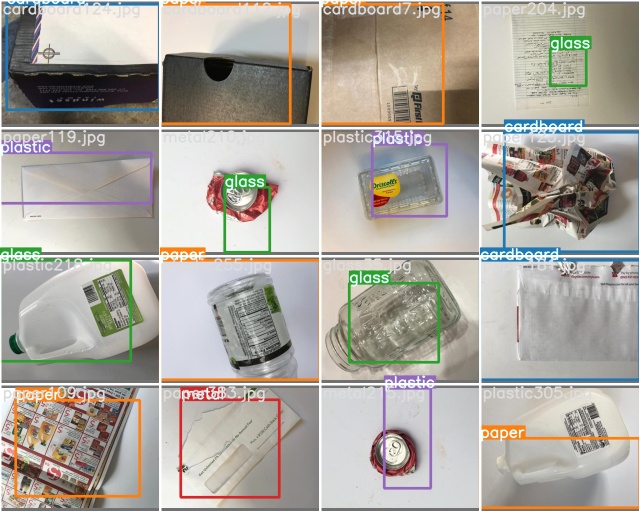
When I train in colab I can get the correct train_batch.jpg, but test_batch_gt.jpg will have a serious label mess.
test_barch0_gt.jpg
train_batch0.jpg
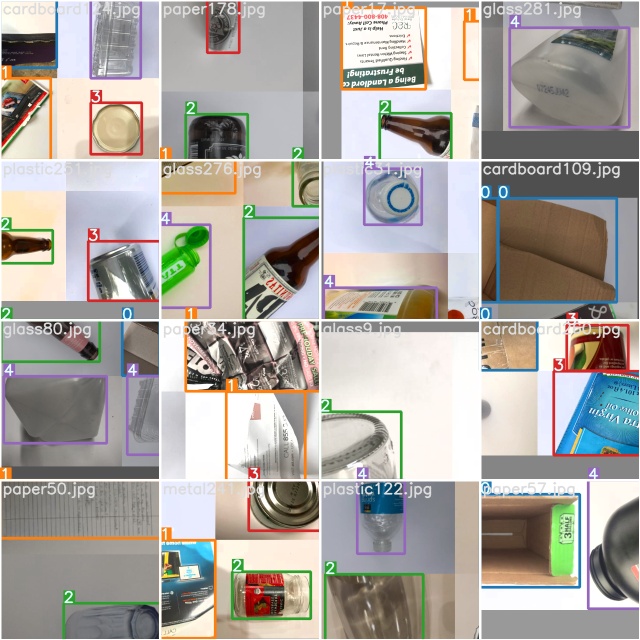
And when I try to use my MacBook for training, I don't even get the correct train_batch*.jpg
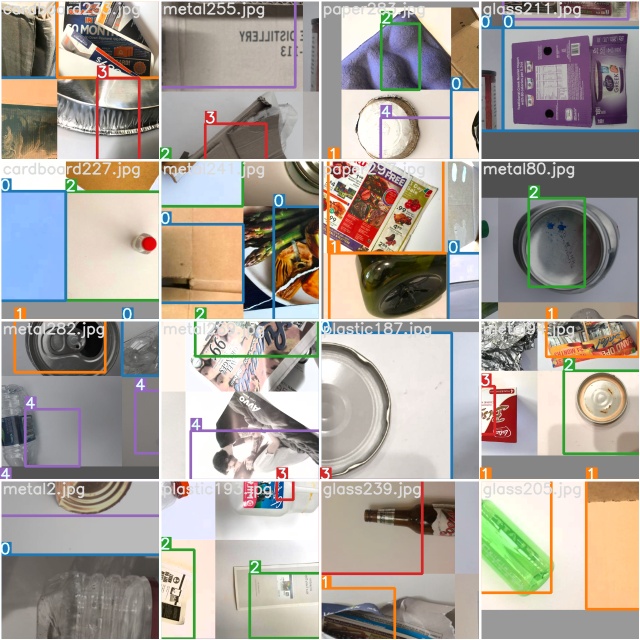
However, it is surprising that despite the extremely low mAP, R, P and other parameters in the training process in colab, this also occurs when the test.py file is run directly after training. But when the weight file was downloaded to the local for actual testing alone, or the weight file was re-uploaded to a blank yolov5 environment, good results were obtained.
for train/val images

for test images

I repeatedly looked at the labeling format and delved into the tutorial of training my own data set to try to solve this problem, but it did not work. @glenn-jocher Just like the question I asked you yesterday, the key to the problem may be that the incorrect reading of the labels caused different test results. Perhaps there is a certain problem in the generation of the label.npy file.
Finally, thanks to the MorioDuran's question for letting me understand that my situation does not exist alone. And thanks to glenn-jocher for taking the time to answer our questions, although you once thought this situation was not repeatable.
 GUOOOZI
on 9 Jul 2020
GUOOOZI
on 9 Jul 2020
@MarioDuran @GUOOOZI 1000 images is the threshold for caching or not caching labels, so this is probably the reason for the different behavior. The purpose of caching is to reduce label loading time, which can be several minutes long for COCO if the labels are read as individual text files. The caching process reads these once and saves them as an *.npy file in the dataset directory.
The current problem is any subsequent changes in the txt file labels will not trigger recaching. Temporary fix is to delete any *.shapes and *.npy files you find in your datasets and retrain. Longer term update to dataloader should arrive next week.
glenn-jocher
on 9 Jul 2020
TODO label recaching fix.
glenn-jocher
on 9 Jul 2020
@glenn-jocher hi, Just like the method you proposed in this question #271 ,adding --rect could make the label of test_batch_gt.jpg correct.
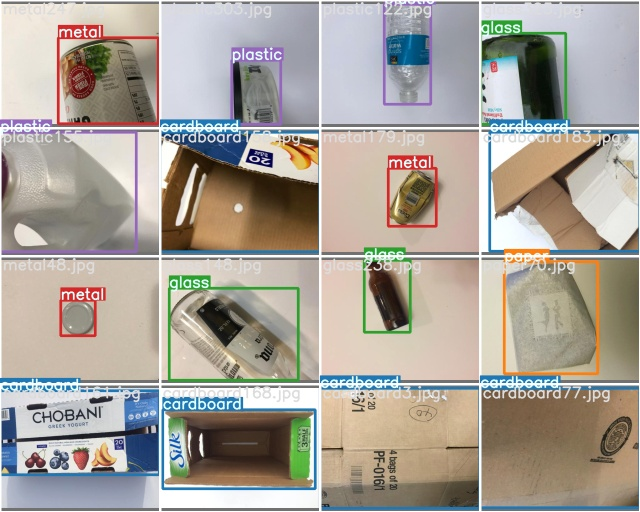
I am trying to use this program for training. The training results may be updated in the next few hours. I think this can be used as a temporary solution.
@MarioDuran Hope it can help you.
GUOOOZI
on 9 Jul 2020
Although a normal training curve can be observed in the --rect mode, its mAP is relatively low. Both weight are trained after 500 epoches and in img-size 320.
normal model
valid images

test images

--rect model
valid images

test images

GUOOOZI
on 10 Jul 2020
@MarioDuran @GUOOOZI I just pushed a major update https://github.com/ultralytics/yolov5/commit/520f5de6f0febf30dd3545793f528c3478c18299 that should resolve all label caching issues. Labels and images are scanned together the first time a dataset is trained, and cached into a labels.cache file now which contains a dictionary of image names, shapes, labels and a unique hash for the cached dataset. Images are scanned for corruption now also as part of the process. All subsequent trainings retrieve the current hash value of the dataset, and if it matches the cached value, then the cached file is used, else the entire dataset is recached and a new file saved. Please try out the changes and let me know if this resolves your issue!
glenn-jocher
on 10 Jul 2020
@MarioDuran @GUOOOZI can i used pytorch1.3 or version <1.5, i come across some problem :the pretrained models cannt load correctly,because the parameters key names in pretrained models is not in defined model,why? dose the pytorch version cause this mistake?
jingenyan
on 10 Jul 2020
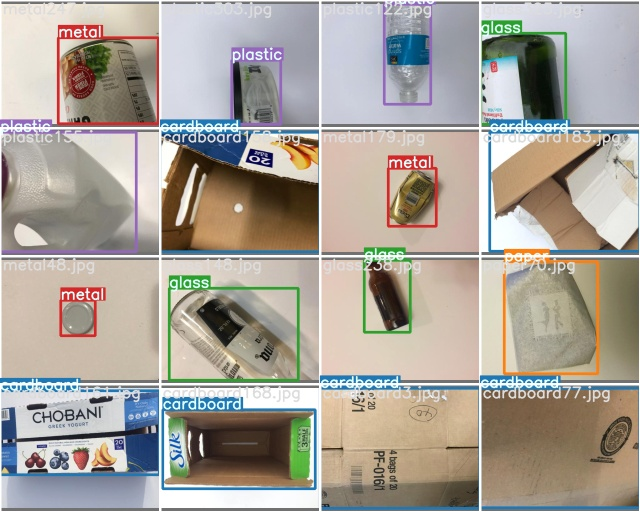
@glenn-jocher Hi, the label in test_batch0_gt.jpg seems correct now. Thank you for effort. And the training result may updated a few hours later.
GUOOOZI
on 10 Jul 2020
Great!! I'm glad the update seems to be working!!
glenn-jocher
on 10 Jul 2020
@glenn-jocher Works flawlessly for my two custom datasets! thank you so much for fixing this issue so fast!
MarioDuran
on 11 Jul 2020
@MarioDuran awesome, glad to hear it! I'll close the issue now as it seems resolved :)
glenn-jocher
on 11 Jul 2020
Related issues
 krishnam3065
·
4Comments
krishnam3065
·
4Comments
 abhiksark
·
3Comments
abhiksark
·
3Comments
 cswwp
·
4Comments
cswwp
·
4Comments
 Single430
·
4Comments
Single430
·
4Comments
 dereyly
·
4Comments
dereyly
·
4Comments