Yolov5: ONNX, TorchScript and CoreML Model Export
🚀 This guide explains how to export a trained YOLOv5 model from PyTorch to ONNX and TorchScript formats.
Before You Start
Clone this repo and install requirements.txt dependencies, including Python>=3.8 and PyTorch==1.6 and also ONNX>=1.7.
git clone https://github.com/ultralytics/yolov5  # clone repo
cd yolov5
pip install -r requirements.txt  # base requirements
pip install onnx>=1.7.0  # for ONNX export
pip install coremltools==4.0  # for CoreML export
Export a Trained YOLOv5 Model
This command exports a pretrained YOLOv5s model to ONNX, TorchScript and CoreML formats. yolov5s.pt is the lightest and fastest model available. Other options are yolov5m.pt, yolov5l.pt and yolov5x.pt, or you own checkpoint from training a custom dataset runs/exp0/weights/best.pt. For details on all available models please see our README table.
python models/export.py --weights yolov5s.pt --img 640 --batch 1 # export at 640x640 with batch size 1
Output:
Namespace(batch_size=1, img_size=[640, 640], weights='./yolov5s.pt')
Downloading https://github.com/ultralytics/yolov5/releases/download/v3.0/yolov5s.pt to ./yolov5s.pt...
100%|██████████| 14.5M/14.5M [00:02<00:00, 5.83MB/s]

Fusing layers...
Model Summary: 140 layers, 7.45958e+06 parameters, 0 gradients, 17.5 GFLOPS

Starting TorchScript export with torch 1.6.0...
TorchScript export success, saved as ./yolov5s.torchscript.pt

Starting ONNX export with onnx 1.7.0...
ONNX export success, saved as ./yolov5s.onnx

Starting CoreML export with coremltools 4.0...
Converting graph.
...
Translating MIL ==> MLModel Ops: 100%|██████████| 1077/1077 [00:00<00:00, 1236.09 ops/s]
CoreML export success, saved as ./yolov5s.mlmodel

Export complete (16.67s). Visualize with https://github.com/lutzroeder/netron.
The 3 exported models will be saved alongside the original PyTorch model:

Netron Viewer is highly recommended for viewing exported models:
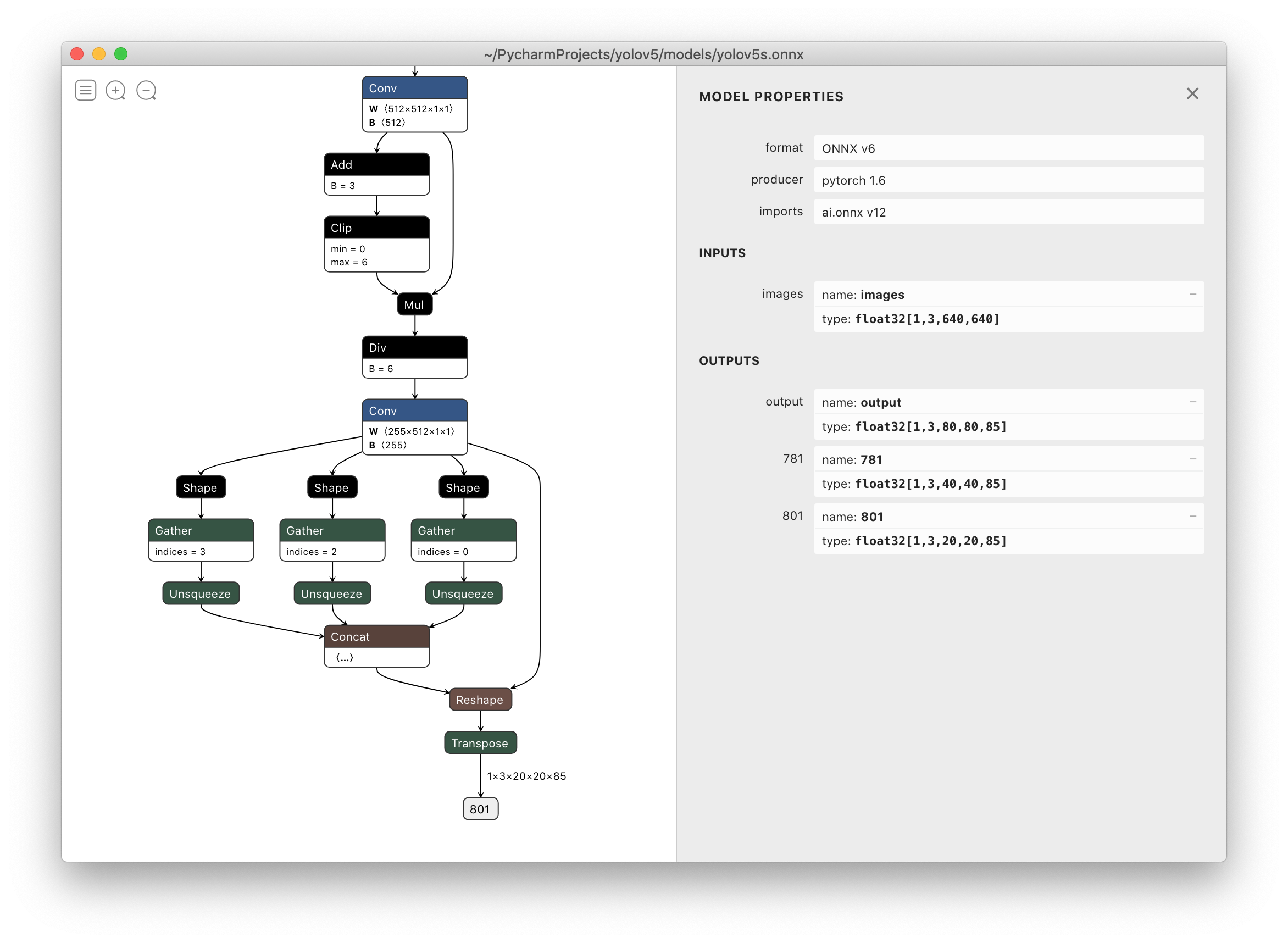
TensorRT Deployment
For deployment of YOLOv5 from PyTorch *.pt weights to NVIDIA TensorRT see https://github.com/wang-xinyu/tensorrtx.
Environments
YOLOv5 may be run in any of the following up-to-date verified environments (with all dependencies including CUDA/CUDNN, Python and PyTorch preinstalled):
- Google Colab Notebook with free GPU:

- Kaggle Notebook with free GPU: https://www.kaggle.com/ultralytics/yolov5
- Google Cloud Deep Learning VM. See GCP Quickstart Guide
- Docker Image https://hub.docker.com/r/ultralytics/yolov5. See Docker Quickstart Guide

 glenn-jocher
All 124 comments
Thank you so much!
I will deploy onnx model on mobile devices!
 TommyZihao
on 1 Jul 2020
TommyZihao
on 1 Jul 2020


it only work with 5s pretrained,
 tienhoang1094
on 3 Jul 2020
tienhoang1094
on 3 Jul 2020
@glenn-jocher My onnx is 1.7.0, python is 3.8.3, pytorch is 1.4.0 (your latest recommendation is 1.5.0).
But exporting to ONNX is failed because of opset version 12. This is my command line:
export PYTHONPATH="$PWD" && python models/export.py --weights ./weights/yolov5s.pt --img 640 --batch 1
And it failed with this error:
Fusing layers...
Model Summary: 140 layers, 7.45958e+06 parameters, 7.45958e+06 gradientsONNX export failed: Unsupported ONNX opset version: 12
I don't think it caused by PyTorch version lower than your recommendation.
Any advice? Thank you.
 rcg12387
on 3 Jul 2020
rcg12387
on 3 Jul 2020
I changed opset_version to 11 in export.py, and new error messages came up:
Fusing layers...
Model Summary: 140 layers, 7.45958e+06 parameters, 7.45958e+06 gradients
Segmentation fault (core dumped)
This is the full message:
$ export PYTHONPATH="$PWD" && python models/export.py --weights ./weights/yolov5s.pt --img 640 --batch 1
Namespace(batch_size=1, img_size=[640, 640], weights='./weights/yolov5s.pt')
/home/DL-001/anaconda3/envs/pytorch/lib/python3.8/site-packages/torch/serialization.py:593: SourceChangeWarning: source code of class 'torch.nn.modules.conv.Conv2d' has changed. you can retrieve the original source code by accessing the object's source attribute or set `torch.nn.Module.dump_patches = True` and use the patch tool to revert the changes.
warnings.warn(msg, SourceChangeWarning)
/home/DL-001/anaconda3/envs/pytorch/lib/python3.8/site-packages/torch/serialization.py:593: SourceChangeWarning: source code of class 'torch.nn.modules.container.ModuleList' has changed. you can retrieve the original source code by accessing the object's source attribute or set `torch.nn.Module.dump_patches = True` and use the patch tool to revert the changes.
warnings.warn(msg, SourceChangeWarning)
TorchScript export failed: Only tensors or tuples of tensors can be output from traced functions (getOutput at /opt/conda/conda-bld/pytorch_1579022027550/work/torch/csrc/jit/tracer.cpp:212)
frame #0: c10::Error::Error(c10::SourceLocation, std::string const&) + 0x47 (0x7fb3a6bdf627 in /home/DL-001/anaconda3/envs/pytorch/lib/python3.8/site-packages/torch/lib/libc10.so)
frame #1: torch::jit::tracer::TracingState::getOutput(c10::IValue const&, unsigned long) + 0x334 (0x7fb3b16d2024 in /home/DL-001/anaconda3/envs/pytorch/lib/python3.8/site-packages/torch/lib/libtorch.so)
frame #2: torch::jit::tracer::trace(std::vector<c10::IValue, std::allocator<c10::IValue> >, std::function<std::vector<c10::IValue, std::allocator<c10::IValue> > (std::vector<c10::IValue, std::allocator<c10::IValue> >)> const&, std::function<std::string (at::Tensor const&)>, bool, torch::jit::script::Module*) + 0x539 (0x7fb3b16d99f9 in /home/DL-001/anaconda3/envs/pytorch/lib/python3.8/site-packages/torch/lib/libtorch.so)
frame #3: <unknown function> + 0x759fed (0x7fb3ddbcafed in /home/DL-001/anaconda3/envs/pytorch/lib/python3.8/site-packages/torch/lib/libtorch_python.so)
frame #4: <unknown function> + 0x7720ee (0x7fb3ddbe30ee in /home/DL-001/anaconda3/envs/pytorch/lib/python3.8/site-packages/torch/lib/libtorch_python.so)
frame #5: <unknown function> + 0x28b8a7 (0x7fb3dd6fc8a7 in /home/DL-001/anaconda3/envs/pytorch/lib/python3.8/site-packages/torch/lib/libtorch_python.so)
<omitting python frames>
frame #24: __libc_start_main + 0xe7 (0x7fb416e13b97 in /lib/x86_64-linux-gnu/libc.so.6)
Fusing layers...
Model Summary: 140 layers, 7.45958e+06 parameters, 7.45958e+06 gradients
Segmentation fault (core dumped)
I debugged it and found the reason.
It failed at ts = torch.jit.trace(model, img), so I realized it was caused by lower version of PyTorch.
Then I upgraded PyTorch to 1.5.1, and it worked good finally.
rcg12387
on 4 Jul 2020
why you set Detect() layer export=True? this will let Detect() layer not in the onnx model.

 Ezra-Yu
on 10 Jul 2020
Ezra-Yu
on 10 Jul 2020
@Ezra-Yu yes that is correct. You are free to set it to False if that suits you better.
glenn-jocher
on 10 Jul 2020
@glenn-jocher Why is the input of onnx fixed,but pt is multiple of 32
 ycdhqzhiai
on 14 Jul 2020
ycdhqzhiai
on 14 Jul 2020
hi, is there any sample code to use the exported onnx to get the Nx5 bbox?. i tried to use the postprocess from detect.py, but it doesnt work well.
 neverrop
on 14 Jul 2020
neverrop
on 14 Jul 2020
hi, is there any sample code to use the exported onnx to get the Nx5 bbox?. i tried to use the postprocess from detect.py, but it doesnt work well.
Hi @neverrop
I have added guidance over how this could be achieved here: https://github.com/ultralytics/yolov5/issues/343#issuecomment-658021043
Hope this is useful!
 dlawrences
on 14 Jul 2020
dlawrences
on 14 Jul 2020
hi, is there any sample code to use the exported onnx to get the Nx5 bbox?. i tried to use the postprocess from detect.py, but it doesnt work well.
Hi @neverrop
I have added guidance over how this could be achieved here: #343 (comment)
Hope this is useful!.
Thank you so much. I will try it today。
neverrop
on 15 Jul 2020
Would CoreML failure as shown below affect the successfully converted onnx model? Thank you.
ONNX export success, saved as weights/yolov5s.onnx
WARNING:root:TensorFlow version 2.2.0 detected. Last version known to be fully compatible is 1.14.0 .
WARNING:root:Keras version 2.4.3 detected. Last version known to be fully compatible of Keras is 2.2.4 .
Starting CoreML export with coremltools 3.4...
CoreML export failure: module 'coremltools' has no attribute 'convert'
Export complete. Visualize with https://github.com/lutzroeder/netron
 shenglih
on 15 Jul 2020
shenglih
on 15 Jul 2020
Hi @shenglih
CoreML export doesn't affect the ONNX one in any way.
Regards
dlawrences
on 16 Jul 2020
Starting CoreML export with coremltools 3.4...
CoreML export failure: module 'coremltools' has no attribute 'convert'
Export complete. Visualize with https://github.com/lutzroeder/netron.
anyone solved it?
 Mayur2992
on 17 Jul 2020
Mayur2992
on 17 Jul 2020
Starting CoreML export with coremltools 3.4...
CoreML export failure: module 'coremltools' has no attribute 'convert'Export complete. Visualize with https://github.com/lutzroeder/netron.
anyone solved it?
Hi. I think you need to update to the latest coremltools package version.
Please see this one: https://github.com/ultralytics/yolov5/issues/315#issuecomment-656629623
dlawrences
on 28 Jul 2020
Starting CoreML export with coremltools 3.4...
CoreML export failure: module 'coremltools' has no attribute 'convert'Export complete. Visualize with https://github.com/lutzroeder/netron.
anyone solved it?
reinstall your coremltools:
pip install coremltools==4.0b2
 zyyang
on 29 Jul 2020
zyyang
on 29 Jul 2020
pip install coremltools==4.0b2
my pytorch version is 1.4, coremltools=4.0b2,but error
Starting ONNX export with onnx 1.7.0...
Fusing layers... Model Summary: 284 layers, 8.84108e+07 parameters, 8.45317e+07 gradients
ONNX export failure: Unsupported ONNX opset version: 12
Starting CoreML export with coremltools 4.0b2...
CoreML export failure: name 'ts' is not defined
how to solved it
 zhepherd
on 29 Jul 2020
zhepherd
on 29 Jul 2020
@zhepherd
Please install torch=1.5.1.
dlawrences
on 29 Jul 2020
Starting CoreML export with coremltools 3.4...
CoreML export failure: module 'coremltools' has no attribute 'convert'Export complete. Visualize with https://github.com/lutzroeder/netron.
anyone solved it?
Try this out:
import coremltools as ct
model = ct.converters.onnx.convert(model='my_model.onnx')
 Abhimanyu8713
on 30 Jul 2020
Abhimanyu8713
on 30 Jul 2020
@zhepherd
Please install
torch=1.5.1.
thx it's ok
zhepherd
on 31 Jul 2020
When I convert the onnx model to trt. I meet this problem:
While parsing node number 164 [Resize]:
ERROR: ModelImporter.cpp:124 In function parseGraph:
[5] Assertion failed: ctx->tensors().count(inputName)
I use tensorRT 7.0 with opset 12
 VCBE123
on 3 Aug 2020
VCBE123
on 3 Aug 2020
How is the output tensor meant to be read? Currently when I read the tensor it includes negative numbers and has a 5D shape. I'm also new to Yolo
 BernardinD
on 8 Aug 2020
BernardinD
on 8 Aug 2020
Starting CoreML export with coremltools 3.4...
CoreML export failure: module 'coremltools' has no attribute 'convert'
Export complete. Visualize with https://github.com/lutzroeder/netron.
anyone solved it?reinstall your coremltools:
pip install coremltools==4.0b2
Yes Brother,
Thanks its working now.
Do you have any further step to deploy in ios?
Mayur2992
on 10 Aug 2020
I don't know it is okay to put my questions here. But hopefully someone could answer my questions.
I successfully converted my custom yolov5 model(train it using pre-train model yolov5x using only car, bus, truck data from 2017_train COCO datasets) and made onnx model too following instructions in this github. However, the outputs of onnx model is quite hard for me to understand and I don't know how to draw bounding boxes on original images from the outputs.
the output and my code below
"======================code======================="
layer name for onnx model
followed this, https://github.com/onnx/onnx/issues/2657
import onnx
model = onnx.load('xxx.onnx')
output =[node.name for node in model.graph.output]
input_all = [node.name for node in model.graph.input]
input_initializer = [node.name for node in model.graph.initializer]
net_feed_input = list(set(input_all) - set(input_initializer))
print('Inputs: ', net_feed_input)
print('Outputs: ', output)
intput: ['images']
output: ['output', '772', '791']
I followed this link, https://pytorch.org/docs/stable/onnx.html
import onnxruntime as ort
ort_session = ort.InferenceSession('best.onnx')
outputs = ort_session.run(None, {'images': np.random.randn(1, 3, 640, 640).astype(np.float32)})
print(outputs[0])`
"======================output========================="

Well, to put it in a nutshell, my questions below.
- Could anyone tell me what it means for each dimension of the output?
- Could anyone tell postpreprocessing after inferencing stages of onnx model? ( For example, https://github.com/onnx/models/blob/master/vision/object_detection_segmentation/yolov4/dependencies/inference.ipynb)
thanks
 jubrowon
on 12 Aug 2020
jubrowon
on 12 Aug 2020
@jubrowon Follow this guy's script and the thread and you should be fine. https://github.com/ultralytics/yolov5/issues/343#issuecomment-659223637
Going through it will break down most of what you'll need in order to understand what's going on. A quick simplistic overview, by default the final postprocessing layer of the model isn't exported and that's why the ouput seems confusing
BernardinD
on 12 Aug 2020
@BernardinD Thank you so much!
jubrowon
on 12 Aug 2020
@glenn-jocher some notes for Windows:
it seems like setting the PYTHONPATH using set PYTHONPATH="%cd%" is not enough for torch to load the model correctly (I get an error ModuleNotFoundError: No module named 'models' from torch.load when trying to load the model). I tried a few things to make the relative import work, but couldn't find a simple solution.
What I did to make it work is to simply move export.py at the root of the project and then it exported correctly following the export command.
 Ownmarc
on 12 Aug 2020
Ownmarc
on 12 Aug 2020
@Ownmarc CI tests include export on Windows. All tests are passing. Code below, recent run here.
https://github.com/ultralytics/yolov5/blob/d2da5230533db7a2c76af1dde6d91c7e1631a1b8/.github/workflows/ci-testing.yml#L60-L75
glenn-jocher
on 12 Aug 2020
@glenn-jocher ah, we have to use bash commands and not the cmd ! I tried it using bash and it worked as intended, I didn't notice I had to use bash there, I rarely use bash on Windows!
Ownmarc
on 12 Aug 2020
i get an error : Can't get attribute 'Hardswish' on 
 zhanglaplace
on 18 Aug 2020
zhanglaplace
on 18 Aug 2020
@zhanglaplace I got this error too but I solved it by updating torch to 1.6. I hope this could help.
jubrowon
on 18 Aug 2020
@jubrowon i got another error when using torch==1.6.1 ...sad
zhanglaplace
on 18 Aug 2020
@zhanglaplace did you update your torchvision to 0.7 as well?
jubrowon
on 18 Aug 2020
@jubrowon torch==1.6.1 and torchvision 0.7.0. or. torch==1.5.1. torchvision==0.6.1
zhanglaplace
on 18 Aug 2020
@zhanglaplace mine is torch==1.6.0 and torchvision==0.7.0
jubrowon
on 18 Aug 2020
@jubrowon I was wrong,my env in torch==1.6.0 and torchvision==0.7.0.
zhanglaplace
on 18 Aug 2020
@zhanglaplace Hm... I think you are using conda env but I used pyenv and pip package management. it could affect this ?
jubrowon
on 18 Aug 2020
@jubrowon 1.6.0 and 0.7.0

zhanglaplace
on 18 Aug 2020
@zhanglaplace I was wrong. I exported onnx model a weeks ago with a repo cloned 3 weeks ago.
I clone this repo again and I tried export.py then I got the same error you have :(
jubrowon
on 18 Aug 2020
916d4aad9a154587dc5914f9b04be575a0990529

zhanglaplace
on 18 Aug 2020
@jubrowon 1.6.0 and 0.7.0
hi bro, i have the same error with you. my env in (torch==1.6.0 and torchvision==0.7.0.)or(torch==1.5.1. torchvision==0.6.1). 1.6.0+0.7.0 error is ONNX export failure: Unsupported ONNX opset version: 12 and 1.5.1+0.6.1 error is AttributeError: Can't get attribute 'Hardswish' on
 robinjoe93
on 18 Aug 2020
robinjoe93
on 18 Aug 2020
@robinjoe93 i will try using leakyrelu repalce hardswish
zhanglaplace
on 18 Aug 2020
https://github.com/onnx/onnx/issues/2942
hardswish would be add in onnx at 1.8 release
robinjoe93
on 18 Aug 2020
I tried this command python models/export.py --weights yolov5s.pt --img 640 --batch 1
and got module not found error but the modules are present.
Traceback (most recent call last):
File "models/export.py", line 12, in
from utils.google_utils import attempt_download
ModuleNotFoundError: No module named 'utils.google_utils'
 Lingesuwaran
on 20 Aug 2020
Lingesuwaran
on 20 Aug 2020
@Lingesuwaran you have to prepend environmental assignment before the command:
PYTHONPATH=. python models/export.py --weights yolov5s.pt --img 640 --batch 1
 zldrobit
on 21 Aug 2020
zldrobit
on 21 Aug 2020
@robinjoe93 i will try using leakyrelu repalce hardswish
did this work? also what were the steps you followed?
 ShreshthSaxena
on 21 Aug 2020
ShreshthSaxena
on 21 Aug 2020
can you tell why and where we can not use torch1.4, I have to use torch1.4, I want to do some changes that make the script work in torch1.4.
Ezra-Yu
on 21 Aug 2020
@robinjoe93 i will try using leakyrelu repalce hardswish
did this work? also what were the steps you followed?
yes,leakyrelu could be converted to onnx ,only replace HardSwish to leakyRelu
zhanglaplace
on 21 Aug 2020
@zhanglaplace do I need to train the model again ?
ShreshthSaxena
on 21 Aug 2020
There is an onnx example here which use the yolov5 tag 2.0. I followed the REAEMD but still got some error below:
Starting ONNX export with onnx 1.7.0...
Fusing layers... ONNX export failure: 'Conv' object has no attribute '_non_persistent_buffers_set'
@dsuess
 aisensiy
on 25 Aug 2020
aisensiy
on 25 Aug 2020
@aisensiy It's a bit confusing... The tag v2.0 doesn't seem to point to the v2.0 models. Check out these changes, I've just tested and confirmed that this works: https://github.com/dsuess/yolov5/commit/a68162c37fbe624a8f2ce63bf4e16d5c8c4de06e
 dsuess
on 25 Aug 2020
dsuess
on 25 Aug 2020
@aisensiy @dsuess see https://github.com/ultralytics/yolov5/issues/831 for a recently implemented export fix. Full export functionality is now available for the most recent v3.0 YOLOv5 models, as well as previous version models (including pytorch 1.5 trained models, v2.0 models, etc) to all destinations (torchscript, onnx and coreml). A new model fusion feature addition has been added as well (https://github.com/ultralytics/yolov5/issues/827).
Please git pull to get the most recent updates, or simply reclone the repo and try again.
glenn-jocher
on 25 Aug 2020
Wow, soooo fast reply. I tried the latest commit. Exporing works!
aisensiy
on 25 Aug 2020
Python 3.7.8
torch 1.6.0+cu101
onnx 1.7.0
TorchScript export success, saved as ./runs/exp0/weights/best.torchscript.pt
Starting ONNX export with onnx 1.7.0...
Fusing layers...
Model Summary: 236 layers, 4.737e+07 parameters, 4.48868e+07 gradients
ONNX export failure: Exporting the operator hardswish to ONNX opset version 12 is not supported. Please open a bug to request ONNX export support for the missing operator.
Starting CoreML export with coremltools 3.4...
CoreML export failure: module 'coremltools' has no attribute 'convert'
 nobody-cheng
on 28 Aug 2020
nobody-cheng
on 28 Aug 2020
Hi, is there any way to export onnx or torchscript enable dynamic input shape?
 yuanyuangoo
on 28 Aug 2020
yuanyuangoo
on 28 Aug 2020
@yuanyuangoo I don't know, that's a good question. CoreML allows for this after export using coremltools, but I'm not sure about the other two.
https://apple.github.io/coremltools/generated/coremltools.models.neural_network.flexible_shape_utils.html
glenn-jocher
on 28 Aug 2020
@glenn-jocher
I get this error
AttributeError: 'Detect' object has no attribute 'm'
with PyTorch==1.5.1 & torchvision==0.6.1 & onnx==1.7
- Tried PyTorch==1.6.0 but also failed with the same error.
- Changed from Hardswish to LeakRelu in PyTorch 1.5.1
- added the yolov5 path to
PYTHONPATH
Any ideas ?
 MohamedAliRashad
on 29 Aug 2020
MohamedAliRashad
on 29 Aug 2020
there are three scenarios,
First, the pt file was damaged, use other pt files.
Second, change argpase on detect.py to absolute path,
Third, your python code was't updated so, download project again, and try again.
if you use kernel, I prefer you to use pycharm, change codes and runs on the pycharm IDE.
 jepetolee
on 29 Aug 2020
jepetolee
on 29 Aug 2020
- The pt is good, i tested it multiple times
- you mean
export.py, did that and didn't work too - have the latest version of the Repo
MohamedAliRashad
on 29 Aug 2020
Model traacing is incorrect
torch==1.6
device="cuda"
imgsz=640
img = torch.zeros((1, 3, imgsz, imgsz), device=device)
The output shape after loading model in models/export.py
model = torch.load("./runs/exp32/weights/last.pt", map_location=torch.device('cpu'))['model'].float()
model.eval()
model.model[-1].export = True # set Detect() layer export=True
y = model(img) # dry run
print(y[0].shape)
>>> torch.Size([1, 3, 80, 80, 6])
The output shape when loaded in detect.py
model = attempt_load("./runs/exp32/weights/last.pt",device)
model.eval();
y = model(img)
print(y[0].shape)
>>> torch.Size([1, 25200, 6])
output when tracing
TracerWarning: Encountering a list at the output of the tracer might cause the trace to be incorrect, this is only valid if the container structure does not change based on the module's inputs. Consider using a constant container instead (e.g. for `list`, use a `tuple` instead. for `dict`, use a `NamedTuple` instead). If you absolutely need this and know the side effects, pass strict=False to trace() to allow this behavior.
module._c._create_method_from_trace(method_name, func, example_inputs, var_lookup_fn, strict, _force_outplace)
TorchScript export success, saved as yolov5s.torchscript.pt
 hyperparameters
on 31 Aug 2020
hyperparameters
on 31 Aug 2020
I'm not sure if this is a AWS issue or tracing issue. I'm currently using Yolov5x in an ONNX format to be compiled for an ARM processor using the AWS Neo cross-compiler. Given an input data configuration of {"images":[1, 3, 640, 640]} to the Neo compilation job, it is stated that "TVM cannot convert ONNX model, and relay.concatenate requires all tensors have the same shape on non-concatenating axes". The Neo compilation worked perfectly fine on the yolov3-spp ONNX model. My guess that it is something in here, as mentioned before, but I cannot place the issue.
img = torch.zeros((opt.batch_size, 3, *opt.img_size)) # image size(1,3,320,192) iDetection
# Load PyTorch model
model = attempt_load(opt.weights, map_location=torch.device('cpu')) # load FP32 model
# Update model
for k, m in model.named_modules():
m._non_persistent_buffers_set = set() # pytorch 1.6.0 compatability
if isinstance(m, Conv) and isinstance(m.act, nn.Hardswish):
m.act = Hardswish() # assign activation
# if isinstance(m, Detect):
# m.forward = m.forward_export # assign forward (optional)
model.model[-1].export = True # set Detect() layer export=True
The error occurs when the input configuration is wrong ({"images":[1, 3, 640, 640]}), am I missing something or is this a bug? I can provide a more detailed error description if necessary.
 pranavravella
on 1 Sep 2020
pranavravella
on 1 Sep 2020
Would CoreML failure as shown below affect the successfully converted onnx model? Thank you.
ONNX export success, saved as weights/yolov5s.onnx
WARNING:root:TensorFlow version 2.2.0 detected. Last version known to be fully compatible is 1.14.0 .
WARNING:root:Keras version 2.4.3 detected. Last version known to be fully compatible of Keras is 2.2.4 .Starting CoreML export with coremltools 3.4...
CoreML export failure: module 'coremltools' has no attribute 'convert'Export complete. Visualize with https://github.com/lutzroeder/netron
fix this error by:
pip install coremltools==4.0b3
pip install packaging
 xiaosongshine
on 3 Sep 2020
xiaosongshine
on 3 Sep 2020
@xiaosongshine no, they are independent. Yes, your fix looks correct. See requirements.txt for a full list of dependencies.
glenn-jocher
on 3 Sep 2020
Is there any update on the issue I presented earlier in the thread? Sorry for bothering you all!
pranavravella
on 3 Sep 2020
is this possible to create with variable batch size onnx model?
 luvwinnie
on 6 Sep 2020
luvwinnie
on 6 Sep 2020
is this possible to create with variable batch size onnx model?
                torch.onnx.export(self.model,  # model being run
                                  inputs,  # model input (or a tuple for multiple inputs)
                                  export_onnx_file,  # where to save the model (can be a file or file-like object)
                                  export_params=True,  # store the trained parameter weights inside the model file
                                  opset_version=10,  # the ONNX version to export the model to
                                  do_constant_folding=True,  # whether to execute constant folding for optimization
                                  input_names=['input'],  # the model's input names
                                  output_names=['output'],  # the model's output names
                                  dynamic_axes={'input': {0: 'batch_size'},  # variable lenght axes  # 批处理
                                                'output': {0: 'batch_size'}})
@nobody-cheng, @luvwinnie , dynamic batch size is working for you?. I tried doing the same.I used batch_size=16 while exporting, trying to infer on batch_size=32. But I am getting the following error at the time of inference.
onnxruntime.capi.onnxruntime_pybind11_state.RuntimeException: [ONNXRuntimeError] : 6 : RUNTIME_EXCEPTION : Non-zero status code returned while running Reshape node. Name:'Reshape_931' Status Message: /onnxruntime_src/onnxruntime/core/providers/cpu/tensor/reshape_helper.h:43 onnxruntime::ReshapeHelper::ReshapeHelper(const onnxruntime::TensorShape&, std::vector<long int>&) gsl::narrow_cast<int64_t>(input_shape.Size()) == size was false.
The input tensor cannot be reshaped to the requested shape. Input shape:{32,3,64,64,2}, requested shape:{16,3,64,64,2}
 satheeshkatipomu
on 11 Sep 2020
satheeshkatipomu
on 11 Sep 2020
@nobody-cheng, @luvwinnie , dynamic batch size is working for you?. I tried doing the same.I used batch_size=16 while exporting, trying to infer on batch_size=32. But I am getting the following error at the time of inference.
onnxruntime.capi.onnxruntime_pybind11_state.RuntimeException: [ONNXRuntimeError] : 6 : RUNTIME_EXCEPTION : Non-zero status code returned while running Reshape node. Name:'Reshape_931' Status Message: /onnxruntime_src/onnxruntime/core/providers/cpu/tensor/reshape_helper.h:43 onnxruntime::ReshapeHelper::ReshapeHelper(const onnxruntime::TensorShape&, std::vector<long int>&) gsl::narrow_cast<int64_t>(input_shape.Size()) == size was false.
The input tensor cannot be reshaped to the requested shape. Input shape:{32,3,64,64,2}, requested shape:{16,3,64,64,2}
for me personally is work
def inference(devices, img_paths, index, batchsize):
    os.environ['CUDA_VISIBLE_DEVICES'] = str(devices)
    features = list()
    ort_sess = onnxruntime.InferenceSession(args.model_path)
    input_name = ort_sess.get_inputs()[0].name
    images = list()
    for img_path in img_paths:
        image = preprocess(img_path, args.height, args.width)
        if len(images) < batchsize:
            images.append(image)
            continue
        else:
            intput_image = np.concatenate(images)
            feat = ort_sess.run(None, {input_name: intput_image})[0]
            feat = normalize(feat, axis=1)
            for i in feat:
                features.append(i)
            images.clear()
Thank you for the response. which of the model configs(yolov5[s,l,m,x]) are you using?
satheeshkatipomu
on 14 Sep 2020
In running models/export.py, I meet a mistake on export my own .pt(base in yolov5s) to onnx:
Traceback (most recent call last):
File "models/export.py", line 41, in
y = model(img) # dry run
File "/usr/local/lib/python3.6/dist-packages/torch/nn/modules/module.py", line 722, in _call_impl
result = self.forward(input, *kwargs)
File "/content/yolov5/models/yolo.py", line 113, in forward
return self.forward_once(x, profile) # single-scale inference, train
File "/content/yolov5/models/yolo.py", line 133, in forward_once
x = m(x) # run
File "/usr/local/lib/python3.6/dist-packages/torch/nn/modules/module.py", line 722, in _call_impl
result = self.forward(input, *kwargs)
File "/content/yolov5/models/common.py", line 98, in forward
return torch.cat(x, self.d)
RuntimeError: Sizes of tensors must match except in dimension 1. Got 20 and 19 in dimension 2 (The offending index is 1)
How can I solve this mistake?
 zgh199710
on 15 Sep 2020
zgh199710
on 15 Sep 2020
In running models/export.py, I meet a mistake on export my own .pt(base in yolov5s) to onnx:
Traceback (most recent call last):
File "models/export.py", line 41, in
y = model(img) # dry run
File "/usr/local/lib/python3.6/dist-packages/torch/nn/modules/module.py", line 722, in _call_impl
result = self.forward(input, *kwargs)
File "/content/yolov5/models/yolo.py", line 113, in forward
return self.forward_once(x, profile) # single-scale inference, train
File "/content/yolov5/models/yolo.py", line 133, in forward_once
x = m(x) # run
File "/usr/local/lib/python3.6/dist-packages/torch/nn/modules/module.py", line 722, in _call_impl
result = self.forward(input, *kwargs)
File "/content/yolov5/models/common.py", line 98, in forward
return torch.cat(x, self.d)
RuntimeError: Sizes of tensors must match except in dimension 1. Got 20 and 19 in dimension 2 (The offending index is 1)How can I solve this mistake?
Oh,I solve it,because my image size set in onnx-export is different from size in .pt. But I also have a new question: How do I set image size with 300*300 on yolov5?
zgh199710
on 15 Sep 2020
Thank you for the response. which of the model configs(yolov5[s,l,m,x]) are you using?
yolov5l
torch==1.6.0
torchvision==0.7.0
onnx 1.7.0
only use best.onnx
Namespace(batch_size=1, img_size=[640, 640], weights='./runs/exp6/weights/best.pt')
Fusing layers...
Model Summary: 236 layers, 4.74401e+07 parameters, 4.48868e+07 gradients

Starting TorchScript export with torch 1.6.0...
/home/ubuntu/anaconda3/envs/cz/lib/python3.7/site-packages/torch/jit/__init__.py:1109: TracerWarning: Encountering a list at the output of the tracer might cause the trace to be incorrecte does not change based on the module's inputs. Consider using a constant container instead (e.g. for `list`, use a `tuple` instead. for `dict`, use a `NamedTuple` instead). If you absolu strict=False to trace() to allow this behavior.
  module._c._create_method_from_trace(method_name, func, example_inputs, var_lookup_fn, strict, _force_outplace)
TorchScript export success, saved as ./runs/exp6/weights/best.torchscript.pt

Starting ONNX export with onnx 1.7.0...
ONNX export success, saved as ./runs/exp6/weights/best.onnx

Starting CoreML export with coremltools 4.0b2...
CoreML export failure: module 'torch._C' has no attribute '_jit_pass_canonicalize_ops'

Export complete. Visualize with https://github.com/lutzroeder/netron.
I am trying to generate torchscript file. Here is what i did so far.
OS : Windows
torch : 1.6.0
model: yolov5l
I have trained yolov5 on custom dataset and saved the weight as best.pt
Now I am encountering 2 problems
- Running this command does not helps _python models/export.py --weights runs/exp9/weights/best.pt --img 416 --batch 1_
Error : File "models/export.py", line 10, in
import models
ModuleNotFoundError: No module named 'models'
This behaviour is strange because i can still import module from python. Anyway I moved the script from models/export.py to base directory.
- Now it runs the export.py file : new command _python export.py --weights runs/exp9/weights/best.pt --img 416 --batch 1_
log trace :
Namespace(batch_size=1, img_size=[416, 416], weights='runs/exp9/weights/best.pt')
Fusing layers...
Model Summary: 236 layers, 4.73808e+07 parameters, 4.48868e+07 gradients
Starting TorchScript export with torch 1.6.0...
D:\yolov5-master\yolov5-master\models\yolo.py:45: TracerWarning: Converting a tensor to a Python boolean might cause the trace to be incorrect. We can't record the data flow of Python values, so this value will be treated as a constant in the future. This means that the trace might not generalize to other inputs!
if self.grid[i].shape[2:4] != x[i].shape[2:4]:
C:\Users\st34616\Anaconda3envs\py38\lib\site-packages\torch\jit__init__.py:1109: TracerWarning: Encountering a list at the output of the tracer might cause the trace to be incorrect, this is only valid if the container structure does not change based on the module's inputs. Consider using a constant container instead (e.g. for list, use a tuple instead. for dict, use a NamedTuple instead). If you absolutely need this and know the side effects, pass strict=False to trace() to allow this behavior.
module._c._create_method_from_trace(method_name, func, example_inputs, var_lookup_fn, strict, _force_outplace)
TorchScript export success, saved as runs/exp9/weights/best.torchscript.pt
ONNX export failure: No module named 'onnx'
CoreML export failure: No module named 'coremltools'
Export complete. Visualize with https://github.com/lutzroeder/netron.
Again why it exports to best.torchscript.pt format but not just *.torchscript?
 blackHorz
on 18 Sep 2020
blackHorz
on 18 Sep 2020
I am try to run :
!python models/export.py --weights yolov5s.pt --img 640 --batch 1 # export
and got an error:
Traceback (most recent call last):
File "models/export.py", line 12, in
import models
ModuleNotFoundError: No module named 'models'
how can i slove it?thanks
 qingweihk
on 22 Sep 2020
qingweihk
on 22 Sep 2020
I am try to run :
!python models/export.py --weights yolov5s.pt --img 640 --batch 1 # exportand got an error:
Traceback (most recent call last):
File "models/export.py", line 12, in
import models
ModuleNotFoundError: No module named 'models'how can i slove it?thanks
cd yolov5
export PYTHONPATH="$PWD"  # ******
python models/export.py --weights yolov5s.pt --img 640 --batch 1
@glenn-jocher how to export model trained with sync-bn,
I trained the model with SyncBatchNorm.
When I try to convert the model to onnx using the default configuration, I encountered the following error:
So I try to convert the model with gpu, I set device to 'cuda', but met another error:
ONNX export failure: All input tensors must be on the same device. Received cuda:0 and cpu
https://github.com/ultralytics/yolov5/issues/1018
Thanks.
 Edwardmark
on 23 Sep 2020
Edwardmark
on 23 Sep 2020
I am try to run :
!python models/export.py --weights yolov5s.pt --img 640 --batch 1 # export
and got an error:
Traceback (most recent call last):
File "models/export.py", line 12, in
import models
ModuleNotFoundError: No module named 'models'
how can i slove it?thankscd yolov5 export PYTHONPATH="$PWD" # ****** python models/export.py --weights yolov5s.pt --img 640 --batch 1
you should add the yolo-v5 directory into python path.
Edwardmark
on 23 Sep 2020
Edwardmark ,
You tried to conversion with latest models.
 molyswu
on 23 Sep 2020
molyswu
on 23 Sep 2020
@glenn-jocher Hi, how to export the Detect to onnx as well? I tried the export.py, the onxx output do not contain detect but with three output.
Edwardmark
on 23 Sep 2020
Hi everyone,
Apologies for the stupid question I am about to ask (I am new to C++).
I've jitted my trained model following the pipeline described above. Now, when I am attempting to run it from C++ I am getting a weird Debug Error!

Could anyone please explain why this might be happening? Interestingly, the default ResNet model from the torchvision library jitted and run in the same way works like a charm. Here is the C++ code I use to run the model:

Thanks in advance.
Regards,
E
 EvgeniiTitov
on 28 Sep 2020
EvgeniiTitov
on 28 Sep 2020
Is it necessary to have fixed input size when exporting? I can understand there may be issues with setting the grid offsets at run time with dynamic input, but if the JIT tools are used, can't that be dealt with?
 pfeatherstone
on 28 Sep 2020
pfeatherstone
on 28 Sep 2020
I am try to run :
!python models/export.py --weights yolov5s.pt --img 640 --batch 1 # exportand got an error:
Traceback (most recent call last):
File "models/export.py", line 12, in
import models
ModuleNotFoundError: No module named 'models'how can i slove it?thanks
把export.py放到根目录文件下
 cxr12345
on 29 Sep 2020
cxr12345
on 29 Sep 2020
I am try to run :
!python models/export.py --weights yolov5s.pt --img 640 --batch 1 # exportand got an error:
Traceback (most recent call last):
File "models/export.py", line 12, in
import models
ModuleNotFoundError: No module named 'models'how can i slove it?thanks
!python -m models.export --weights yolov5s.pt --img 640 --batch 1
Use this instead can also address this issue.
 zhiqwang
on 29 Sep 2020
zhiqwang
on 29 Sep 2020
hello @glenn-jocher ,
my env is python3.6, pytorch==1.6.0,onnx=1.7.0,tensorrt==7,cuda10.2,2020TI.
I run ‘python models/export.py --weights weights/yolov5s.pt --img 640 --batch 1’,


then I make onnx to trt,I get the error:

please help!
 ltm920716
on 4 Oct 2020
ltm920716
on 4 Oct 2020
@ltm920716 see TensorRT Deployment tutorial:
https://github.com/ultralytics/yolov5#tutorials
glenn-jocher
on 5 Oct 2020
Quick question - doesn't the number of bounding boxes depend on the image under inference?
In the exported ONNX model, the output has a fixed shape of [(1, 3, 40, 40, 85), (1, 3, 20, 20, 85), (1, 3, 10, 10, 85)], which can be concated together to [(1, 6300, 85)].
But when I look at the test.py, the bus.jpg image produces an output of [(1, 10584, 85)].
Does this mean that the number of bounding boxes predicted in the export models is blocked at 1050 (6300/6)? Any effect on accuracy?
 yoni-f
on 6 Oct 2020
yoni-f
on 6 Oct 2020
The number of bounding boxes is sensitive to the image shape passed in the network.
zhiqwang
on 6 Oct 2020
I know, but how does that sit with the fact that in TRT the graph output is fixed?
Or you mean that every image of size 640x640 will have the same number of bounding boxes?
yoni-f
on 6 Oct 2020
@yoni-f there will be 3 boxes at each grid point for each yolo output layer with strides 8, 16, 32. Your output size is not related to anyone else's output size, it is only correlated to your input image size.
glenn-jocher
on 6 Oct 2020
I've been trying to get a yolo model to be ONNX exportable with dynamic input size, while not having to manually add grid offsets or apply anchors. I have the following:
@torch.jit.script
def yolo_predict(pred, anchors, stride: int, scale_x_y: float):
    #transpose
    nA = anchors.size(0)
    nB, nC, nH, nW = pred.size()
    nattr = int(nC / nA)
    pred = pred.view(nB, nA, nattr, nH, nW).permute(0, 1, 3, 4, 2).contiguous()

    #make grid
    grid_x = torch.arange(nW).view(1, 1, 1, nW)
    grid_y = torch.arange(nH).view(1, 1, nH, 1)
    anchor_w = anchors[:, 0].view(1, nA, 1, 1).float() / (nW * stride)
    anchor_h = anchors[:, 1].view(1, nA, 1, 1).float() / (nH * stride)

    #apply grid
    x = pred[..., 0]
    y = pred[..., 1]
    w = pred[..., 2]
    h = pred[..., 3]
    p = pred[..., 4:]
    bx = ((torch.sigmoid(x) - 0.5) * scale_x_y + 0.5 + grid_x) / nW
    by = ((torch.sigmoid(y) - 0.5) * scale_x_y + 0.5 + grid_y) / nH
    bw = torch.exp(w) * anchor_w
    bh = torch.exp(h) * anchor_h
    bp = torch.sigmoid(p)
    preds = torch.stack([bx, by, bw, bh], -1)
    preds = torch.cat([preds, bp], -1)
    preds = preds.view(nB, -1, nattr)

    return preds
where pred is the output of the last convolutional layer right before a yolo layer, scale_x_y is 1 and stride is 32, 16 an 8.
it fails with error
RuntimeError: !node->kind().is_aten() && !node->kind().is_prim() && !node->kind().is_attr() INTERNAL ASSERT FAILED at "/pytorch/torch/csrc/jit/serialization/export.cpp":453, please report a bug to PyTorch.
I don't understand the error. I can't see anything in that function that isn't either a pytorch tensor or a primitive.
It's so close to working. Anybody have any ideas??
It would be great if a yolo model was fully ONNX exportable, without having to do much post processing with dynamic input size.
By the way, using that function works perfectly fine in normal execution, i.e. not running torch.onnx.export().
pfeatherstone
on 6 Oct 2020
@glenn-jocher
@Ezra-Yu yes that is correct. You are free to set it to False if that suits you better.
This seems to put the last layer (Detect) to work in the training mode for the ONNX export.
Is there a special reason for that?
Perhaps useful for other frameworks to import and train by default?
 farleylai
on 7 Oct 2020
farleylai
on 7 Oct 2020
@farleylai you're free to modify export to suit your needs.
glenn-jocher
on 8 Oct 2020
@Ezra-Yu yes that is correct. You are free to set it to False if that suits you better.
But setting this to False throws error for coreml conversion.
@dlawrences can you help me out regarding this?
 waheed0332
on 9 Oct 2020
waheed0332
on 9 Oct 2020
If you are getting an error such as this during inference (device mismatch)
RuntimeError: The following operation failed in the TorchScript interpreter.
Traceback of TorchScript, serialized code (most recent call last):
  File "code/__torch__/models/yolo.py", line 47, in <fused code>
    _38 = (_5).forward(_37, )
    _39 = (_3).forward((_4).forward(_37, ), _30, )
    _40 = (_0).forward((_1).forward((_2).forward(_39, ), ), _38, _35, )
           ~~~~~~~~~~~ <--- HERE
    _41, _42, _43, _44, = _40
    return (_44, [_41, _42, _43])
  File "code/__torch__/models/yolo.py", line 73, in forward
    _52 = torch.sub(_51, CONSTANTS.c2, alpha=1)
    _53 = torch.to(CONSTANTS.c3, dtype=6, layout=0, device=torch.device("cpu"), pin_memory=False, non_blocking=False, copy=False, memory_format=None)
    _54 = torch.mul(torch.add(_52, _53, alpha=1), torch.select(CONSTANTS.c4, 0, 0))
                    ~~~~~~~~~ <--- HERE
    _55 = torch.slice(y, 4, 0, 2, 1)
    _56 = torch.expand(torch.view(_54, [3, 20, 20, 2]), [1, 3, 20, 20, 2], implicit=True)

Traceback of TorchScript, original code (most recent call last):
C:\Users\waicool20\Programming\python\yolov5\models\yolo.py(34): forward
C:\Python38\lib\site-packages\torch\nn\modules\module.py(534): _slow_forward
C:\Python38\lib\site-packages\torch\nn\modules\module.py(548): __call__
C:\Users\waicool20\Programming\python\yolov5\models\yolo.py(117): forward_once
C:\Users\waicool20\Programming\python\yolov5\models\yolo.py(97): forward
C:\Python38\lib\site-packages\torch\nn\modules\module.py(534): _slow_forward
C:\Python38\lib\site-packages\torch\nn\modules\module.py(548): __call__
C:\Python38\lib\site-packages\torch\jit\__init__.py(1027): trace_module
C:\Python38\lib\site-packages\torch\jit\__init__.py(873): trace
./models/export.py(35): <module>
RuntimeError: Expected all tensors to be on the same device, but found at least two devices, cuda:0 and cpu!
You can work around it by manually editing the yolo.py file inside the exported torchscript archive
  def forward(self: __torch__.models.yolo.Detect,
    argument_1: Tensor,
    argument_2: Tensor,
    argument_3: Tensor) -> Tuple[Tensor, Tensor, Tensor, Tensor]:
    dev = argument_1.device                        <--- Add this line
    _45 = self.anchor_grid
    bs = ops.prim.NumToTensor(torch.size(argument_1, 0))
Then replace all the references of torch.device("cpu") to dev
Not sure if there's a better way to export it so it does something like this by default :/
 waicool20
on 9 Oct 2020
waicool20
on 9 Oct 2020
Hi @waicool20 , It seems that your model or input images are not on the same device when you are tracing, just make sure their device are same. It's not needed to edit the yolo.py the authors write here (I guess).
zhiqwang
on 9 Oct 2020
Hi @waicool20 , It seems that your model or input images are not on the same device when you are tracing, just make sure their device are same. It's not needed to edit the
yolo.pythe authors write here (I guess).
The model and input images are on the same devices, I have checked already through the debugger. But the exported model loads some constant tensors into cpu, leading to that error.
waicool20
on 9 Oct 2020
The model and input images are on the same devices, I have checked already through the debugger. But the exported model loads some constant tensors into cpu, leading to that error.
Hi @waicool20 Oops, it's weird here.
zhiqwang
on 9 Oct 2020
Converting Frontend ==> MIL Ops: 90%|████████████████████████████████████████▌ | 1051/1165 [00:00<00:00, 1457.09 ops/s]
CoreML export failure:
Export complete (8.28s). Visualize with https://github.com/lutzroeder/netron.
When i set model.model[-1].export = False coreml export fails without and error. What could be the reason?
@zhiqwang @waicool20
waheed0332
on 9 Oct 2020
Hi @waheed0332 , Sorry, I did not have many experiences on CoreML.
zhiqwang
on 10 Oct 2020
I've been trying to get a yolo model to be ONNX exportable with dynamic input size, while not having to manually add grid offsets or apply anchors. I have the following:
@torch.jit.script
def yolo_predict(pred, anchors, stride: int, scale_x_y: float):
    #transpose
    nA = anchors.size(0)
    nB, nC, nH, nW = pred.size()
    nattr = int(nC / nA)
    pred = pred.view(nB, nA, nattr, nH, nW).permute(0, 1, 3, 4, 2).contiguous()

    #make grid
    grid_x = torch.arange(nW).view(1, 1, 1, nW)
    grid_y = torch.arange(nH).view(1, 1, nH, 1)
    anchor_w = anchors[:, 0].view(1, nA, 1, 1).float() / (nW * stride)
    anchor_h = anchors[:, 1].view(1, nA, 1, 1).float() / (nH * stride)

    #apply grid
    x = pred[..., 0]
    y = pred[..., 1]
    w = pred[..., 2]
    h = pred[..., 3]
    p = pred[..., 4:]
    bx = ((torch.sigmoid(x) - 0.5) * scale_x_y + 0.5 + grid_x) / nW
    by = ((torch.sigmoid(y) - 0.5) * scale_x_y + 0.5 + grid_y) / nH
    bw = torch.exp(w) * anchor_w
    bh = torch.exp(h) * anchor_h
    bp = torch.sigmoid(p)
    preds = torch.stack([bx, by, bw, bh], -1)
    preds = torch.cat([preds, bp], -1)
    preds = preds.view(nB, -1, nattr)

    return preds
where
predis the output of the last convolutional layer right before a yolo layer,scale_x_y is 1andstrideis 32, 16 an 8.it fails with error
RuntimeError: !node->kind().is_aten() && !node->kind().is_prim() && !node->kind().is_attr() INTERNAL ASSERT FAILED at "/pytorch/torch/csrc/jit/serialization/export.cpp":453, please report a bug to PyTorch.I don't understand the error. I can't see anything in that function that isn't either a pytorch tensor or a primitive.
It's so close to working. Anybody have any ideas??
It would be great if a yolo model was fully ONNX exportable, without having to do much post processing with dynamic input size.By the way, using that function works perfectly fine in normal execution, i.e. not running
torch.onnx.export().
@pfeatherstone Were you able to get it to work? Dynamic batching would be very helpful.
 chad-green
on 19 Oct 2020
chad-green
on 19 Oct 2020
I posted an issue on the pytorch github page too. They are working on a fix.
pfeatherstone
on 19 Oct 2020
Here is the issue https://github.com/pytorch/pytorch/issues/45816. Looks like a PR is imminent.
pfeatherstone
on 19 Oct 2020
@glenn-jocher Is there a reason why the input size is fixed when doing an ONNX export if the anchors and grid offsets aren't applied? I can understand either:
- fixed input size + apply anchors + apply grid offsets + permute dimensions + concat dimensions OR
- dynamic input size + output conv layers immediately preceding yolo layers
In other words i would expect either:
- input dim == [1,3,640,640] output dim == [1,25200,85] OR
- input dim == [1,3, height, width] output dims == [1,3,height / 32, width / 32,85] , [1,3, height / 16, width / 16,85] , [1,3,height / 8, width / 8,85]
This is what I do for yolov3 models defined in pytorch and it works a dream.
pfeatherstone
on 19 Oct 2020
@glenn-jocher Hi, I try to convert the onnx to tensorRT, but it complaines No importer registered for op: ScatterND.
Would you tell me where is the scatterND op in yolo and how to replace with some op that tensorRT support?
Edwardmark
on 20 Oct 2020
@glenn-jocher Is there a reason why the input size is fixed when doing an ONNX export if the anchors and grid offsets aren't applied? I can understand either:
* fixed input size + apply anchors + apply grid offsets + permute dimensions + concat dimensions OR

* dynamic input size + output conv layers immediately preceding yolo layers
In other words i would expect either:
* input dim == [1,3,640,640] output dim == [1,25200,85] OR

* input dim == [1,3, height, width] output dims == [1,3,height / 32, width / 32,85] , [1,3, height / 16, width / 16,85] , [1,3,height / 8, width / 8,85]
This is what I do for yolov3 models defined in pytorch and it works a dream.
I changed the export line to:
torch.onnx.export(model, img, f, verbose=False, export_params=True, opset_version=12,
                          input_names=['img'],
                          output_names=['out1', 'out2', 'out3'],
                          dynamic_axes={'img': [0,2,3], 'out1': [0,2,3], 'out2': [0,2,3], 'out3': [0,2,3]})
@glenn-jocher What was the motivation behind this:
y[..., 0:2] = (y[..., 0:2] * 2. - 0.5 + self.grid[i].to(x[i].device)) * self.stride[i]  # xy
y[..., 2:4] = (y[..., 2:4] * 2) ** 2 * self.anchor_grid[i]  # wh
??
That's very different to yolov3 and yolov4
pfeatherstone
on 20 Oct 2020
@Ezra-Yu yes that is correct. You are free to set it to False if that suits you better.
But setting this to False throws error for coreml conversion.
@dlawrences can you help me out regarding this?
@dlawrences
I get the same empty error as well. I changed nothing other than setting export to False.
model.model[-1].export = False
Printed the traceback of the error:
Converting Frontend ==> MIL Ops:  89%|█████████████████████████████████████████████████████████████████████████████████████████████████████████████████████████████████▊               | 970/1084 [00:00<00:00, 1678.45 ops/s]
CoreML export failure:
Traceback (most recent call last):
  File "models/export.py", line 86, in <module>
    model = ct.convert(ts, inputs=[ct.ImageType(name='image', shape=img.shape, scale=1 / 255.0, bias=[0, 0, 0])])
  File "/home/dogus/environments/work3.8/lib/python3.8/site-packages/coremltools/converters/_converters_entry.py", line 176, in convert
    mlmodel = mil_convert(
  File "/home/dogus/environments/work3.8/lib/python3.8/site-packages/coremltools/converters/mil/converter.py", line 128, in mil_convert
    proto = mil_convert_to_proto(model, convert_from, convert_to,
  File "/home/dogus/environments/work3.8/lib/python3.8/site-packages/coremltools/converters/mil/converter.py", line 171, in mil_convert_to_proto
    prog = frontend_converter(model, **kwargs)
  File "/home/dogus/environments/work3.8/lib/python3.8/site-packages/coremltools/converters/mil/converter.py", line 85, in __call__
    return load(*args, **kwargs)
  File "/home/dogus/environments/work3.8/lib/python3.8/site-packages/coremltools/converters/mil/frontend/torch/load.py", line 85, in load
    raise e
  File "/home/dogus/environments/work3.8/lib/python3.8/site-packages/coremltools/converters/mil/frontend/torch/load.py", line 75, in load
    prog = converter.convert()
  File "/home/dogus/environments/work3.8/lib/python3.8/site-packages/coremltools/converters/mil/frontend/torch/converter.py", line 224, in convert
    convert_nodes(self.context, self.graph)
  File "/home/dogus/environments/work3.8/lib/python3.8/site-packages/coremltools/converters/mil/frontend/torch/ops.py", line 56, in convert_nodes
    _add_op(context, node)
  File "/home/dogus/environments/work3.8/lib/python3.8/site-packages/coremltools/converters/mil/frontend/torch/ops.py", line 1612, in select
    assert _input.val is None
AssertionError
Ubuntu 18.04
Cuda 10.0
I installed PyTorch for GPU
torch==1.6.0+cu101 torchvision==0.7.0+cu101
Installed packages in the Python3.8.0 environment that I use:
attr==0.3.1
attrs==20.2.0
certifi==2020.6.20
coremltools==4.0
cycler==0.10.0
Cython==0.29.21
future==0.18.2
joblib==0.17.0
kiwisolver==1.2.0
matplotlib==3.3.2
mpmath==1.1.0
numpy==1.19.2
onnx==1.7.0
opencv-python==4.4.0.44
packaging==20.4
Pillow==8.0.1
pkg-resources==0.0.0
protobuf==3.13.0
pyparsing==2.4.7
python-dateutil==2.8.1
PyYAML==5.3.1
scikit-learn==0.23.2
scipy==1.5.3
six==1.15.0
sympy==1.6.2
threadpoolctl==2.1.0
torch==1.6.0+cu101
torchvision==0.7.0+cu101
tqdm==4.51.0
typing-extensions==3.7.4.3
 dgsbicak
on 26 Oct 2020
dgsbicak
on 26 Oct 2020
There are many warnings when convert to onnx:
Warning: ATen was a removed experimental ops. In the future, we may directly reject this operator. Please update your model as soon as possible.
but the ONNX export success.
However, when convert onnx to openvino. this warning become error:
[ ERROR ] Cannot infer shapes or values for node "ATen_470".
[ ERROR ] There is no registered "infer" function for node "ATen_470" with op = "ATen". Please implement this function in the extensions.
For more information please refer to Model Optimizer FAQ (https://docs.openvinotoolkit.org/latest/_docs_MO_DG_prepare_model_Model_Optimizer_FAQ.html), question #37.
[ ERROR ]
[ ERROR ] It can happen due to bug in custom shape infer function .
[ ERROR ] Or because the node inputs have incorrect values/shapes.
[ ERROR ] Or because input shapes are incorrect (embedded to the model or passed via --input_shape).
[ ERROR ] Run Model Optimizer with --log_level=DEBUG for more information.
[ ERROR ] Exception occurred during running replacer "REPLACEMENT_ID" (<class 'extensions.middle.PartialInfer.PartialInfer'>): Stopped shape/value propagation at "ATen_470" node.
For more information please refer to Model Optimizer FAQ (https://docs.openvinotoolkit.org/latest/_docs_MO_DG_prepare_model_Model_Optimizer_FAQ.html), question #38.
Can anyone help me? Thank you very much!
 Wuuyoo
on 27 Oct 2020
Wuuyoo
on 27 Oct 2020
set self.training = False in Detector before you export the model, then U can get the same output with original model.
 FantasyJXF
on 10 Nov 2020
FantasyJXF
on 10 Nov 2020
You can work around it by manually editing the
yolo.pyfile inside the exported torchscript archive
Same here, how to modify the torchscript file? since it's a binary file.
FantasyJXF
on 10 Nov 2020
You can work around it by manually editing the
yolo.pyfile inside the exported torchscript archiveSame here, how to modify the
torchscriptfile? since it's a binary file.
torchscript file is just a zip file, open it with 7-zip or winrar
waicool20
on 10 Nov 2020
@waicool20
Just export the torchscript with map_location=torch.device('cuda') will solve the problem:
RuntimeError: Expected all tensors to be on the same device, but found at least two devices, cuda:0 and cpu!
But this would have another problem: the torchscript can only run on cuda device but not on CPU ONLY case. Maybe I should figure out why there are constant value while tracing the model. Or the torchscript could make it compatible for devices.👻
FantasyJXF
on 10 Nov 2020
i change code to export dynmaic batching. but i can't.
       dynamic_axes={'images': {0: 'batch_size'}, 'output': {0: 'batch_size'}, '781': {0: 'batch_size'}, '801': {0: 'batch_size'}}
       f = opt.weights.replace('.pt', '.onnx')  # filename
        # torch.onnx.export(model, img, f, verbose=False, opset_version=12, input_names=['images'],
                        #   output_names=['classes', 'boxes'], dynamic_axes=dynamic_axes if y is None else ['output'])

        torch.onnx.export(model, img, f, verbose=False, opset_version=12, input_names=['images'],
                          output_names=['output'], dynamic_axes=dynamic_axes)
can anyone help me to get batching model?
 HoangTienDuc
on 24 Nov 2020
HoangTienDuc
on 24 Nov 2020
Hi @HoangTienDuc , I add a dynmaic batching inference in the notebooks.
zhiqwang
on 24 Nov 2020
@zhiqwang thanks. i got it.
HoangTienDuc
on 25 Nov 2020
If you are getting an error such as this during inference (device mismatch)
RuntimeError: The following operation failed in the TorchScript interpreter.
Traceback of TorchScript, serialized code (most recent call last):
  File "code/__torch__/models/yolo.py", line 47, in <fused code>
    _38 = (_5).forward(_37, )
    _39 = (_3).forward((_4).forward(_37, ), _30, )
    _40 = (_0).forward((_1).forward((_2).forward(_39, ), ), _38, _35, )
           ~~~~~~~~~~~ <--- HERE
    _41, _42, _43, _44, = _40
    return (_44, [_41, _42, _43])
  File "code/__torch__/models/yolo.py", line 73, in forward
    _52 = torch.sub(_51, CONSTANTS.c2, alpha=1)
    _53 = torch.to(CONSTANTS.c3, dtype=6, layout=0, device=torch.device("cpu"), pin_memory=False, non_blocking=False, copy=False, memory_format=None)
    _54 = torch.mul(torch.add(_52, _53, alpha=1), torch.select(CONSTANTS.c4, 0, 0))
                    ~~~~~~~~~ <--- HERE
    _55 = torch.slice(y, 4, 0, 2, 1)
    _56 = torch.expand(torch.view(_54, [3, 20, 20, 2]), [1, 3, 20, 20, 2], implicit=True)

Traceback of TorchScript, original code (most recent call last):
C:\Users\waicool20\Programming\python\yolov5\models\yolo.py(34): forward
C:\Python38\lib\site-packages\torch\nn\modules\module.py(534): _slow_forward
C:\Python38\lib\site-packages\torch\nn\modules\module.py(548): __call__
C:\Users\waicool20\Programming\python\yolov5\models\yolo.py(117): forward_once
C:\Users\waicool20\Programming\python\yolov5\models\yolo.py(97): forward
C:\Python38\lib\site-packages\torch\nn\modules\module.py(534): _slow_forward
C:\Python38\lib\site-packages\torch\nn\modules\module.py(548): __call__
C:\Python38\lib\site-packages\torch\jit\__init__.py(1027): trace_module
C:\Python38\lib\site-packages\torch\jit\__init__.py(873): trace
./models/export.py(35): <module>
RuntimeError: Expected all tensors to be on the same device, but found at least two devices, cuda:0 and cpu!
You can work around it by manually editing the
yolo.pyfile inside the exported torchscript archivedef forward(self: __torch__.models.yolo.Detect, argument_1: Tensor, argument_2: Tensor, argument_3: Tensor) -> Tuple[Tensor, Tensor, Tensor, Tensor]: dev = argument_1.device <--- Add this line _45 = self.anchor_grid bs = ops.prim.NumToTensor(torch.size(argument_1, 0))Then replace all the references of
torch.device("cpu")todevNot sure if there's a better way to export it so it does something like this by default :/
This worked perfectly!
The torchtraced model has the same issue with model = model.half() as some constants remain in FP32. Have you tried solving it?
 MarcoCBA
on 25 Nov 2020
MarcoCBA
on 25 Nov 2020
Exporting the model in FP16 its not possible due to some constants remain in FP32
MarcoCBA
on 25 Nov 2020
i just change the code like this:
model = attempt_load(opt.weights, map_location=torch.device('cuda:0')) # load FP32 model
img = torch.zeros(opt.batch_size, 3, *opt.img_size).to(device='cuda:0')
then run:
python models/export.py --weights ./weights/yolov5s.pt --img 640 --batch 1
and the error is:
RuntimeError: CUDA error: out of memory
could you help me ?
 missbook520
on 27 Nov 2020
missbook520
on 27 Nov 2020
@ waicool20
只需导出torchscript即可map_location=torch.device('cuda')解决问题:RuntimeError: Expected all tensors to be on the same device, but found at least two devices, cuda:0 and cpu!但这会带来另一个问题:火炬脚本只能在cuda设备上运行,而不能仅在CPU上运行。也许我应该找出原因,
constant value同时追踪模型。或者火炬脚本可以使其与设备兼容。👻
When I export the GPU model, the following error will be reported. May I ask why:
(pytorch1_6) F:\Pytorch_Project\yolov5_11_27\yolov5-master>python models/export.py --weights ./weights/yolov5s.pt --img 640 --batch 1
Namespace(batch_size=1, img_size=[640, 640], weights='./weights/yolov5s.pt')
Traceback (most recent call last):
File "models/export.py", line 37, in
model = attempt_load(opt.weights, map_location=torch.device('cuda:0')) # load FP32 model
File ".\models\experimental.py", line 137, in attempt_load
model.append(torch.load(w, map_location=map_location)['model'].float().fuse().eval()) # load FP32 model
File "D:\Anaconda3envs\pytorch1_6\lib\site-packages\torch\serialization.py", line 584, in load
return _load(opened_zipfile, map_location, pickle_module, **pickle_load_args)
File "D:\Anaconda3envs\pytorch1_6\lib\site-packages\torch\serialization.py", line 842, in _load
result = unpickler.load()
File "D:\Anaconda3envs\pytorch1_6\lib\site-packages\torch\serialization.py", line 834, in persistent_load
load_tensor(data_type, size, key, _maybe_decode_ascii(location))
File "D:\Anaconda3envs\pytorch1_6\lib\site-packages\torch\serialization.py", line 823, in load_tensor
loaded_storages[key] = restore_location(storage, location)
File "D:\Anaconda3envs\pytorch1_6\lib\site-packages\torch\serialization.py", line 803, in restore_location
return default_restore_location(storage, str(map_location))
File "D:\Anaconda3envs\pytorch1_6\lib\site-packages\torch\serialization.py", line 174, in default_restore_location
result = fn(storage, location)
File "D:\Anaconda3envs\pytorch1_6\lib\site-packages\torch\serialization.py", line 156, in _cuda_deserialize
return obj.cuda(device)
File "D:\Anaconda3envs\pytorch1_6\lib\site-packages\torch_utils.py", line 77, in _cuda
return new_type(self.size()).copy_(self, non_blocking)
RuntimeError: CUDA error: out of memory
missbook520
on 27 Nov 2020
I run export.py for export .pt to torchscript, but i got this error:
Namespace(batch_size=1, img_size=[640, 640], weights='weights/yolov5s.pt')
Fusing layers...
Model Summary: 232 layers, 7459581 parameters, 0 gradients

Starting TorchScript export with torch 1.7.0...
./models/yolo.py:53: TracerWarning: Converting a tensor to a Python boolean might cause the trace to be incorrect. We can't record the data flow of Python values, so this value will be treated as a constant in the future. This means that the trace might not generalize to other inputs!
  if self.grid[i].shape[2:4] != x[i].shape[2:4]:
/home/yasin/yolo/lib/python3.8/site-packages/torch/jit/_trace.py:934: TracerWarning: Encountering a list at the output of the tracer might cause the trace to be incorrect, this is only valid if the container structure does not change based on the module's inputs. Consider using a constant container instead (e.g. for `list`, use a `tuple` instead. for `dict`, use a `NamedTuple` instead). If you absolutely need this and know the side effects, pass strict=False to trace() to allow this behavior.
  module._c._create_method_from_trace(
TorchScript export success, saved as weights/yolov5s.torchscript.pt
and using this saved torchscript on my c++ program using libtorch, produce some error:
terminate called after throwing an instance of 'std::runtime_error'
  what():  The following operation failed in the TorchScript interpreter.
Traceback of TorchScript, serialized code (most recent call last):
  File "code/__torch__/models/yolo.py", line 45, in forward
    _35 = (_4).forward(_34, )
    _36 = (_2).forward((_3).forward(_35, ), _29, )
    _37 = (_0).forward(_33, _35, (_1).forward(_36, ), )
           ~~~~~~~~~~~ <--- HERE
    _38, _39, _40, _41, = _37
    return (_41, [_38, _39, _40])
  File "code/__torch__/models/yolo.py", line 75, in forward
    _52 = torch.sub(_51, CONSTANTS.c3, alpha=1)
    _53 = torch.to(CONSTANTS.c4, dtype=6, layout=0, device=torch.device("cpu"), pin_memory=None, non_blocking=False, copy=False, memory_format=None)
    _54 = torch.mul(torch.add(_52, _53, alpha=1), torch.select(CONSTANTS.c5, 0, 0))
                    ~~~~~~~~~ <--- HERE
    _55 = torch.slice(y, 4, 0, 2, 1)
    _56 = torch.expand(torch.view(_54, [3, 80, 80, 2]), [1, 3, 80, 80, 2], implicit=True)

Traceback of TorchScript, original code (most recent call last):
./models/yolo.py(57): forward
/home/yasin/yolo/lib/python3.8/site-packages/torch/nn/modules/module.py(709): _slow_forward
/home/yasin/yolo/lib/python3.8/site-packages/torch/nn/modules/module.py(725): _call_impl
./models/yolo.py(137): forward_once
./models/yolo.py(121): forward
/home/yasin/yolo/lib/python3.8/site-packages/torch/nn/modules/module.py(709): _slow_forward
/home/yasin/yolo/lib/python3.8/site-packages/torch/nn/modules/module.py(725): _call_impl
/home/yasin/yolo/lib/python3.8/site-packages/torch/jit/_trace.py(934): trace_module
/home/yasin/yolo/lib/python3.8/site-packages/torch/jit/_trace.py(733): trace
models/export.py(57): <module>
RuntimeError: The size of tensor a (48) must match the size of tensor b (80) at non-singleton dimension 2
anyone can help me?
 Yasin40
on 28 Nov 2020
Yasin40
on 28 Nov 2020
i already export yolov5l model to onnx dynamic batching.
But when i run my onnx model, it doesnot use gpu, it only use cpu.
Can any one help me to solve this problem?
HoangTienDuc
on 30 Nov 2020
I have got some error with this export.py script.
Please Guide me.
https://github.com/ultralytics/yolov5/issues/1554#issue-753020980
Yasin40
on 30 Nov 2020
i already export yolov5l model to onnx dynamic batching.
But when i run my onnx model, it doesnot use gpu, it only use cpu.
Can any one help me to solve this problem?
Use onnxruntime-gpu maybe?
MarcoCBA
on 30 Nov 2020
@MarcoCBA i have tried onnxruntime-gpu many time. I think it is not easy. see #1559
i already export yolov5l model to onnx dynamic batching.
But when i run my onnx model, it doesnot use gpu, it only use cpu.
Can any one help me to solve this problem?Use onnxruntime-gpu maybe?
HoangTienDuc
on 1 Dec 2020
Related issues
 lisa676
·
3Comments
lisa676
·
3Comments
 cswwp
·
4Comments
cswwp
·
4Comments
 KangHoyong
·
3Comments
KangHoyong
·
3Comments
 linhaoqi027
·
4Comments
linhaoqi027
·
4Comments
 milind-soni
·
3Comments
milind-soni
·
3Comments
Most helpful comment