Yolov5: Train Custom Data Tutorial 🚀
This guide explains how to train your own custom dataset with YOLOv5.
Before You Start
Clone this repo, download tutorial dataset, and install requirements.txt dependencies, including Python>=3.8 and PyTorch>=1.6.
git clone https://github.com/ultralytics/yolov5  # clone repo
curl -L -o tmp.zip https://github.com/ultralytics/yolov5/releases/download/v1.0/coco128.zip && unzip -q tmp.zip && rm tmp.zip  # download dataset
cd yolov5
pip install -r requirements.txt  # install dependencies
Train On Custom Data
1. Create dataset.yaml
data/coco128.yaml is a small tutorial dataset composed of the first 128 images in COCO train2017. These same 128 images are used for both training and validation in this example. coco128.yaml defines 1) a path to a directory of training images (or path to a *.txt file with a list of training images), 2) the same for our validation images, 3) the number of classes, 4) a list of class names:
# download command/URL (optional)
download: https://github.com/ultralytics/yolov5/releases/download/v1.0/coco128.zip

# train and val data as 1) directory: path/images/, 2) file: path/images.txt, or 3) list: [path1/images/, path2/images/]
train: ../coco128/images/train2017/
val: ../coco128/images/train2017/

# number of classes
nc: 80

# class names
names: ['person', 'bicycle', 'car', 'motorcycle', 'airplane', 'bus', 'train', 'truck', 'boat', 'traffic light',
        'fire hydrant', 'stop sign', 'parking meter', 'bench', 'bird', 'cat', 'dog', 'horse', 'sheep', 'cow',
        'elephant', 'bear', 'zebra', 'giraffe', 'backpack', 'umbrella', 'handbag', 'tie', 'suitcase', 'frisbee',
        'skis', 'snowboard', 'sports ball', 'kite', 'baseball bat', 'baseball glove', 'skateboard', 'surfboard',
        'tennis racket', 'bottle', 'wine glass', 'cup', 'fork', 'knife', 'spoon', 'bowl', 'banana', 'apple',
        'sandwich', 'orange', 'broccoli', 'carrot', 'hot dog', 'pizza', 'donut', 'cake', 'chair', 'couch',
        'potted plant', 'bed', 'dining table', 'toilet', 'tv', 'laptop', 'mouse', 'remote', 'keyboard',
        'cell phone', 'microwave', 'oven', 'toaster', 'sink', 'refrigerator', 'book', 'clock', 'vase', 'scissors',
        'teddy bear', 'hair drier', 'toothbrush']
2. Create Labels
After using a tool like Labelbox, CVAT or makesense.ai to label your images, export your labels to YOLO format, with one *.txt file per image (if no objects in image, no *.txt file is required). The *.txt file specifications are:
- One row per object
- Each row is
class x_center y_center width heightformat. - Box coordinates must be in normalized xywh format (from 0 - 1). If your boxes are in pixels, divide
x_centerandwidthby image width, andy_centerandheightby image height. - Class numbers are zero-indexed (start from 0).
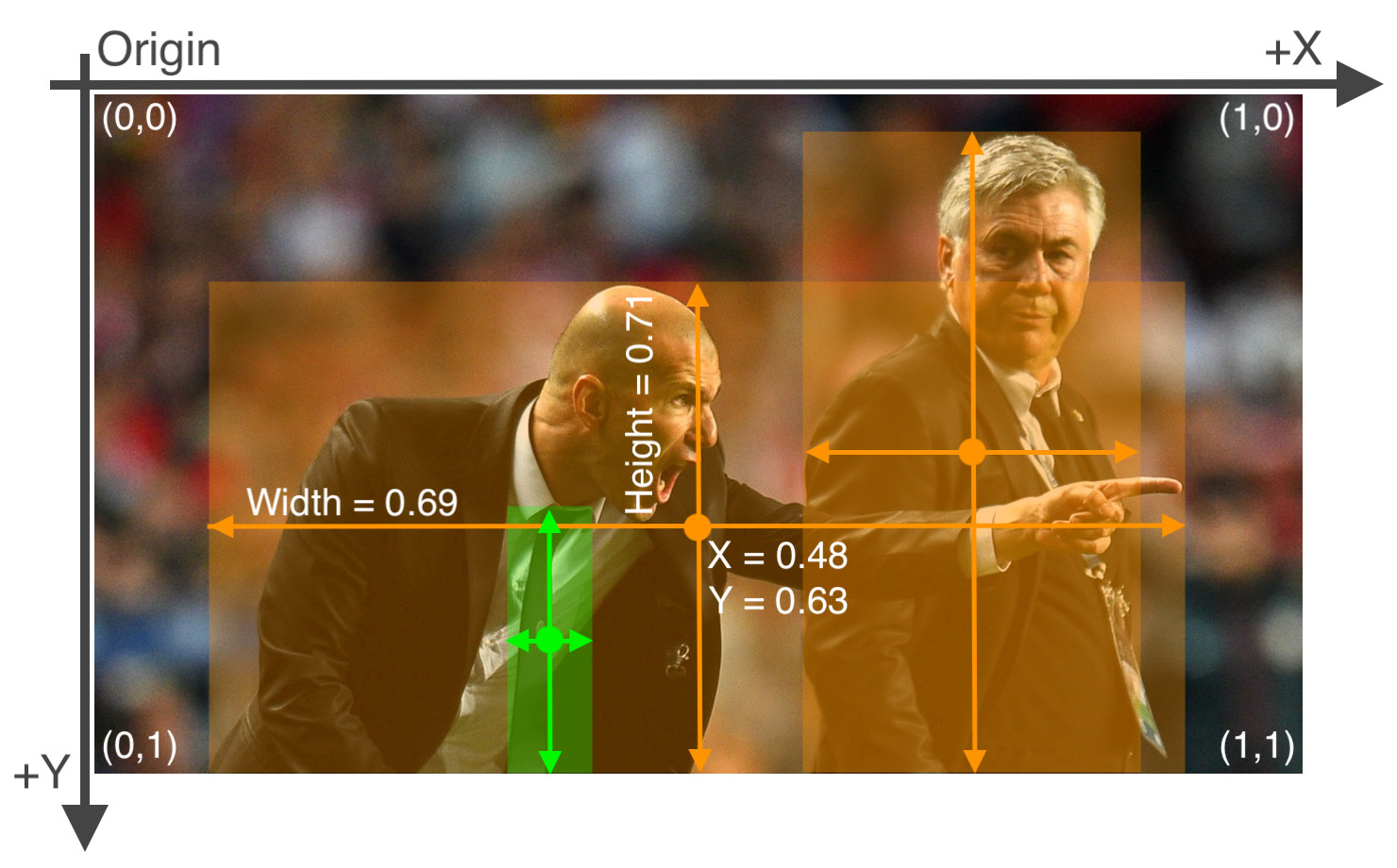
Each image's label file should be locatable by simply replacing /images/*.jpg with /labels/*.txt in its pathname. An example image and label pair would be:
dataset/images/train2017/000000109622.jpg  # image
dataset/labels/train2017/000000109622.txt  # label
An example label file with 5 persons (all class 0):
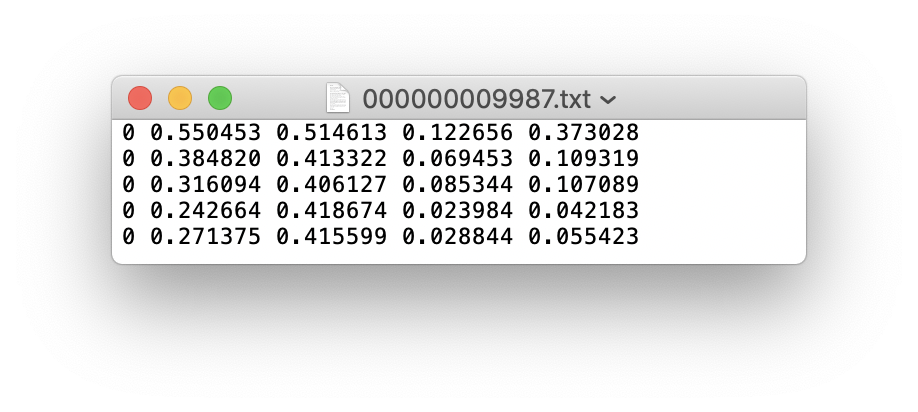
3. Organize Directories
Organize your train and val images and labels according to the example below. Note /coco128 should be next to the /yolov5 directory. Make sure coco128/labels folder is next to coco128/images folder.

4. Select a Model
Select a model from the ./models folder. Here we select yolov5s.yaml, the smallest and fastest model available. See our README table for a full comparison of all models. Once you have selected a model, if you are not training COCO, update the nc: 80 parameter in your yaml file to match the number of classes in your dataset from step 1.
# parameters
nc: 80  # number of classes
depth_multiple: 0.33  # model depth multiple
width_multiple: 0.50  # layer channel multiple

# anchors
anchors:
  - [10,13, 16,30, 33,23]  # P3/8
  - [30,61, 62,45, 59,119]  # P4/16
  - [116,90, 156,198, 373,326]  # P5/32

# YOLOv5 backbone
backbone:
  # [from, number, module, args]
  [[-1, 1, Focus, [64, 3]],  # 0-P1/2
   [-1, 1, Conv, [128, 3, 2]],  # 1-P2/4
   [-1, 3, BottleneckCSP, [128]],
   [-1, 1, Conv, [256, 3, 2]],  # 3-P3/8
   [-1, 9, BottleneckCSP, [256]],
   [-1, 1, Conv, [512, 3, 2]],  # 5-P4/16
   [-1, 9, BottleneckCSP, [512]],
   [-1, 1, Conv, [1024, 3, 2]],  # 7-P5/32
   [-1, 1, SPP, [1024, [5, 9, 13]]],
   [-1, 3, BottleneckCSP, [1024, False]],  # 9
  ]

# YOLOv5 head
head:
  [[-1, 1, Conv, [512, 1, 1]],
   [-1, 1, nn.Upsample, [None, 2, 'nearest']],
   [[-1, 6], 1, Concat, [1]],  # cat backbone P4
   [-1, 3, BottleneckCSP, [512, False]],  # 13

   [-1, 1, Conv, [256, 1, 1]],
   [-1, 1, nn.Upsample, [None, 2, 'nearest']],
   [[-1, 4], 1, Concat, [1]],  # cat backbone P3
   [-1, 3, BottleneckCSP, [256, False]],  # 17 (P3/8-small)

   [-1, 1, Conv, [256, 3, 2]],
   [[-1, 14], 1, Concat, [1]],  # cat head P4
   [-1, 3, BottleneckCSP, [512, False]],  # 20  (P4/16-medium)

   [-1, 1, Conv, [512, 3, 2]],
   [[-1, 10], 1, Concat, [1]],  # cat head P5
   [-1, 3, BottleneckCSP, [1024, False]],  # 23  (P5/32-large)

   [[17, 20, 23], 1, Detect, [nc, anchors]],  # Detect(P3, P4, P5)
  ]
5. Train
Train a YOLOv5s model on COCO128 by specifying model yaml --cfg yolo5s.yaml, and data yaml --data coco128.yaml. Start training from pretrained --weights yolov5s.pt (recommended), or from randomly initialized --weights '' (not recommended). Pretrained weights are auto-downloaded from the latest YOLOv5 release.
# Train YOLOv5s on COCO128 for 5 epochs
$ python train.py --img 640 --batch 16 --epochs 5 --data coco128.yaml --weights yolov5s.pt
Training results are saved to runs/exp0 at first, then runs/exp1, runs/exp2 etc. for subsequent 'experiments'. For training outputs and further details please see the Training section of our Google Colab Notebook. 
6. Visualize
View runs/exp0/train*.jpg images to see training images, labels and augmentation effects. A Mosaic Dataloader is used for training (shown below), a new concept developed by Ultralytics and first featured in YOLOv4. If your labels appear incorrect in these images then you have incorrectly labelled your data, and should revisit step 2. Create Labels.

After the first epoch is complete, view test_batch0_gt.jpg to see test batch 0 ground truth labels:

And view test_batch0_pred.jpg to see test batch 0 _predictions_:

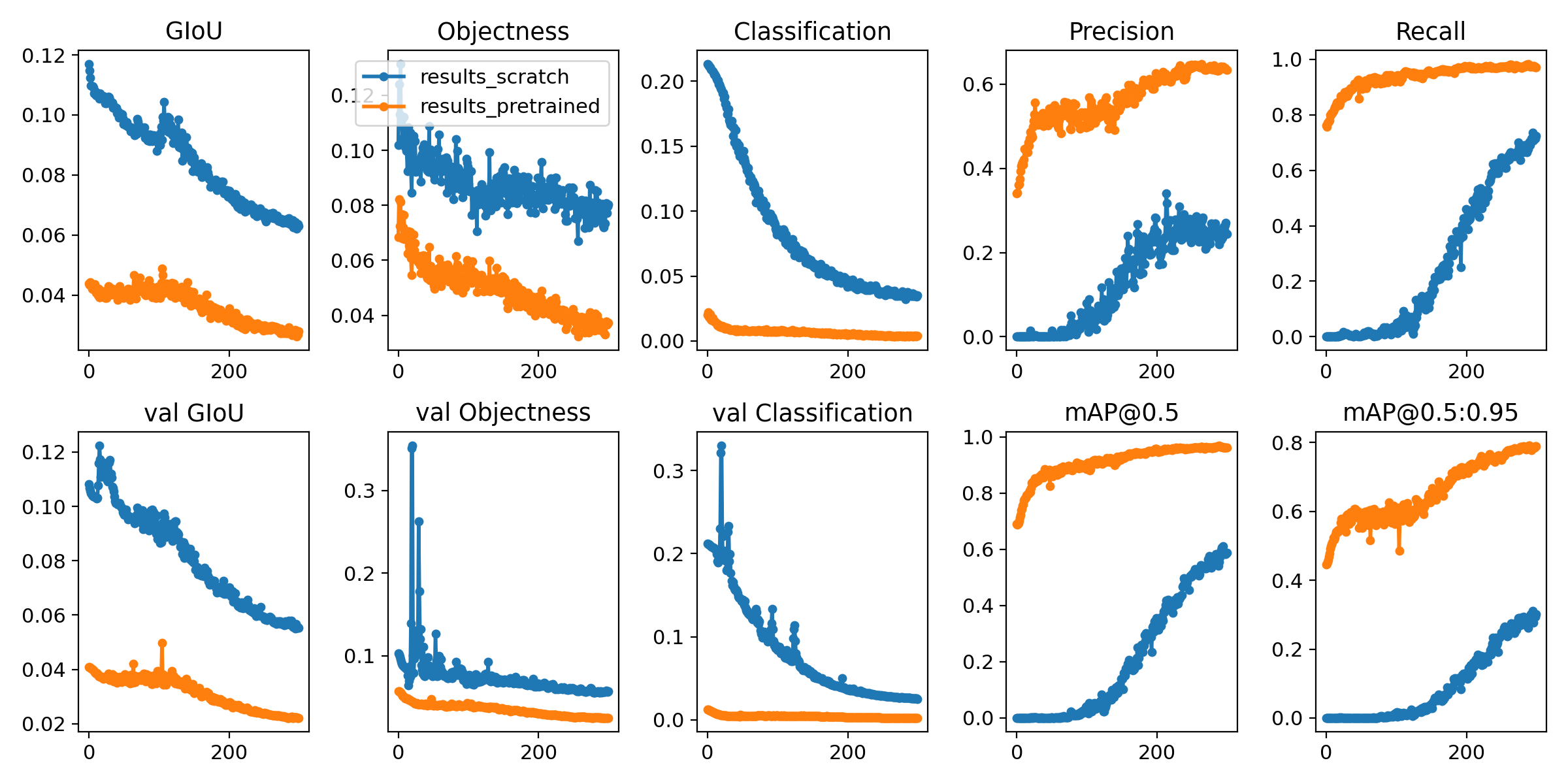
Training losses and performance metrics are logged to Tensorboard and also to a runs/exp0/results.txt logfile. results.txt is plotted as results.png after training completes. Partially completed results.txt files can be plotted with from utils.utils import plot_results; plot_results(save_dir='runs/exp0'). Here we show YOLOv5s trained on COCO128 to 300 epochs, starting from scratch (blue), and from pretrained yolov5s.pt (orange).
Environments
YOLOv5 may be run in any of the following up-to-date verified environments (with all dependencies including CUDA/CUDNN, Python and PyTorch preinstalled):
- Google Colab Notebook with free GPU:
- Kaggle Notebook with free GPU: https://www.kaggle.com/ultralytics/yolov5
- Google Cloud Deep Learning VM. See GCP Quickstart Guide
- Docker Image https://hub.docker.com/r/ultralytics/yolov5. See Docker Quickstart Guide

 glenn-jocher
All 74 comments
I used a my_training.txt file that includes a list of training images instead of a path to the folder of images and annotations, but it always returns AssertionError: No images found in /path_to_my_txt_file/my_training.txt. Could anyone kindly give some pointers to where it went wrong? Thanks
 shenglih
on 7 Jul 2020
shenglih
on 7 Jul 2020
I get the same error @shenglih
 zuoxiang95
on 13 Jul 2020
zuoxiang95
on 13 Jul 2020
hey @glenn-jocher can i train a model on images with size 450x600??
 justAyaan
on 21 Jul 2020
justAyaan
on 21 Jul 2020
@justAyaan sure, just use --img 600, it will automatically use the nearest correct stride multiple.
glenn-jocher
on 21 Jul 2020
@glenn-jocher
ok.. will try.. just one doubt.. is the value of xcenter = (x + w)/ 2
OR is it x + w/2??
justAyaan
on 22 Jul 2020
x_center is the center of your object in the x dimension
glenn-jocher
on 22 Jul 2020
I used Yolov5 training on Kaggel kernel, and this error occurred. I am a novice. How can I solve this problem
Apex recommended for faster mixed precision training: https://github.com/NVIDIA/apex
Using CUDA device0 _CudaDeviceProperties(name='Tesla P100-PCIE-16GB', total_memory=16280MB)
Namespace(batch_size=4, bucket='', cache_images=False, cfg='/kaggle/input/yolov5aconfig/yolov5x.yaml', data='/kaggle/input/yolov5aconfig/wheat0.yaml', device='', epochs=15, evolve=False, hyp='', img_size=[1024, 1024], local_rank=-1, multi_scale=False, name='yolov5x_fold0', noautoanchor=False, nosave=False, notest=False, rect=False, resume=False, single_cls=False, sync_bn=False, total_batch_size=4, weights='', world_size=1)
Start Tensorboard with "tensorboard --logdir=runs", view at http://localhost:6006/
2020-08-01 04:17:02.964977: I tensorflow/stream_executor/platform/default/dso_loader.cc:44] Successfully opened dynamic library libcudart.so.10.1
Hyperparameters {'optimizer': 'SGD', 'lr0': 0.01, 'momentum': 0.937, 'weight_decay': 0.0005, 'giou': 0.05, 'cls': 0.5, 'cls_pw': 1.0, 'obj': 1.0, 'obj_pw': 1.0, 'iou_t': 0.2, 'anchor_t': 4.0, 'fl_gamma': 0.0, 'hsv_h': 0.015, 'hsv_s': 0.7, 'hsv_v': 0.4, 'degrees': 0.0, 'translate': 0.0, 'scale': 0.5, 'shear': 0.0}
from n params module arguments
0 -1 1 8800 models.common.Focus [3, 80, 3]
1 -1 1 115520 models.common.Conv [80, 160, 3, 2]
2 -1 1 315680 models.common.BottleneckCSP [160, 160, 4]
3 -1 1 461440 models.common.Conv [160, 320, 3, 2]
4 -1 1 3311680 models.common.BottleneckCSP [320, 320, 12]
5 -1 1 1844480 models.common.Conv [320, 640, 3, 2]
6 -1 1 13228160 models.common.BottleneckCSP [640, 640, 12]
7 -1 1 7375360 models.common.Conv [640, 1280, 3, 2]
8 -1 1 4099840 models.common.SPP [1280, 1280, [5, 9, 13]]
9 -1 1 20087040 models.common.BottleneckCSP [1280, 1280, 4, False]
10 -1 1 820480 models.common.Conv [1280, 640, 1, 1]
11 -1 1 0 torch.nn.modules.upsampling.Upsample [None, 2, 'nearest']
12 [-1, 6] 1 0 models.common.Concat [1]
13 -1 1 5435520 models.common.BottleneckCSP [1280, 640, 4, False]
14 -1 1 205440 models.common.Conv [640, 320, 1, 1]
15 -1 1 0 torch.nn.modules.upsampling.Upsample [None, 2, 'nearest']
16 [-1, 4] 1 0 models.common.Concat [1]
17 -1 1 1360960 models.common.BottleneckCSP [640, 320, 4, False]
18 -1 1 5778 torch.nn.modules.conv.Conv2d [320, 18, 1, 1]
19 -2 1 922240 models.common.Conv [320, 320, 3, 2]
20 [-1, 14] 1 0 models.common.Concat [1]
21 -1 1 5025920 models.common.BottleneckCSP [640, 640, 4, False]
22 -1 1 11538 torch.nn.modules.conv.Conv2d [640, 18, 1, 1]
23 -2 1 3687680 models.common.Conv [640, 640, 3, 2]
24 [-1, 10] 1 0 models.common.Concat [1]
25 -1 1 20087040 models.common.BottleneckCSP [1280, 1280, 4, False]
26 -1 1 23058 torch.nn.modules.conv.Conv2d [1280, 18, 1, 1]
27 [] 1 0 models.yolo.Detect [1, [[116, 90, 156, 198, 373, 326], [30, 61, 62, 45, 59, 119], [10, 13, 16, 30, 33, 23]], []]
Traceback (most recent call last):
File "/kaggle/input/yolov5/yolov5-master/train.py", line 469, in
train(hyp, tb_writer, opt, device)
File "/kaggle/input/yolov5/yolov5-master/train.py", line 80, in train
model = Model(opt.cfg, nc=nc).to(device)
File "/kaggle/input/yolov5/yolov5-master/models/yolo.py", line 70, in __init__
m.stride = torch.tensor([s / x.shape[-2] for x in self.forward(torch.zeros(1, ch, s, s))]) # forward
File "/kaggle/input/yolov5/yolov5-master/models/yolo.py", line 100, in forward
return self.forward_once(x, profile) # single-scale inference, train
File "/kaggle/input/yolov5/yolov5-master/models/yolo.py", line 120, in forward_once
x = m(x) # run
File "/opt/conda/lib/python3.7/site-packages/torch/nn/modules/module.py", line 550, in __call__
result = self.forward(input, *kwargs)
File "/kaggle/input/yolov5/yolov5-master/models/yolo.py", line 27, in forward
x[i] = self.mi # conv
File "/opt/conda/lib/python3.7/site-packages/torch/nn/modules/container.py", line 147, in __getitem__
return self._modules[self._get_abs_string_index(idx)]
File "/opt/conda/lib/python3.7/site-packages/torch/nn/modules/container.py", line 137, in _get_abs_string_index
raise IndexError('index {} is out of range'.format(idx))
IndexError: index 0 is out of range
 clxa
on 1 Aug 2020
clxa
on 1 Aug 2020
This is old code. Suggest you git clone the latest. PyTorch 1.6 is a requirement now.
glenn-jocher
on 1 Aug 2020
@glenn-jocher yolov5 is really flexible for training on custom datasets! could you please share the script for processing and converting coco to the train2017.txt file? I already have this file but would like to regenerate it with some modifications.
 twangnh
on 5 Aug 2020
twangnh
on 5 Aug 2020
Hi, I have a newbie question...
Could you explain what the difference between providing pretrained weights vs not? when to use?
- Start training from pretrained --weights yolov5s.pt, or from randomly initialized --weights '' *
Should I expect better results if I use yolov5s.pt as pretrained weights?
Thanks
 rwin94
on 5 Aug 2020
rwin94
on 5 Aug 2020
@twangnh train2017.txt is just a textfile with a list of images. You can use the glob package to create this, but it's not necessary, as YOLOv5 data yaml's will also accept a simple directory of training images. You can see this format in the coco128 dataset:
https://github.com/ultralytics/yolov5/blob/728efa6576eae595ddcfdd8b75ab5da40ddfcaf4/data/coco128.yaml#L1-L13
glenn-jocher
on 5 Aug 2020
@rwin94 for small datasets or for quick results yes always start from the pretrained weights:
python train.py --cfg yolov5s.yaml --weights yolov5s.pt
You can see a comparison of pretrained vs from scratch in the custom data training turorial:
https://github.com/ultralytics/yolov5/wiki/Train-Custom-Data#6-visualize
glenn-jocher
on 5 Aug 2020
I want to ask a question: it showes
File "/content/yolov5/utils/datasets.py", line 344, in <listcomp>
    labels, shapes = zip(*[cache[x] for x in self.img_files])
KeyError: '../dota_data/images/val/P0800__1__552___0.png
when training in Google colab.
But everything is ok in my own laptop, so it cannot train with .png?
 Lg955
on 6 Aug 2020
Lg955
on 6 Aug 2020
Hello, I'd like to ask you something. "If no objects in image.no *. txt file is required". For images without labels in the training data (there is no target inthe image), how does it participate in the training as a negative sample?
 liumingjune
on 6 Aug 2020
liumingjune
on 6 Aug 2020
@liumingjune all images are treated equally during training, irrespective of the labels they may or may not have.
glenn-jocher
on 6 Aug 2020
Thanks your reply. I have a question after looking at the code. I would like to ask if you only keep the latest and best models which under runs file when you save the training model? Can't you save the model under the specified epoch? Is it ok to choose the latest model directly after the training? How to select other models under the epoch if this optimal detection does not work well?
liumingjune
on 11 Aug 2020
@liumingjune best.pt and last.pt are saved, which are the best performing model across all epochs and the most recent epoch's model. You can customize checkpointing logic here:
https://github.com/ultralytics/yolov5/blob/9ae868364a2d98bd03cecb8ba8f6310c0d11b482/train.py#L333-L348
glenn-jocher
on 11 Aug 2020
Hello, thank you for your reply. I want to know if Yolov5 has done any work on small target detection.
liumingjune
on 11 Aug 2020
@liumingjune yes, of course. All models will work well with small objects without any changes. My only recommendation is to train at the largest --img-size you can, up to native resolution.
We do have custom small object models with extra ops targeted to higher resolution layers (P2 and P3) which we have not open sourced. These custom models outperform our official models on COCO, in particular in the small object class, but also come with a speed penalty, so we decided not to release them to the community at the present time.
glenn-jocher
on 11 Aug 2020
@liumingjune all images are treated equally during training, irrespective of the labels they may or may not have.
Hello, I have a question. My test results showed a high false alarm rate. If I want to add some large images with no target and only background as negative samples to participate in the training. Obviously, in the format you requested, these images are not labled with *.txt. I have lots of big images with no targets here. so do you have any suggestions for the number of large images with no targets? I am concerned that the imbalance in the number of positive and negative samples will affect the effectiveness of training.Wish your reply.Thanks!
liumingjune
on 12 Aug 2020
Hello, I have a question. My test results showed a high false alarm rate. If I want to add some large images with no target and only background as negative samples to participate in the training. Obviously, in the format you requested, these images are not labled with *.txt. I have lots of big images with no targets here. so do you have any suggestions for the number of large images with no targets? I am concerned that the imbalance in the number of positive and negative samples will affect the effectiveness of training.Wish your reply.Thanks!
liumingjune
on 12 Aug 2020
@liumingjune I can't advise you on custom dataset training.
glenn-jocher
on 12 Aug 2020
@liumingjune I can't advise you on custom dataset training.
Thanks. I understand. I just want to find out if the ratio of positive and negative samples(number of image has label and has no label) has any effect on training.
liumingjune
on 13 Aug 2020
I want to ask a question: it showes
File "/content/yolov5/utils/datasets.py", line 344, in <listcomp> labels, shapes = zip(*[cache[x] for x in self.img_files]) KeyError: '../dota_data/images/val/P0800__1__552___0.png
when training in Google colab.But everything is ok in my own laptop, so it cannot train with .png?
delete *.cache file, again run python3 train.py
 TianFuKang
on 13 Aug 2020
TianFuKang
on 13 Aug 2020
I want to ask a question: it showes
File "/content/yolov5/utils/datasets.py", line 344, in <listcomp> labels, shapes = zip(*[cache[x] for x in self.img_files]) KeyError: '../dota_data/images/val/P0800__1__552___0.png
when training in Google colab.
But everything is ok in my own laptop, so it cannot train with .png?delete *.cache file, again run python3 train.py
Thanks!!
 1311440131
on 18 Aug 2020
1311440131
on 18 Aug 2020
Hi, I am a very beginner in Yolo v5 but I learned it quickly to detect mangoes from digital images with appreciable accuracy. Many thanks to @glenn-jocher for the great contribution.
I am stuck here to find out how to plot the mAP & Loss vs the number of iterations curve just as in Yolov4. Also after training the model any possibility to get the False positives and False Negatives count?
Thanks in advance for the support.
Regards
Pavan
 PavanproJack
on 31 Aug 2020
PavanproJack
on 31 Aug 2020
Hello, due to the high false alarm rate before, we added negative samples without labels to the training, but the increase in the number makes the training slow. So I would like to ask how does a negative sample without a label participate in training, and does it help with training? I am anxious and looking forward to your reply.
---Original---
From: "Glenn Jocher"<[email protected]>
Date: Fri, Aug 7, 2020 00:29 AM
To: "ultralytics/yolov5"<[email protected]>;
Cc: "Mention"<[email protected]>;"liumingjune"<[email protected]>;
Subject: Re: [ultralytics/yolov5] Train Custom Data Tutorial (#12)
@liumingjune all images are treated equally during training, irrespective of the labels they may or may not have.
—
You are receiving this because you were mentioned.
Reply to this email directly, view it on GitHub, or unsubscribe.
liumingjune
on 2 Sep 2020
@liumingjune as I said before all images are treated equally during training, irrespective of the labels they may or may not have.
glenn-jocher
on 2 Sep 2020
I understand. I want to know whether it is helpful for training and whether it will participate in the calculation of loss. I add negative samples to make the training slow.
---Original---
From: "Glenn Jocher"<[email protected]>
Date: Wed, Sep 2, 2020 09:20 AM
To: "ultralytics/yolov5"<[email protected]>;
Cc: "Mention"<[email protected]>;"liumingjune"<[email protected]>;
Subject: Re: [ultralytics/yolov5] Train Custom Data Tutorial (#12)
@liumingjune as I said before all images are treated equally during training, irrespective of the labels they may or may not have.
—
You are receiving this because you were mentioned.
Reply to this email directly, view it on GitHub, or unsubscribe.
liumingjune
on 2 Sep 2020
@liumingjune yes of course, every image participates in loss computation equally. Objectness loss is evaluated for every point in the output grid, giou and cls loss are evaluated for positive object labels.
glenn-jocher
on 2 Sep 2020
I want to ask a question: it showes
File "/content/yolov5/utils/datasets.py", line 344, in <listcomp> labels, shapes = zip(*[cache[x] for x in self.img_files]) KeyError: '../dota_data/images/val/P0800__1__552___0.png
when training in Google colab.But everything is ok in my own laptop, so it cannot train with .png?
same problem. Have you solved it?
 lyuweiwang
on 3 Sep 2020
lyuweiwang
on 3 Sep 2020
@lyuweiwang @lyuweiwang all of the most common formats are supported for training (images) and inference (images and videos):
https://github.com/ultralytics/yolov5/blob/ffe9eb42389038972d47eecd44c0f0dc9f2cf033/utils/datasets.py#L20-L22
glenn-jocher
on 3 Sep 2020
@glenn-jocher can we train yolov5 on a dataset which has varying image sizes?
Ex:-
Img 1 - 256*400
Img 2 - 300*300
justAyaan
on 4 Sep 2020
@justAyaan suggest you run the tutorial and observe the coco128 dataset.
glenn-jocher
on 4 Sep 2020
Hello, I have a question. I want to use hyperparameters in yolov5.but i don't know how to use it . i want to use mixup in training my data. how should i set the mixup
Thanks in advance for the support.
 Alex-afka
on 5 Sep 2020
Alex-afka
on 5 Sep 2020
@Alex-afka two hyp files are available in data/. To use mixup for example, set the mixup probability 1 > mixup > 0 in your hyp file:
https://github.com/ultralytics/yolov5/blob/c8e51812a527eef8ad34fd3530b4942ad156b71e/data/hyp.scratch.yaml#L29
glenn-jocher
on 5 Sep 2020
@glenn-jocher
I meant this:-
can we train yolov5 on a dataset which has varying image sizes?
Ex:-
Img 1 - 256*400
Img 2 - 300*300
justAyaan
on 6 Sep 2020
@justAyaan yes, you can train on datasets with any image sizes.
glenn-jocher
on 7 Sep 2020
@glenn-jocher so what is going to be the specified --img-size for this kind of a scenario?
justAyaan
on 8 Sep 2020
@justAyaan I can't advise you on custom training. Experiment if you want to understand the effects of a variable on your results.
glenn-jocher
on 8 Sep 2020
Thanks for the great work.
I'm training the model with default --img-size 640. Then i can see the following

But when i train by using a higher image size --img-size 1024 , couldn't see the k-means for custom anchor generation and new anchor generated model. Does it meant that no new kmeans custom anchor generation with this higher --img-size ?

 Samjith888
on 10 Sep 2020
Samjith888
on 10 Sep 2020
@Samjith888 autoanchor only runs when the best possible recall is under threshold, so in your second example it's judged that at img size 1024 the best possible recall is sufficiently high to use the default anchors rather than computing new anchors.
glenn-jocher
on 10 Sep 2020
I have very small objects in the dataset, is there anything else should i add for small object detection ?
Samjith888
on 10 Sep 2020
--single-cls ,--rect , --evolve and --hyp
I couldn't find a detailed information about above flags, please explain..
Samjith888
on 14 Sep 2020
When I use yolov5 to train a custom data set, I have modified the nc value of my yaml file and the nc value of yolov5s.yaml file, but it keeps returning AssertionError: Label class 2 exceeds nc=2 in /content/Garbage_data/Garbage.yaml. Possible class labels are 0-1,Hope to get your reply
 ClassifierPower
on 26 Sep 2020
ClassifierPower
on 26 Sep 2020
@mml438659613 as the message states, your dataset has two classes, and your labels can only show class 0 or 1. You have incorrect labels outside of this permitted range.
glenn-jocher
on 4 Oct 2020
Hello, I'm using yolov5 on custom data set of dimension 1352*760, should I use the --rect option ?
Also when I train my model the precision and the recall stay at 0, do you have an explanation for this ?
My objects are very small, you can see below

 constantinfite
on 6 Oct 2020
constantinfite
on 6 Oct 2020
@constantinfite train using all default settings and check your jpgs as stated in the tutorial.
glenn-jocher
on 6 Oct 2020
@glenn-jocher
my command for training is
!python train.py --img 640 --batch 16 --epochs 5 --data ./data.yaml --cfg ./models/yolov5s.yaml --weights ''
The organization of my folder

My data.yaml file located in yolov5 folder

constantinfite
on 6 Oct 2020
@constantinfite train at least 300 epochs, or 1000 epochs if you don't see results after 300.
glenn-jocher
on 6 Oct 2020
I run this tutorial, but there is no prediction in the test_batch0_pred.jpg. Could anyone kindly give some pointers to where it went wrong? Thanks

 xcz0
on 7 Oct 2020
xcz0
on 7 Oct 2020
@xcz0 you need to fully train (to 300 epochs) and then examine your predictions.
glenn-jocher
on 7 Oct 2020
Hi @glenn-jocher, Hi fellows,
Here is a very quick question. I've built my datasets (train, valid and test) following the requirement: locate 'images' and 'labels' folders next to each other such as:
dataset/images/train/1.jpg # image
dataset/labels/train/1.txt # label
Within the .yaml file, it is specified this:
"# train and val data as 1) directory: path/images/, 2) file: path/images.txt, or 3) list: [path1/images/, path2/images/]"
But I can't see (or I don't understand) the specifications related to the labels.txt path.
So, this "train: [path1/images/, path2/images/]" should be "train: [path1/images/, path2/labels/]"?
To sum up, how should we specify both the images and labels paths for the train, for example?
Cheers ✌️
UPDATE:
Well, I actually it seems that train.py scans the 'datasets/labels/train' folder, so no need to specify the label path. If I got it well.
 MikeHatchi
on 10 Oct 2020
MikeHatchi
on 10 Oct 2020
@MikeHatchi that is correct, there is only 1 degree of freedom here, so only 1 piece of information is required (the second, the labels, are a function of the first, the images).
glenn-jocher
on 11 Oct 2020
i will train custom dataset but i have this error
TypeError: float() argument must be a string or a number, not 'tuple'
The above exception was the direct cause of the following exception:
Traceback (most recent call last):
File "train.py", line 460, in
train(hyp, opt, device, tb_writer)
File "train.py", line 167, in train
dataloader, dataset = create_dataloader(train_path, imgsz, batch_size, gs, opt,
File "/home/amkhc2s/data/yolov5/utils/datasets.py", line 53, in create_dataloader
dataset = LoadImagesAndLabels(path, imgsz, batch_size,
File "/home/amkhc2s/data/yolov5/utils/datasets.py", line 380, in __init__
self.shapes = np.array(shapes, dtype=np.float64)
ValueError: setting an array element with a sequence.
Traceback (most recent call last):
File "/home/amkhc2s/data/anaconda/envs/ultralytics/lib/python3.8/runpy.py", line 194, in _run_module_as_main
return _run_code(code, main_globals, None,
File "/home/amkhc2s/data/anaconda/envs/ultralytics/lib/python3.8/runpy.py", line 87, in _run_code
exec(code, run_globals)
File "/home/amkhc2s/data/anaconda/envs/ultralytics/lib/python3.8/site-packages/torch/distributed/launch.py", line 261, in
main()
File "/home/amkhc2s/data/anaconda/envs/ultralytics/lib/python3.8/site-packages/torch/distributed/launch.py", line 256, in main
raise subprocess.CalledProcessError(returncode=process.returncode,
subprocess.CalledProcessError: Command '['/home/amkhc2s/data/anaconda/envs/ultralytics/bin/python', '-u', 'train.py', '--local_rank=3', '--batch-size', '256', '--data', '/home/amkhc2s/data/yolov5/data/xray.yaml', '--cfg', '/home/amkhc2s/data/yolov5/models/yolov5x.yaml', '--weights', '/home/amkhc2s/data/yolov5/weights/yolov5x.pt']' returned non-zero exit status 1.
 MakAbdel
on 21 Oct 2020
MakAbdel
on 21 Oct 2020
@MakAbdel it appears you may have environment issues. Please ensure you meet all dependency requirements if you are attempting to run YOLOv5 locally. If in doubt, create a new virtual Python 3.8 environment, clone the latest repo (code changes daily), and pip install -r requirements.txt again. We also highly recommend using one of our verified environments below.
Requirements
Python 3.8 or later with all requirements.txt dependencies installed, including torch>=1.6. To install run:
$ pip install -r requirements.txt
Environments
YOLOv5 may be run in any of the following up-to-date verified environments (with all dependencies including CUDA/CUDNN, Python and PyTorch preinstalled):
- Google Colab Notebook with free GPU:
- Kaggle Notebook with free GPU: https://www.kaggle.com/ultralytics/yolov5
- Google Cloud Deep Learning VM. See GCP Quickstart Guide
- Docker Image https://hub.docker.com/r/ultralytics/yolov5. See Docker Quickstart Guide
Status

If this badge is green, all YOLOv5 GitHub Actions Continuous Integration (CI) tests are passing. These tests evaluate proper operation of basic YOLOv5 functionality, including training (train.py), testing (test.py), inference (detect.py) and export (export.py) on MacOS, Windows, and Ubuntu.
glenn-jocher
on 21 Oct 2020
the yaml has both a 'train' and 'val' field, in the tutorial they point to the same directory. Is it recommended to do this, or should we take some subset of our training data and place them into a 'val' directory?
 gltovar
on 21 Oct 2020
gltovar
on 21 Oct 2020
@gltovar you should follow standard practices for dataset division. The tutorial shows how to overfit your train set to prove your pipeline works.
glenn-jocher
on 21 Oct 2020
@glenn-jocher I tested with coco128 and only one GPU locally and it worked. but for my dataset with only one GPU I received this error message:
TypeError: float() argument must be a string or a number, not 'tuple'
The above exception was the direct cause of the following exception:
Traceback (most recent call last):
File "train.py", line 460, in
train(hyp, opt, device, tb_writer)
File "train.py", line 167, in train
dataloader, dataset = create_dataloader(train_path, imgsz, batch_size, gs, opt,
File "/home/amkhc2s/data/yolov5/utils/datasets.py", line 53, in create_dataloader
dataset = LoadImagesAndLabels(path, imgsz, batch_size,
File "/home/amkhc2s/data/yolov5/utils/datasets.py", line 380, in __init__
self.shapes = np.array(shapes, dtype=np.float64)
ValueError: setting an array element with a sequence.
MakAbdel
on 21 Oct 2020
@MakAbdel well, if training works with coco128 but not your dataset, then there is a problem in your dataset somewhere. Follow all of the directions above and try to debug the issue.
glenn-jocher
on 21 Oct 2020
@glenn-jocher I changed the location of the dataset but I received this error message:
Transferred 794/802 items from /home/amkhc2s/data/yolov5/weights/yolov5x.pt
Optimizer groups: 134 .bias, 142 conv.weight, 131 other
Traceback (most recent call last):
  File "train.py", line 460, in <module>
    train(hyp, opt, device, tb_writer)
  File "train.py", line 167, in train
    dataloader, dataset = create_dataloader(train_path, imgsz, batch_size, gs, opt,
  File "/home/amkhc2s/data/yolov5/utils/datasets.py", line 53, in create_dataloader
    dataset = LoadImagesAndLabels(path, imgsz, batch_size,
  File "/home/amkhc2s/data/yolov5/utils/datasets.py", line 379, in __init__
    labels, shapes = zip(*[cache[x] for x in self.img_files])
  File "/home/amkhc2s/data/yolov5/utils/datasets.py", line 379, in <listcomp>
    labels, shapes = zip(*[cache[x] for x in self.img_files])
KeyError: '../dataset/images/train/023019.jpg'
MakAbdel
on 22 Oct 2020
@glenn-jocher, Hello!
This is all new to me.
How can I train a new class? Should new data be fully labeled?
For example, I need to identify person and face masks. I have a tagged dataset for masked people (only face masks). Do I need to label persons on them?
If you do as in the manual, then the model detects masks well, but stops detecting people. What am I doing wrong?
Do I need a dataset in which all possible classes are labeled on each image?
 ptz-nerf
on 22 Oct 2020
ptz-nerf
on 22 Oct 2020
@ptz-nerf your model will be trained on all classes in your dataset.
glenn-jocher
on 22 Oct 2020
@glenn-jocher Hi, is the number of images in the dataset (18.000 images) can generate this type of error ?
Traceback (most recent call last):
File "train.py", line 460, in
train(hyp, opt, device, tb_writer)
File "train.py", line 167, in train
dataloader, dataset = create_dataloader(train_path, imgsz, batch_size, gs, opt,
File "../data/yolov5/utils/datasets.py", line 53, in create_dataloader
dataset = LoadImagesAndLabels(path, imgsz, batch_size,
File "../data/yolov5/utils/datasets.py", line 380, in init
self.shapes = np.array(shapes, dtype=np.float64)
ValueError: setting an array element with a sequence.
I tried with half the dataset and it worked
MakAbdel
on 23 Oct 2020
@MakAbdel that's odd. I've seen a few bug reports with the same ValueError: setting an array element with a sequence https://github.com/ultralytics/yolov5/issues/1139. If you reduced your dataset size it may be due to an image in the removed portion, or the .cache files, which are deleted and recreated on dataset modification https://github.com/ultralytics/yolov5/issues/958#issuecomment-714380222. Can you retry with the full 18k images and see if it persists?
If not can you reproduce this in a Colab notebook and link us to it?
glenn-jocher
on 23 Oct 2020
@ptz-nerf your model will be trained on all classes in your dataset.
@glenn-jocher , thanks! But something else confuses me.
I have one part of the dataset with labeled persons (from COCO), another part with people with masks, but the people themselves are not labeled there, but only the masks. Wouldn't that be a problem? Or is it necessary to mark persons there?
After training persons are no longer detected with that dataset.
ptz-nerf
on 23 Oct 2020
@ptz-nerf all objects corresponding to your classes must be fully labelled throughout your entire dataset.
glenn-jocher
on 23 Oct 2020
I chose the simpler way of replacing the train folder with my own images and ran the "train.py" without the default weights - hoping it will build them basis my data set. More importantly i updated the "person" that it identifies to a few sub categories - such as "security" and "swiggy" etc. However, the output continues to id them only as "person". I did bring down the threshold to see if it is lower probability that's hurting but still no luck. Any suggestions?
and first of all - big thanks for a faster version here. Works very well otherwise on default data sets and mp4.
and my coco128 yaml looks like this now - with my added labels. Hope that's alright as well. Pls check last line where i've added 9 more labels.
names: ['person', 'bicycle', 'car', 'motorcycle', 'airplane', 'bus', 'train', 'truck', 'boat', 'traffic light',
'fire hydrant', 'stop sign', 'parking meter', 'bench', 'bird', 'cat', 'dog', 'horse', 'sheep', 'cow',
'elephant', 'bear', 'zebra', 'giraffe', 'backpack', 'umbrella', 'handbag', 'tie', 'suitcase', 'frisbee',
'skis', 'snowboard', 'sports ball', 'kite', 'baseball bat', 'baseball glove', 'skateboard', 'surfboard',
'tennis racket', 'bottle', 'wine glass', 'cup', 'fork', 'knife', 'spoon', 'bowl', 'banana', 'apple',
'sandwich', 'orange', 'broccoli', 'carrot', 'hot dog', 'pizza', 'donut', 'cake', 'chair', 'couch',
'potted plant', 'bed', 'dining table', 'toilet', 'tv', 'laptop', 'mouse', 'remote', 'keyboard', 'cell phone',
'microwave', 'oven', 'toaster', 'sink', 'refrigerator', 'book', 'clock', 'vase', 'scissors', 'teddy bear',
'hair drier', 'toothbrush', 'security', 'swiggy','scooter', 'carEXIT', 'carENTRY', 'cyclist', 'bike', 'sweeps', 'LPG']
 botdulars
on 3 Nov 2020
botdulars
on 3 Nov 2020
Couple of additional data points ...
- I realized that i didn't use the weights coming from this "train.py" call explicitly so i copied the best.pt and last.pt on to the main folder and tried this -
python detect.py --source inference/images --weights best.pt --conf 0.25
No luck but maybe the 48 odd images i added weren't sufficient; but good thing the old bounding boxes with the old tags for Person/ Car etc. have also not come through. - I also have to mention that i edited each of the labelimg files to make sure the indices for the added labels were appropriate. Something like -
81 0.480208 0.319907 0.058333 0.234259
81 0.553646 0.327315 0.036458 0.213889
81 0.385937 0.265741 0.030208 0.150000
82 0.492188 0.305093 0.042708 0.199074
I thought this could've been a problem given that the indices were originally starting from 0. No luck with that either.
Some good news ... i realized the last folder in the "runs" does have images that have recognized 81, 82, ... 87. For some reason while i run detect.py again - either their probability is not good enough or I don't know which .pt to use. Kindly I've tried best.pt or the last.pt coming from the runs latest folder but no luck. The only proof of recognition is in the images within the runs folder but not when i run detect again.
@glenn-jocher ... could you pls advise.
thanks.
botdulars
on 4 Nov 2020
@glenn-jocher - kindly let me know if you had a chance to look at my configuration above. Either my training data set is not clear and significant enough or am missing something here. Kindly advise.
thanks.
botdulars
on 28 Nov 2020
@hungthanhpham94 see https://en.wikipedia.org/wiki/Training,_validation,_and_test_sets
glenn-jocher
on 1 Dec 2020
@glenn-jocher for custom data training by yolov5, what‘s the hyp pattern that finetune or from scratch can get the better result?
 nanhui69
on 3 Dec 2020
nanhui69
on 3 Dec 2020
@nanhui69 depends on your dataset.
glenn-jocher
on 3 Dec 2020
@glenn-jocher waht's meanning? my dataset has 2w images and 10 category now, BTW could you give a example??
nanhui69
on 4 Dec 2020
Related issues
 nanometer34688
·
3Comments
nanometer34688
·
3Comments
 linhaoqi027
·
4Comments
linhaoqi027
·
4Comments
 krishnam3065
·
4Comments
krishnam3065
·
4Comments
 ShreshthSaxena
·
4Comments
ShreshthSaxena
·
4Comments
 dereyly
·
4Comments
dereyly
·
4Comments
Most helpful comment
delete *.cache file, again run python3 train.py