Yolov3: ONNX model output boxes are all zeros.
🐛 Bug
Hi @glenn-jocher , first of all, thanks again for your great work. I met this problem after I trained on my own dataset and convert the model to ONNX. While I am running the ONNX model on a normal input image, I got the output like this:
boxes:
[0, 0, 0, 0],
[0, 0, 0, 0],
[0, 0, 0, 0],
...
the classes output seems normal just between 0 and 1.
this is the ONNX model:
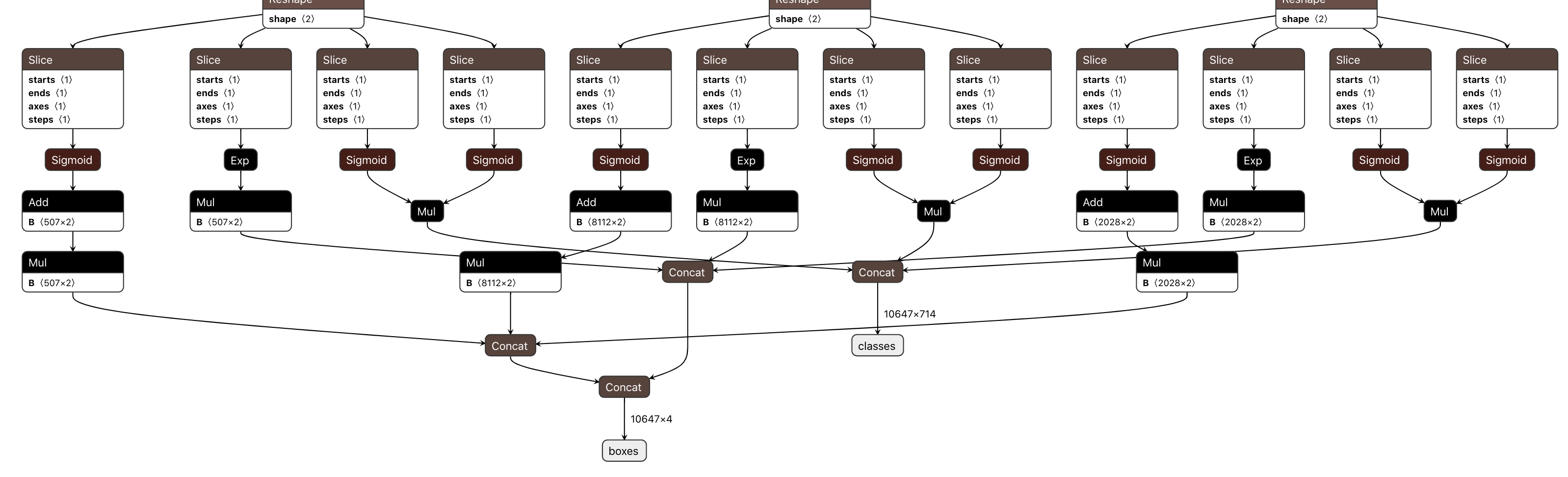
which I think should be correct.
To Reproduce
REQUIRED: Code to reproduce your issue below
First, I set ONNX_EXPORT = True in [model.py])(https://github.com/ultralytics/yolov3/blob/b2fcfc573e5418c0b2ef0c0357bf51bc5cb027b6/models.py#L5)
Then, due to the machine env problem, I have to use opset_version=9 in detect.py
After this I convert the model to onnx:
python detect.py --cfg yolov3-spp.cfg \
    --names data/mydataset.names \
    --weights weights/best.pt \
    --source data/samples \
    --conf-thres 0.3 \
    --iou-thres 0.6
I will receive a warning during conversion:
yolov3/utils/layers.py:60: TracerWarning: Converting a tensor to a Python boolean might cause the trace to be incorrect. We can't record the data flow of Python values, so this value will be treated as a constant in the future. This means that the trace might not generalize to other inputs!
  if nx == na:  # same shape
which I think is related to https://github.com/ultralytics/yolov3/blob/b2fcfc573e5418c0b2ef0c0357bf51bc5cb027b6/utils/layers.py#L60
But I am not sure whether this warning will cause this issue.
After then I run the inference through onnxruntime. and got a normal classes output and a all zero output boxes.
Expected behavior
Expected behavior the boxes definitely not all zeros.
Environment
If applicable, add screenshots to help explain your problem.
- OS: [Ubuntu 1604]
- GPU [V100]
 vandesa003
All 38 comments
To make things more clear, I also tested with opset_version=11, but still the output boxes are all zeros. I am really confused why this happens. I've been trapped here for near one week... any hints would be appreciated!
vandesa003
on 13 May 2020
@vandesa003 the warning is normal, but opset 9 export is unsupported, so you are on your own if you choose to pass that argument.
Recommend you retry with the latest versions of pytorch and onnx, and opset 10 or 11.
 glenn-jocher
on 13 May 2020
glenn-jocher
on 13 May 2020
@vandesa003 also make sure you are using the latest code when you convert: run git pull.
glenn-jocher
on 13 May 2020
@vandesa003 the warning is normal, but opset 9 export is unsupported, so you are on your own if you choose to pass that argument.
Recommend you retry with the latest versions of pytorch and onnx, and opset 10 or 11.
Sure @glenn-jocher I also tested with opset_version=11, but still receive all zeros boxes. Maybe I missed something related to the onnx version or other environment dependencies. Just make sure if this is a rare case, then it should be environment related issue. Thanks for your reply, I am closing this issue.
vandesa003
on 14 May 2020
Hi @glenn-jocher , finally I fixed the problem after pulling the new code. Thanks a lot! But I compared the box output from pytorch and onnx model and found that:
- pytorch output:
tensor([[ 27.06218, 26.60020, 57.13964, 56.54650],
[ 43.89460, 25.20766, 93.28602, 48.31281],
[ 85.00977, 25.02055, 152.51794, 48.84522],
...,
[395.99429, 409.55035, 48.99826, 17.14021],
[402.78732, 409.71115, 35.31765, 18.58157],
[410.01999, 410.44141, 21.80795, 18.26802]], device='cuda:0')
- onnx output:
tensor([[0.0768, 0.0720, 0.0398, 0.0806],
[0.0993, 0.0679, 0.1353, 0.0163],
[0.1595, 0.0448, 0.5260, 0.0086],
...,
[0.9423, 0.9808, 0.8031, 0.0051],
[0.9615, 0.9808, 0.4474, 0.0102],
[0.9808, 0.9808, 0.2708, 0.0243]])
Just wonder is the onnx box outputs are normalized? I need to multiply by the image size?
vandesa003
on 16 May 2020
@vandesa003 yes they are normalized. These are the requirements of the the coreml model in
our iDetection app.
glenn-jocher
on 16 May 2020
@vandesa003 yes they are normalized. These are the requirements of the the coreml model in
our iDetection app.
@glenn-jocher Oh I see. I tried to restore the result by multiply the image size, but it seems not exact same. How can I restore the exact result?
vandesa003
on 16 May 2020
@vandesa003 actually looking at the code there are no normalization steps, so they should be in pixel space. You can compare how the two outputs are handled here:
https://github.com/ultralytics/yolov3/blob/3f27ef1253bf83429350cbaeb8e1d01aff9de7ae/models.py#L196-L217
glenn-jocher
on 16 May 2020
@vandesa003 ah yes, I was correct originally. 1/ng is normalizing it in grid space.
glenn-jocher
on 16 May 2020
First of all thanks for your work.
I'm trying to use your yolov3-tiny-1cls model into a tensorrt model for Jetson Nano.
I successfully converted the model to a onnx model (opset_version = 10) and to a tensorrt.
The problem is the shape of the output of the onnx model.
If I used the torch inference the prediction has shape (12096, 6) \
While the tensorrt prediction has shape (12096,) , (48384,) -> (12096, 5)
I just don't know how to use this prediction to draw the bounding boxes etc...
In the torch approach you used the function:
def non_max_suppression(prediction, conf_thres=0.1, iou_thres=0.6, multi_label=True, classes=None, agnostic=False):
"""
Performs Non-Maximum Suppression on inference results
Returns detections with shape:
nx6 (x1, y1, x2, y2, conf, cls)
"""
The output(prediction) of the torch model: with shape:
(1, 12096, 6)
[[[ 24.503 23.25 89.051 86.157 0.00035801 0.97608]
[ 49.759 28.121 102.1 55.264 0.0097554 0.98109]
[ 79.55 28.874 125.83 53.467 0.012427 0.98558]
...
[ 364.86 508.49 47.539 30.411 7.7272e-05 0.97495]
[ 372.76 508.1 46.075 27.851 7.985e-05 0.97406]
[ 380.88 508.44 41.789 28.087 7.4096e-05 0.97476]]]
The output(prediction) of tensorrt/onnx model: with shape:
(12096,) #classes
(48384,) #boxes
[3.5801044e-04 9.7554326e-03 1.2427208e-02 ... 7.7271565e-05 7.9850302e-05 7.4095879e-05]
[0.06380871 0.04540921 0.23190494 ... 0.99304414 0.10882567 0.05485656]
I just want to know how to use these values to build the predictions of the model.
Thanks in advance.
 gasparramoa
on 20 May 2020
gasparramoa
on 20 May 2020
@gasparramoa use netron to view.
glenn-jocher
on 20 May 2020
@gasparramoa use netron to view.
I used, I just don't know how to use the result to build the prediction.

Others details of the onnx model:

gasparramoa
on 20 May 2020
@gasparramoa the outputs are the boxes and the confidences (0-1) of each class (looks like you have a single-class model), you can see them right there in your screenshot. What else do you need?
glenn-jocher
on 20 May 2020
So, what I need to do is to find the max value of confidence and use the bounding boxes for that confidence. Am I right?
gasparramoa
on 25 May 2020
@gasparramoa I can't advise you on this, if you want please open a new issue as this original issue is resolved.
glenn-jocher
on 25 May 2020
This issue has been resolved in a commit in early May 2020. If you are having this issue update your code with git pull or clone a new repo.
glenn-jocher
on 25 May 2020
@gasparramoa as I said in previous reply, the output of onnx model is normalised in anchor wise. You only need to remove the normalised process, then everything is ok.
vandesa003
on 26 May 2020
This issue has been resolved in a commit in early May 2020. If you are having this issue update your code with git pull or clone a new repo.
@glenn-jocher Sorry I should have closed this issue. Now I restored the normalised value and I can use it! thanks again for you guys great work! learned a lot from your repo.
vandesa003
on 26 May 2020
@gasparramoa as I said in previous reply, the output of onnx model is normalised in anchor wise. You only need to remove the normalised process, then everything is ok.
So I can not restore the result by multiply the image size? What is normalization in achor wise ? Can you give me a simple example of how to remove this normalization process please?
Thanks in advance, I really mean it.
gasparramoa
on 26 May 2020
@gasparramoa as I said in previous reply, the output of onnx model is normalised in anchor wise. You only need to remove the normalised process, then everything is ok.
So I can not restore the result by multiply the image size? What is normalization in achor wise ? Can you give me a simple example of how to remove this normalization process please?
Thanks in advance, I really mean it.
Just multiply by the self.stride.
        elif ONNX_EXPORT:
            # Avoid broadcasting for ANE operations
            m = self.na * self.nx * self.ny
            # ng = 1. / self.ng.repeat(m, 1)
            grid = self.grid.repeat(1, self.na, 1, 1, 1).view(m, 2)
            # anchor_wh = self.anchor_wh.repeat(1, 1, self.nx, self.ny, 1).view(m, 2) * ng
            anchor_wh = self.anchor_wh.repeat(1, 1, self.nx, self.ny, 1).view(m, 2)

            p = p.view(m, self.no)
            xy = torch.sigmoid(p[:, 0:2]) + grid  # x, y
            wh = torch.exp(p[:, 2:4]) * anchor_wh  # width, height
            p_cls = torch.sigmoid(p[:, 4:5]) if self.nc == 1 else \
                torch.sigmoid(p[:, 5:self.no]) * torch.sigmoid(p[:, 4:5])  # conf
            # return p_cls, xy * ng, wh
            return p_cls, xy * self.stride, wh * self.stride
Thank you @vandesa003 !!!
That was it!
Now I have exactly the same result in the torch model and in the TensorRT model.
gasparramoa
on 27 May 2020
@gasparramoa Where you able to get the onnx model into a tensorRT model? If so, did you use the onnx-tensorRT github for that? If not, what tool did you use and what is your performance?
I would like to look into this more as I am very curious.
Thanks in advance!
 marvision-ai
on 13 Jun 2020
marvision-ai
on 13 Jun 2020
@gasparramoa @mbufi there's a request for tensorrt on our new repo as well. I personally don't have experience with it, but if you guys have time or suggestions that would be awesome.
https://github.com/ultralytics/yolov5/issues/45
There is a tensorrt export here as well that is already working for this repo:
https://github.com/wang-xinyu/tensorrtx/tree/master/yolov3-spp
glenn-jocher
on 13 Jun 2020
@glenn-jocher Yes I saw! Thanks for the suggestion. I may look into it.
marvision-ai
on 13 Jun 2020
@vandesa003 @gasparramoa @glenn-jocher I'm running into some issues where the torch output and onnx model outputs do not match in the current version of the repo. Steps to reproduce:
- First, I set
ONNX_EXPORT = Trueand ran detect.py to generate an onnx file
python detect.py --cfg ./cfg/yolov3-spp.cfg --weights weights/yolov3-spp.pt
Then, I set
ONNX_EXPORT = Falseand run detect.py normally and as expected, the outputs look correct on the sample images.Then, I wanted to try running with onnx_runtime using my new onnx file. To do this, I replaced the
pred = model(img, augment=opt.augment)[0]call in detect.py (so all the normal image preprocessing still runs) with the following:
session = onnxruntime.InferenceSession('weights/yolov3-spp.onnx')
in_img = {session.get_inputs()[0].name: img.numpy()}
out = session.run(None, in_img)[0]
However, when I was debugging, I saw that the onnxruntime output and the pytorch model outputs do not match:
pytorch output (after running inference but before nms):
tensor([[[1.89963e+01, 1.56430e+01, 2.04850e+02, ..., 1.42084e-03, 1.65047e-03, 8.64788e-04],
[4.88579e+01, 2.42638e+01, 1.55053e+02, ..., 1.70676e-03, 1.44675e-03, 7.56415e-04],
[8.29035e+01, 2.43567e+01, 1.74981e+02, ..., 2.03217e-03, 1.57435e-03, 5.97334e-04],
...,
[2.99602e+02, 1.88690e+02, 8.93882e+01, ..., 1.16396e-03, 3.20018e-04, 2.71256e-04],
[3.06881e+02, 1.88730e+02, 8.49935e+01, ..., 2.39168e-03, 6.58945e-04, 7.91102e-04],
[3.16741e+02, 1.88525e+02, 9.01153e+01, ..., 1.65509e-03, 1.31225e-03, 1.66143e-03]]], grad_fn=<CatBackward>)
onnx runtime output (after running inference but before nms):
array([[ 1.2182e-07, 2.07e-09, 6.1938e-09, ..., 2.7896e-09, 6.1711e-10, 2.6199e-10],
[ 6.162e-06, 5.007e-08, 5.9215e-08, ..., 4.0838e-08, 1.0652e-08, 2.6904e-09],
[ 3.3448e-05, 2.9604e-07, 2.3664e-07, ..., 1.4082e-07, 5.1649e-08, 7.7577e-09],
...,
[ 3.7442e-05, 4.1841e-07, 1.5349e-06, ..., 2.9282e-07, 1.8697e-08, 3.0575e-08],
[ 8.224e-06, 1.4772e-07, 6.8398e-07, ..., 1.1183e-07, 6.8377e-09, 1.1774e-08],
[ 8.2141e-07, 2.1218e-08, 6.2566e-08, ..., 1.6764e-08, 2.4703e-09, 3.212e-09]], dtype=float32)
I added the fix from @vandesa003 (return p_cls, xy * self.stride, wh * self.stride) in models.py but I'm still getting this issue. Any ideas why this might be happening?
 prathik-naidu
on 25 Jun 2020
prathik-naidu
on 25 Jun 2020
@prathik-naidu we offer model export to onnx and coreml as a service. If you are interested please send us a request via email.
glenn-jocher
on 25 Jun 2020
@glenn-jocher I'm just running on the current open source yolov3 code given that it has ONNX export functionality. Does this not work? I'm using the default yolov3-spp.cfg and yolov3-spp.pt files that are from the repo but still not able to match the outputs between pytorch and onnxruntime.
prathik-naidu
on 25 Jun 2020
@glenn-jocher yes, there is limited export functionality available here! If you can get by with this then great :)
glenn-jocher
on 25 Jun 2020
@glenn-jocher I see so just to clarify, what is currently possible with the export functionality in this repo? It seems like there is capability to export to an onnx file but that onnx file doesn't actually replicate the results of the pytorch model. Is that expected?
Is there something that needs to be changed with this open source code to get that working (not sure if I'm missing something) or does this functionality not exist?
prathik-naidu
on 25 Jun 2020
@prathik-naidu export works as intended here. If you need additional help we can provide it as a service.
glenn-jocher
on 25 Jun 2020
@glenn-jocher I see so just to clarify, what is currently possible with the export functionality in this repo? It seems like there is capability to export to an onnx file but that onnx file doesn't actually replicate the results of the pytorch model. Is that expected?
Is there something that needs to be changed with this open source code to get that working (not sure if I'm missing something) or does this functionality not exist?
So can't we use the exported onnx model normally? I wanted to use OPENCV of C + + to call the exported onnx model, and then use C + + reasoning to deploy the project. But if the prediction result of onnx model is not correct, does that mean that the result of subsequent deployment will also be incorrect
 sky-fly97
on 25 Jun 2020
sky-fly97
on 25 Jun 2020
@sky-fly97 export operates correctly.
glenn-jocher
on 25 Jun 2020
@sky-fly97 export operates correctly.
Oh, Thank you! I see that the above person said that the output of the exported onnx model is quite inconsistent with the original pytorch model, so I have such a question.By the way, thank you very much for your work, which is really important
sky-fly97
on 25 Jun 2020
@sky-fly97 Let me know if you are able to get consistent results with your work. I'm still not able to figure out why the exported onnx model generates different results from the pytorch model (even on simple inputs like torch.ones). If export works correctly, I assume that means the model that is loaded from the onnx file should also work as well?
prathik-naidu
on 25 Jun 2020
@sky-Fly97如果你能和你的工作取得一致的结果,请告诉我。我仍然无法弄清楚为什么导出的onnx模型会产生与py手电模型不同的结果(即使是在像torch.ones这样的简单输入上)。如果导出工作正常,我假设这意味着从onnx文件加载的模型也应该工作吗?
OK。I will try. I have another question, why does the onnx model take (320,192) as the input size.Does it matter?
sky-fly97
on 26 Jun 2020
谢谢@ vandesa003 !!!
就是这样!
现在,在割炬模型和TensorRT模型中,我得到的结果完全相同。
Hello, I have also successfully converted the downloaded yolov3.weights into onnx, but the error in converting to tensor RT is as follows:
[TensorRT] ERROR: Network must have at least one output
Traceback (most recent call last):
context = engine.create_ execution_ context()
AttributeError: 'NoneType' object has no attribute 'create_ execution_ context'
 hande6688
on 30 Jul 2020
hande6688
on 30 Jul 2020
@prathik-naidu , I have results similar to yours (onnx pred probabilities around 10e-7), have you figured it out ?
 StanislasBertrand
on 21 Aug 2020
StanislasBertrand
on 21 Aug 2020
Hi @glenn-jocher , finally I fixed the problem after pulling the new code. Thanks a lot! But I compared the box output from pytorch and onnx model and found that:
pytorch output:
tensor([[ 27.06218,  26.60020,  57.13964,  56.54650],
        [ 43.89460,  25.20766,  93.28602,  48.31281],
        [ 85.00977,  25.02055, 152.51794,  48.84522],
        ...,
        [395.99429, 409.55035,  48.99826,  17.14021],
        [402.78732, 409.71115,  35.31765,  18.58157],
        [410.01999, 410.44141,  21.80795,  18.26802]], device='cuda:0')
onnx output:
tensor([[0.0768, 0.0720, 0.0398, 0.0806],
        [0.0993, 0.0679, 0.1353, 0.0163],
        [0.1595, 0.0448, 0.5260, 0.0086],
        ...,
        [0.9423, 0.9808, 0.8031, 0.0051],
        [0.9615, 0.9808, 0.4474, 0.0102],
        [0.9808, 0.9808, 0.2708, 0.0243]])
Just wonder is the onnx box outputs are normalized? I need to multiply by the image size?
hi , my onnx model have two output
box (10647, 4)
class (10647, 2).
how to decode this output and get final result? could you give me some advice?
do you did it?
could you share your code?
thanks!!!!
 cendelian
on 15 Sep 2020
cendelian
on 15 Sep 2020
Related issues
 acburigo
·
4Comments
acburigo
·
4Comments
 MichaelCong
·
4Comments
MichaelCong
·
4Comments
 Sibozhu
·
4Comments
Sibozhu
·
4Comments
 kaaier
·
3Comments
kaaier
·
3Comments
 JiahongXue
·
5Comments
JiahongXue
·
5Comments
Most helpful comment
Just multiply by the
self.stride.