Yolov3: CUDA error: device-side assert triggered
CUDA error: device-side assert triggered
- OS:Ubuntu 18.04
- pytorch 1.2
- python 3.7
I am using custom data to train the network.
I have followed the tutorial mentioned Training Custom Data
In addition to that I am using single class
My repository is also up-to-date.
I have also checked sample train_batch0.jpg which looked fine to me.
Any help would be appriciated.
Thank you
<3:49:19, 2.47it/s]/opt/conda/conda-bld/pytorch_1565272271120/work/aten/src/ATen/native/cuda/IndexKernel.cu:60: lambda ->auto::operator()(int)->auto: block: [0,0,0], thread: [32,0,0] Assertion index >= -sizes[i] && index < sizes[i] && "index out of bounds" failed.
/opt/conda/conda-bld/pytorch_1565272271120/work/aten/src/ATen/native/cuda/IndexKernel.cu:60: lambda ->auto::operator()(int)->auto: block: [0,0,0], thread: [33,0,0] Assertion index >= -sizes[i] && index < sizes[i] && "index out of bounds" failed.
/opt/conda/conda-bld/pytorch_1565272271120/work/aten/src/ATen/native/cuda/IndexKernel.cu:60: lambda ->auto::operator()(int)->auto: block: [0,0,0], thread: [34,0,0] Assertion index >= -sizes[i] && index < sizes[i] && "index out of bounds" failed.
/opt/conda/conda-bld/pytorch_1565272271120/work/aten/src/ATen/native/cuda/IndexKernel.cu:60: lambda ->auto::operator()(int)->auto: block: [0,0,0], thread: [35,0,0] Assertion index >= -sizes[i] && index < sizes[i] && "index out of bounds" failed.
/opt/conda/conda-bld/pytorch_1565272271120/work/aten/src/ATen/native/cuda/IndexKernel.cu:60: lambda ->auto::operator()(int)->auto: block: [0,0,0], thread: [6,0,0] Assertion index >= -sizes[i] && index < sizes[i] && "index out of bounds" failed.
/opt/conda/conda-bld/pytorch_1565272271120/work/aten/src/ATen/native/cuda/IndexKernel.cu:60: lambda ->auto::operator()(int)->auto: block: [0,0,0], thread: [7,0,0] Assertion index >= -sizes[i] && index < sizes[i] && "index out of bounds" failed.
/opt/conda/conda-bld/pytorch_1565272271120/work/aten/src/ATen/native/cuda/IndexKernel.cu:60: lambda ->auto::operator()(int)->auto: block: [0,0,0], thread: [8,0,0] Assertion index >= -sizes[i] && index < sizes[i] && "index out of bounds" failed.
/opt/conda/conda-bld/pytorch_1565272271120/work/aten/src/ATen/native/cuda/IndexKernel.cu:60: lambda ->auto::operator()(int)->auto: block: [0,0,0], thread: [9,0,0] Assertion index >= -sizes[i] && index < sizes[i] && "index out of bounds" failed.
/opt/conda/conda-bld/pytorch_1565272271120/work/aten/src/ATen/native/cuda/IndexKernel.cu:60: lambda ->auto::operator()(int)->auto: block: [0,0,0], thread: [10,0,0] Assertion index >= -sizes[i] && index < sizes[i] && "index out of bounds" failed.
/opt/conda/conda-bld/pytorch_1565272271120/work/aten/src/ATen/native/cuda/IndexKernel.cu:60: lambda ->auto::operator()(int)->auto: block: [0,0,0], thread: [11,0,0] Assertion index >= -sizes[i] && index < sizes[i] && "index out of bounds" failed.
/opt/conda/conda-bld/pytorch_1565272271120/work/aten/src/ATen/native/cuda/IndexKernel.cu:60: lambda ->auto::operator()(int)->auto: block: [0,0,0], thread: [30,0,0] Assertion index >= -sizes[i] && index < sizes[i] && "index out of bounds" failed.
/opt/conda/conda-bld/pytorch_1565272271120/work/aten/src/ATen/native/cuda/IndexKernel.cu:60: lambda ->auto::operator()(int)->auto: block: [0,0,0], thread: [31,0,0] Assertion index >= -sizes[i] && index < sizes[i] && "index out of bounds" failed.
Traceback (most recent call last):
File "train.py", line 425, in
train() # train normally
File "train.py", line 270, in train
loss, loss_items = compute_loss(pred, targets, model)
File "/home/sagarbhonde/yolov3/utils/utils.py", line 335, in compute_loss
tobj[b, a, gj, gi] = 1.0 # obj
RuntimeError: CUDA error: device-side assert triggered
 sbhonde1
All 7 comments
@sbhonde1 this is a generic error message when the error is triggered on the GPU. To see the underlying actual error, you would need to run this in CPU mode, i.e. python3 train.py --device cpu
Since the error is caused by custom data, the source is likely also in your custom images or labels.
 glenn-jocher
on 16 Oct 2019
glenn-jocher
on 16 Oct 2019
Adding to what @glenn-jocher mentioned, I had this error due to negative values in my label files from off-screen bounding boxes. Make sure to follow the guidelines outlined in Train Custom Data; specifically:
- Each row is
class x_center y_center width heightformat. - Box coordinates must be in normalized xywh format (from 0 - 1).
- Classes are zero-indexed (start from 0).
 doughtmw
on 16 Oct 2019
doughtmw
on 16 Oct 2019
I'm also facing the same issue and as @glenn-jocher said I'm unable to run using CPU if i Do that this warning arises

How did I collected data is:-
I have downloaded the Open images CSV and cloned OIDv4_ToolKit where annotations are downloaded in a Original way I have changed some parts of code to where I grab Xmin,Ymin,Xmax,Ymax using the functions by @glenn-jocher in utils.py xyxy2xywh() changed to the following format
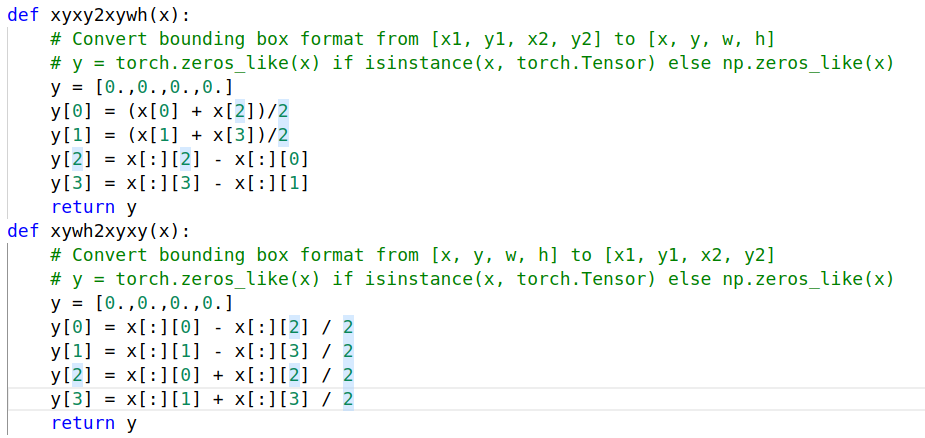
and verified like this
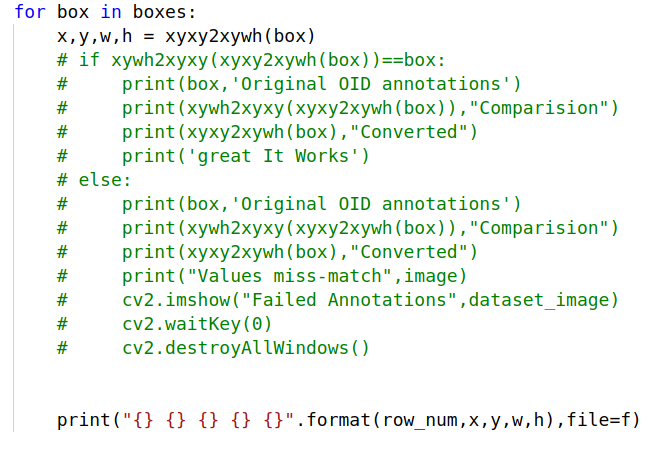
Which gives a proper boundaries
I have cross verified after seeing @glenn-jocher and @doughtmw replies to this issue Using Yolo_mark tool where these annotations and images are copied to a directory it draws the perfect boundaries but if I'm using the same dataset it gives this error as first screenshot
My Hardware is:
CPU: Intel(R) Xeon(R) Gold 6148 CPU @ 2.40GHz
GPU:
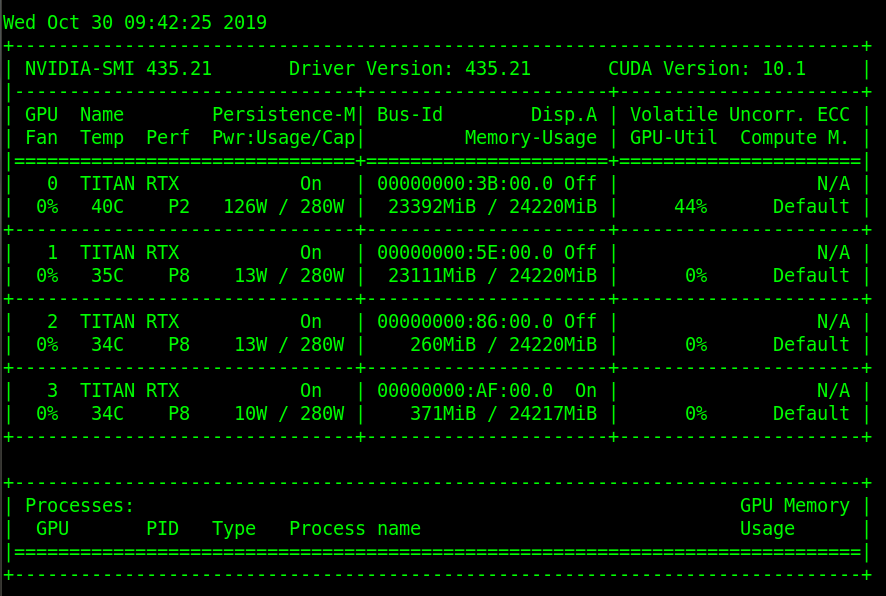
Can you help me resolve this @glenn-jocher or @doughtmw

 Rajasekhar06
on 30 Oct 2019
Rajasekhar06
on 30 Oct 2019
@Rajasekhar06 you have problems in your environment. I suggest your use a GCP VM or a Google Colab notebook with working environments.
https://github.com/ultralytics/yolov3/wiki
glenn-jocher
on 3 Nov 2019
In the mean while you replied me I started training the custom dataset with pjreddie repo by compiling it for GPU and using the same hardware it was training but class confidence always remain zero , Can you please say me what would be the reason for that I assume custom configuration went wrong, where for whole 600 classes I want to train the darknet backbone weights onlt two classes which distinguish the Sunglasses and Glasses
Rajasekhar06
on 4 Nov 2019
@doughtmw @glenn-jocher
I have this problem, too.
And I've checked that my labels don't have values less than 0 and greater than 1
Also,when I run test.py alone, this error does not occur.
Here is the error in my train:
               Class    Images   Targets         P         R   [email protected]        F1:   0%|          | 0/151 [00:00<?, ?it/s]
/pytorch/aten/src/ATen/native/cuda/IndexKernel.cu:60: lambda [](int)->auto::operator()(int)->auto: block: [0,0,0], thread: [98,0,0] Assertion `index >= -sizes[i] && index < sizes[i] && "index out of bounds"` failed.
/pytorch/aten/src/ATen/native/cuda/IndexKernel.cu:60: lambda [](int)->auto::operator()(int)->auto: block: [0,0,0], thread: [99,0,0] Assertion `index >= -sizes[i] && index < sizes[i] && "index out of bounds"` failed.
/pytorch/aten/src/ATen/native/cuda/IndexKernel.cu:60: lambda [](int)->auto::operator()(int)->auto: block: [0,0,0], thread: [100,0,0] Assertion `index >= -sizes[i] && index < sizes[i] && "index out of bounds"` failed.
/pytorch/aten/src/ATen/native/cuda/IndexKernel.cu:60: lambda [](int)->auto::operator()(int)->auto: block: [0,0,0], thread: [101,0,0] Assertion `index >= -sizes[i] && index < sizes[i] && "index out of bounds"` failed.
/pytorch/aten/src/ATen/native/cuda/IndexKernel.cu:60: lambda [](int)->auto::operator()(int)->auto: block: [0,0,0], thread: [102,0,0] Assertion `index >= -sizes[i] && index < sizes[i] && "index out of bounds"` failed.
/pytorch/aten/src/ATen/native/cuda/IndexKernel.cu:60: lambda [](int)->auto::operator()(int)->auto: block: [0,0,0], thread: [103,0,0] Assertion `index >= -sizes[i] && index < sizes[i] && "index out of bounds"` failed.
/pytorch/aten/src/ATen/native/cuda/IndexKernel.cu:60: lambda [](int)->auto::operator()(int)->auto: block: [0,0,0], thread: [104,0,0] Assertion `index >= -sizes[i] && index < sizes[i] && "index out of bounds"` failed.

               Class    Images   Targets         P         R   [email protected]        F1:   0%|          | 0/151 [00:02<?, ?it/s]
Traceback (most recent call last):
  File "train_spp1.py", line 534, in <module>
    train()  # train normally
  File "train_spp1.py", line 364, in train
    dataloader=testloader)
  File "/data1/docker/hh/test.py", line 94, in test
    loss += compute_loss(train_out, targets, model)[1][:3].cpu()  # GIoU, obj, cls
  File "/data1/docker/hh/utils/utils.py", line 414, in compute_loss
    lbox += (1.0 - giou).sum() if red == 'sum' else (1.0 - giou).mean()  # giou loss
  File "/home/cxy/anaconda3/lib/python3.7/site-packages/torch/tensor.py", line 394, in __rsub__
    return _C._VariableFunctions.rsub(self, other)
RuntimeError: CUDA error: device-side assert triggered
 chouxianyu
on 15 Mar 2020
chouxianyu
on 15 Mar 2020
@chouxianyu Hello, thank you for your interest in our work! This issue seems to lack the minimum requirements for a proper response, or is insufficiently detailed for us to help you. Please note that most technical problems are due to:
- Your changes to the default repository. If your issue is not reproducible in a fresh
git cloneversion of this repository we can not debug it. Before going further run this code and ensure your issue persists:
sudo rm -rf yolov3  # remove existing
git clone https://github.com/ultralytics/yolov3 && cd yolov3 # clone latest
python3 detect.py  # verify detection
python3 train.py  # verify training (a few batches only)
# CODE TO REPRODUCE YOUR ISSUE HERE
- Your custom data. If your issue is not reproducible with COCO data we can not debug it. Visit our Custom Training Tutorial for exact details on how to format your custom data. Examine
train_batch0.jpgandtest_batch0.jpgfor a sanity check of training and testing data. - Your environment. If your issue is not reproducible in a GCP Quickstart Guide VM we can not debug it. Ensure you meet the requirements specified in the README: Unix, MacOS, or Windows with Python >= 3.7, PyTorch >= 1.4 etc. You can also use our Google Colab Notebook and our Docker Image to test your code in a working environment.
If none of these apply to you, we suggest you close this issue and raise a new one using the Bug Report template, providing screenshots and minimum viable code to reproduce your issue. Thank you!
glenn-jocher
on 15 Mar 2020
Related issues
 acburigo
·
4Comments
acburigo
·
4Comments
 aluds123
·
4Comments
aluds123
·
4Comments
 Aria20155
·
3Comments
Aria20155
·
3Comments
 CF2220160244
·
5Comments
CF2220160244
·
5Comments
 kaaier
·
3Comments
kaaier
·
3Comments
Most helpful comment
@sbhonde1 this is a generic error message when the error is triggered on the GPU. To see the underlying actual error, you would need to run this in CPU mode, i.e.
python3 train.py --device cpuSince the error is caused by custom data, the source is likely also in your custom images or labels.