I have two 1080ti graphics cards. When I train with one (just one card installed in the computer) everything goes fine. But when I put another card into the computer, the training process freezes at the first epoch. I just get this output:
Namespace(accumulate=8, batch_size=8, bucket='', cfg='cfg/yolov3.cfg', data_cfg='data/pladenj.data', epochs=100, evolve=False, img_size=416, nosave=False, notest=False, num_workers=4, rect=False, resume=False, single_scale=False, transfer=False, var=0, xywh=False)
Using CUDA device0 _CudaDeviceProperties(name='GeForce GTX 1080 Ti', total_memory=11175MB)
           device1 _CudaDeviceProperties(name='GeForce GTX 1080 Ti', total_memory=11178MB)

Model Summary: 222 layers, 6.15237e+07 parameters, 6.15237e+07 gradients

   Epoch       Batch   GIoU/xy        wh       obj       cls     total   targets  img_size
And it stays like this forever, then if I kill my process the whole computer just freezes and I have to restart. I checked the motherboards manual and it supports multiple gpu's. Also did some stress tests on the gpu's and everything turned out to be fine. Only thing that bothers me is when i check in the terminal on how many pci lanes they are running it says 16x on both, but in the manual it says if using multiple gpu's they should use 8x lanes. Any help greatly appreciated.
Software:
- OS: ubuntu 18.04
- Cuda: 9.1
- Python: 3.7
Hardware:
- GPU: 2x Gigabyte Aurus 1080ti
- Motherboard: Gigabyte GA-AX370-Gaming-K7
- CPU: Ryzen 1800x
- RAM: 64 Gb
- PSU: Corsair 1000W
- Storage: 500gb SSD
 lexer21
All 9 comments
@lexer21 someone else mentioned this also https://github.com/ultralytics/yolov3/issues/377, which in their case was attached to using the --multi-scale flag. You have a slightly out of date repo, if you git pull and try again, the new default is to use single scale, so this would be interesting if the issue is indeed related to multi-scale.
We tested one epoch a few days ago with 2 V100´s on a GCP instance and everything went fine.
Another item though is disappointing multi-gpu performance, which is still a mystery to us https://github.com/ultralytics/yolov3/issues/269.
 glenn-jocher
on 23 Jul 2019
glenn-jocher
on 23 Jul 2019
@glenn-jocher thank you for quick reply. I tried that setting but it didn't work for me. I end up playing around with BIOS settings and disabling IOMMU seems to work for me. Now I can train with both GPU's
lexer21
on 23 Jul 2019
@lexer21 ah, great! I will link to your comment in the other issue.
If you come up with any multi-GPU insights in the future feel free to post here or submit PRs.
glenn-jocher
on 23 Jul 2019
I have the same problem when trainning using multi-gpus. But I can train multi-gpus before I pull the code some day.
 sofiawu
on 29 Jul 2019
sofiawu
on 29 Jul 2019
@sofiawu we can’t reproduce the issue in GCP. If you can point us to a GCP VM setup that reproduces the issue that would help us debug, otherwise we have nothing to go on.
glenn-jocher
on 29 Jul 2019
I am having the same problem on GCP.
Running on n1-standard-8 type machine(deep learning vm),us-west,8 K80 GPUs,python 3.7,CUDA 10.
On doing some debugging it turns out the code freezes on the loss.backward() statement.
Could be a problem with DistributedDataParallel?
One weird observation is that transfer learning runs with no problem.Training from scratch causes hang.
 jasdeep06
on 31 Jul 2019
jasdeep06
on 31 Jul 2019
@jasdeep06 do you get this error using the default repo? Can you post your terminal output here?
BTW, K80's are not economical, I highly recommend you swap 8 K80's for 2 T4's or 1 V100. You'll probably train faster for less money: https://github.com/ultralytics/yolov3#speed
glenn-jocher
on 31 Jul 2019
Thanks for the reply @glenn-jocher .I am running the latest version of this repo with my own dataset which contains 704 training images of dimension 800 * 448.I have modified my config files and .data files accordingly.That should not be a problem because transfer learning is running seamlessly without any problem.Here are my terminal outputs-
Running python3 train.py --img-size 800 --epochs 1000 --cfg cfg/waste_smaller.cfg --data waste_data/waste_smaller_data.data --rect produces following output (I have added print statement at major transition points.The statement after loss.backward() is never executed.)-
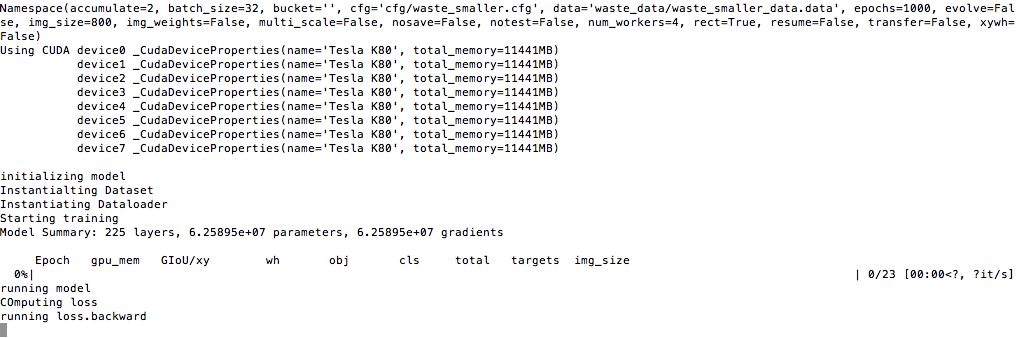
The script is stuck indefinitely.Re sshing into the instance is only option to unfreeze it.
Here is my nvidia-smi output -
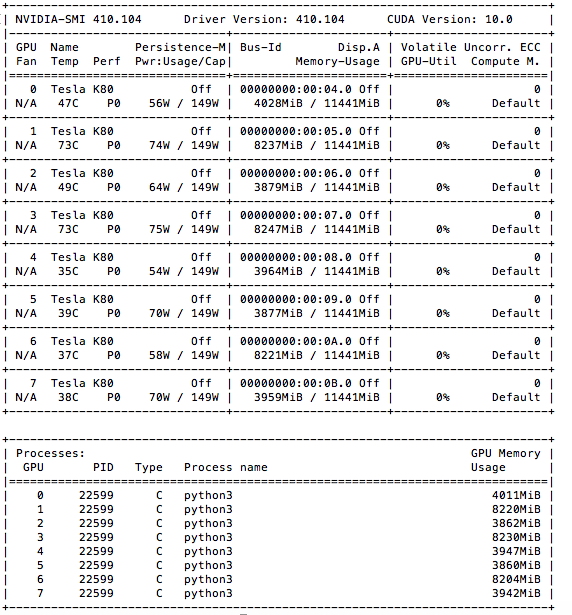
Here is my ram usage -

Here is hard disk(100 Gigs) usage
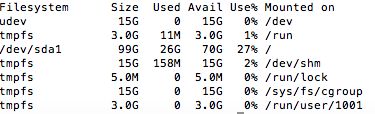
IMHO there is no problems in above parameters.
I request you to have a look at fairly recent issue in pytorch https://github.com/pytorch/pytorch/issues/20355
Also thanks for your advice of using V100.I used it,and can confirm it is indeed multi-gpu problem.Training from scratch does work perfectly in 1 V100 GPU.
jasdeep06
on 31 Jul 2019
@glenn-jocher thank you for quick reply. I tried that setting but it didn't work for me. I end up playing around with BIOS settings and disabling IOMMU seems to work for me. Now I can train with both GPU's
If disable the IOMMU, will it have any side-effects?
 yangxu351
on 3 Apr 2020
yangxu351
on 3 Apr 2020
Related issues
 CF2220160244
·
5Comments
CF2220160244
·
5Comments
 Alex1101a
·
5Comments
Alex1101a
·
5Comments
 JungminChung
·
3Comments
JungminChung
·
3Comments
 mehrdadazizi72
·
3Comments
mehrdadazizi72
·
3Comments
 Aria20155
·
3Comments
Aria20155
·
3Comments