Yolov3: What does "normalized xywh" mean?
I use Microsoft VoTT to do my image annotation and their V2 product is amazing. I can't live without it now. The only real export they provide though is Pascal VOC format which is that xml style format. There's converters out there, but they either don't work at all or are just wrong in some cases. If I was taking a format like:
    <bndbox>
        <xmin>814.3226424126376</xmin>
        <ymin>376.42021276595744</ymin>
        <xmax>941.1584490186692</xmax>
        <ymax>455.46702127659574</ymax>
    </bndbox>
And try to "Normalize" that, what does that mean?
 rlewkowicz
All 11 comments
Alright, so I'm leaving this here, but at somepoint I really should just build an actual toolchain because there's not a good one out there. I stole most of this from the darknet repo.
import xml.etree.ElementTree as ET
import pickle
import os
from os import listdir, getcwd
from os.path import isfile, join
from pathlib import Path
import re

classes = ["doot"]

#This should just be a folder of xmls
annotations = "/home/ryan/Repos/newanno/thedoots/Annotations"
#Then you have a folder of txts.
modified_annotations = "/home/ryan/Repos/newanno/thedoots/converted_labels"

def convert(size, box):
    dw = 1./(size[0])
    dh = 1./(size[1])
    x = (box[0] + box[1])/2.0 - 1
    y = (box[2] + box[3])/2.0 - 1
    w = box[1] - box[0]
    h = box[3] - box[2]
    x = x*dw
    w = w*dw
    y = y*dh
    h = h*dh
    return (x,y,w,h)

def convert_annotation():

    filepaths=[]
    for f in listdir(annotations):
        filepaths.append(join(annotations, f))

    for filepath in filepaths:
        txtpath = join(modified_annotations,re.sub(r"\.xml$", ".txt", os.path.basename(filepath)))

        in_file = open(filepath, 'r')
        Path(txtpath).touch()
        out_file = open(txtpath, 'w')

        tree=ET.parse(in_file)
        root = tree.getroot()
        size = root.find('size')
        w = int(size.find('width').text)
        h = int(size.find('height').text)

        for obj in root.iter('object'):
            difficult = obj.find('difficult').text
            cls = obj.find('name').text
            if cls not in classes or int(difficult)==1:
                continue
            cls_id = classes.index(cls)
            xmlbox = obj.find('bndbox')
            b = (float(xmlbox.find('xmin').text), float(xmlbox.find('xmax').text), float(xmlbox.find('ymin').text), float(xmlbox.find('ymax').text))
            bb = convert((w,h), b)
            out_file.write(str(cls_id) + " " + " ".join([str(a) for a in bb]) + '\n')

convert_annotation()
Great! You can examine train_batch0.jpg and test_batch0.jpg to check your bounding boxes on your training and testing data (once you start training).
 glenn-jocher
on 21 Jun 2019
glenn-jocher
on 21 Jun 2019
@glenn-jocher why did you give us one exactly example about "normalized xywh "
 Ai-is-light
on 9 Jul 2019
Ai-is-light
on 9 Jul 2019
@Ai-is-light normalized means the range of the values is between 0 and 1.
xywh means x and y centers of the objects and the widths w and heights h.
glenn-jocher
on 11 Jul 2019
x = (box[0] + box[1])/2.0 - 1 & y = (box[2] + box[3])/2.0 - 1
why x & y (center) values have to minus 1?
 yoga-0125
on 21 Jan 2020
yoga-0125
on 21 Jan 2020
@yoga-0125
I have the same question about this.
Do you solve this problem?
 whale-yf
on 6 Oct 2020
whale-yf
on 6 Oct 2020
@yoga-0125 @whale-yf see https://github.com/ultralytics/yolov5/wiki/Train-Custom-Data#2-create-labels
glenn-jocher
on 6 Oct 2020
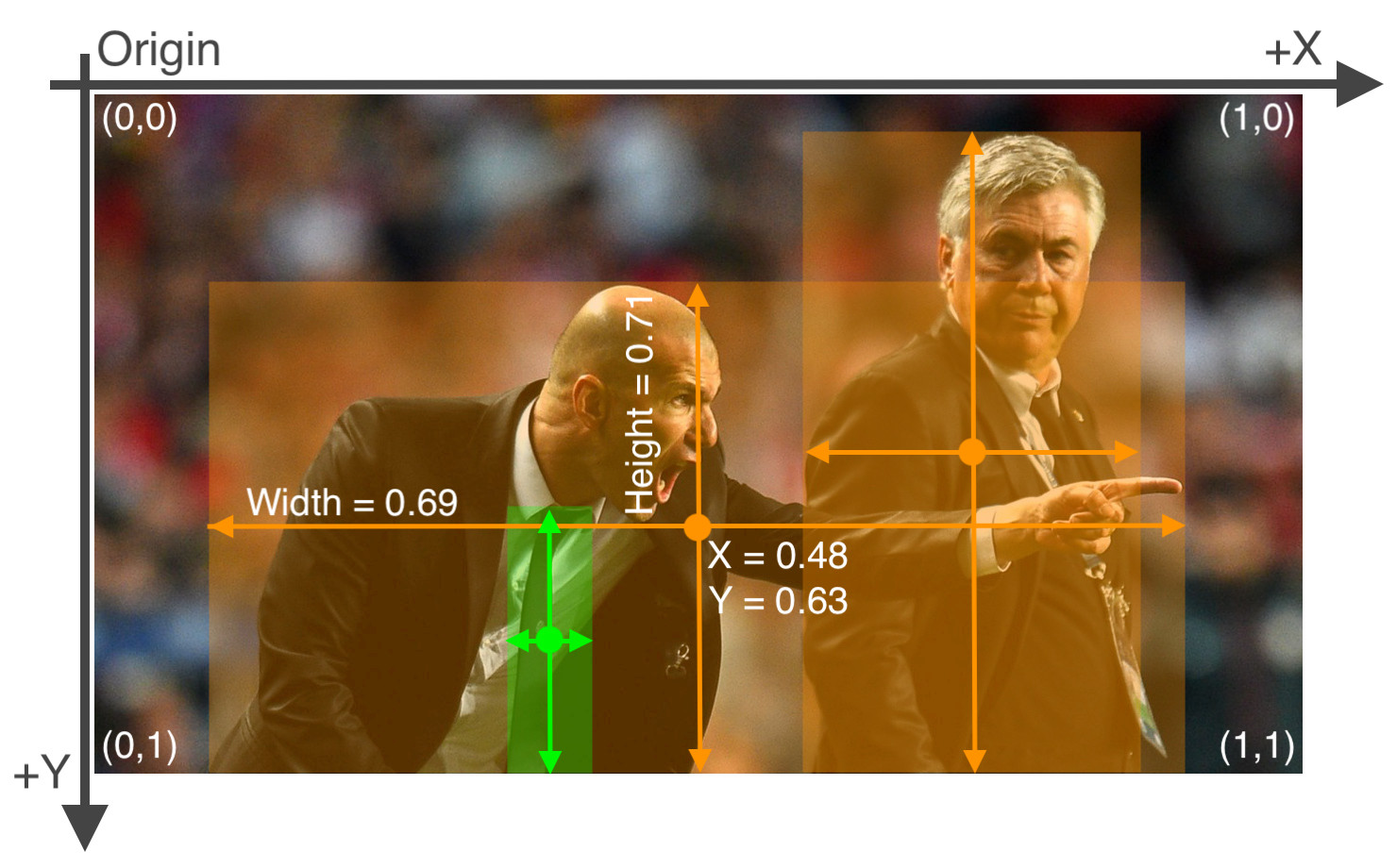
glenn-jocher
on 6 Oct 2020
@glenn-jocher
Thanks for sharing.
I understand the reason why xywh should be normalized, but i got different answers from google
- x = (box[0] + box[1])/2.0 & y = (box[2] + box[3])/2.0
- x = (box[0] + box[1])/2.0 - 1 & y = (box[2] + box[3])/2.0 -1
I have known where the (x,y) here equal to the center of box, why the center values should be minus 1?
whale-yf
on 6 Oct 2020
@whale-yf I have nothing to add other than the info I've provided above.
glenn-jocher
on 6 Oct 2020
Thanks :)
whale-yf
on 6 Oct 2020
Related issues
 leeyunhome
·
3Comments
leeyunhome
·
3Comments
 Arunavameister
·
3Comments
yoga-0125
·
4Comments
Arunavameister
·
3Comments
yoga-0125
·
4Comments
 NgTuong
·
4Comments
NgTuong
·
4Comments
 Sibozhu
·
4Comments
Sibozhu
·
4Comments
Most helpful comment
Alright, so I'm leaving this here, but at somepoint I really should just build an actual toolchain because there's not a good one out there. I stole most of this from the darknet repo.