Yolov3: CUSTOM TRAINING EXAMPLE (OLD)
This guide explains how to train your own custom dataset with YOLOv3.
Before You Start
Clone this repo, download COCO dataset, and install requirements.txt dependencies, including Python>=3.7 and PyTorch>=1.4.
git clone https://github.com/ultralytics/yolov3
bash yolov3/data/get_coco2017.sh  # 19GB
cd yolov3
pip install -U -r requirements.txt
Train On Custom Data
1. Label your data in Darknet format. After using a tool like Labelbox to label your images, you'll need to export your data to darknet format. Your data should follow the example created by get_coco2017.sh, with images and labels in separate parallel folders, and one label file per image (if no objects in image, no label file is required). The label file specifications are:
- One row per object
- Each row is
class x_center y_center width heightformat. - Box coordinates must be in normalized xywh format (from 0 - 1). If your boxes are in pixels, divide
x_centerandwidthby image width, andy_centerandheightby image height. - Class numbers are zero-indexed (start from 0).
Each image's label file must be locatable by simply replacing /images/*.jpg with /labels/*.txt in its pathname. An example image and label pair would be:
../coco/images/train2017/000000109622.jpg  # image
../coco/labels/train2017/000000109622.txt  # label
An example label file with 5 persons (all class 0):
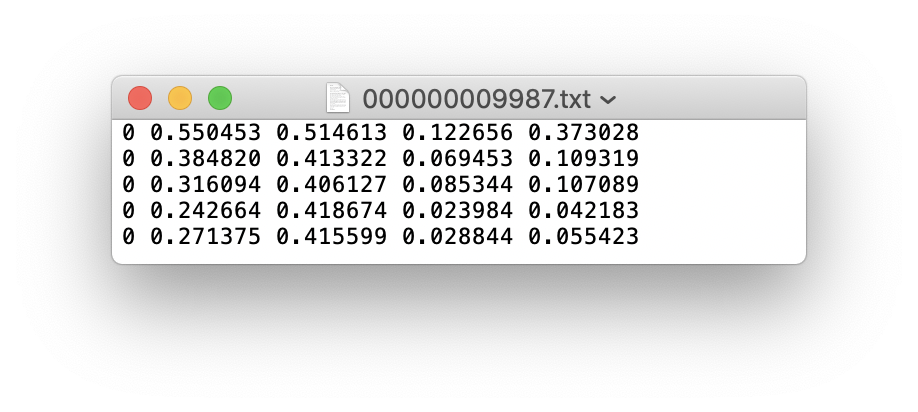
2. Create train and test *.txt files. Here we create data/coco16.txt, which contains the first 16 images of the COCO2017 dataset. We will use this small dataset for both training and testing. Each row contains a path to an image, and remember one label must also exist in a corresponding /labels folder for each image containing objects.

3. Create new *.names file listing the class names in our dataset. Here we use the existing data/coco.names file. Classes are zero indexed, so person is class 0, bicycle is class 1, etc.

4. Create new *.data file with your class count (COCO has 80 classes), paths to train and validation datasets (we use the same images twice here, but in practice you'll want to validate your results on a separate set of images), and with the path to your *.names file. Save as data/coco16.data.

5. Update yolov3-spp.cfg (optional). By default each YOLO layer has 255 outputs: 85 values per anchor [4 box coordinates + 1 object confidence + 80 class confidences], times 3 anchors. Update the settings to filters=[5 + n] * 3 and classes=n, where n is your class count. This modification should be made in all 3 YOLO layers.

6. (OPTIONAL) Update hyperparameters such as LR, LR scheduler, optimizer, augmentation settings, multi_scale settings, etc in train.py for your particular task. If in doubt about these settings, we recommend you start with all-default settings before changing anything.
7. Train. Run python3 train.py --cfg yolov3-spp.cfg --data data/coco16.data --nosave to train using your custom *.data and *.cfg. By default pretrained --weights yolov3-spp-ultralytics.pt is used to initialize your model. You can instead train from scratch with --weights '', or from any other weights or backbone of your choice, as long as it corresponds to your *.cfg.
Visualize Results
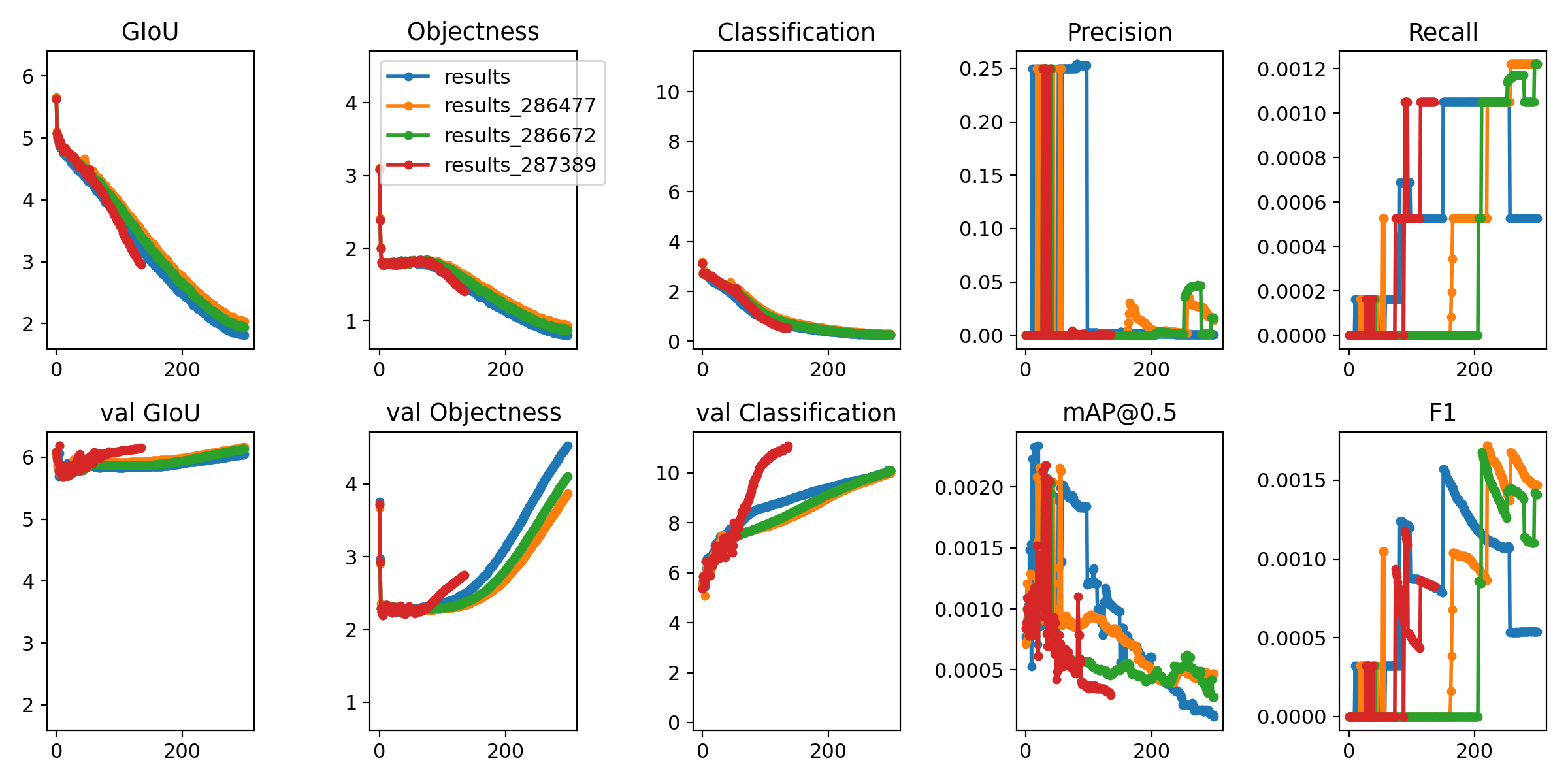
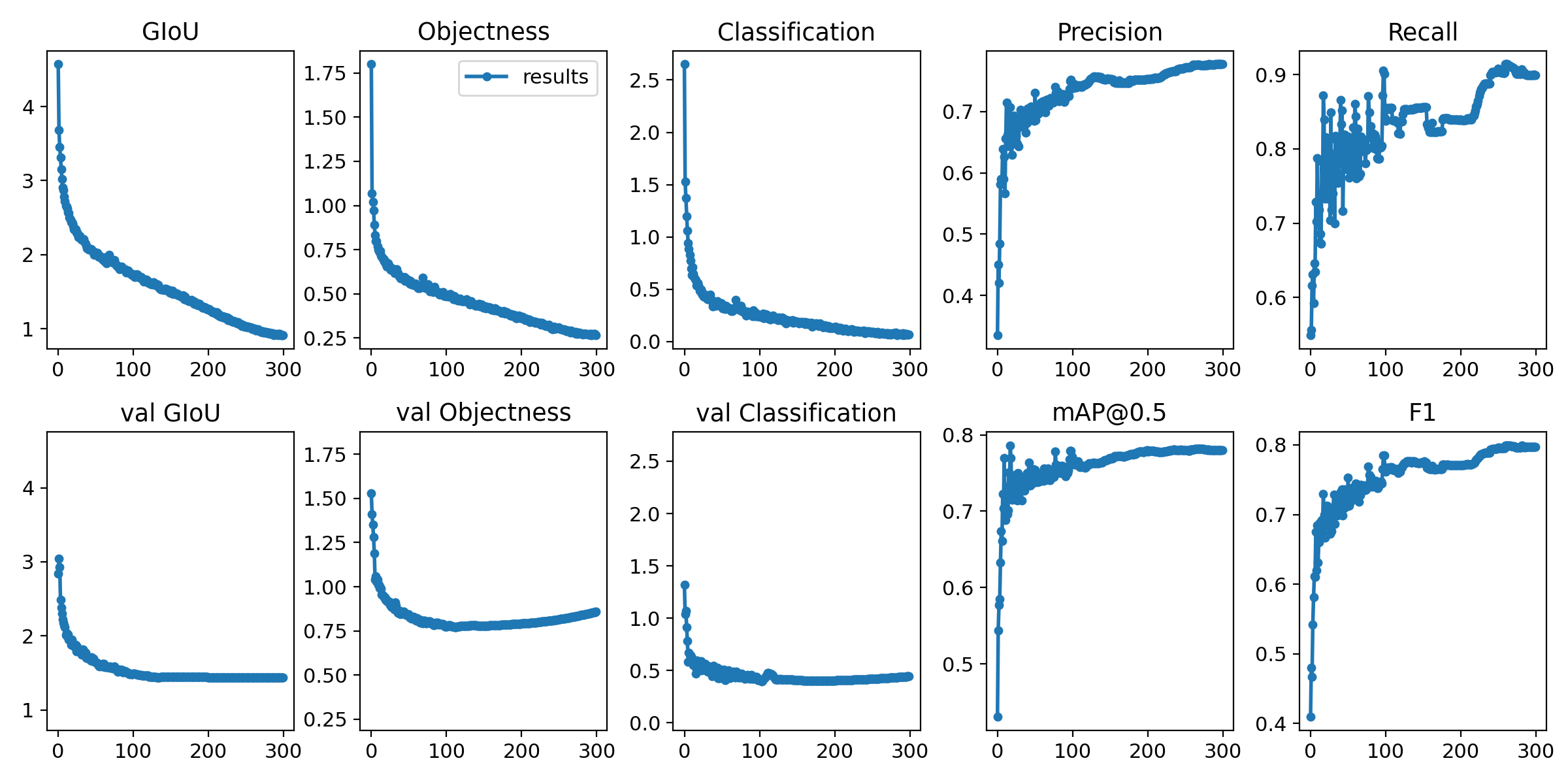
Run from utils import utils; utils.plot_results() to see your training losses and performance metrics vs epoch. If you don't see acceptable performance, try hyperparameter tuning and re-training. Multiple results.txt files are overlaid automatically to compare performance.
Here we see training results from data/coco64.data starting from scratch, a darknet53 backbone, and our yolov3-spp-ultralytics.pt pretrained weights.

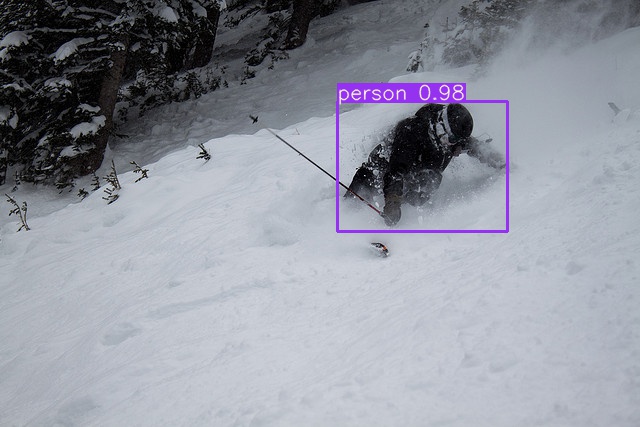
Run inference with your trained model by copying an image to data/samples folder and running
python3 detect.py --weights weights/last.pt
Reproduce Our Results
To reproduce this tutorial, simply run the following code. This trains all the various tutorials, saves each results*.txt file separately, and plots them together as results.png. It all takes less than 30 minutes on a 2080Ti.
git clone https://github.com/ultralytics/yolov3
python3 -c "from yolov3.utils.google_utils import gdrive_download; gdrive_download('1h0Id-7GUyuAmyc9Pwo2c3IZ17uExPvOA','coco2017demos.zip')"  # datasets (20 Mb)
cd yolov3
python3 train.py --data coco64.data --batch 16 --epochs 300 --nosave --cache --weights '' --name from_scratch
python3 train.py --data coco64.data --batch 16 --epochs 300 --nosave --cache --weights yolov3-spp-ultralytics.pt --name from_yolov3-spp-ultralytics
python3 train.py --data coco64.data --batch 16 --epochs 300 --nosave --cache --weights darknet53.conv.74 --name from_darknet53.conv.74
python3 train.py --data coco1.data --batch 1 --epochs 300 --nosave --cache --weights darknet53.conv.74 --name 1img
python3 train.py --data coco1cls.data --batch 16 --epochs 300 --nosave --cache --weights darknet53.conv.74 --cfg yolov3-spp-1cls.cfg --name 1cls
Reproduce Our Environment
To access an up-to-date working environment (with all dependencies including CUDA/CUDNN, Python and PyTorch preinstalled), consider a:
- GCP Deep Learning VM with $300 free credit offer: See our GCP Quickstart Guide
- Google Colab Notebook with 12 hours of free GPU time: Google Colab Notebook
- Docker Image from https://hub.docker.com/r/ultralytics/yolov3. See Docker Quickstart Guide
 glenn-jocher
All 167 comments
I trained and tested mnist data by using this tutorial. Thank you for guidance.
 mahiratmis
on 6 Apr 2019
mahiratmis
on 6 Apr 2019
Hi @glenn-jocher ,
I am trying to train on my custom dataset and I get the following error

Can you please let me know the fix for this error? I see that 'model' class in utils.py does not have an attribute 'hyp'. I followed all the steps outlined in order.
Thanks.
 akshaygadipatil
on 18 Apr 2019
akshaygadipatil
on 18 Apr 2019
Hi @glenn-jocher ,
I am trying to train on my custom dataset and I get the following error
Can you please let me know the fix for this error? I see that 'model' class in utils.py does not have an attribute 'hyp'. I followed all the steps outlined in order.
Thanks.
I tried on coco_10img.data; I get the same error.
akshaygadipatil
on 18 Apr 2019
@akshaygadipatil the hyp attribute contains hyperparameters set in train.py and attached to model as an easy way to pass the hyperparameters to build_targets() and compute_losses(). We just made this change today. Please git pull to get the absolute latest changes and try again.
Also, what happens if you simply run python3 train.py?
glenn-jocher
on 18 Apr 2019
@akshaygadipatil the example executes correctly on CPU and single GPU. Your issue may be multi-GPU related (you did not specify in your post). If so, git pull and try again.
python3 train.py --data data/coco_1img.data
Namespace(accumulate=1, backend='nccl', batch_size=16, cfg='cfg/yolov3-spp.cfg', data_cfg='data/coco_1img.data', dist_url='tcp://127.0.0.1:9999', epochs=273, evolve=False, img_size=416, multi_scale=False, nosave=False, notest=False, num_workers=4, rank=0, resume=False, transfer=False, var=0, world_size=1)

Using CPU

layer                                     name  gradient   parameters                shape         mu      sigma
    0                          0.conv_0.weight      True          864        [32, 3, 3, 3]   -0.00339     0.0648
    1                    0.batch_norm_0.weight      True           32                 [32]      0.987       1.07
    2                      0.batch_norm_0.bias      True           32                 [32]     -0.698       2.07
    3                          1.conv_1.weight      True        18432       [64, 32, 3, 3]   0.000298     0.0177
    4                    1.batch_norm_1.weight      True           64                 [64]       0.88      0.389
    5                      1.batch_norm_1.bias      True           64                 [64]     -0.409       1.01
 ...
  223                      112.conv_112.weight      True        65280     [255, 256, 1, 1]   0.000119     0.0362
  224                        112.conv_112.bias      True          255                [255]  -0.000773     0.0356
Model Summary: 225 layers, 6.29987e+07 parameters, 6.29987e+07 gradients

   Epoch       Batch        xy        wh      conf       cls     total  nTargets      time
   0/272         0/0     0.192     0.105      15.3      2.36        18         4      5.58
               Class    Images   Targets         P         R       mAP        F1
Computing mAP: 100%|████████████████████████████████████████████████████████████████| 1/1 [00:01<00:00,  1.90s/it]
                 all         1         6         0         0         0         0

              person         1         3         0         0         0         0
           surfboard         1         3         0         0         0         0

   Epoch       Batch        xy        wh      conf       cls     total  nTargets      time
   1/272         0/0     0.218    0.0781      15.3      2.36      17.9         5       8.2
               Class    Images   Targets         P         R       mAP        F1
Computing mAP: 100%|████████████████████████████████████████████████████████████████| 1/1 [00:01<00:00,  1.64s/it]
                 all         1         6         0         0         0         0

              person         1         3         0         0         0         0
           surfboard         1         3         0         0         0         0

   Epoch       Batch        xy        wh      conf       cls     total  nTargets      time
   2/272         0/0     0.165    0.0669      14.7      2.31      17.2         5         7
               Class    Images   Targets         P         R       mAP        F1
Computing mAP: 100%|████████████████████████████████████████████████████████████████| 1/1 [00:01<00:00,  1.49s/it]
                 all         1         6         0         0         0         0

              person         1         3         0         0         0         0
           surfboard         1         3         0         0         0         0
@glenn-jocher, thanks!
Sorry abt not mentioning single/multi gpu usage.
I am actually running on a 2-GPU machine.
To be in sync, I tried with the latest changes in the repo.
The training has begun. Thank you!

akshaygadipatil
on 18 Apr 2019
Hi @glenn-jocher ,
Ran into a problem- requesting help:
For some reason, there was a power cut and so the gpu's shut off.
I would like to resume the training process from the latest checkpoint "latest.pt". This was on a multi gpu machine.
I tried changing the weight file in line 87 in train.py file:
cutoff = load_darknet_weights(model, weights + 'latest.pt')
When I run python3 train.py, I get an error message:

Can you help me solve this?
Thanks!
akshaygadipatil
on 18 Apr 2019
Hi @glenn-jocher ,
Ran into a problem- requesting help:
For some reason, there was a power cut and so the gpu's shut off.
I would like to resume the training process from the latest checkpoint "latest.pt". This was on a multi gpu machine.
I tried changing the weight file in line 87 intrain.pyfile:
cutoff = load_darknet_weights(model, weights + 'latest.pt')When I run
python3 train.py, I get an error message:
Can you help me solve this?
Thanks!
Never mind, I should have changed line 67 instead of 87 (in train.py).
BTW, in train.py, I changed line 122 to- sampler=None as I was getting an error like as shown below with sampler=sampler
sampler option is mutually exclusive with shuffle
And the error was gone after my fix and the training began ( this was all yesterday).
It is not wrong I believe. What do you say?
akshaygadipatil
on 18 Apr 2019
@akshaygadipatil as the README clearly states https://github.com/ultralytics/yolov3#training
Start Training: python3 train.py to begin training after downloading COCO data with data/get_coco_dataset.sh.
Resume Training: python3 train.py --resume to resume training from weights/latest.pt.
glenn-jocher
on 18 Apr 2019
@glenn-jocher Hi Glen didn't know that this custom training exist. Thanks for the reply earlier, I just abit confuse on how we actually train.
when we run
- Train. Run python3 train.py --data data/coco_10img.data to train using your custom data. If you created a custom *.cfg file as well, specify it using --cfg cfg/my_new_file.cfg.
are we actually training the model to look for the bounding box of a random image(from coco dataset)
because Im confused with step 1 and 2;
where 1 you convert your data into darknet format where it consist of 1.jpg(image) and 1.txt(bounding boxes)
but in 2 we actually train with our coco dataset, not our data set? since the text file is the path of images
I guess I just don't get on how to modify #2
 Jriandono
on 1 May 2019
Jriandono
on 1 May 2019
@Jriandono you need to create your own *.txt files pointing to your own list of training and testing images. coco_10img.txt is an example with 10 images in it. Clearly, you make your own if you want to use your own data.
glenn-jocher
on 1 May 2019
I want to train custom data ,but the following error happened. I think my converted.pt was not correct ,i dont kown how to modify it ,please help me .
Namespace(accumulate=1, backend='nccl', batch_size=1, cfg='cfg/yolov3.cfg', data_cfg='data/coco_10img.data', dist_url='tcp://127.0.0.1:9999', epochs=273, evolve=False, img_size=416, multi_scale=False, nosave=False, notest=False, num_workers=0, rank=0, resume=False, transfer=False, var=0, world_size=1)

Using CUDA device0 _CudaDeviceProperties(name='GeForce GTX 1050', total_memory=2048MB)
Traceback (most recent call last):
  File "G:/pycharm/yolo/yolov3-master/train.py", line 309, in <module>
    multi_scale=False,
  File "G:/pycharm/yolo/yolov3-master/train.py", line 88, in train
    chkpt = torch.load(latest, map_location=device)  # load checkpoint
  File "C:\Users\HP\Anaconda3\envs\wei\lib\site-packages\torch\serialization.py", line 368, in load
    return _load(f, map_location, pickle_module)
  File "C:\Users\HP\Anaconda3\envs\wei\lib\site-packages\torch\serialization.py", line 532, in _load
    magic_number = pickle_module.load(f)
_pickle.UnpicklingError: invalid load key, '5'.
 guxiaowei1
on 11 May 2019
guxiaowei1
on 11 May 2019
@you don't need converted.pt to train custom data, you can start training from scratch (i.e. the darknet53 backbone). Just run:
python3 train.py --data data/mycustomfile.data --cfg cfg/mycustomfile.cfg
glenn-jocher
on 11 May 2019
@you don't need converted.pt to train custom data, you can start training from scratch (i.e. the darknet53 backbone). Just run:
python3 train.py --data data/mycustomfile.data --cfg cfg/mycustomfile.cfg
@you don't need converted.pt to train custom data, you can start training from scratch (i.e. the darknet53 backbone). Just run:
python3 train.py --data data/mycustomfile.data --cfg cfg/mycustomfile.cfg
Thank u so much for your kind reply. if i want to tranfer learning ,how to deal with that question?The converted.pt was created by convert.py in yolov3
guxiaowei1
on 11 May 2019
@glenn-jocher
First of all, Thank you for creating this repository.
I have followed all the above steps to train the model on my own dataset.
I have 3 classes of samples. so I have modified the filters in *.cfg to filters = 24
but I have one error of

I guess most probably it is due to my image input size. My images are all in the fixed size of 100x100.
would you please guide me which part of the code would be affected by this?
 Sam813
on 15 May 2019
Sam813
on 15 May 2019
@Sam813 this may be related to a recent commit which was fixed. git pull and try again?
glenn-jocher
on 15 May 2019
@Sam813 this may be related to a recent commit which was fixed.
git pulland try again?
Hi @glenn-jocher,
I have tried the new git pull.
After that, I the below error happens in some recently added part of the code.

I have 3 classes, and also modified the data.cfg and *.cfg
Sam813
on 16 May 2019
@Sam813 your custom data is not configured correctly. If you have 3 classes they should be zero indexed and the class counts in your cfg and .data file should correspond. The error message is saying you are stating 4 classes somewhere and it is not matching up with 3.
- Your custom data. If your issue is not reproducible with COCO data we can not debug it. Visit our Custom Training Tutorial for exact details on how to format your custom data. Examine
train_batch0.jpgandtest_batch0.jpgfor a sanity check of training and testing data.
glenn-jocher
on 18 May 2019
@Sam813 your custom data is not configured correctly. If you have 3 classes they should be zero indexed and the class counts in your cfg and .data file should correspond. The error message is saying you are stating 4 classes somewhere and it is not matching up with 3.
- Your custom data. If your issue is not reproducible with COCO data we can not debug it. Visit our Custom Training Tutorial for exact details on how to format your custom data. Examine
train_batch0.jpgandtest_batch0.jpgfor a sanity check of training and testing data.
@glenn-jocher
Thank you for your help, I found the problem, I had forgotten to set num classes in the cfg file.
But now my training results are not making any sense.

all the Precision, recall and F1 are constantly 0. Yet, I can see the confidence is reducing true the training.
Do you have any idea whats wrong here?
Sam813
on 20 May 2019
@Sam813 you are plotting multiple runs sequentially, as results.txt is not erased between runs. If you have zero losses for bounding box regresions, it means you have no bounding boxes to regress, which likely means you have no targets at all, and that the repo can not find your training data.
glenn-jocher
on 20 May 2019
@Sam813 you are plotting multiple runs sequentially, as results.txt is not erased between runs. If you have zero losses for bounding box regresions, it means you have no bounding boxes to regress, which likely means you have no targets at all, and that the repo can not find your training data.
@glenn-jocher thank you for the help,
If I am not mistaken what you said means my data is not prepared properly?
But I have followed the steps to prepare the data. Moreover, I got this output picture for the test batch which confused me:

Does it have any meaning for you? I guess the bounding boxes have been detected but the image is pure white? could you help to explain it a bit more?
Sam813
on 24 May 2019
@Sam813 no this is not correct, your data seems to be missing the images. The train_batch0.jpg file generated when training starts (for correctly prepared data) should look similar to this:
train_batch0.jpg

glenn-jocher
on 24 May 2019
@glenn-jocher would mind give me an example about
"Box coordinates must be in normalized xywh format (from 0 - 1)."
I'm a little bit confused about normalized xywh
 Ai-is-light
on 9 Jul 2019
Ai-is-light
on 9 Jul 2019
Dear glenn,
I have satellite single channel data and a single class. I already followed the instruction on data preparation and provided bounding boxes; however, I still have two issues. First I want to load images which is different from loading other pictures and I should use gdal for that. then I want to resize them because their size is 512*512 at the moment as well as normalize them and convert them to tensor.
The second issue is splitting them into training and validation set. I am following ultralytics code and would like to get some advice on customizing my data in the class LoadImages and class LoadImagesAndLabels(Dataset). Many thanks for any advice.Sanaz
 sanazss
on 12 Jul 2019
sanazss
on 12 Jul 2019
@sanazss this repo handles all image loading, resizing, rescaling and augmentation for a variety of image formats including tif. I recommend you simply follow the example tutorials with your existing data.
glenn-jocher
on 16 Jul 2019
I downloade coco data and its structure is like two separate folders for images and labels each contain train and validation set. However I found that you put this path : def coco_class_count(path='coco/images/labels/train2014/'): while there is not any folder named labels in images folder. I am so confused about this structuring. And I think that is one of the reasons I cannot run the code properly on my images.
sanazss
on 17 Jul 2019
@sanazss you need to mirror the coco data structure properly to train. The python argument you mention has no place in this discussion, its not called at all during training.
glenn-jocher
on 18 Jul 2019
hello, I just got 0% mAP all the time, what should I do to solve it?
 Chida15
on 2 Aug 2019
Chida15
on 2 Aug 2019
@Chida15 start by reproducing the tutorial.
glenn-jocher
on 2 Aug 2019
Hi,
I try to apply the tutorial using kitti dataset. I have a GPU so I select device=0 in the train file, but when I am running it is still using the CPU. Anyone had trouble with this?


 n0ct4li
on 12 Sep 2019
n0ct4li
on 12 Sep 2019
@GotCstl PyTorch is unable to locate your GPU. You need to install PyTorch and CUDA correctly.
glenn-jocher
on 12 Sep 2019
I Manage to launch on GPU. But now I have the following error :

n0ct4li
on 13 Sep 2019
@GotCstl your data is likely not formatted correctly. Start from the tutorial dataset (i.e. coco_64img.data) and go from there.
glenn-jocher
on 13 Sep 2019
I am on windows and here is an extract of the text file for train img locations and Data file . Is there any problem?


n0ct4li
on 16 Sep 2019
@glenn-jocher I mange the problem. Image size in config file and train file differs.
Just want to know, how can I get in a file the values for the bounding box coordinates prediction for each test image?
n0ct4li
on 16 Sep 2019
@n0ct4li detect.py lets you save outputs to a text file by setting save_txt=True:
https://github.com/ultralytics/yolov3/blob/b62dc6f06a4288d759151ea8289da0908f64db2c/detect.py#L9
glenn-jocher
on 16 Sep 2019
@glenn-jocher Perfect. And last question, if I want to train on gray-scale images; I just have to set channels = 1 in the config file or is there others things to change? Like maybe number of trainable layers
edit : Got the following error with just changing the channel parameter to 1

n0ct4li
on 16 Sep 2019
@n0ct4li yes for greyscale images set channels=1 in your cfg file.
Beware you may not be able to preload a backbone this way.
glenn-jocher
on 16 Sep 2019
Why Am I getting an error?(I put channels=1)
n0ct4li
on 16 Sep 2019
Thank for your sharing.I follow your tutorial and train my custom data on 2 classes, but I got low precison and low mAP.

How to solve this problem?
 GKDHurryUp
on 24 Sep 2019
GKDHurryUp
on 24 Sep 2019
Hi,
I'm trying to train on my own custom data set for only one class but I get the following error:

I've trained with the same .cfg file on PyTorch before and I'm pretty sure my .data file and my .txt files are correct. But I'm not sure if I need to modify something in train.py to training for one class. I would really appreciate the help. Cheers
 oscarzasa
on 24 Sep 2019
oscarzasa
on 24 Sep 2019
@oscarzasa see the single class tutorial in the wiki: https://github.com/ultralytics/yolov3/wiki
glenn-jocher
on 25 Sep 2019
@GKDHurryUp read up on vision and ML and follow some of the common options: change your batch size, optimzer, hyperparameters, increase training data, img-size etc.
glenn-jocher
on 25 Sep 2019
Hi,
I'm trying to train on my own custom data set for only one class but I get the following error:
I've trained with the same .cfg file on PyTorch before and I'm pretty sure my .data file and my .txt files are correct. But I'm not sure if I need to modify something in train.py to training for one class. I would really appreciate the help. Cheers
Hi,
I'm trying to train on my own custom data set for only one class but I get the following error:
I've trained with the same .cfg file on PyTorch before and I'm pretty sure my .data file and my .txt files are correct. But I'm not sure if I need to modify something in train.py to training for one class. I would really appreciate the help. Cheers
I think you should check the classes and filters number around [yolo] in the .cfg file.There is no need to modify in train.py except some files path.
GKDHurryUp
on 25 Sep 2019
@GKDHurryUp read up on vision and ML and follow some of the common options: change your batch size, optimzer, hyperparameters, increase training data, img-size etc.
Thank you a lot.I'll try it.
GKDHurryUp
on 25 Sep 2019
@glenn-jocher thanks mate, I will. Cheers.
oscarzasa
on 25 Sep 2019
@GKDHurryUp I already modified my .cfg file for one class and with the proper number of filters because I previously trained the same file using Darknet. But maybe I missing something else. Thanks tho.
oscarzasa
on 25 Sep 2019
Does anyone known how to normalize the box xywh ?
Or for example, an image size is (640,480,3), original box is (38, 75,20, 60)?
What is the normalize result??
 houzeyu2683
on 8 Oct 2019
houzeyu2683
on 8 Oct 2019
Here you will find the solution @Hzyu810225
 RajashekarY
on 8 Oct 2019
RajashekarY
on 8 Oct 2019
Is it possible initial model weight before training model?
i.e. I don't want to training model by load yolo.weight. I want random initial weight.
houzeyu2683
on 9 Oct 2019
@Hzyu810225 this is already the default action if you don’t specify weights.
glenn-jocher
on 9 Oct 2019
Thank you for sharing. I successfully train single-class net. But now I try to train on multiple classses and get error:

Please help me resolve this.
 coolmarat
on 15 Oct 2019
coolmarat
on 15 Oct 2019
@coolmarat your cfg may not be configured correctly. Make sure these are both updated to correctly reflect your class count:

glenn-jocher
on 15 Oct 2019
@glenn-jocher , I have 13 classes and set filters to 15+3*13=54. I replace all strings "filters=255" with "filters=54".
At first I forget to change classes count, but there was another error with message "model classes exceed total count", when I set correct classes count it disappeared. But now I have this error...
coolmarat
on 15 Oct 2019
Well make sure you are using the right cfg file and do some debugging. The error says that its trying to reshape something into the vector shown, which clearly won't work:
2292032/13/13/32/3
Out[8]: 141.2741617357002
Another option if you have <= 80 classes is just the use the default cfg.
glenn-jocher
on 15 Oct 2019
ah I had the compute wrong, it is looking for size 18 in that dimension, not 15:
292032/13/13/32/3
Out[9]: 18.0
@glenn-jocher. I use tiny.cfg, because standard yolov3.cfg try to obtain all my 16GB RAM. Can it be problem place? I found this issue https://github.com/ultralytics/yolov3/issues/415 and download weights, but still no luck
coolmarat
on 15 Oct 2019
Can anybody share yolov3-tiny.cfg file for exact 13 classes detection pls?
coolmarat
on 16 Oct 2019
Hi @glenn-jocher,
In the results graphs, why do the values of Precision and F1 drop at the end of the training?
oscarzasa
on 23 Oct 2019
I Manage to launch on GPU. But now I have the following error :
hi, i have met the same error with you.did you solved that?
 mkmk001
on 4 Nov 2019
mkmk001
on 4 Nov 2019
@oscarzasa because the pipeline drops the confidence threshold almost to zero at final test time. I'm not convinced this is a good way to benchmark models, but it does give an improvement on mAP. Essentially you're "hacking" the fact that mAP doesn't care if some of your bounding boxes are rubbish. So when you have a low threshold, sometimes you might get some very low confidence boxes appearing that match with the correct prediction. This is why during training mAP is evaluated at a threshold of 0.1, mAP tends to be lower before spiking at the end.
This mainly affects precision because you're generating more boxes and it's a measure of how many correct predictions you made out of the number of total predictions. Recall isn't affected because it measures how well you recover the ground truth (which you will do anyway for a good model, regardless of the number of spurious boxes - this is where mAP isn't good). F1 is the harmonic mean of the two, so it goes down.
It's worth noting that when you compare results to other libraries like darknet, they validate mAP on a much higher confidence threshold (darknet is 0.25 for example).
This has much less of an effect on "good" models, i.e. ones which are well regularised and don't give spurious results, but it may artificially boost _benchmark_ performance on a bad model.
You can look at other metrics like https://arxiv.org/abs/1807.01696 as well as mAP. It might also be improved with a better NMS threshold. What you want is for lots of the overlapping boxes to be suppressed and to keep the low confidence ones that cover classes you missed.
This is fine for benchmarking COCO (and as you can see from the models, they work just fine), but in reality if you're training on your own dataset, I would suggest setting the test confidence threshold to be something realistic for your application - for example, would you accept the prediction of a classifier if it was only 20% confident? 5%? 0.1%?
 jveitchmichaelis
on 6 Nov 2019
jveitchmichaelis
on 6 Nov 2019
@glenn-jocher is there any intuition behind setting the gains in the loss function?
I've trained a custom model with 5 classes. I got pretty good results using the 80 class config (gets to about 55mAP which is roughly what I'd expect). For interest, my results plateau at about 60 epochs without putting more effort into augmentation or adjusting learning rates. Typically I was seeing passable results after the first epoch.
I'm not training with an adjusted config file, still using darknet53.conv.74 so I assume the output YOLO layers are randomly initialised. It seems to train OK, although it takes a few epochs for anything sensible to start appearing. For now I just multiplied cls_gain and obj_gain by 5/80. I guess I can evolve them to improve, but just wondering how they relate to the number of output classes (or the distribution within those classes)
jveitchmichaelis
on 6 Nov 2019
Hello guys!
I want to complete my source set of image during training. Is it possible to train model with one set of images for some epochs then resume training on other set of images? Will it improve performance?
coolmarat
on 7 Nov 2019
@coolmarat no, you should train with all available images at all times.
@jveitchmichaelis ok. 5 classes should train fine with yolov3-spp.cfg, but you'll probably get better mAP if you create your own yolov3-spp-5cls.cfg file. Beware that default training is 273 epochs, with LR drops at 80 and 90% epochs (about 220 and 240), so if you want to stop at 50 you should train from the start with --epochs 50. But then check results.png to see if your validation losses are actually plateaued or rising after 50 epochs, and if not then you should train longer. You can get faster results (but maybe not better results) just using yolov3-spp.weights as the backbone instead of darknet53.conv.74. Here are the 4 backbone options on the coco64_img.datasets.
python3 train.py --data data/coco_64img.data --batch-size 16 --accumulate 1 --nosave --weights weights/yolov3-spp.weights --transfer --name yolov3-spp_transfer  # TRANSFER LEARNING COMPARISON
python3 train.py --data data/coco_64img.data --batch-size 16 --accumulate 1 --nosave --weights '' --name from_scratch
python3 train.py --data data/coco_64img.data --batch-size 16 --accumulate 1 --nosave --weights weights/darknet53.conv.74 --name darknet53_backbone
python3 train.py --data data/coco_64img.data --batch-size 16 --accumulate 1 --nosave --weights weights/yolov3-spp.weights --name yolov3-spp_backbone

glenn-jocher
on 7 Nov 2019
Cheers @glenn-jocher - I already have a custom config file and I'm training for 75, seems to do the trick. Somehow I had managed to write over my darknet weights with freshly initialised values, so everything was training from scratch.
Still, the question about the gain hyperparameters - I guess these are tuned on COCO, so does it make a difference how many classes you use? For example the comment in the code says:
'obj': 21.35, # obj loss gain (*=80 for uBCE with 80 classes) which suggests it should be modified if you're not using COCO, or is that only if you're using uBCE?
jveitchmichaelis
on 7 Nov 2019
@jveitchmichaelis ah, uBCE is a different type of architecture we experimented with that combined detection and classification into the same vector. It worked better with different hyps, but I wouldn't worry about that. The current hyps work best with all default settings, they were determined via a genetic algorithm on partially trained COCO at img-size 320.
You can evolve your own hyperparameters also, see https://github.com/ultralytics/yolov3/issues/392.
glenn-jocher
on 7 Nov 2019
@jveitchmichaelis I was thinking about the topic a bit more. If I compare the latest COCO trainings at 416 and 608, the only main difference in the losses is the obj loss. Orange is 416 and blue is 608. The hyperparameters were evolved at 320, so it makes sense that we might want to scale hyp['obj'] with the img_size. According to the plots below, a rough scaling might be hyp['obj']*=img_size/320, in order to maintain the same loss magnitude at the higher img-sizes.

glenn-jocher
on 8 Nov 2019
Sometimes my trained model gives false-positive detections. Can I improve it by adding images with this error-detected objects with empty txt?
coolmarat
on 8 Nov 2019
@coolmarat of course. If you are training on detecting certain objects, you generally want to supply 'background' images in the training (and test) set as well in a 1:1 object_img:background_img ratio to help the model learn what is not an object. COCO images are good for supplying these backgrounds.
glenn-jocher
on 9 Nov 2019
@glenn-jocher I try to train yolov3 to detect some small object such as gun, knife on security camera with image size 1920x1080. When training yolov3 model, Does i need resize image extract from that camera to 416 to help model learning feature from image? Thank you!
 smalldroid
on 26 Nov 2019
smalldroid
on 26 Nov 2019
@smalldroid resizing is handled automatically to the --img-size you specify.
glenn-jocher
on 26 Nov 2019
@smalldroid resizing is handled automatically to the
--img-sizeyou specify.
Thank you. All image was trained with --img-size default value = 416. My result is greenline in below image. Does I need train more epochs to improve recall. It seems my model detects gun in 1920x1080 image with bad result. Gun object have small size in image 1920x1080. Is there any way to improve this? Should i try yolov3-spp version? Thank you!

smalldroid
on 27 Nov 2019
@smalldroid, yes there's always lots of ways to improve results! You can certainly try spp, higher resolution training, multi-scale, hyperparameter evolution, more aggressive augmentation, etc. If you need help, we offer consulting in this area, from providing expert advice on your specific task up to delivery of fully customized, end-to-end AI solutions for our clients. We'd be happy to discuss your problem with you in more detail!
https://www.ultralytics.com/
glenn-jocher
on 27 Nov 2019
@smalldroid resizing is handled automatically to the
--img-sizeyou specify.Thank you. All image was trained with --img-size default value = 416. My result is greenline in below image. Does I need train more epochs to improve recall. It seems my model detects gun in 1920x1080 image with bad result. Gun object have small size in image 1920x1080. Is there any way to improve this? Should i try yolov3-spp version? Thank you!
From experience. It seems that larger images do better when trained at a nearer size to the original size. I would advice that you lower the batch size and try to train as close as possible to your original size. You will see dramatically different results.
 FranciscoReveriano
on 27 Nov 2019
FranciscoReveriano
on 27 Nov 2019
Thanks for your answers. I tried to train with spp model and recall increased 0.7->0.8. Increasing input-size improves detection too. I will try to train with higher input-size with lower batch size. My Pc only has 1 VGA RTX2080ti with 11GB. I will try my best.
smalldroid
on 28 Nov 2019
Hi @glenn-jocher
I'm wondering why my curves on this tutorial are pretty similar to yours but with different values?

 MOHAMEDELDAKDOUKY
on 30 Nov 2019
MOHAMEDELDAKDOUKY
on 30 Nov 2019
@MOHAMEDELDAKDOUKY that's fine they look good. The repo is always undergoing changes/improvements.
glenn-jocher
on 30 Nov 2019
I have get a coco2014 dataset from the office website, So I can transfer the json annotations to single txts as you required?
 PointCloudNiphon
on 2 Dec 2019
PointCloudNiphon
on 2 Dec 2019
@PointCloudNiphon
Yes, you will have to parse these .json files and convert them to the format specified above.
MOHAMEDELDAKDOUKY
on 2 Dec 2019
I did not perform the third step which is DOWNLOAD COCO,due to outline from China. And when I train own data, it can run a while, then occur an error, FileNotFoundError: [Errno 2] No usable temporary directory found in ['/tmp', '/var/tmp', '/usr/tmp', '/home/zangxh/Sen/yolo']
 LIUhansen
on 11 Dec 2019
LIUhansen
on 11 Dec 2019
@LIUhansen is there a Google Drive equivalent we can use for China? This seems to be a common problem.
glenn-jocher
on 11 Dec 2019
Baidu Cloud. But,It seems that third step could be skip. My error caused by no space left on device.
LIUhansen
on 11 Dec 2019
Hello,
Many thanks for sharing this amazing repo!
I followed instructions for custom data training and when I run train.py, I get the following error:
`Namespace(accumulate=4, adam=False, arc='default', batch_size=16, bucket='', cache_images=False, cfg='cfg/yolov3.cfg', data='data/vedai_train.data', device='', epochs=273, evolve=False, img_size=416, multi_scale=False, name='', nosave=False, notest=False, prebias=False, rect=False, resume=False, transfer=False, var=None, weights='weights/ultralytics68.pt')
Using CUDA device0 _CudaDeviceProperties(name='GeForce RTX 2060', total_memory=6144MB)
Traceback (most recent call last):
File "train.py", line 462, in
train() # train normally
File "train.py", line 111, in train
chkpt = torch.load(weights, map_location=device)
File "C:\Users\mayur\AppData\Local\Programs\Python\Python37lib\site-packages\torch\serialization.py", line 426, in load
return _load(f, map_location, pickle_module, *pickle_load_args)
File "C:\Users\mayur\AppData\Local\Programs\Python\Python37lib\site-packages\torch\serialization.py", line 603, in _load
magic_number = pickle_module.load(f, *pickle_load_args)
_pickle.UnpicklingError: invalid load key, '<'.`
Could you please let me know how to rectify this and continue training ?
 MayurDhanaraj
on 31 Dec 2019
MayurDhanaraj
on 31 Dec 2019
@MayurDhanaraj I'm not sure. It's possible your downloaded weights are corrupted or your dependencies are not correct. Try recloning a fresh copy or using one of our working environments: https://github.com/ultralytics/yolov3#reproduce-our-environment
glenn-jocher
on 31 Dec 2019
Thank you for the quick response @glenn-jocher. I am new to GitHub so this question may be silly, but I follow the step by step instructions to train on custom data and the instructions did not mention downloading weights from the official yolov3 webpage.
Am I required to do it and place the weights in a specific path ?
Please let me know.
MayurDhanaraj
on 31 Dec 2019
@MayurDhanaraj this repo will attempt to download any --weights you request automatically, i.e. --weights yolov3-spp.pt, or you can specify randomly initialized weights with --weights ''.
glenn-jocher
on 31 Dec 2019
Im training custom dataset in colab. I get following error:
!python3 train.py --data data/bdd100k.data --weights yolov3.weights --cfg cfg/yolov3-bdd100k.cfg
Namespace(accumulate=4, adam=False, arc='default', batch_size=16, bucket='', cache_images=False, cfg='cfg/yolov3-bdd100k.cfg', data='data/bdd100k.data', device='', epochs=273, evolve=False, img_size=416, multi_scale=False, name='', nosave=False, notest=False, prebias=False, rect=False, resume=False, var=None, weights='yolov3.weights')
Using CUDA device0 _CudaDeviceProperties(name='Tesla P100-PCIE-16GB', total_memory=16280MB)
Caching labels: 0% 0/32 [00:00
File "train.py", line 446, in
train() # train normally
File "train.py", line 189, in train
cache_images=opt.cache_images and not opt.prebias)
File "/content/drive/My Drive/darknet/yolov3/utils/datasets.py", line 335, in __init__
assert l.shape[1] == 5, '> 5 label columns: %s' % file
AssertionError: > 5 label columns: ./labels/b1c66a42-6f7d68ca.txt
My images are in yolov3/images/.jpg directory
labels inside yolov3/labels/.txt directory. What Am I doing wrong here?
 pushgct
on 4 Jan 2020
pushgct
on 4 Jan 2020
@pushgct as the assertion error states, your labels do not have 5 columns. Your labels need to be in class x_center y_center width height format. See the COCO labels and follow that format.
glenn-jocher
on 5 Jan 2020
I have now the correct label format in each .txt files:
0 0.390234375 0.2965277777777778 0.39765625 0.3125
0 0.378515625 0.3090277777777778 0.3859375 0.34444444444444444
0 0.355859375 0.31180555555555556 0.3734375 0.35555555555555557
0 0.341796875 0.3194444444444444 0.36484375 0.3680555555555556
0 0.3109375 0.33055555555555555 0.33515625 0.3875
0 0.2265625 0.33125 0.29921875 0.4305555555555556
could you help me with structure of labels and images directory? I get following error from Google Colab. I have my images and labels in following directories though:
My images are in yolov3/images/.jpg directory
labels inside yolov3/labels/.txt directory.
contents of train.txt:
images/00abd8a7-ecd6fc56.jpg
images/0c1d07e3-8cb61d13.jpg
images/00d9e313-926b6698.jpg
images/000d35d3-41990aa4.jpg
images/00e5e793-22614772.jpg
images/0ed0d326-5ec5573f.jpg
!python3 train.py --data data/bdd100k.data --weights yolov3.weights --cfg cfg/yolov3-bdd100k.cfg
Namespace(accumulate=4, adam=False, arc='default', batch_size=16, bucket='', cache_images=False, cfg='cfg/yolov3-bdd100k.cfg', data='data/bdd100k.data', device='', epochs=273, evolve=False, img_size=416, multi_scale=False, name='', nosave=False, notest=False, prebias=False, rect=False, resume=False, var=None, weights='yolov3.weights')
Using CUDA device0 _CudaDeviceProperties(name='Tesla P100-PCIE-16GB', total_memory=16280MB)
Caching labels: 100% 56/56 [00:00<00:00, 27535.88it/s]
Traceback (most recent call last):
File "train.py", line 446, in
train() # train normally
File "train.py", line 189, in train
cache_images=opt.cache_images and not opt.prebias)
File "/content/drive/My Drive/darknet/yolov3/utils/datasets.py", line 380, in init
assert nf > 0, 'No labels found. See %s' % help_url
pushgct
on 5 Jan 2020
Hi,
correct me if I am wrong but it seems that the --transfer flag is no more among the possible flags of train.py. Is it right? If yes, is there an easy way to have the same result?
Thanks
 gabrielebaris
on 8 Jan 2020
gabrielebaris
on 8 Jan 2020
@gabrielebaris yes we removed the --transfer flag. To start training from an existing set of weights simply use --weights --cfg, i.e.:
python3 train.py --weights yolov3-spp-ultralytics.pt --cfg yolov3-spp.cfg --data yourdatahere
To train from scratch:
python3 train.py --weights '' --cfg yolov3-spp.cfg --data yourdatahere
Hello,
I have a set of different bag images to be detected which is very small considering the whole image's resolution. Since this class is already part of COCO class, I am planning to fine-tune my custom dataset using the COCO weights. Will the below command help me achieve the same ??
python3 train.py --weights ultralytics68.pt --cfg yolov3-spp.cfg --data yourdatahere
I have prepared my object.names file, .yolov3-spp.cfg file to reflect classes=1 and filters=18 in 3 places and a custom .data file specifying the classes and path. Is this all the changes that is needed to do a transfer learning ? I doubt as these steps are very similar to the instructions to train custom data and not from transfer learning branch..
Please let me know how to use the coco weights to fine-tune my network with my data. !!!!
Thank you so much for the help !
 akshu281
on 26 Feb 2020
akshu281
on 26 Feb 2020
@akshu281 to start from the latest pretrained coco weights on yolov3-spp simply run:
python3 train.py --weights yolov3-spp-ultralytics.pt --cfg yolov3-spp.cfg --data yourdatahere
Thank you Glenn! When I downloaded, the pre-trained weights are ultralytics68.pt which I can run with yolov3-spp.cfg
Just another thing, now using this I can fine-tune on one custom class (for bags) using coco weights, however is it possible to detect one more class (from coco object list) along with this custom class ? How do I train only one custom class and detect another class using the same coco trained as it is good enough ? Is it possible anyways ?
akshu281
on 27 Feb 2020
@akshaygadipatil you can not do what you describe. Any new training will affect existing weights. If you want two classes, you must train on those two classes.
glenn-jocher
on 27 Feb 2020
Understood.. Thank You Glenn I will just use two different models just during inference rather than training them which as you say will affect the existing weights!
akshu281
on 27 Feb 2020
In step 5
If you use fewer classes, reduce filters to filters=[4 + 1 + n] * 3, where n is your class count.
I think it should be modified whenever the class count is different from the original.
 TheodoreKrypton
on 11 Mar 2020
TheodoreKrypton
on 11 Mar 2020
@TheodoreKrypton yes good point!
glenn-jocher
on 11 Mar 2020
Hi, I just followed the tutorial for training on custom data and looked at my train_batch0 and test_batch0 images but found that some of the images are cropped and combined (see train_batch0). Is this a normal part of the data augmentation? Does anyone know what is causing this problem?
train_batch0:

test_batch0:

Thanks :)
 susanw97
on 11 Mar 2020
susanw97
on 11 Mar 2020
It seems like you turn on the "mosaic", It works for me when I set the mosaic=False.
From: susanw97 notifications@github.com
Sent: Wednesday, March 11, 2020 15:38
To: ultralytics/yolov3 yolov3@noreply.github.com
Cc: Yang Xu yang.xu351@duke.edu; Comment comment@noreply.github.com
Subject: Re: [ultralytics/yolov3] CUSTOM TRAINING EXAMPLE (#192)
Hi, I just followed the tutorial for training on custom data and looked at my train_batch0 and test_batch0 images but found that some of the images are cropped and combined (see train_batch0). Is this a normal part of the data augmentation? Does anyone know what is causing this problem?
[train_batch0]https://urldefense.com/v3/__https://user-images.githubusercontent.com/28661814/76456669-b7a8b380-63ad-11ea-8184-46cd8a415dd8.png__;!!OToaGQ!9Mq7BSTSICl_BVwZ1o79O7334LaQu0jadXlEQiM2p2ERngS7r8v20FKyebTONE5eDOrUQg$
[test_batch0]https://urldefense.com/v3/__https://user-images.githubusercontent.com/28661814/76456673-b8414a00-63ad-11ea-8f62-4e9485b49a1b.png__;!!OToaGQ!9Mq7BSTSICl_BVwZ1o79O7334LaQu0jadXlEQiM2p2ERngS7r8v20FKyebTONE66PQ-_9w$
Thanks :)
—
You are receiving this because you commented.
Reply to this email directly, view it on GitHubhttps://urldefense.com/v3/__https://github.com/ultralytics/yolov3/issues/192*issuecomment-597829198__;Iw!!OToaGQ!9Mq7BSTSICl_BVwZ1o79O7334LaQu0jadXlEQiM2p2ERngS7r8v20FKyebTONE4QZTf7_A$, or unsubscribehttps://urldefense.com/v3/__https://github.com/notifications/unsubscribe-auth/AC5CJDNGF732HIPJ4O2QDPDRG7SDRANCNFSM4HEAWLDA__;!!OToaGQ!9Mq7BSTSICl_BVwZ1o79O7334LaQu0jadXlEQiM2p2ERngS7r8v20FKyebTONE4WaC9q-Q$.
 yangxu351
on 11 Mar 2020
yangxu351
on 11 Mar 2020
@susanw97 this is called Mosaic Augmentation, and it's what helps us achieve better results! You can disable it (not recommended) simply by using rectangular training instead:
python3 train.py --rect
@GKDHurryUp read up on vision and ML and follow some of the common options: change your batch size, optimzer, hyperparameters, increase training data, img-size etc.
Thank you a lot.I'll try it.
Hi, I have the same problem with you. Have you solved it?
 mingkaaaaaai
on 12 Mar 2020
mingkaaaaaai
on 12 Mar 2020
Im training custom dataset in colab. I get following error:
!python3 train.py --data data/bdd100k.data --weights yolov3.weights --cfg cfg/yolov3-bdd100k.cfg
Namespace(accumulate=4, adam=False, arc='default', batch_size=16, bucket='', cache_images=False, cfg='cfg/yolov3-bdd100k.cfg', data='data/bdd100k.data', device='', epochs=273, evolve=False, img_size=416, multi_scale=False, name='', nosave=False, notest=False, prebias=False, rect=False, resume=False, var=None, weights='yolov3.weights')
Using CUDA device0 _CudaDeviceProperties(name='Tesla P100-PCIE-16GB', total_memory=16280MB)Caching labels: 0% 0/32 [00:00 File "train.py", line 446, in
train() # train normally
File "train.py", line 189, in train
cache_images=opt.cache_images and not opt.prebias)
File "/content/drive/My Drive/darknet/yolov3/utils/datasets.py", line 335, in init
assert l.shape[1] == 5, '> 5 label columns: %s' % file
AssertionError: > 5 label columns: ./labels/b1c66a42-6f7d68ca.txtMy images are in yolov3/images/_.jpg directory labels inside yolov3/labels/_.txt directory. What Am I doing wrong here?
I have now the correct label format in each .txt files:
0 0.390234375 0.2965277777777778 0.39765625 0.3125
0 0.378515625 0.3090277777777778 0.3859375 0.34444444444444444
0 0.355859375 0.31180555555555556 0.3734375 0.35555555555555557
0 0.341796875 0.3194444444444444 0.36484375 0.3680555555555556
0 0.3109375 0.33055555555555555 0.33515625 0.3875
0 0.2265625 0.33125 0.29921875 0.4305555555555556could you help me with structure of labels and images directory? I get following error from Google Colab. I have my images and labels in following directories though:
My images are in yolov3/images/.jpg directory
labels inside yolov3/labels/.txt directory.contents of train.txt:
images/00abd8a7-ecd6fc56.jpg
images/0c1d07e3-8cb61d13.jpg
images/00d9e313-926b6698.jpg
images/000d35d3-41990aa4.jpg
images/00e5e793-22614772.jpg
images/0ed0d326-5ec5573f.jpg!python3 train.py --data data/bdd100k.data --weights yolov3.weights --cfg cfg/yolov3-bdd100k.cfg
Namespace(accumulate=4, adam=False, arc='default', batch_size=16, bucket='', cache_images=False, cfg='cfg/yolov3-bdd100k.cfg', data='data/bdd100k.data', device='', epochs=273, evolve=False, img_size=416, multi_scale=False, name='', nosave=False, notest=False, prebias=False, rect=False, resume=False, var=None, weights='yolov3.weights')
Using CUDA device0 _CudaDeviceProperties(name='Tesla P100-PCIE-16GB', total_memory=16280MB)Caching labels: 100% 56/56 [00:00<00:00, 27535.88it/s]
Traceback (most recent call last):
File "train.py", line 446, in
train() # train normally
File "train.py", line 189, in train
cache_images=opt.cache_images and not opt.prebias)
File "/content/drive/My Drive/darknet/yolov3/utils/datasets.py", line 380, in init
assert nf > 0, 'No labels found. See %s' % help_url
have you slove this bug?
 daiwc
on 26 Mar 2020
daiwc
on 26 Mar 2020
Hi, I am sad to encounter this problem. Firslty I will tell what I have done. I just transformed a VOC2007 dataset to a COCO format.No matter how I finshed this process,I train it in a single GPU successfully And it generate "best.pt" in file weights. And then I want to test the perfomance of this "best.pt" using the following code:
python3 test.py --cfg cfg/yolov3.cfg --weights weights/best.pt
Something happens:
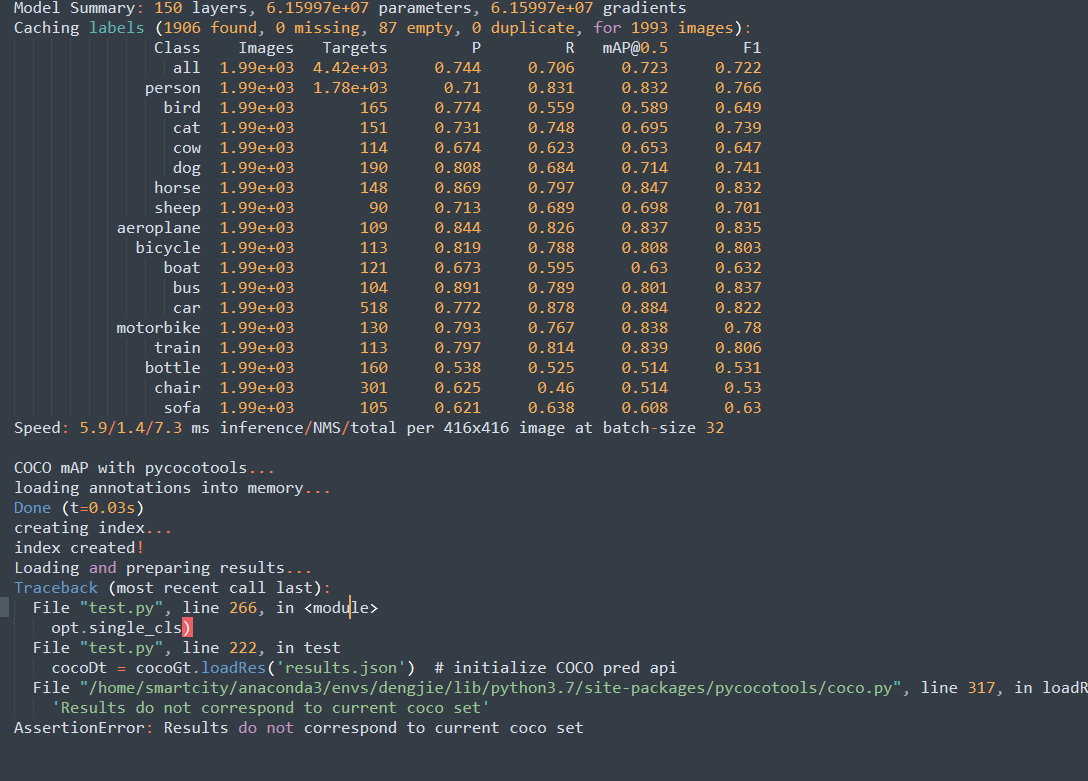
My dataset are orgnized like this(It;s just a VOC2007 dataset) And Now maybe it is a COCO format.
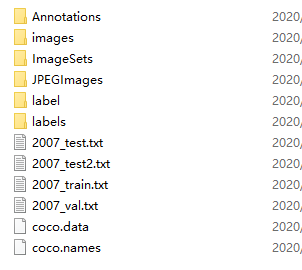
in the file images contains "train2014" &"val2014" in the file labels contains "train2014"&"val2014".Can you help me to handle this error?Thank you very much.
 zzfpython
on 8 Apr 2020
zzfpython
on 8 Apr 2020
Hi, I am sad to encounter this problem. Firslty I will tell what I have done. I just transformed a VOC2007 dataset to a COCO format.No matter how I finshed this process,I train it in a single GPU successfully And it generate "best.pt" in file weights. And then I want to test the perfomance of this "best.pt" using the following code:
python3 test.py --cfg cfg/yolov3.cfg --weights weights/best.pt
Something happens:
My dataset are orgnized like this(It;s just a VOC2007 dataset) And Now maybe it is a COCO format.
in the file images contains "train2014" &"val2014" in the file labels contains "train2014"&"val2014".Can you help me to handle this error?Thank you very much.
maybe you should Specify you data file like --data data/coco.data, alse it has a default values.
PointCloudNiphon
on 8 Apr 2020
@zzfpython your training and testing was successful! The error appears because it is trying to use pycocotools to compute mAP against the COCO dataset. Since your data does not correspond to the COCO dataset the error appears.
This will occur anytime a *.data file is used that contains the word coco, coco2014 or coco2017. If you rename your *.data to voc.data the error will disapear.
https://github.com/ultralytics/yolov3/blob/b6959a2f54dcfb713a7b024255faf3b60e66257f/test.py#L240
BTW, it might be useful to make a tutorial on training VOC data here, as I see it often in the issues.
glenn-jocher
on 8 Apr 2020
Hello,
Many thanks for sharing this amazing repo!
I followed instructions for custom data training but the training results are very bad.
What should I do?
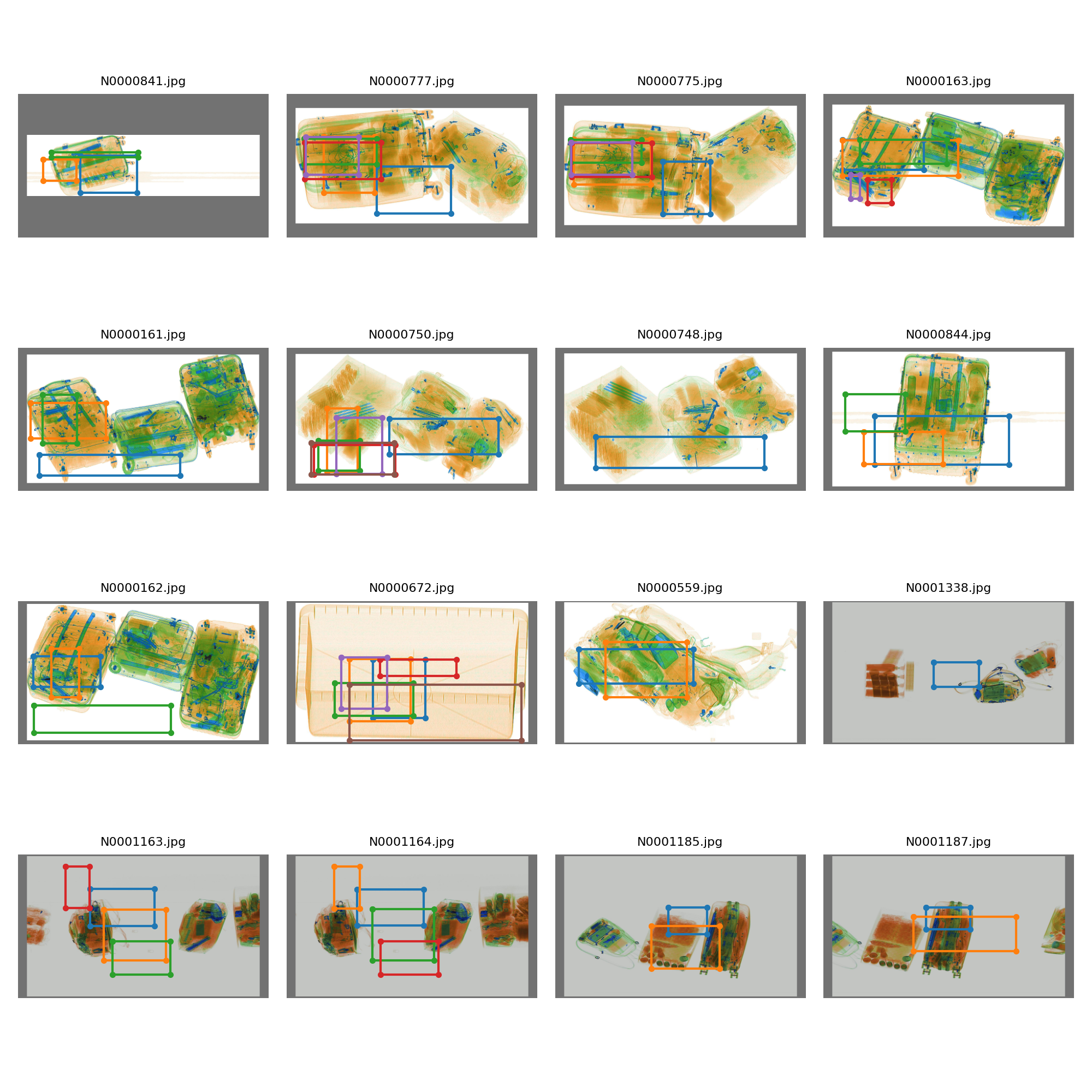
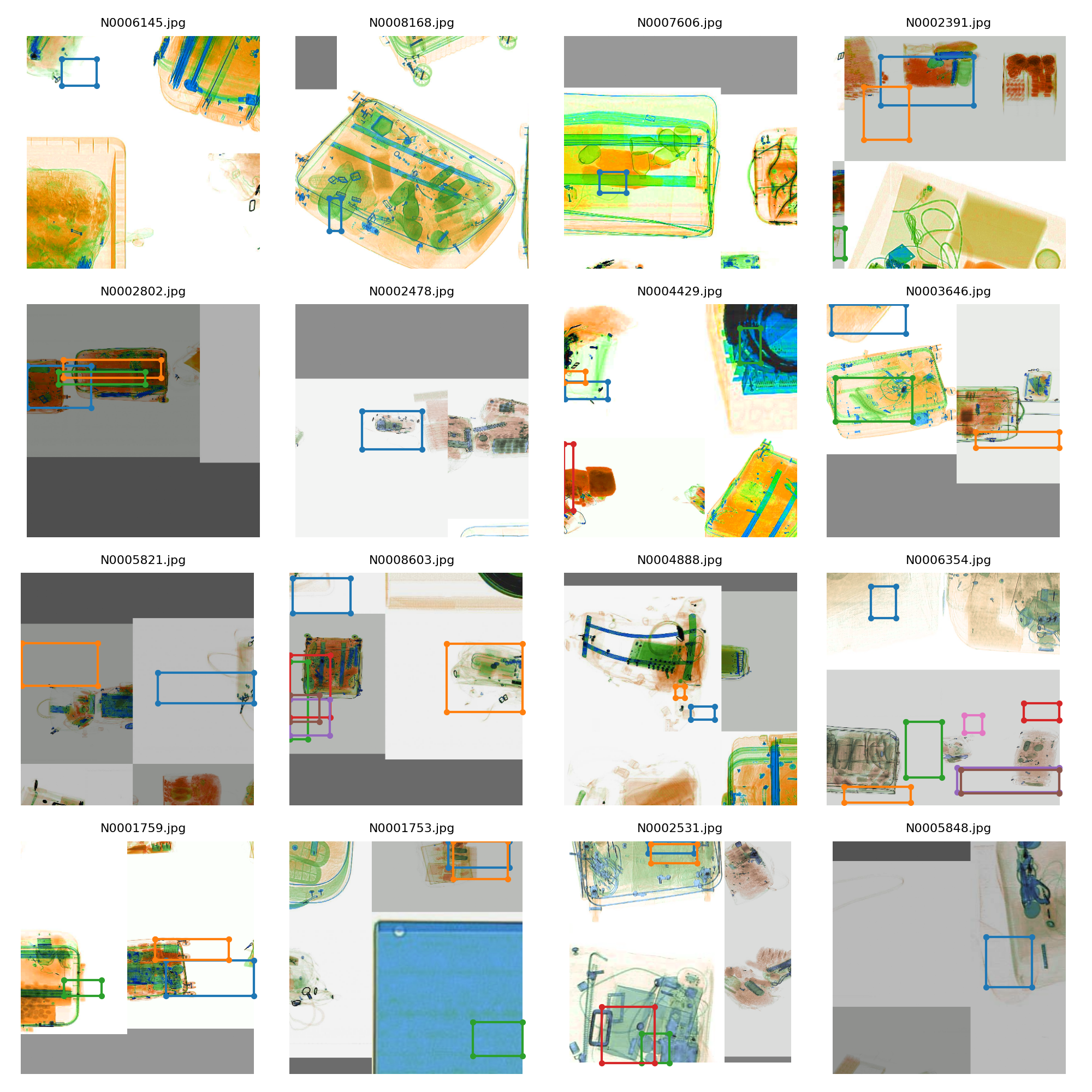
 MakAbdel
on 17 Apr 2020
MakAbdel
on 17 Apr 2020
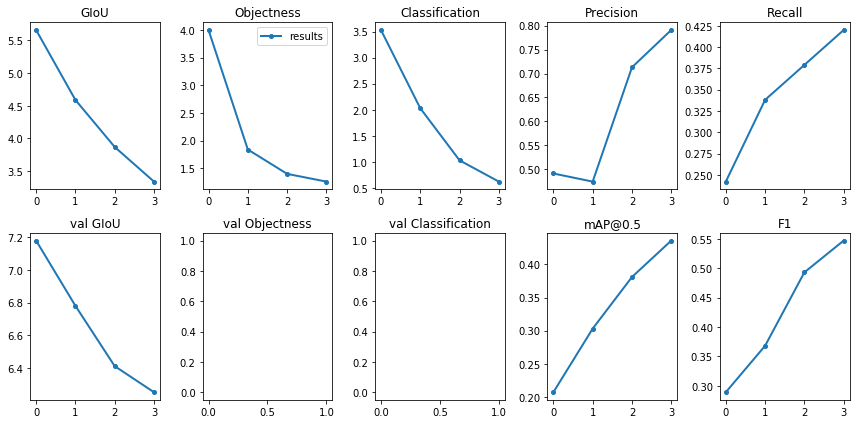
help me! my val classification and val loss is missing...
PointCloudNiphon
on 17 Apr 2020
@MakAbdel hello, thanks for your example screenshots! Your labels are incorrect as far as I can tell, as the bounding boxes do not contain any normal objects. The rectangle images are used for testing, the square mosaic images for training. You need to correct your labels so that the rectangles are about the objects you want to detect. See https://github.com/ultralytics/yolov3#image-augmentation for what the mosaic labels should look like.
@PointCloudNiphon missing points here indicates nan values, check your results.txt. nan's in validation losses is not common, but does not affect your results, and is a non issue for using the trained model for inference, so I wouldn't worry about it, especially since the first few epochs are always unstable.
glenn-jocher
on 17 Apr 2020
and is a non issue for using the trained model for inference, so I wouldn't worry about it, especially since the first few epochs are always unstable.
ok,thanks
PointCloudNiphon
on 18 Apr 2020
You need to correct your labels so that the rectangles are about the objects you want to detect.
I will correct the labels and try again to train the model. Thanks
MakAbdel
on 18 Apr 2020
Hello,
I corrected the labels and trained the model again. But for the test, the results are not labeled with my defined classes. they are labeled with the initial labels of the coco dataset
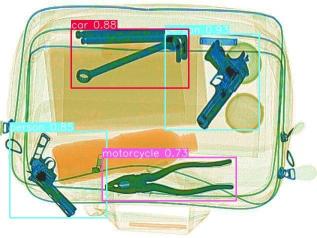
MakAbdel
on 20 Apr 2020
@MakAbdel looks better! Since your objects can rotate you may want to enable the rotation hyperparameter.
To correct your class names you need to point to your *.names file when running detect.py:
python3 detect.py --names your_names_file.names
https://github.com/ultralytics/yolov3/blob/accce6b56532f6242215fbdd8df612e51aae091b/detect.py#L167
glenn-jocher
on 20 Apr 2020
To correct your class names you need to point to your *.names file when running detect.py:
python3 detect.py --names your_names_file.names
it works. Thank you :)
MakAbdel
on 20 Apr 2020
Hi! I have a question. If I'm training a single class detector with a custom dataset, should I feed the model images where the class is not present as well? meaning there would be no labels *.txt files for those? Or should I only feed it images where the one class is present? - I get an error when I try to use all images including the ones without any object present, but I think these should go in there so the model learns "what's not the object". (RuntimeError: cannot perform reduction function max on tensor with no elements because the operation does not have an identity)
 leevyth
on 21 Apr 2020
leevyth
on 21 Apr 2020
@leevyth yes you can include images in your dataset with no corresponding labels file. When caching labels you will see these show up as 'missing'.
Regarding bugs, please supply minimum viable code to reproduce, thank you.
glenn-jocher
on 21 Apr 2020
Hi,
I have a question. how can i check the best exact value (%) of mAP and IoU?
MakAbdel
on 21 Apr 2020
@MakAbdel python3 test.py <args> returns performance metrics including mAP. See https://github.com/ultralytics/yolov3#map
glenn-jocher
on 21 Apr 2020
thank you :)
MakAbdel
on 21 Apr 2020
Hi @glenn-jocher. Thank you for confirming that. they do show up as missing when caching. The output i get is the following:
```
Namespace(accumulate=1, adam=False, arc='default', batch_size=5, bucket='', cache_images=False, cfg='cfg/yolov3-spp-1cls.cfg', data='data/square_mines_all_1cls.data', device='', epochs=273, evolve=False, img_size=[416], multi_scale=False, name='square_mines_1cls', nosave=True, notest=False, rect=False, resume=False, single_cls=True, var=None, weights='weights/yolov3-spp-ultralytics.pt')
Using CUDA Apex device0 _CudaDeviceProperties(name='GeForce GTX 1080', total_memory=8118MB)
Caching labels (28 found, 102 missing, 0 empty, 0 duplicate, for 130 images): 100%|█████████████████████████████████████████████████| 130/130 [00:00<00:00, 39724.58it/s]
Caching labels (28 found, 102 missing, 0 empty, 0 duplicate, for 130 images): 100%|█████████████████████████████████████████████████| 130/130 [00:00<00:00, 45697.24it/s]
Model Summary: 225 layers, 6.25733e+07 parameters, 6.25733e+07 gradients
Using 5 dataloader workers
Starting training for 273 epochs...
 Epoch   gpu_mem      GIoU       obj       cls     total   targets  img_size
 0/272     2.19G      1.86     0.938         0      2.79         1       416: 100%|██████████████████████████████████████████████████| 26/26 [00:09<00:00,  3.69it/s]
           Class    Images   Targets         P         R   [email protected]        F1: 100%|██████████████████████████████████████████████████| 13/13 [00:03<00:00,  6.00it/s]
             all       130        32  6.77e-06    0.0312  1.79e-06  1.35e-05

 Epoch   gpu_mem      GIoU       obj       cls     total   targets  img_size
 1/272     2.41G      2.46      0.12         0      2.58         0       416: 100%|██████████████████████████████████████████████████| 26/26 [00:08<00:00,  3.67it/s]
           Class    Images   Targets         P         R   [email protected]        F1: 100%|██████████████████████████████████████████████████| 13/13 [00:03<00:00,  6.44it/s]
             all       130        32  5.07e-05     0.125  0.000258  0.000101

 Epoch   gpu_mem      GIoU       obj       cls     total   targets  img_size
 2/272     2.41G      2.14    0.0909         0      2.23         2       416: 100%|██████████████████████████████████████████████████| 26/26 [00:08<00:00,  3.64it/s]
           Class    Images   Targets         P         R   [email protected]        F1: 100%|██████████████████████████████████████████████████| 13/13 [00:03<00:00,  6.41it/s]
             all       130        32         0         0         0         0
Model Bias Summary: layer regression objectness classification
89 0.01+/-0.02 -4.68+/-0.03 4.61+/-0.01
101 0.00+/-0.04 -4.71+/-0.02 4.61+/-0.00
113 -0.01+/-0.05 -4.70+/-0.05 4.61+/-0.01
 Epoch   gpu_mem      GIoU       obj       cls     total   targets  img_size
 3/272     2.41G      2.14     0.091         0      2.23         0       416: 100%|██████████████████████████████████████████████████| 26/26 [00:08<00:00,  3.67it/s]
           Class    Images   Targets         P         R   [email protected]        F1: 100%|██████████████████████████████████████████████████| 13/13 [00:03<00:00,  6.28it/s]
             all       130        32         0         0         0         0

 Epoch   gpu_mem      GIoU       obj       cls     total   targets  img_size
 4/272     2.41G      1.55    0.0906         0      1.64         3       416: 100%|██████████████████████████████████████████████████| 26/26 [00:08<00:00,  3.65it/s]
           Class    Images   Targets         P         R   [email protected]        F1: 100%|██████████████████████████████████████████████████| 13/13 [00:03<00:00,  6.13it/s]
             all       130        32  5.12e-05     0.375  2.16e-05  0.000102

 Epoch   gpu_mem      GIoU       obj       cls     total   targets  img_size
 5/272     2.41G      1.71    0.0892         0       1.8         1       416: 100%|██████████████████████████████████████████████████| 26/26 [00:08<00:00,  3.65it/s]
           Class    Images   Targets         P         R   [email protected]        F1: 100%|██████████████████████████████████████████████████| 13/13 [00:03<00:00,  6.14it/s]
             all       130        32  6.38e-05       0.5  4.59e-05  0.000128

 Epoch   gpu_mem      GIoU       obj       cls     total   targets  img_size
 6/272     2.41G       1.4    0.0917         0      1.49         4       416: 100%|██████████████████████████████████████████████████| 26/26 [00:08<00:00,  3.61it/s]
           Class    Images   Targets         P         R   [email protected]        F1:  69%|███████████████████████████████████▎               | 9/13 [00:02<00:00,  4.52it/s]
Traceback (most recent call last):
File "train.py", line 437, in
train() # train normally
File "train.py", line 323, in train
dataloader=testloader)
File "/usr/src/coco/test.py", line 98, in test
output = non_max_suppression(inf_out, conf_thres=conf_thres, iou_thres=iou_thres) # nms
File "/usr/src/coco/utils/utils.py", line 539, in non_max_suppression
conf, j = pred[:, 5:].max(1)
RuntimeError: cannot perform reduction function max on tensor with no elements because the operation does not have an identity
````
Edit: Once in the past I was able to run without any issues using only the images with labels, and that mislead me to think that the cause could be using all the images. However today I ran into the same problem on either case.
leevyth
on 22 Apr 2020
@leevyth ah thank you! It seems the issue has to do with the NMS function. I've not seen this error before. Could you wrap the statement in a try except to catch the error input? This is around line 540 in utils/utils.py:
        try:
            # Detections matrix nx6 (xyxy, conf, cls)
            if multi_label:
                i, j = (x[:, 5:] > conf_thres).nonzero().t()
                x = torch.cat((box[i], x[i, j + 5].unsqueeze(1), j.float().unsqueeze(1)), 1)
            else:  # best class only
                conf, j = x[:, 5:].max(1)
                x = torch.cat((box, conf.unsqueeze(1), j.float().unsqueeze(1)), 1)
        except:
            print(x, box)
            assert False
Sure. On the version that I have "x" is actually called "pred". It outputs:
####################################################################################################
tensor([], device='cuda:0', size=(0, 6), dtype=torch.float16) tensor([], device='cuda:0', size=(0, 4), dtype=torch.float16)
####################################################################################################

Traceback (most recent call last):
  File "/usr/src/coco/utils/utils.py", line 540, in non_max_suppression
    conf, j = pred[:, 5:].max(1)
RuntimeError: cannot perform reduction function max on tensor with no elements because the operation does not have an identity

During handling of the above exception, another exception occurred:

Traceback (most recent call last):
  File "train.py", line 437, in <module>
    train()  # train normally
  File "train.py", line 323, in train
    dataloader=testloader)
  File "/usr/src/coco/test.py", line 98, in test
    output = non_max_suppression(inf_out, conf_thres=conf_thres, iou_thres=iou_thres)  # nms
  File "/usr/src/coco/utils/utils.py", line 546, in non_max_suppression
    assert False
AssertionError
@leevyth so this is odd. You are getting the error because the tensor is empty. If I produce the same shape (0, 6) tensor I get the same error on .max(), but there is an L520 if continue statement above it that is supposed to exit the loop before your L534 error would be reached. What is your OS?
https://github.com/ultralytics/yolov3/blob/82a12e2c8e6afa54115a2bd605bfb8f18ec26f65/utils/utils.py#L519-L536
If you run this code do you see 'will continue'?
import torch

x = torch.zeros(0,6)
if not x.shape[0]:
    print('will continue')
Thank you, I need an updated version, cause I don't have the if continue statement in mine.
I do see "will continue" when I run that code.
I'm running your docker container on an Ubuntu 18.04.4 remote. Locally I have an ubuntu 18.04.4 VM.
leevyth
on 22 Apr 2020
@leevyth ah I got it. I've just updated the latest docker image. The following command should run it with access to your coco folder:
t=ultralytics/yolov3:v0 && sudo docker pull $t && sudo docker run -it --gpus all --ipc=host -v "$(pwd)"/coco:/usr/src/coco $t bash
Thank you! That worked! :) I'm having trouble opening tensorboard though, should I install tensorflow on the container?
root@ab6f2b75bbdf:/usr/src/app# tensorboard --logdir=runs
TensorFlow installation not found - running with reduced feature set.
TensorBoard 2.1.0 at http://ab6f2b75bbdf:6006/ (Press CTRL+C to quit)
@leevyth ah that's a good question. You don't need to install TF in the container, but you probably need some ssh and port trickery. Also FYI GCP (not sure about AWS) instances additionally have ephemeral IP addresses that only last the lifetime of the running instance.
You might try this:
https://leimao.github.io/blog/TensorBoard-On-Docker/
Google Colab makes tensorboard very easy, I've been meaning to update our tutorial notebook with it. In that instance you run a cell with this before running a second cell with python3 train.py:
%load_ext tensorboard
%tensorboard --logdir logs
Can you post an update if you get this working, it would be a good addition to our docker tutorial.
glenn-jocher
on 24 Apr 2020
@glenn-jocher it worked like a charm, thank you for the tip! Simply connecting the container port to the server port was enough. I did the same mapping as Lei Mao suggests, so i added the flag -p 5001:6006 to the docker run command. I can now connect via rdp to the remote server and see tensorboard on localhost:5001.
The only thing left to do now is to improve my results :rofl:
leevyth
on 28 Apr 2020
@leevyth great! I don't know a lot about server ports, do you think you could write a quick step by step tutorial? It would be useful for the wider community here I'm sure, including myself.
glenn-jocher
on 28 Apr 2020
Sure, there's not much more to it than this.
1) I connect to the server via ssh, then run:
docker run -p 5001:6006 --gpus all --ipc=host -it -d -v "$(pwd)"/coco:/usr/src/coco ultralytics/yolov3:v0
-p 5001:6006tensorboard runs by default on port 6006 of the host which in this case is the container. By exposing the port it becomes accessible on the host's 5001 port, and the host's ports are available to any client that can reach the host.the flag
-dleaves the container running detached.I attach my local VSCode session to this running container, using the Remote Container extension. This way I have all the commodities of the ide. It's a good abstraction from all the mumbo jumbo going on. (I can provide the steps to set this up)
2) I run train.py.
3) I run: tensorboard --logdir=runs
4) To see tensorboard, since it's running on the remote container (but now exposed to the remote's 5001 port), you can either connect via rdp or vnc. Either one will do. On the server's desktop then go to: http://localhost:5001
On my case rdp is much faster than vnc, but it will depend on the network, I guess. To do this you need to setup port forwarding for the correspondent connection's port on the remote, and use a rdp/vnc client locally. The exact procedure for forwarding a port differs from router vendor to vendor and even between models. You will have to consult your router's manual and/or the internet for your specific router. Note that every open port poses a potential security risk
Another solution is to use PuTTY, enable X11 forwarding, and open the browser from there.
This was the best way I found to setup everything now during quarentine. :/
leevyth
on 29 Apr 2020
Hi nice repo! helped me a lot in my fun little project @glenn-jocher huge thanks to you!
However now i'm thinking of training yolov3 on stanford40 dataset for action detection tasks - im currently using google colab and training there is quite slow (12 minutes per epoch) so i was thinking using TPU instead.
Have you tried training on TPU? would need you'r help setting it up for TPU
 khawar56
on 30 Apr 2020
khawar56
on 30 Apr 2020
@khawar56 see https://github.com/pytorch/xla
If you get this to work, please update with speed comparisons!
glenn-jocher
on 30 Apr 2020
Each image's label file must be locatable by simply replacing
/images/*.jpgwith/labels/*.txtin its pathname. An example image and label pair would be:
When I test coco2017-test-dev which has no labels ,how can fix it?
 feixiangdekaka
on 26 May 2020
feixiangdekaka
on 26 May 2020
@jveitchmichaelis you test with --save-json, and then send your json to the eval server. See http://cocodataset.org/#upload
glenn-jocher
on 26 May 2020
@glenn-jocher
I want to target only 4classes. Should i train my model with base weights as yolov3-spp-ultralytics.pt and have only images of those 4classes passing 4class names in coco.names and train?
Or
Should i perform transfer learning to the existing model by adding new 4 classes which will be 84classes?
 joel5638
on 18 Jun 2020
joel5638
on 18 Jun 2020
@joel5638 option 1
glenn-jocher
on 18 Jun 2020
@glenn-jocher on what weights did you train the whole 80classes on?
Is it on darknet53.conv74?
joel5638
on 20 Jun 2020
@joel5638 all models here are trained from scratch, which means just randomly initialized weights. no pretrained weights were used.
For starting new projects though I would recommend https://github.com/ultralytics/yolov5.
glenn-jocher
on 20 Jun 2020
@glenn-jocher I want to train my whole cocodataset now with all 80classes. im confused what are the base weights that I should pass
joel5638
on 20 Jun 2020
@joel5638 its very simple. The commands to reproduce are here:
https://github.com/ultralytics/yolov3#reproduce-our-results
glenn-jocher
on 20 Jun 2020
@glenn-jocher I used your framework to train my data set, and the recall rate has been very low, which caused my model performance not to improve.I tried to use other frameworks to train my data to achieve high performance.Then what might be the reason for my low recall rate? Could you please give me some advice
 TAOSHss
on 27 Jun 2020
TAOSHss
on 27 Jun 2020
@glenn-jocher If i want to train on custom dataset, should I compute new anchors?
 alex96295
on 27 Jun 2020
alex96295
on 27 Jun 2020
@glenn-jocher If i want to train on custom dataset, should I compute new anchors?
I tried to calculate the new anchor, but the results were still not very good, and I did not use the new anchor when I used other frames
TAOSHss
on 27 Jun 2020
@TAOSHss thank you for the reply! What do you mean by 'other frames'? I mean, should I use YOLOv3 anchors when using my dataset?
alex96295
on 27 Jun 2020
@alex96295 you probably don't need to re-calculate your anchors, unless you're getting bad training results. Anchors essentially encode the distribution of object shapes in your data, so unless all your objects are really small (maybe you don't expect any large objects in your images), or have a funny aspect ratio (like one side of the bounding box is very small compared to the other), you should be OK with the defaults.
jveitchmichaelis
on 27 Jun 2020
@alex96295 you probably don't need to re-calculate your anchors, unless you're getting bad training results. Anchors essentially encode the distribution of object shapes in your data, so unless all your objects are really small (maybe you don't expect any large objects in your images), or have a funny aspect ratio (like one side of the bounding box is very small compared to the other), you should be OK with the defaults.
Ok I got it thank you! So in general if my images have boxes with 'standard' dimensions, like for example 'people', which are more or less steady in size, changing the anchors is not necessary?
I believed it was a sort of 'have-to-do' when changing the dataset, but your explanation is reasonable to me
alex96295
on 27 Jun 2020
It's definitely not something you should do until you have a baseline model trained, otherwise you won't be able to tell if it improved things or not.
And yeah, the default anchors are generated from COCO (presumably). It's not so much if you have uniformly sized bounding boxes, but if you have vastly different sizes/shapes to objects found in COCO.
jveitchmichaelis
on 27 Jun 2020
@jveitchmichaelis Well it's fine for now. I'll ask again if I have troubles, meanwhile thank you!
alex96295
on 27 Jun 2020
@alex96295 @jveitchmichaelis I might recommend trying yolov5, which has AutoAnchor now. It analyzes your anchors against your labels before training starts, and if it finds that your best possible recall (BPR) is below threshold it will evolve you new anchors and automatically integrate them into your model before training starts.
This is the default behavior in yolov5, no extra settings are required.
glenn-jocher
on 27 Jun 2020
@glenn-jocher According to the tutorial you gave me, I use Coco64.Data to verify. Previously, I didn't get good results with multi-GPU training, but single GPU training is ok, but it seems that the current version is not as good as previous versions.Can you teach me how to use your project for multi-GPU training?
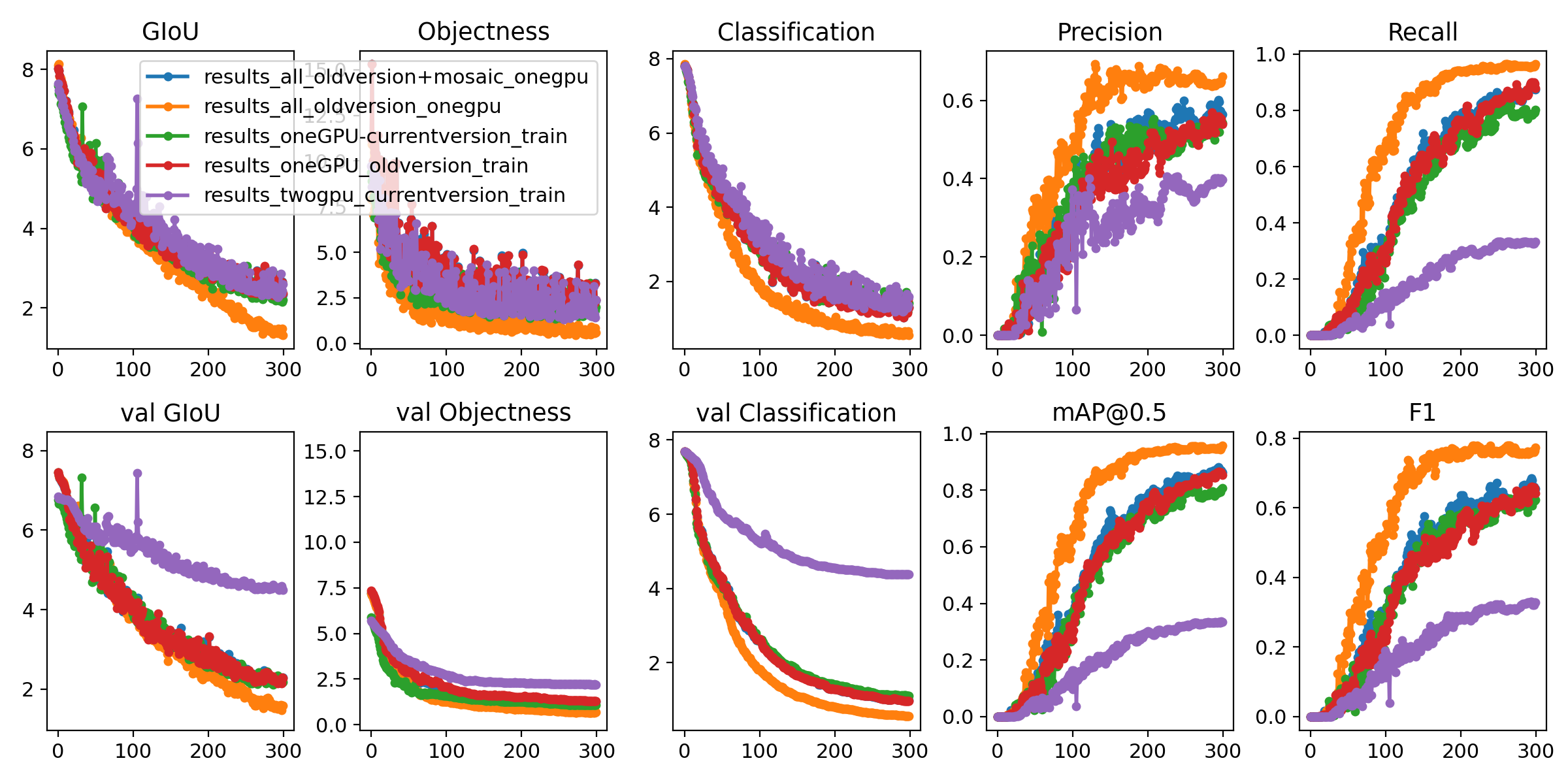
The results above were all in yolov3.cfg and using the pre-trained model darknet53.conv74
TAOSHss
on 29 Jun 2020
@TAOSHss ah, thank you for posting the plots. I suppose green and purple are the most important to compare, current single and double gpu training. Multi-GPU training may need a syncbatchnorm layer to properly synchronize batch-norm running means between GPUs. I do all of my training on single GPU so I can't speak from my own experience here, but that may be something to look into. You may want to try yolov5 as well https://github.com/ultralytics/yolov5, which trains to higher mAPs than this repo.
glenn-jocher
on 29 Jun 2020
Hi
During training my custom data a RuntimeError happend
Traceback (most recent call last):
  File "train.py", line 431, in <module>
    train(hyp)  # train normally
  File "train.py", line 333, in train
    multi_label=ni > n_burn)
  File "C:\Matg\yolov3-master\test.py", line 76, in test
    _ = model(torch.zeros((1, 3, imgsz, imgsz), device=device)) if device.type != 'cpu' else None  # run once
  File "C:\Users\Azad\AppData\Local\Programs\Python\Python37\lib\site-packages\torch\nn\modules\module.py", line 550, in __call__
    result = self.forward(*input, **kwargs)
  File "C:\Matg\yolov3-master\models.py", line 244, in forward
    return self.forward_once(x)
  File "C:\Matg\yolov3-master\models.py", line 312, in forward_once
    x = torch.cat(x, 1)  # cat yolo outputs
RuntimeError: Sizes of tensors must match except in dimension 2. Got 85 and 10
I could not find any way to fix it
Thanks
 matg41
on 4 Jul 2020
matg41
on 4 Jul 2020
Hi
During training my custom data a RuntimeError happend
Traceback (most recent call last): File "train.py", line 431, in <module> train(hyp) # train normally File "train.py", line 333, in train multi_label=ni > n_burn) File "C:\Matg\yolov3-master\test.py", line 76, in test _ = model(torch.zeros((1, 3, imgsz, imgsz), device=device)) if device.type != 'cpu' else None # run once File "C:\Users\Azad\AppData\Local\Programs\Python\Python37\lib\site-packages\torch\nn\modules\module.py", line 550, in __call__ result = self.forward(*input, **kwargs) File "C:\Matg\yolov3-master\models.py", line 244, in forward return self.forward_once(x) File "C:\Matg\yolov3-master\models.py", line 312, in forward_once x = torch.cat(x, 1) # cat yolo outputs RuntimeError: Sizes of tensors must match except in dimension 2. Got 85 and 10I could not find any way to fix it
Thanks
Hi, I got a same error, have you solved it yet?
 ObKsEm
on 13 Jul 2020
ObKsEm
on 13 Jul 2020
Ultralytics has open-sourced YOLOv5 at https://github.com/ultralytics/yolov5, featuring faster, lighter and more accurate object detection. YOLOv5 is recommended for all new projects.

 ** GPU Speed measures end-to-end time per image averaged over 5000 COCO val2017 images using a V100 GPU with batch size 32, and includes image preprocessing, PyTorch FP16 inference, postprocessing and NMS. EfficientDet data from google/automl at batch size 8.
- August 13, 2020: v3.0 release: nn.Hardswish() activations, data autodownload, native AMP.
- July 23, 2020: v2.0 release: improved model definition, training and mAP.
- June 22, 2020: PANet updates: new heads, reduced parameters, improved speed and mAP 364fcfd.
- June 19, 2020: FP16 as new default for smaller checkpoints and faster inference d4c6674.
- June 9, 2020: CSP updates: improved speed, size, and accuracy (credit to @WongKinYiu for CSP).
- May 27, 2020: Public release. YOLOv5 models are SOTA among all known YOLO implementations.
- April 1, 2020: Start development of future compound-scaled YOLOv3/YOLOv4-based PyTorch models.
Pretrained Checkpoints
| Model | APval | APtest | AP50 | SpeedGPU | FPSGPU || params | FLOPS |
|---------- |------ |------ |------ | -------- | ------| ------ |------ | :------: |
| YOLOv5s | 37.0 | 37.0 | 56.2 | 2.4ms | 416 || 7.5M | 13.2B
| YOLOv5m | 44.3 | 44.3 | 63.2 | 3.4ms | 294 || 21.8M | 39.4B
| YOLOv5l | 47.7 | 47.7 | 66.5 | 4.4ms | 227 || 47.8M | 88.1B
| YOLOv5x | 49.2 | 49.2 | 67.7 | 6.9ms | 145 || 89.0M | 166.4B
| | | | | | || |
| YOLOv5x + TTA|50.8| 50.8 | 68.9 | 25.5ms | 39 || 89.0M | 354.3B
| | | | | | || |
| YOLOv3-SPP | 45.6 | 45.5 | 65.2 | 4.5ms | 222 || 63.0M | 118.0B
* APtest denotes COCO test-dev2017 server results, all other AP results in the table denote val2017 accuracy.
* All AP numbers are for single-model single-scale without ensemble or test-time augmentation. Reproduce by python test.py --data coco.yaml --img 640 --conf 0.001
* SpeedGPU measures end-to-end time per image averaged over 5000 COCO val2017 images using a GCP n1-standard-16 instance with one V100 GPU, and includes image preprocessing, PyTorch FP16 image inference at --batch-size 32 --img-size 640, postprocessing and NMS. Average NMS time included in this chart is 1-2ms/img. Reproduce by python test.py --data coco.yaml --img 640 --conf 0.1
* All checkpoints are trained to 300 epochs with default settings and hyperparameters (no autoaugmentation).
** Test Time Augmentation (TTA) runs at 3 image sizes. Reproduce by python test.py --data coco.yaml --img 832 --augment
For more information and to get started with YOLOv5 please visit https://github.com/ultralytics/yolov5. Thank you!
glenn-jocher
on 13 Jul 2020
Hi
During training my custom data a RuntimeError happend
Traceback (most recent call last): File "train.py", line 431, in <module> train(hyp) # train normally File "train.py", line 333, in train multi_label=ni > n_burn) File "C:\Matg\yolov3-master\test.py", line 76, in test _ = model(torch.zeros((1, 3, imgsz, imgsz), device=device)) if device.type != 'cpu' else None # run once File "C:\Users\Azad\AppData\Local\Programs\Python\Python37\lib\site-packages\torch\nn\modules\module.py", line 550, in __call__ result = self.forward(*input, **kwargs) File "C:\Matg\yolov3-master\models.py", line 244, in forward return self.forward_once(x) File "C:\Matg\yolov3-master\models.py", line 312, in forward_once x = torch.cat(x, 1) # cat yolo outputs RuntimeError: Sizes of tensors must match except in dimension 2. Got 85 and 10
I could not find any way to fix it
ThanksHi, I got a same error, have you solved it yet?
Hi
Actually I did.
You need to edit *.cfg file and change "filters" and "classes" numbers to your custom amount as it is mentioned in reedme. Just consider there are three of each and you need to change six numbers.
For example if you want to have one class, filters are equal to 18 and classes are equal to one and you should change them all in the file. I suggest you use "find" in your IDLE.
matg41
on 13 Jul 2020
@glenn-jocher I have received your reply that the map errors of multiple Gpus have been fixed, but I can't get good results. I'm using Coco64 to test and it still doesn't work. You are using Coco64 for this tutorial, and can you give me the results for coco64 with multiple GPU training, which may take more than ten minutes
TAOSHss
on 15 Jul 2020
@glenn-jocher Hello,bro. --weights '' will be remind '' missing,try downloading.... How to solve it? I'm looking forward to your answer

 summeryumyee
on 18 Jul 2020
summeryumyee
on 18 Jul 2020
@glenn-jocher
my command line:python train.py --cfg cfg/yolov3.cfg --data data/voc0712.data --weights weights/yolov3.weights
can run the training program.
but use command line :python train.py --cfg cfg/yolov3.cfg --data data/voc0712.data --weights ''
can't run thr training program.

I made some network improvements, so I need train from scratch. The newest repo is cancelled --weights "?
Thank you. I love you ~~
summeryumyee
on 18 Jul 2020
@summeryumyee pushed a fix for this in https://github.com/ultralytics/yolov3/commit/cec59f12c8b0800d00949ea15511469f667d45dd
glenn-jocher
on 18 Jul 2020
@glenn-jocher Thank you very much!! After I replace the code, using -Weights "gives an error, but using -Weights "" can run the training program. I love you ~
summeryumyee
on 19 Jul 2020
@glenn-jocher oh!!!!! my idol!! Creators of Mosaic data augment!!! I have a question to ask you, this mosaic augment of the repo can blend in with Mixup?I want to simulate overlap and occlusion situation.
Thank you ,my prince charming !
looking forward to your reply.
summeryumyee
on 23 Jul 2020
@summeryumyee haha, thank you. Yes Mosaic and Mixup (and CutMix) can be used together. See https://github.com/ultralytics/yolov5/issues/357 for an example.
glenn-jocher
on 23 Jul 2020
@glenn-jocher I trained with my own data. I only marked 1000 pieces of training for the first time, and then 1000 pieces for the second time. How can I continue to train 1000 pieces of training in the weight of the first training, instead of merging the first data into the second training again? thank you
 hande6688
on 13 Aug 2020
hande6688
on 13 Aug 2020
Hi, Doctor, I have trained 300 times with my data set, map is no longer promoted and I have saved weights.
Then I imported the weight training, and the Map immediately doubled and trained 500 times.
But I want to train a full 800 times at a time and get a high map. What should I do?
Looking forward to your reply.
 Bingcor
on 16 Aug 2020
Bingcor
on 16 Aug 2020
@honghande @Bingcor I would highly recommend starting from YOLOv5 rather than v3.
For more information and to get started with YOLOv5 please visit https://github.com/ultralytics/yolov5. Thank you!
glenn-jocher
on 17 Aug 2020
This issue has been automatically marked as stale because it has not had recent activity. It will be closed if no further activity occurs. Thank you for your contributions.
![github-actions[bot] picture](https://avatars.githubusercontent.com/in/15368?v=4&s=40) github-actions[bot]
on 19 Sep 2020
github-actions[bot]
on 19 Sep 2020
This issue has been automatically marked as stale because it has not had recent activity. It will be closed if no further activity occurs. Thank you for your contributions.
github-actions[bot]
on 8 Nov 2020
Related issues
 Alex1101a
·
5Comments
Alex1101a
·
5Comments
 Rajasekhar06
·
3Comments
Rajasekhar06
·
3Comments
 JiahongXue
·
5Comments
JiahongXue
·
5Comments
 mehrdadazizi72
·
3Comments
mehrdadazizi72
·
3Comments
 NgTuong
·
4Comments
NgTuong
·
4Comments
Most helpful comment
Ultralytics has open-sourced YOLOv5 at https://github.com/ultralytics/yolov5, featuring faster, lighter and more accurate object detection. YOLOv5 is recommended for all new projects.
Pretrained Checkpoints
| Model | APval | APtest | AP50 | SpeedGPU | FPSGPU || params | FLOPS |
|---------- |------ |------ |------ | -------- | ------| ------ |------ | :------: |
| YOLOv5s | 37.0 | 37.0 | 56.2 | 2.4ms | 416 || 7.5M | 13.2B
| YOLOv5m | 44.3 | 44.3 | 63.2 | 3.4ms | 294 || 21.8M | 39.4B
| YOLOv5l | 47.7 | 47.7 | 66.5 | 4.4ms | 227 || 47.8M | 88.1B
| YOLOv5x | 49.2 | 49.2 | 67.7 | 6.9ms | 145 || 89.0M | 166.4B
| | | | | | || |
| YOLOv5x + TTA|50.8| 50.8 | 68.9 | 25.5ms | 39 || 89.0M | 354.3B
| | | | | | || |
| YOLOv3-SPP | 45.6 | 45.5 | 65.2 | 4.5ms | 222 || 63.0M | 118.0B
* APtest denotes COCO test-dev2017 server results, all other AP results in the table denote val2017 accuracy.
* All AP numbers are for single-model single-scale without ensemble or test-time augmentation. Reproduce by
python test.py --data coco.yaml --img 640 --conf 0.001* SpeedGPU measures end-to-end time per image averaged over 5000 COCO val2017 images using a GCP n1-standard-16 instance with one V100 GPU, and includes image preprocessing, PyTorch FP16 image inference at --batch-size 32 --img-size 640, postprocessing and NMS. Average NMS time included in this chart is 1-2ms/img. Reproduce by
python test.py --data coco.yaml --img 640 --conf 0.1* All checkpoints are trained to 300 epochs with default settings and hyperparameters (no autoaugmentation).
** Test Time Augmentation (TTA) runs at 3 image sizes. Reproduce by
python test.py --data coco.yaml --img 832 --augmentFor more information and to get started with YOLOv5 please visit https://github.com/ultralytics/yolov5. Thank you!