Dear dbolya,
I have tried to run train.py and found out that it takes long long time than I expected.
I recently configured my PC with
RTX 2080ti x 4
Intel® Core™ i9-9920X CPU @ 3.50GHz × 24
Asus WS X299 sage/10G
ubuntu 18.04
torch 1.3.0
cuda 10.1
GPU Driver Version: 430.26
args :"--config", "yolact_base_config", "--resume", "weights/yolact_base_54_800000.pth"


Is it a reasonable ETA?
Did you actually spend more than two weeks for training?
 emjay73
All 28 comments
What is your dataset size, batch size and number of iterations? Also possibly the resolution of your images?
 sainatarajan
on 17 Oct 2019
sainatarajan
on 17 Oct 2019
well, I used coco dataset and default configuration values.
emjay73
on 17 Oct 2019
You can add some code in the train.py to show the data loading time and the net forward time, if the data loading time is too long (I think <0.03 should be normal), then there maybe something wrong with your device.
 feiyuhuahuo
on 17 Oct 2019
feiyuhuahuo
on 17 Oct 2019
I tried to estimate the time of each section as follows.
        start_d = time.time()
        for datum in data_loader:
            end_d = time.time()
            print("data loading time:" , ( end_d - start_d))
            ....
            # Forward Pass
            start_inf = time.time()
            out = net(images)
            end_inf =  time.time()
            print("inference time:" , (end_inf - start_inf))
            ...
            start_d = time.time()
and it was like
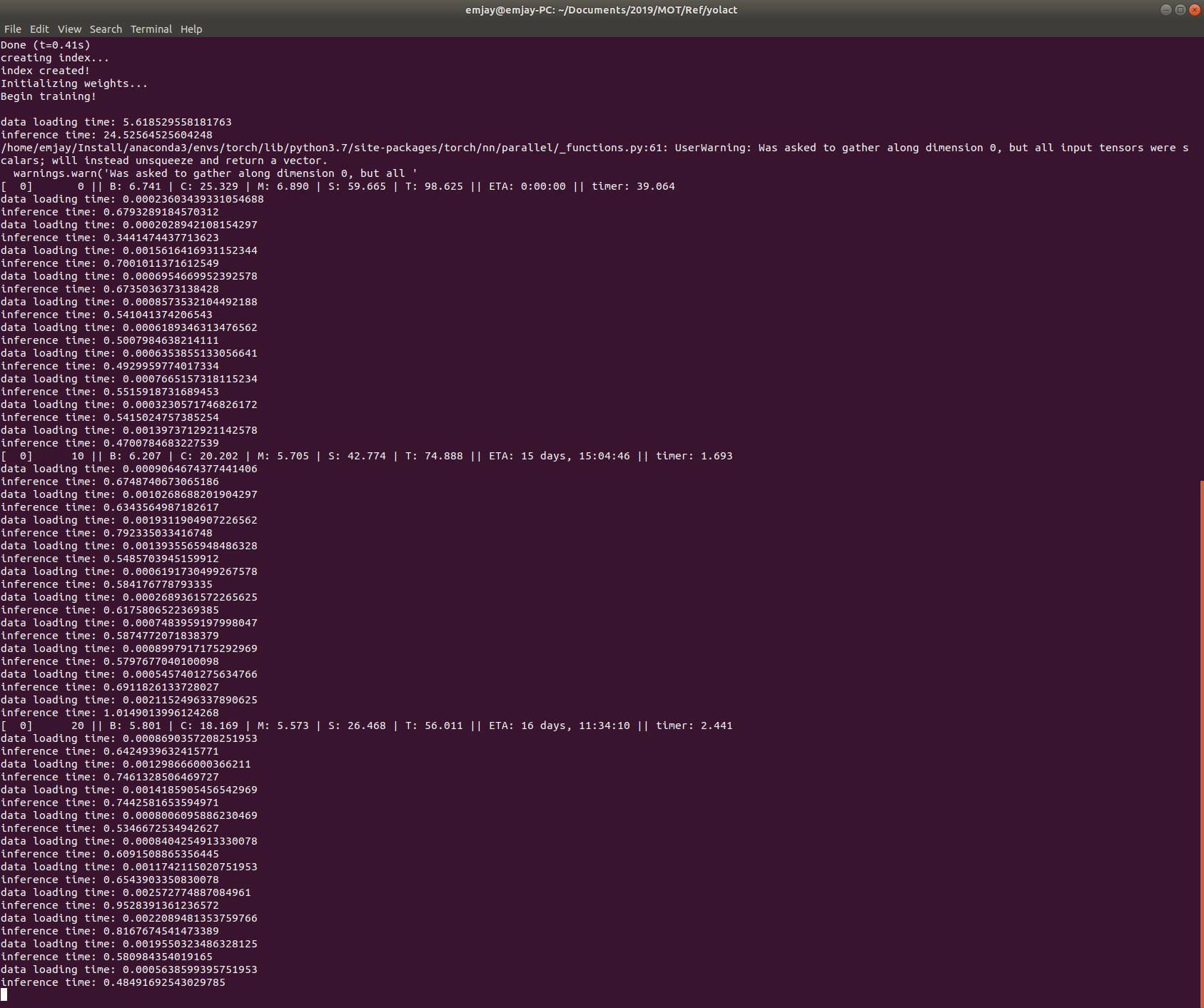
(default batch size == 8)
What happened to my inference time?!?!@@
ps.
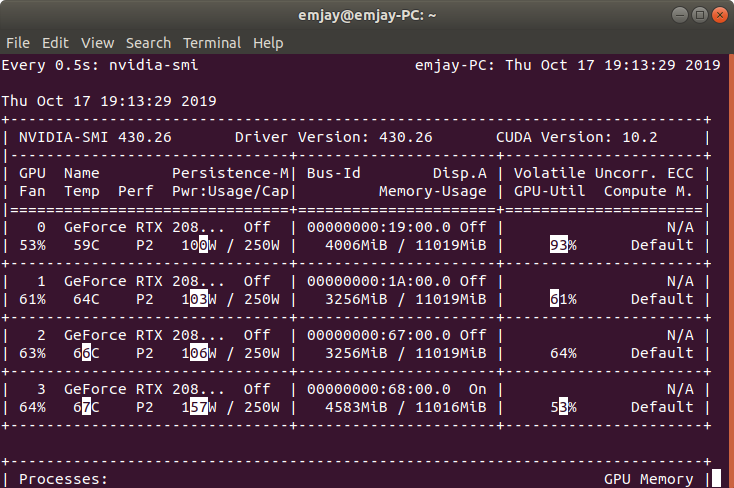
I also checked my GPU utilization.
Although not all of the four GPUs are fully utilized, all of them are working anyway.
emjay73
on 17 Oct 2019
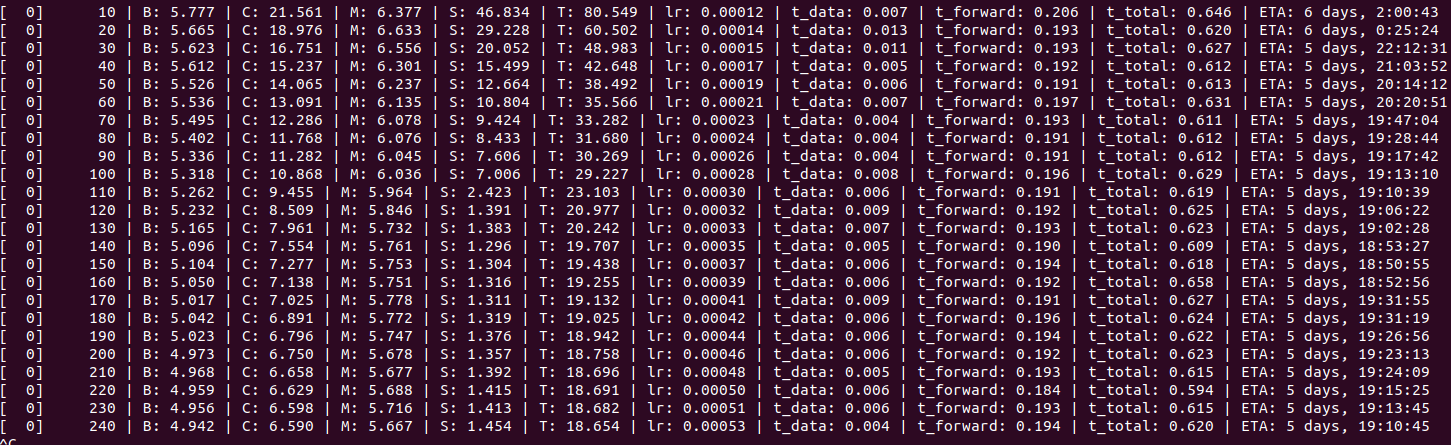
This is my training time with batch_size=6 on one RTX2070. May be you can try to training on one GPU and watch the result.
feiyuhuahuo
on 17 Oct 2019
Yeah YOLACT is currently not very optimized for multiple GPUs. If you want to use 4 gpus, follow these steps (I'll make them automatic in the near future):
- In
data/config.py, inyolact_base_config, divide the total iterations and each learning rate step by the number of GPUs (in your case, 4). - In the same config, add
'lr': coco_base_config.lr * 4,(where 4 is the your number of GPUs). - When training, increase your batch size to 8 times the number of GPUs (so 32 in your case):
--batch_size=32.
Let me know if that pushes the ETA <= 5 days (what it should be for 1 day on a single 2080ti).
 dbolya
on 17 Oct 2019
dbolya
on 17 Oct 2019
@dbolya i have custom data set for 2lakh with 111 classes with different resolutions the max is 4k resolution will the above mentioned help me speed up the process i am having 2 gpu cards 2080ti
 abhigoku10
on 19 Oct 2019
abhigoku10
on 19 Oct 2019
@abhigoku10 It should but it won't be a 2x speed up. I'm trying to work on getting the speed up proportional to the number of GPUs, and I'll be pushing an update within a week about it.
However, if image size is a problem, you could downsample your dataset first so the dataloader doesn't have to do it on the fly (downsample it to the input resolution of the model you're using and make sure to do the same with the masks and boxes).
dbolya
on 19 Oct 2019
When I trained my data, I encountered the following problem,Do you know how to solve it?
Multiple GPUs detected! Turning off JIT.
loading annotations into memory...
Done (t=0.03s)
creating index...
index created!
loading annotations into memory...
Done (t=0.33s)
creating index...
index created!
Initializing weights...
Traceback (most recent call last):
File "/home/uroot/niliuxi_yolact/train.py", line 383, in
train()
File "/home/uroot/niliuxi_yolact/train.py", line 166, in train
yolact_net.init_weights(backbone_path=args.save_folder + cfg.backbone.path)
File "/home/uroot/niliuxi_yolact/yolact.py", line 499, in init_weights
is_script_conv = isinstance(module, torch.jit.WeakScriptModuleProxy) \
AttributeError: module 'torch.jit' has no attribute 'WeakScriptModuleProxy'
Process finished with exit code 1
 niliuxi
on 21 Oct 2019
niliuxi
on 21 Oct 2019
@feiyuhuahuo
In order to utilize a single GPU, I used the following command
CUDA_VISIBLE_DEVICES=0 python train.py --config yolact_base_config
and the ETA is
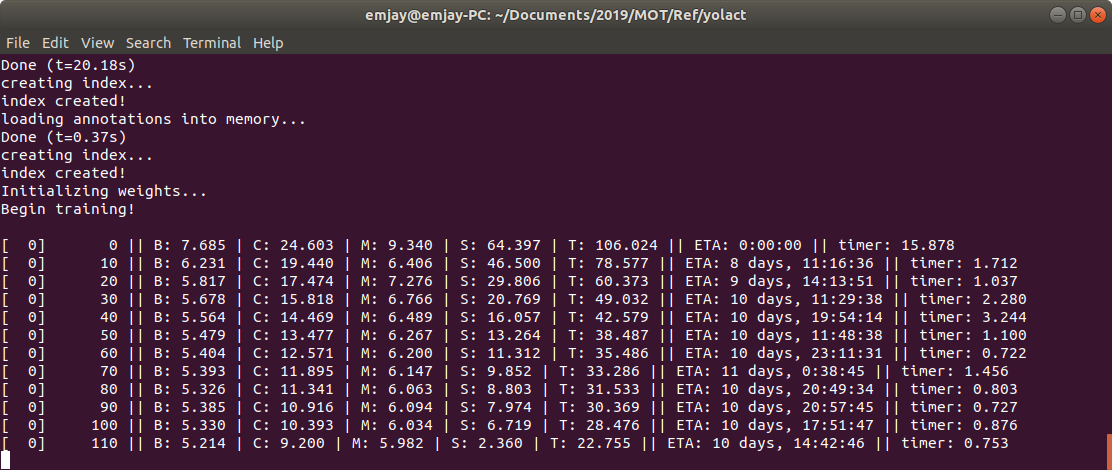
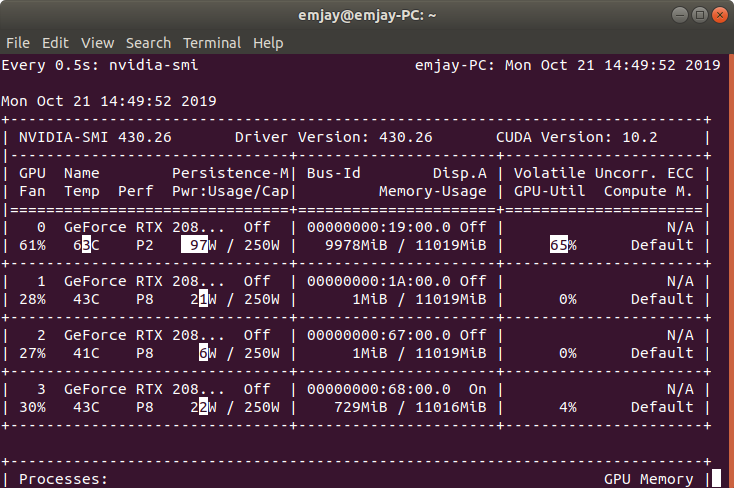
Still !!
what's wrong with my pc??!?!?!?!?!
@dbolya
I changed config.py as follows
yolact_base_config = coco_base_config.copy({
...
'lr_steps': (70000, 150000, 175000, 187500),
'max_iter': 200000,
'lr': coco_base_config.lr * 4,
...
And then I changed train.py as follows
parser.add_argument('--batch_size', default=32, type=int,
help='Batch size for training')
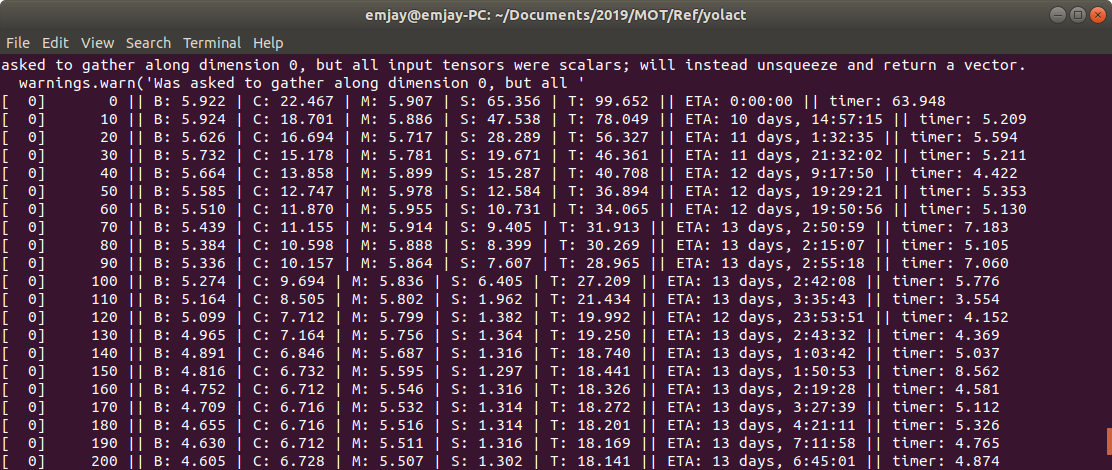
@niliuxi
check this out : https://github.com/dbolya/yolact/issues/175
emjay73
on 21 Oct 2019
Thank you very much for your answer. When I finished the #175 revision, I encountered the following question. Do you know why?
Multiple GPUs detected! Turning off JIT.
loading annotations into memory...
Done (t=0.00s)
creating index...
index created!
loading annotations into memory...
Done (t=0.32s)
creating index...
index created!
Initializing weights...
Begin training!
/home/uroot/anaconda3/envs/maskrcnn_benchmark/lib/python3.7/site-packages/torch/nn/parallel/_functions.py:61: UserWarning: Was asked to gather along dimension 0, but all input tensors were scalars; will instead unsqueeze and return a vector.
warnings.warn('Was asked to gather along dimension 0, but all '
[ 0] 0 || B: 6.676 | C: 17.717 | M: 5.157 | S: 5.621 | T: 35.171 || ETA: 0:00:00 || timer: 18.520
Computing validation mAP (this may take a while)...
Traceback (most recent call last):
File "/home/uroot/niliuxi_yolact/train.py", line 384, in
train()
File "/home/uroot/niliuxi_yolact/train.py", line 307, in train
compute_validation_map(yolact_net, val_dataset)
File "/home/uroot/niliuxi_yolact/train.py", line 377, in compute_validation_map
eval_script.evaluate(yolact_net, dataset, train_mode=True)
File "/home/uroot/niliuxi_yolact/eval.py", line 855, in evaluate
img, gt, gt_masks, h, w, num_crowd = dataset.pull_item(image_idx)
File "/home/uroot/niliuxi_yolact/data/coco.py", line 145, in pull_item
target = self.target_transform(target, width, height)
File "/home/uroot/niliuxi_yolact/data/coco.py", line 39, in __call__
label_idx = self.label_map[obj['category_id']] - 1
KeyError: 34
Process finished with exit code 1
niliuxi
on 21 Oct 2019
@niliuxi
I never encountered such error but it happens when a dictionary does not have an indicating key value.
Which means, self.label_map does not have a key named '34' which is obviously gotten from obj['category_id'].
In my case, since I'm using coco dataset, self.label_map equals COCO_LABEL_MAP in config.py.
Check where your label_map comes from and your arguments for configuration.
ex ) python train.py --config yolact_base_config
emjay73
on 21 Oct 2019
@emjay73
I have no idea. Is there any other process running when you are training on one single GPU. There's another 729M memory used in GPU3. And what's the 'Processes' which is below the GPU info looks like? This is my 'nvidia-smi' with batch_size=8, all memory was used together on one GPU.
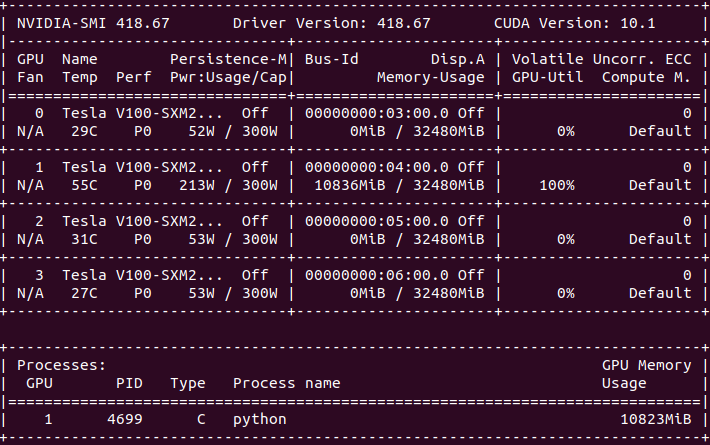
@dbolya

I noticed a Dataparallel warning here, what's the cause of this, will this effect the training performance?
feiyuhuahuo
on 21 Oct 2019
@niliuxi Sounds like you configured your dataset improperly. I suggest setting 'label_map' to None. But, you should be keeping your replies about this in the issue you made about this not in this unrelated one.
@emjay73 Btw is this on a custom dataset? Images are rescaled on the CPU during training, so if you're using like 4k images, then that can be a significant CPU drain that the GPUs might have to weight for. If you're using a custom dataset, can you try training on COCO to see if your stats differ? If so, you can pre-rescale your images and annotations to be the size of the model's input (550x550).
Otherwise, I'd test training COCO on a clean clone of YOLACT. If there's still something wrong, it might be with your CPU (or how busy it is) or how you have your environment set up.
@feiyuhuahuo The DataParallel warnings are nothing to worry about (I have them fixed locally and will push it out with the rest of the optimizations later, they do not affect speed). They just mean that the result of computation on each gpu was a scalar (i.e., the loss values) and it stacked them into a vector, which idk why that's a warning because what else would you expect from DataParallel? I'm really puzzled why they even included that warning.
dbolya
on 21 Oct 2019
@niliuxi
I never encountered such error but it happens when a dictionary does not have an indicating key value.
Which means, self.label_map does not have a key named '34' which is obviously gotten from obj['category_id'].
In my case, since I'm using coco dataset, self.label_map equals COCO_LABEL_MAP in config.py.
Check where your label_map comes from and your arguments for configuration.
ex ) python train.py --config yolact_base_config
I also use the coco dataset. I only have one class. The label_map is set to None. How should I change my COCO_LABEL_MAP?
niliuxi
on 21 Oct 2019
@niliuxi Again, own thread, but if you are restricting COCO to just person for instance, there are a couple pitfalls to avoid:
- The proper way to specify a tuple of 1 element in python is
('person',). If you do('person')that will resolve to a list of each character, which is not what you want (so check yourclass_names). - You have to modify the coco jsons to remove all annotations that are not for your given class. So in the person case, it would be to remove all
'annotations'elements withann['category_id'] != 1(for any other class, use that class's id). - Finally, if the class you're using isn't person, set label_map to
{ 1: id }whereidis the category id that you didn't remove above (setting it toNonewill automatically generate{ 1: 1 }).
dbolya
on 21 Oct 2019
@dbolya
Well, It actually was the COCO dataset. But I downloaded the dataset in HDD while the code was executed in SSD. In order to run the code using COCO dataset saved in a different location other than ./data/coco, I modified the config.py as follows
coco2017_dataset = dataset_base.copy({
'name': 'COCO 2017',
'train_images': '/media/emjay/DB/public/COCO/train2017',
'valid_images': '/media/emjay/DB/public/COCO/val2017',

# 'train_info': './data/coco/annotations/instances_train2017.json',
# 'valid_info': './data/coco/annotations/instances_val2017.json',
'train_info': '/media/emjay/DB/public/COCO/annotations_trainval2017/instances_train2017.json',
'valid_info': '/media/emjay/DB/public/COCO/annotations_trainval2017/instances_val2017.json',

'label_map': COCO_LABEL_MAP
})
As I mentioned earlier, this is a newly configured computer, so as you said there could be compatibility issues between each component such as CPU and GPU.
As you recommended, I'll try what you suggested, a clean start!
Please wish me luck.
@feiyuhuahuo
Quick question, what was your environmental configuration with RTX 2070 GPU?
Especially, OS type, OS version, GPU driver version, CUDA version, and pythorch version
emjay73
on 21 Oct 2019
@niliuxi Again, own thread, but if you are restricting COCO to just person for instance, there are a couple pitfalls to avoid:
- The proper way to specify a tuple of 1 element in python is
('person',). If you do('person')that will resolve to a list of each character, which is not what you want (so check yourclass_names).- You have to modify the coco jsons to remove all annotations that are not for your given class. So in the person case, it would be to remove all
'annotations'elements withann['category_id'] != 1(for any other class, use that class's id).- Finally, if the class you're using _isn't_ person, set label_map to
{ 1: id }whereidis the category id that you didn't remove above (setting it toNonewill automatically generate{ 1: 1 }).
I don't quite understand the second point you said. You are referring to the json file in the annotations folder?There is still a bit of confusion. I want to ask you. When I use labelme for labeling, different people are named person1. person2,..., is this naming method correct, so I named my category id>1
niliuxi
on 21 Oct 2019
@emjay73
My environment for RTX2070: ubuntu18.04, nvidia-smi: 415.27, CUDA:10.0, pytorch: 1.1.
feiyuhuahuo
on 21 Oct 2019
@emjay73 Try running in Google colab or any other similar system.
sainatarajan
on 21 Oct 2019
@niliuxi Check your other post (#184). I'll stop responding to you here, but I've responded in the issue you opened earlier.
dbolya
on 21 Oct 2019

Clean start was not a solution. :(
As a next step, I'm going to imitate @feiyuhuahuo 's settings.
Dear @feiyuhuahuo , would you please let me know your CuDNN version too?
emjay73
on 22 Oct 2019
I finally solved the problem!!!!!
It was because of my bios version!!
For those who struggle:
- Download BIOS file
Thanks to my coworker, I updated my mainboard bios with a file downloaded from the site below.
Version 2002(2019/10/18)
https://www.asus.com/us/Motherboards/WS-X299-SAGE-10G/HelpDesk_BIOS/
Move BIOS file
I moved the downloaded cap file into admin:///boot/efi/EFI/ubuntu/fw so that I can find the bios file from bios mode.Update BIOS
After the reboot, I followed the steps from the site below.https://www.asus.com/support/FAQ/1008859/
After the update, my ETA now is 2 days!!!!
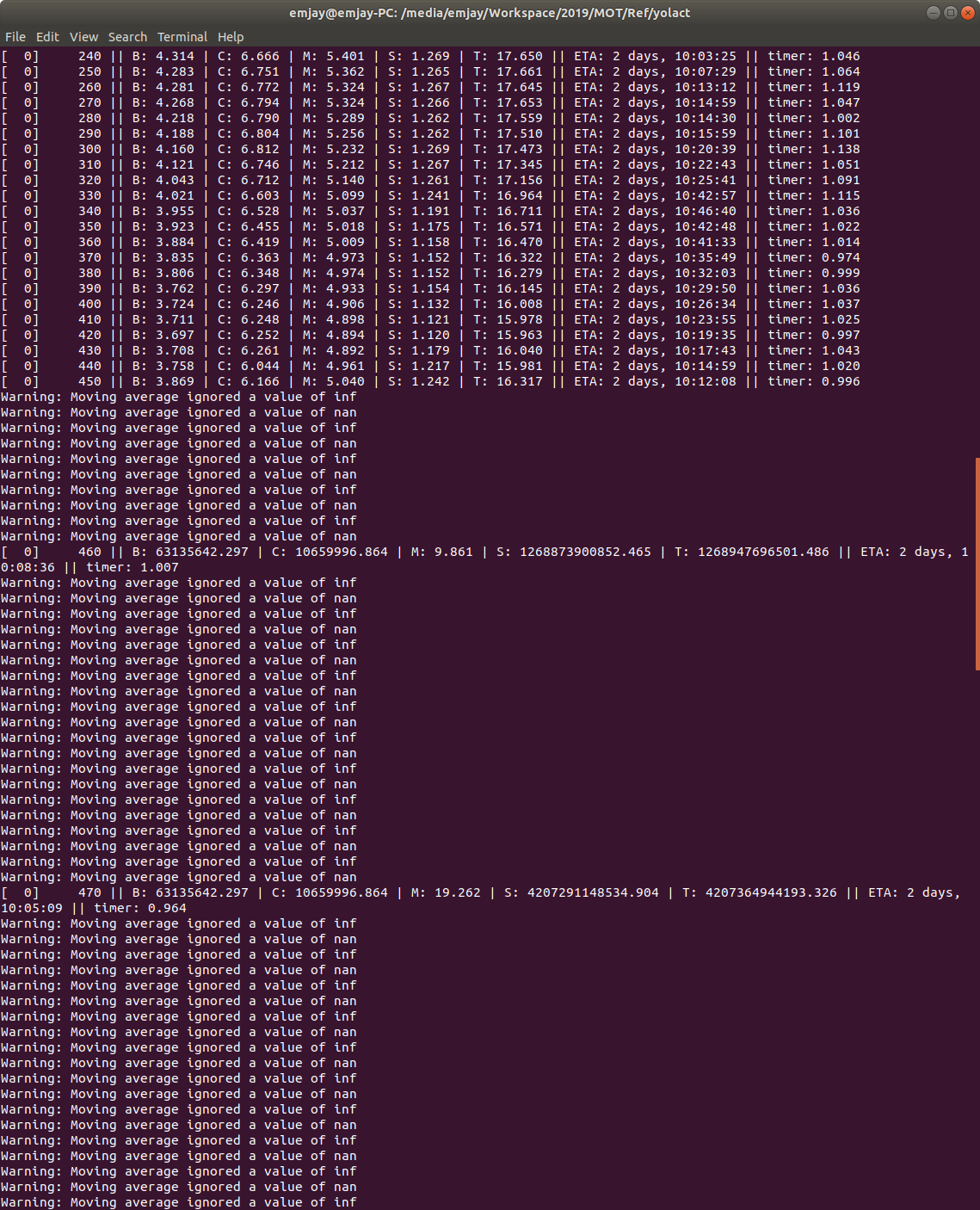
But I found out there are some messages saying,
Warning: Moving average ignored a value of inf/nan
Is that OK?
If it is not, let me know so that I can open a new thread for this.
emjay73
on 22 Oct 2019
Ok that's an interesting solution, but actually makes a lot of sense. The i9-9*x series was actually a refresh of an older chipset that used the X299 platform. Old motherboards could work with this refresh, but only after a bios update. Most boards have the bios update preinstalled before shipping, but I guess yours was older stock or something (I actually just built a server with this same potential issue, but my bios was updated).
And yeah the nan is definitely a problem (your loss, as you can see, exploded). If it doesn't go away after restarting training (most of the time a random restart will fix it), open a new issue for it with your training parameters.
Glad you got that fixed, and good to know for future troubleshooting! I guess I'll close this issue now.
dbolya
on 22 Oct 2019
Bios that I downloaded was updated only 4 days ago. So who knows?
I regret not to check my original bios version.
After a restart, it seems fine till now.
Thank you for your instant responses and kindness.
I hope I can see you at ICCV!
emjay73
on 22 Oct 2019
I'll be there :^)
dbolya
on 22 Oct 2019
By the way @emjay73 I pushed those multi-gpu optimizations and an auto-scaler to scale the parameters automatically. Check out the Multi-GPU training section of the readme and see if it improves training speed for you (even after you fixed this issue).
dbolya
on 25 Oct 2019
I would love that.
However, I'll be at ICCV for a whole week so it will take some time to check that out.
emjay73
on 26 Oct 2019
Related issues
 serhatiscan
·
5Comments
serhatiscan
·
5Comments
 noobgrow
·
4Comments
noobgrow
·
4Comments
 davodogster
·
10Comments
davodogster
·
10Comments
 sree3333
·
10Comments
abhigoku10
·
6Comments
sree3333
·
10Comments
abhigoku10
·
6Comments
Most helpful comment
@niliuxi Again, own thread, but if you are restricting COCO to just person for instance, there are a couple pitfalls to avoid:
('person',). If you do('person')that will resolve to a list of each character, which is not what you want (so check yourclass_names).'annotations'elements withann['category_id'] != 1(for any other class, use that class's id).{ 1: id }whereidis the category id that you didn't remove above (setting it toNonewill automatically generate{ 1: 1 }).