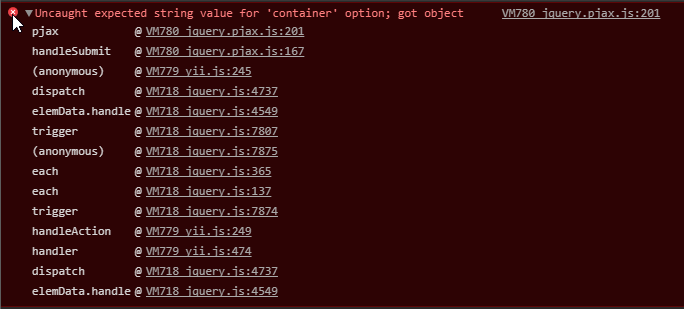
Yii2: Pjax submit() error: Uncaught expected string value for 'container' option; got object
What steps will reproduce the problem?
Clicking on a link with yii.js data-method form inside a Pjax widget like in the following code:
Pjax::begin();
echo Html::a('test', ['test'], ['class' => 'btn btn-primary', 'data' => ['method' => 'post', 'pjax' => true]]);
Pjax::end();
Will result in the following exception:
| Q | A
| ---------------- | ---
| Yii version | 2.0.12
| yii2-pjax version | 2.0.7
| PHP version | 7.1
| Operating system | Windows
 anuark
All 7 comments
Should be already fixed by https://github.com/yiisoft/yii2/commit/7e681b4a5620b133ed7b68388845a7b89279e193
 SilverFire
on 6 Oct 2017
SilverFire
on 6 Oct 2017
Could you check with yiisoft/yii2:dev-master?
SilverFire
on 6 Oct 2017
@SilverFire it works on dev-master thanks. On a side note is there a way for my project to rollback yii2-pjax to use 2.0.6 instead of 2.0.7? I can't use dev-master on production site, I have tried adding on require "bower-asset/yii2-pjax": "2.0.6" in composer.json but I get
The requested package bower-asset/yii2-pjax 2.0.6 exists as bower-asset/yii2-pjax[2.0.7, v1.8.0-patch1, dev-heroku, dev-master, 2.0.7] but these are rejected by your constraint.
Am I doing this wrong? or is there no way to install version 2.0.6 of yii2-pjax?
Thanks.
anuark
on 7 Oct 2017
This way is absolutely correct, I've checked it. You can try to do it on clear application template to make sure it works.
Sometimes composer fails to resolve dependencies, especially when you rollback a package. Try to remove vendor dir and run composer install. Then, if fails, remove vendor and composer.lock and run composer install.
SilverFire
on 7 Oct 2017
Thank you @SilverFire that worked.
anuark
on 7 Oct 2017
I'm getting this error too.
I have delete vendor dir and composer.lock file. In "composer.json" I change yiisoft/yii2 branch to :dev-master. Then I've run "composer install".
In sum I have Jquery 3*, Pjax 2.0.7.1, but error is still there.
Uncaught expected string value for 'container' option; got object on click Pjax links.
What wrong am I doing? And what is stable version of yii2+yii2-pjax?
 papalapa
on 31 Oct 2017
papalapa
on 31 Oct 2017
I am use these to fix Uncaught expected string value for 'container' option; got object on Pjax links
Pjax::begin();
echo Html::a('test', 'javascript:void(0)', ['class' => 'btn btn-primary', 'onclick' => '$.pjax({ url: "/users/profile", container: "#pjax-container" })']);
Pjax::end();
 bamstwn
on 21 Dec 2018
bamstwn
on 21 Dec 2018
Related issues
 kminooie
·
3Comments
kminooie
·
3Comments
 psfpro
·
3Comments
psfpro
·
3Comments
 sahifedp
·
3Comments
sahifedp
·
3Comments
 jpodpro
·
3Comments
jpodpro
·
3Comments
 wartur
·
3Comments
wartur
·
3Comments
Most helpful comment
This way is absolutely correct, I've checked it. You can try to do it on clear application template to make sure it works.
Sometimes composer fails to resolve dependencies, especially when you rollback a package. Try to remove
vendordir and runcomposer install. Then, if fails, removevendorandcomposer.lockand runcomposer install.