I'm using the latest git version of yew, my main component just renders this:
        html! {
            <svg width="500", height="400", viewBox="0 0 800 500", preserveAspectRatio="none",>
                <rect x="0", y="0", width="400", height="500", fill="none", stroke="yellow", stroke-width="2", />
                <rect x="0", y="0", width="800", height="500", style="fill: none; stroke: black; stroke-width: 2;", />
                <rect x="0", y="0", width="300", height="100", style="fill: blue;", />
                <rect x="10", y="200", width="300", height="100", style="fill: red;", />
            </svg>
        }
Here you can see it working in a fiddle.
But when I render it with yew, the svg has width 0 and height 0, and when I use chrome dev tools to edit the width and height, I see that all the rect's also have size 0x0.
Btw, when I right-click on the svg node in the "Elements" view in dev tools, then "Edit as HTML", then add a blank line at the end (to make it cause a re-render), then hit ctrl-enter to save, it renders the SVG with its correct size, like in the fiddle!
Why isn't it rendered with correct size by yew? :)
 Boscop
All 9 comments
Sorry for the low effort reply, but I was able to get svgs working with the following code:
// load the svg file into the compiled binary via include_str!()
const LOADING_SVG: &'static str = include_str!("../inlined_assets/Loading.svg");

struct LoadingIcon (&'static str);
impl<U> Renderable<U> for LoadingIcon
    where
        U: Component
{
    fn view(&self) -> Html<U> {
        let js_svg = js! {
            var div = document.createElement("div");
            div.innerHTML = @{self.0.to_string()};
            return div;
        };
        let node = Node::try_from(js_svg).expect("convert js_svg");
        let vnode = VNode::VRef(node);
        vnode
    }
}
As far as I'm aware, the html! macro doesn't work well with svg, instead you need to do the above to get it to work. Maybe @DenisKolodin could explain more.
 hgzimmerman
on 20 Jul 2018
hgzimmerman
on 20 Jul 2018
Yes, I was also doing the above and it worked, but I thought it should also work with the way I wrote it with tags in html!{}, right?
Or am I doing anything wrong in the way I'm writing the svg tags there?
Boscop
on 21 Jul 2018
I'm having the same problem. Using the js! macro does not work for my case since I want to change the fill color dynamically.
 tiberiusferreira
on 24 Jul 2018
tiberiusferreira
on 24 Jul 2018
@tiberiusferreira I'm generating the whole SVG dynamically, with a rect for every midi note in the midi clip I'm rendering. Just use a function to compute the SVG String before you embed it in the js!{} (and pass the relevant data (e.g. fill color) as args) :)
(Or just inline that computation if it's readable enough.)
Boscop
on 24 Jul 2018
@Boscop This is the way I use svg. Just thought I'd share.
use stdweb::web::{INode, Node, IElement, Element};
use stdweb::unstable::TryFrom;
use yew::virtual_dom::VNode;

impl Renderable<Model> for Model {
    fn view(&self) -> Html<Self> {
       // This could be moved into a function
        let svg = Element::try_from(js! {
            return document.createElementNS("http://www.w3.org/2000/svg", "svg");
        }).unwrap();

        svg.set_attribute("style", "border: 1px solid black").unwrap();
        svg.set_attribute("width", "600").unwrap();
        svg.set_attribute("height", "250").unwrap();

        let circle = Element::try_from(js! {
            return document.createElementNS("http://www.w3.org/2000/svg", "circle");
        }).unwrap();

        circle.set_attribute("cx", "50").unwrap();
        circle.set_attribute("cy", "50").unwrap();
        circle.set_attribute("r", "50").unwrap();

        svg.append_child(&circle);

        html! {
            <div>
                {VNode::VRef(Node::from(svg))}
            </div>
        }
    }
}
 fattenap
on 29 Jul 2018
fattenap
on 29 Jul 2018
This is how I'm currently using it:
impl Renderable<Model> for Model {
    fn view(&self) -> Html<Self> {
        let svg = self.generate_svg_as_string();
        let js_svg = js! {
            var div = document.createElement("div");
            div.innerHTML = @{svg};
            div.style.width = "100%";
            div.style.height = "100%";
            return div;
        };
        let node = Node::try_from(js_svg).expect("convert js_svg");
        let vnode = VNode::VRef(node);
        html! {
            <div class="song_view",>
                <div style="position: relative;",>
                    <div class="song_name",>{ &self.song_name }</div>
                </div>
                { vnode }
            </div>
        }
    }
}
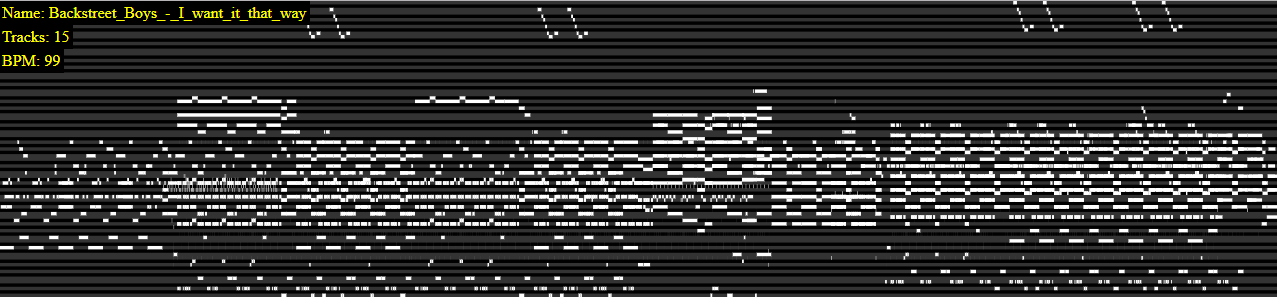
Boscop
on 30 Jul 2018
Any news to this? What would be a possible way to make !htmlwork with svg? I am new to rust+yew and want to demonstrate it's usage by a small data logging app where i definitely want to use svg+events on it (onmouseover etc.).
 fstuess
on 7 Mar 2019
fstuess
on 7 Mar 2019
These hacks are a bit awkward and it seems like it breaks the dom reconciliation stuff. I have a function that uses document.createElementNS("http://www.w3.org/2000/svg", "svg") to create an svg element and return it as an yew::Html<_>, but the svg element in the dom is destroyed and recreated every time the component changes even though the svg doesn't.
I assume I can work around this by having a component for svgs so yew can tell that the svg component hasn't changed and not ask for an update; but even if that works this is like bandaging a bandage. :(
 sqwishy
on 21 Mar 2019
sqwishy
on 21 Mar 2019
Related issues
 djahandarie
·
3Comments
djahandarie
·
3Comments
 agausmann
·
3Comments
agausmann
·
3Comments
 thienpow
·
3Comments
thienpow
·
3Comments
 wldcordeiro
·
4Comments
wldcordeiro
·
4Comments
 alun
·
4Comments
alun
·
4Comments
Most helpful comment
Any news to this? What would be a possible way to make
!htmlwork with svg? I am new to rust+yew and want to demonstrate it's usage by a small data logging app where i definitely want to use svg+events on it (onmouseover etc.).