Yetiforcecrm: SQLSTATE[HY000]: General error: 1835 Malformed communication packet The SQL being executed was: SELECT * FROM `vtiger_tab`
Hi
I got this error without make any aparently changes in the system.
I can't access any Yeti site, not even to login page.
 alexynadamas
All 17 comments
Hi @alexynadamas ,
detailed info are essential.
It looks like a MySql problem: what's your MySql server version?
without login you can provide (cleaned) PHP logs.
if you cannot login, pls skip login-required steps
YF Logs - How To
- disable (temporarily) the chat module, in Standard modules / Modules – Installation
- set (temporarily) CRON execution to 5 minutes or more
- in config/Debug.php set
- $LOG_TO_FILE = true;
- $LOG_LEVELS = false;
- reset contents for the files:
- cache/logs/system.log
- php_errors.log
- reproduce the issue/bug/problem
- upload here the files
- cache/logs/system.log
- php_errors.log
Browser console - How To - https://support.shortpoint.com/support/solutions/articles/1000222881-save-browser-s-console-file
- open browser console
- switch to "Console" tab
- clean console
- reproduce the issue/bug/problem
- save console contents in a file
- upload here the just created file
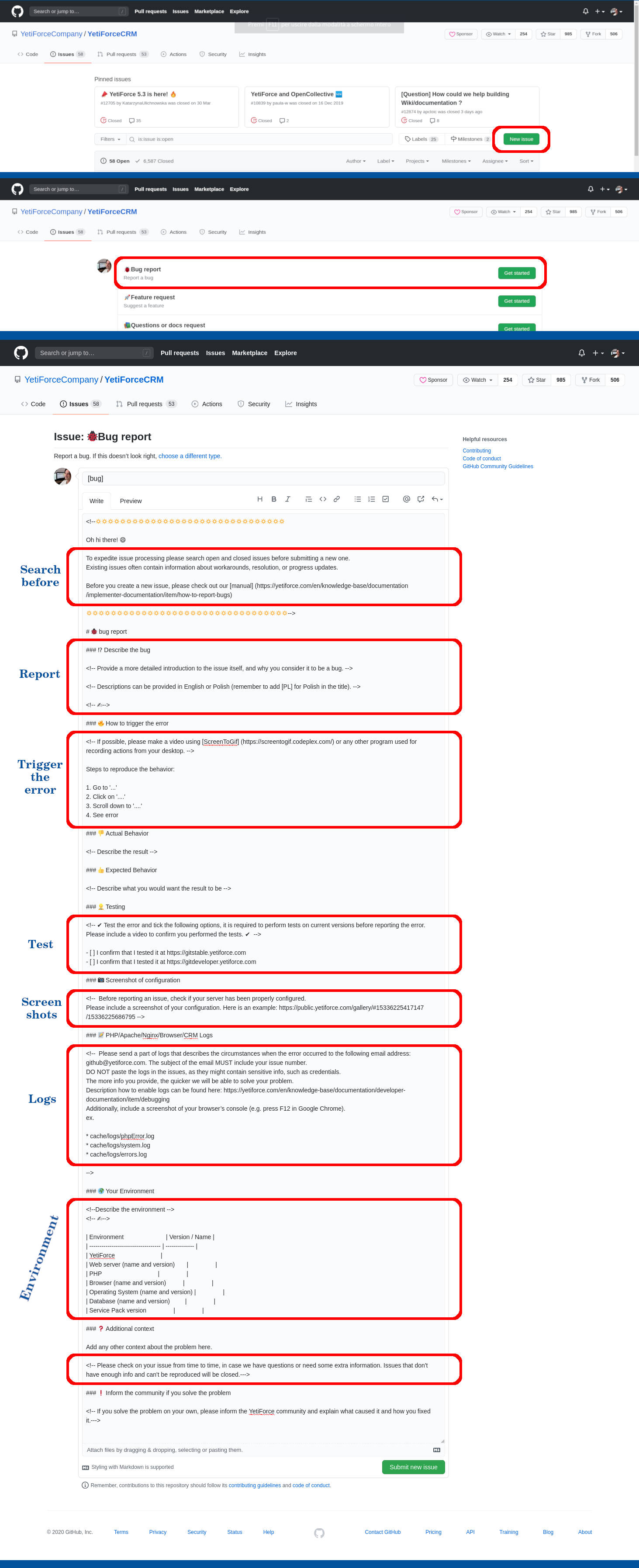
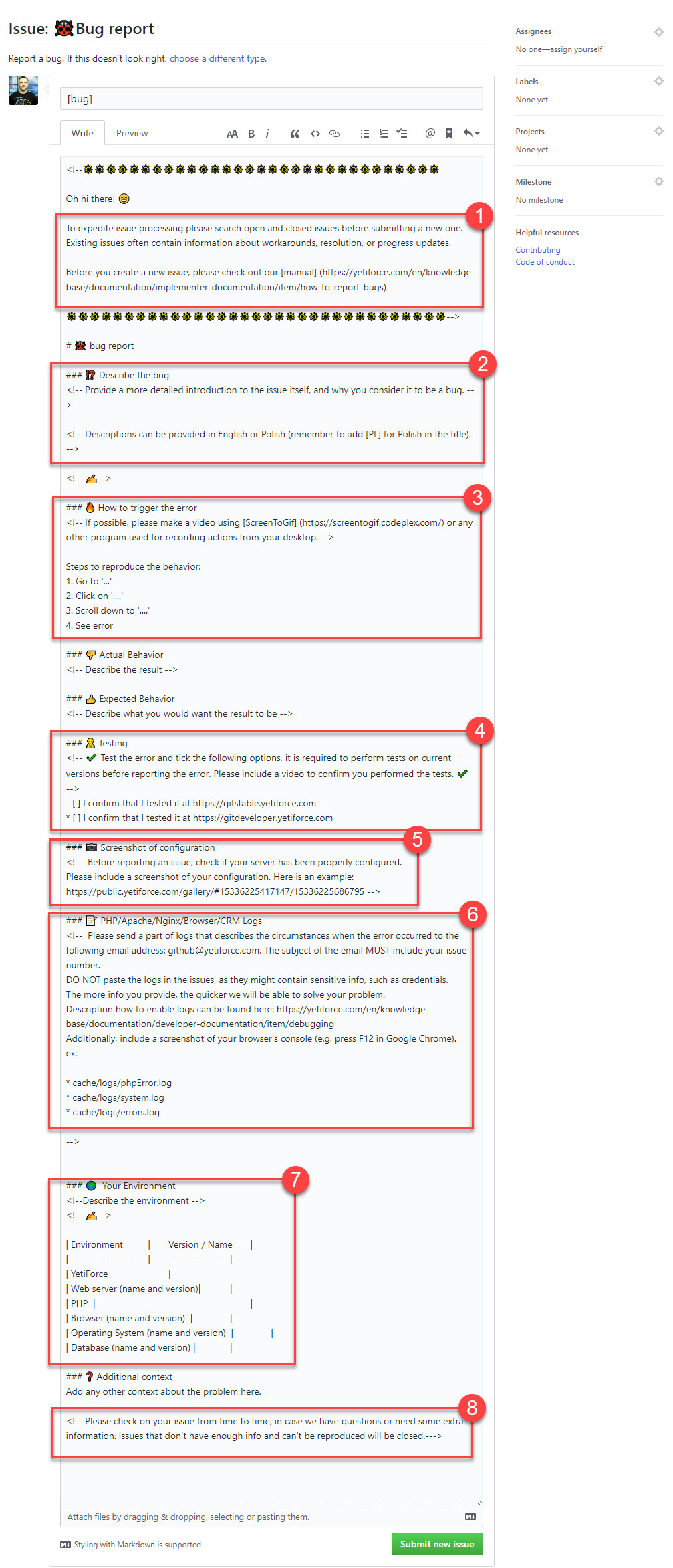
Fill out the Bug Report
 davide-alghi
on 4 Nov 2020
davide-alghi
on 4 Nov 2020
How can I "skip login-required steps"?
alexynadamas
on 4 Nov 2020
How can I "skip login-required steps"?
...
- in config/Debug.php set
- $LOG_TO_FILE = true;
- $LOG_LEVELS = false;
- reset contents for the files:
- cache/logs/system.log
- php_errors.log
- reproduce the issue/bug/problem
- upload here the files
- cache/logs/system.log
- php_errors.log
Browser console - How To - https://support.shortpoint.com/support/solutions/articles/1000222881-save-browser-s-console-file
- open browser console
- switch to "Console" tab
- clean console
- reproduce the issue/bug/problem
- save console contents in a file
- upload here the just created file
...
davide-alghi
on 4 Nov 2020
what's your MySql server version?
davide-alghi
on 4 Nov 2020
Without adding attachments with necessary information, it is a waste of everyone's time.
 mariuszkrzaczkowski
on 4 Nov 2020
mariuszkrzaczkowski
on 4 Nov 2020
what's your MySql server version?
10.2.35-MariaDB
alexynadamas
on 4 Nov 2020
what's your MySql server version?
10.2.35-MariaDB
ok, maybe it's not a MySql problem. we're waiting for logs
davide-alghi
on 4 Nov 2020
I haven't the files cache/logs/system.log and php_errors.log.
I have the file" errors" in cache/logs (Atacched as cache-logs-errors.log)
cache-logs-errors.log
And I have errors_log by Apache:
https://drive.google.com/file/d/1Exi3gZX_tb8AkKLmFChJe-RuDwBJGEfk/view?usp=sharing
Console error when try to access to domain: gestor.mediterjuridico.es
console.log
alexynadamas
on 4 Nov 2020
mariuszkrzaczkowski
on 4 Nov 2020
Hi @alexynadamas,
these logs are not enough.
I haven't the files cache/logs/system.log and php_errors.log.
did you set these? without this settings cache/logs/system.log is not generated
in config/Debug.php
$LOG_TO_FILE = true;
$LOG_LEVELS = false;
just a question: is your server a CentOS and you have updated MySql (and system) today?
davide-alghi
on 4 Nov 2020
I changed this parameters:
$LOG_TO_FILE = true;
$LOG_LEVELS = false;
My server is Debian with Plesk. I got a Plesk update last night:
The following packages were successfully updated:
- galera-3 25.3.31-stretch from MariaDB for by MariaDB repo (previous version: 25.3.30-stretch from MariaDB for by MariaDB repo)
- libmariadb3 10.2.35+maria~stretch from MariaDB for by MariaDB repo (previous version: 10.2.34+maria~stretch from MariaDB for by MariaDB repo)
- libmariadbclient18 10.2.35+maria~stretch from MariaDB for by MariaDB repo (previous version: 10.2.34+maria~stretch from MariaDB for by MariaDB repo)
- mariadb-client-10.2 10.2.35+maria~stretch from MariaDB for by MariaDB repo (previous version: 10.2.34+maria~stretch from MariaDB for by MariaDB repo)
- mariadb-client-core-10.2 10.2.35+maria~stretch from MariaDB for by MariaDB repo (previous version: 10.2.34+maria~stretch from MariaDB for by MariaDB repo)
- mariadb-common 10.2.35+maria~stretch from MariaDB for by MariaDB repo (previous version: 10.2.34+maria~stretch from MariaDB for by MariaDB repo)
- mariadb-server-10.2 10.2.35+maria~stretch from MariaDB for by MariaDB repo (previous version: 10.2.34+maria~stretch from MariaDB for by MariaDB repo)
- mariadb-server-core-10.2 10.2.35+maria~stretch from MariaDB for by MariaDB repo (previous version: 10.2.34+maria~stretch from MariaDB for by MariaDB repo)
- mysql-common 10.2.35+maria~stretch from MariaDB for by MariaDB repo (previous version: 10.2.34+maria~stretch from MariaDB for by MariaDB repo)
alexynadamas
on 4 Nov 2020
My server is Debian with Plesk. I got a Plesk update last night:
Debain 9 or 10?
I changed this parameters:
$LOG_TO_FILE = true;
$LOG_LEVELS = false;
if you set these variables and you went to YF page via browser, logs must be there. It's very strange.
Can you access to MySql with phpMyAdmin as root or with the same YF MySql user/password? Can you list vtiger_tab table?
Can you access to MySql via console?
I suspect that there is some problems with last MariaDB update
davide-alghi
on 4 Nov 2020
Debian 9.13.
Yes to all. I can access to phpMyAdmin with root, Yeti's user. Also I can access to MySQL by console.
alexynadamas
on 4 Nov 2020
I've no idea.
make a YF backup (PHP and DB) and if your db charset is utf8mb4 try to set
'charset' => 'utf8mb4',
in config/Db.php:61
there might be some PDO problems with MariaDB last update on Debian 9. On my Debian 10 everything works fine.
CentOS owners are having similar problems.
I'm walking around blind :(
the strange thing is that logs are not generated!
did you check files/folders owner/group and files/folders permissions?
davide-alghi
on 4 Nov 2020
you have problem with server configuration, your admin should take care of it.
This is not a bug in CRM
mariuszkrzaczkowski
on 4 Nov 2020
Hi
With PHP 7.3 or 7.4 works properly. MariaDB doesn't work with 7.2 or below versions.
You Can see it in this post:
https://xenforo.com/community/threads/mariadb-10-3-26-1-breaks-php-7-2.187331/
Then you can downgrade MariaDB too.
alexynadamas
on 4 Nov 2020
just change to php 7.3 or higher if u have latest maria db...
 rioshaz
on 5 Nov 2020
rioshaz
on 5 Nov 2020
Related issues
 Raggazzoo
·
3Comments
Raggazzoo
·
3Comments
 rubysown
·
3Comments
rubysown
·
3Comments
 michelmarquesrj
·
3Comments
michelmarquesrj
·
3Comments
 canomogollon
·
3Comments
canomogollon
·
3Comments
 MacarenaReina
·
3Comments
MacarenaReina
·
3Comments
Most helpful comment
Hi @alexynadamas ,
detailed info are essential.
It looks like a MySql problem: what's your MySql server version?
without login you can provide (cleaned) PHP logs.
if you cannot login, pls skip login-required steps
YF Logs - How To
Browser console - How To - https://support.shortpoint.com/support/solutions/articles/1000222881-save-browser-s-console-file
Fill out the Bug Report