Yetiforcecrm: [bug] No crmid in Webservice
Hi,
So I am currently evaluating YetiForce and so far so good, however there's one problem that I can't get my head around and that is the webservice, it produces a 401 error upon trying to login in webservice. I also have tested this on the gitstable.yetiforce.com and gitdeveloper.yetforce.com and works fine.
I followed the instructions here to enable the webservice.
The following output I get when trying to login via /Users/Login
{"status":0,"error":{"message":"No crmid","code":401}}
WebserviceErrors.log:
============ Error exception ====== 2020-09-25 19:50:04 ======
code: 401 | message: No crmid
file: /public_html/api/webservice/Portal/Users/Login.php (217)
============ stacktrace:
#0 /public_html/api/webservice/Controller.php(87): Api\Portal\Users\Login->post()
#1 /public_html/webservice.php(15): Api\Controller->process()
#2 {main}
============ Headers:
REQUEST_METHOD : POST
host: {REDACTED}
connection: Keep-Alive
accept-encoding: gzip
cf-ipcountry: NL
x-forwarded-for: {REDACTED}
cf-ray: 5d8695de68bf1e6d-AMS
content-length: 278
x-forwarded-proto: https
cf-visitor: {"scheme":"https"}
content-type: multipart/form-data; boundary=--------------------------018927383863765079090555
x-api-key: {REDACTED}
authorization: Basic dGVzdDp0ZXN0
user-agent: PostmanRuntime/7.25.0
accept: */*
cache-control: no-cache
postman-token: df1b39b9-e089-4754-ad90-12856eee251a
cookie: __cfduid=db3f72994b2b45627510a697da5b36f9a1600879238; YTSID=b71605073999daf89710dc632aa95a84
cf-request-id: 0567fbfeff00001e6d9db37200000001
cf-connecting-ip: {REDACTED}
cdn-loop: cloudflare
x-https: 1
============ Request data :
WebserviceDebug.log:
============ Request ======  2020-09-25 19:50:04  ======
REQUEST_METHOD: POST
REQUEST_URI: /webservice/Users/Login
QUERY_STRING: module=Users&action=Login
PATH_INFO:
----------- Headers -----------
host : {REDACTED}
connection : Keep-Alive
accept-encoding : gzip
cf-ipcountry : NL
x-forwarded-for : {REDACTED}
cf-ray : 5d8695de68bf1e6d-AMS
content-length : 278
x-forwarded-proto : https
cf-visitor : {"scheme":"https"}
content-type : multipart/form-data; boundary=--------------------------018927383863765079090555
x-api-key : H2zS05NCTNB4uyH9uTNzrHq0cSeUM8vu
authorization : Basic dGVzdDp0ZXN0
user-agent : PostmanRuntime/7.25.0
accept : */*
cache-control : no-cache
postman-token : df1b39b9-e089-4754-ad90-12856eee251a
cookie : __cfduid=db3f72994b2b45627510a697da5b36f9a1600879238; YTSID=b71605073999daf89710dc632aa95a84
cf-request-id : 0567fbfeff00001e6d9db37200000001
cf-connecting-ip : {REDACTED}
cdn-loop : cloudflare
x-https : 1
----------- Request data -----------
Array
(
    [module] => Users
    [action] => Login
    [userName] => test
    [password] => test
)

----------- _GET -----------
Array
(
    [module] => Users
    [action] => Login
)

----------- _POST -----------
Array
(
    [userName] => test
    [password] => test
)

----------- Request payload -----------

-------------  Response  -----  2020-09-25 19:50:04  ------
Status: 401
REQUEST_METHOD: POST
REQUEST_URI: /webservice/Users/Login
QUERY_STRING: module=Users&action=Login
PATH_INFO:
----------- Response data -----------
Array
(
    [status] => 0
    [error] => Array
        (
            [message] => No crmid
            [code] => 401
        )

)
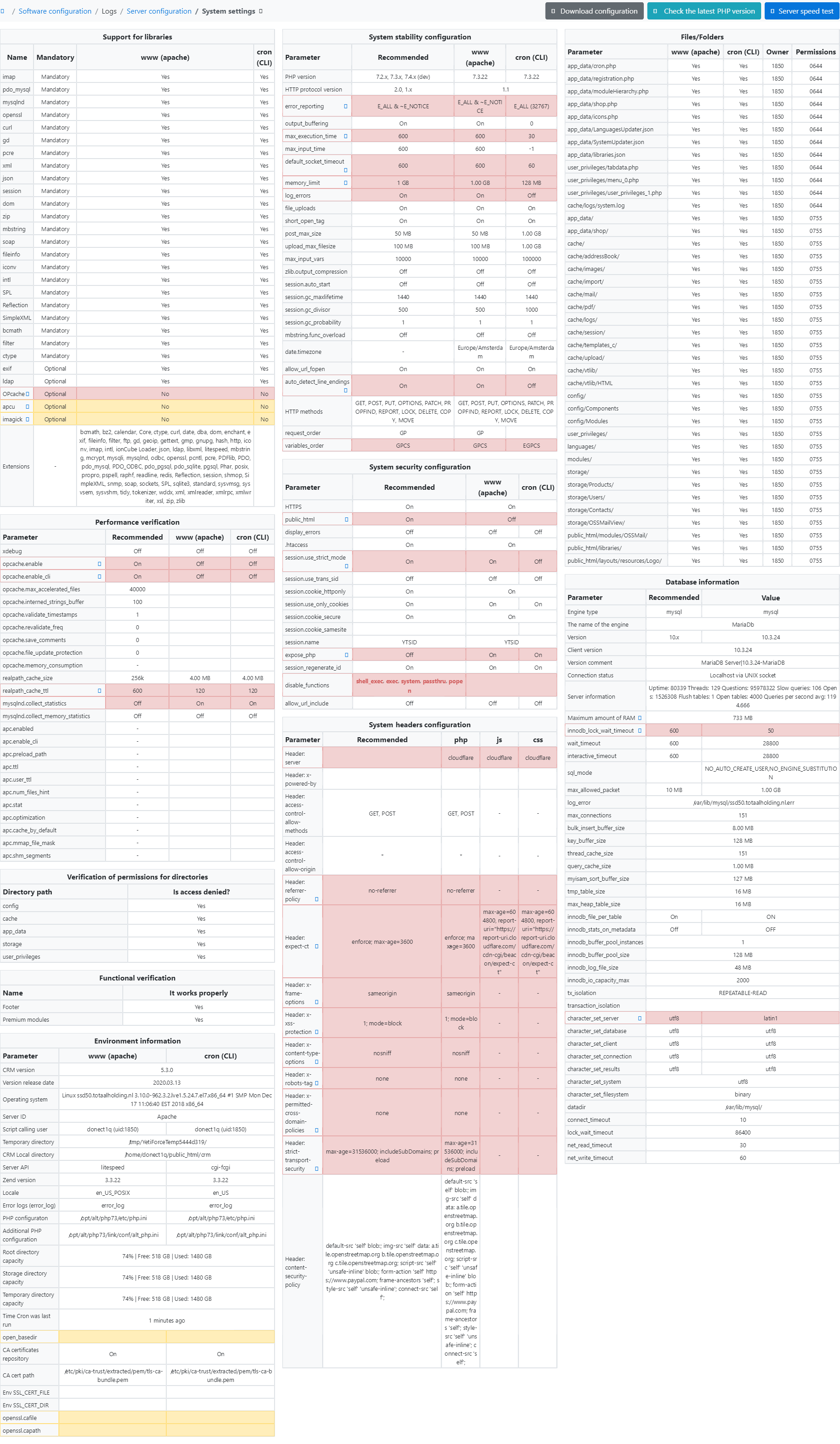
My YetiForce server config;
| Environment | Version / Name |
| ----------------------------------- | -------------- |
| YetiForce |5.3
| Web server (name and version) | Apache 2.4.46 |
| PHP | 7.3 |
| Browser (name and version) | |
| Operating System (name and version) | |
| Database (name and version) | MariaDB 10.3.24 |
| Service Pack version | YetiForce CRM 5.3 Service Pack v4
--
Please let me know if you need more information.
Thanks,
Patrick
 Patriciawa
All 3 comments
- correct the server configuration as it will cause a lot of errors.
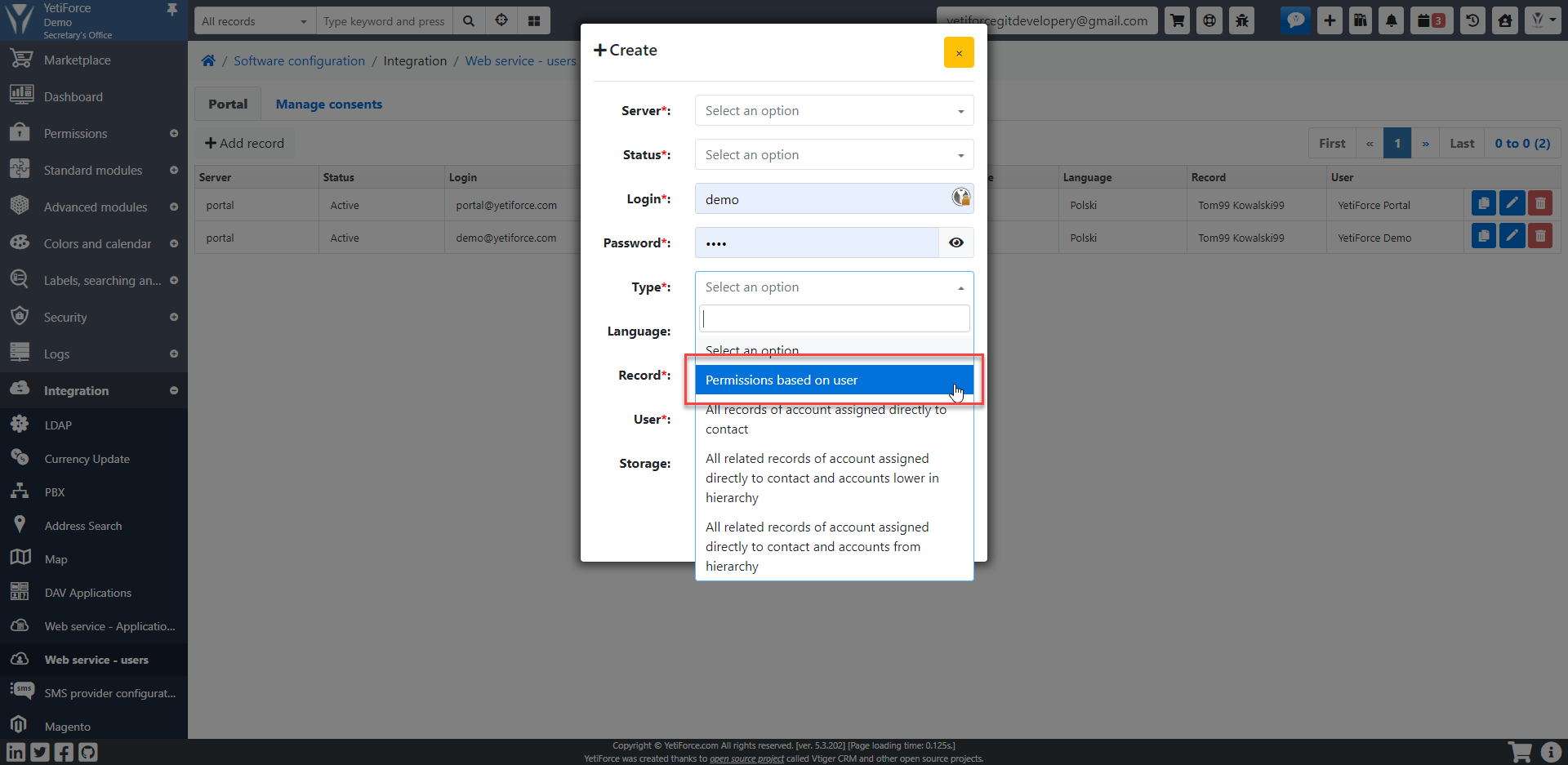
- try to change user type
 mariuszkrzaczkowski
on 28 Sep 2020
mariuszkrzaczkowski
on 28 Sep 2020
Hi @mariuszkrzaczkowski ,
Thank you for getting back to me.
I'll try to correct the server configuration and let you know if that works.
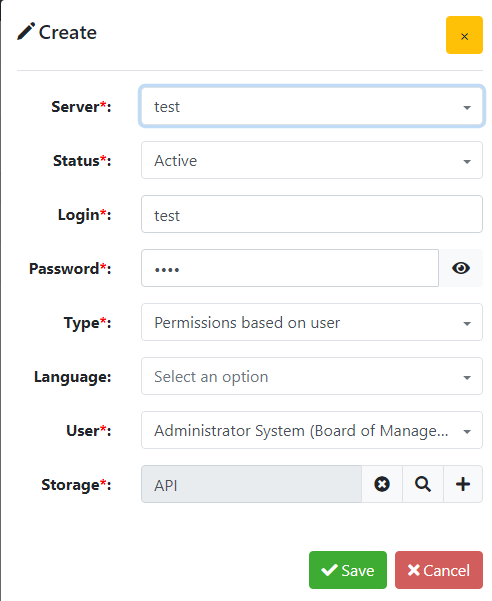
Regarding the user type, it's already configured as "Permissions based on user"
Regards,
Patrick
Patriciawa
on 28 Sep 2020
Okay so I've installed YetiForce on a VPS and configured it correctly this time and all works.
Patriciawa
on 1 Oct 2020
Related issues
 michelmarquesrj
·
3Comments
michelmarquesrj
·
3Comments
 skramanzia
·
3Comments
skramanzia
·
3Comments
 canomogollon
·
3Comments
canomogollon
·
3Comments
 PDMeira
·
3Comments
PDMeira
·
3Comments
 rskrzypczak
·
3Comments
rskrzypczak
·
3Comments
Most helpful comment
Okay so I've installed YetiForce on a VPS and configured it correctly this time and all works.