Yetiforcecrm: How do I get Mailscanner contact info on my dashboard?
In general, I'm looking for information about how to get the most out of our self-hosted installation of Yeti. Any direction there
The use case I'm most interested in is client and lead contact tracking.
Specifically, I finally got the Gmail mail scanner working. The thing that would be the most useful is to be able to have an overview of contact and leads email contact on my dashboard. ANy help here would be great.
OH.. also when I try to add widgets to my Dashobaird i can not select any of the filter values so the add fails.
thanks
 bpwane
>All comments
If you need any other widget other than that are available from widget setting, i would recommend you hiring a PHP + JS developer, or purchase support from yetiforce directly.
For filters go to Seetings->Labels and searching->Filters->Go to Needed Module->Edit
Make sure List in Metrics is selected.
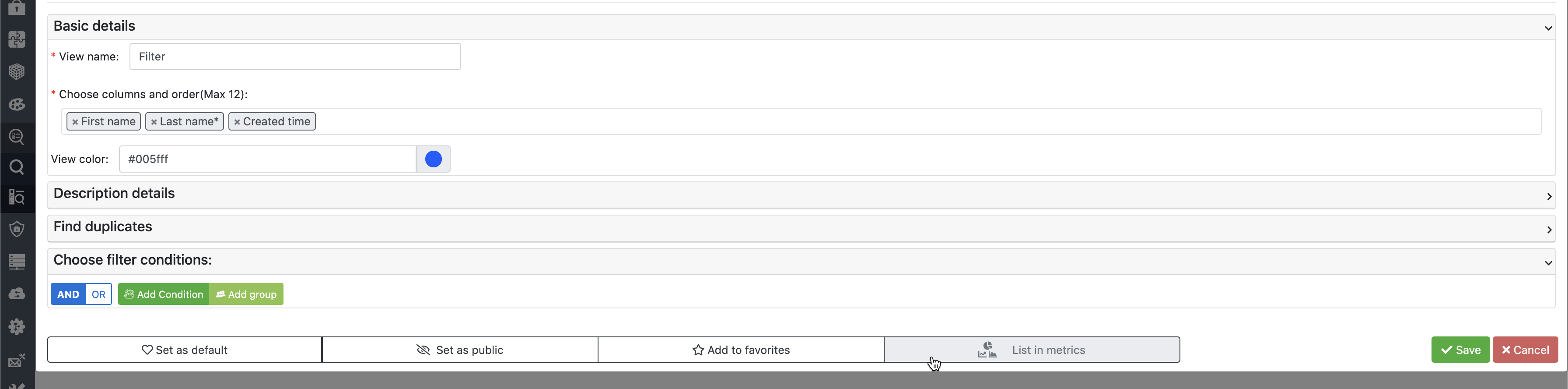
Then you will be able to use filters during widget creation process
 z0lo13
on 26 Jun 2020
z0lo13
on 26 Jun 2020
Related issues
 serbiaserbia
·
3Comments
serbiaserbia
·
3Comments
 MacarenaReina
·
3Comments
MacarenaReina
·
3Comments
 ldgbc
·
3Comments
ldgbc
·
3Comments
 PDMeira
·
3Comments
PDMeira
·
3Comments
 vovpff
·
3Comments
vovpff
·
3Comments
Most helpful comment
If you need any other widget other than that are available from widget setting, i would recommend you hiring a PHP + JS developer, or purchase support from yetiforce directly.
For filters go to Seetings->Labels and searching->Filters->Go to Needed Module->Edit

Make sure List in Metrics is selected.
Then you will be able to use filters during widget creation process