Yetiforcecrm: [Question] Is there way to send email every x days ?
Hi YetiForce Group !
i want to do email marketing with Yetiforce. Especially, when an account be active i want to sent him an email just now. After that i want to sent him the second email 5 days later. After that i want to sent him the third email 10 days later etg.
i want it to work for all accounts. Automatically.
Now i can do it manually for every account and it is not handy
Could i do that automatically ? is there any way ?
thank you
 Giorgos-Hellene
All 4 comments
Hi ippeas1,
yes you can via workflow. There is not every 5 days, but you can choose Execution schedule (defined time intervals), Monthly by date and select 2nd, 7th, 12th, 17th, 22nd, 27th
Send Mail as Add To Do
 davide-alghi
on 30 Jul 2019
davide-alghi
on 30 Jul 2019
Hi
Hi ippeas1,
yes you can via workflow. There is not every 5 days, but you can choose Execution schedule (defined time intervals), Monthly by date and select 2nd, 7th, 12th, 17th, 22nd, 27th
Send Mail as Add To Do
Hi davide-alghi !
thank you for your reply !
if i do this way i will have problem . For example if someone be active on 15th of month he will get the 3rd email first but I want he gets the first email then the second then the third etg The email has rationality
the range that he will receive the emails is very important.
Could it help me this tool? http://prntscr.com/omb70c
In a few words i search a way to send an email x days after a field be active ( Once time )
Giorgos-Hellene
on 31 Jul 2019
Ok, now is clear: you need an email sequence.
Yes you can do that via workflow and email templating
I uploaded a simple example to show you a guideline
Email_templates.zip
workflows.zip
What it does (Accounts module)
Sequence is activated by YF user manually (you can set it on creation or modify)
the sequence is activable only if
- account Active field is On AND
- account Primary email exists AND
- account Permission to send emails is On
If account denies Permission to send emails, sequence stops to send emails
My example is a 3mail-sequence: the 1st one is sent by user (manually), the 2nd one is sent after 5 days at 11.00 o'clock, the 3rd one after 10 days at 11.00
Days are incremented at 00.30 o'clock
Steps
- create 2 new fields into Accounts module with these field system names (to match with workflow tasks): days_from_sequence_start and number_sent_sequence_email
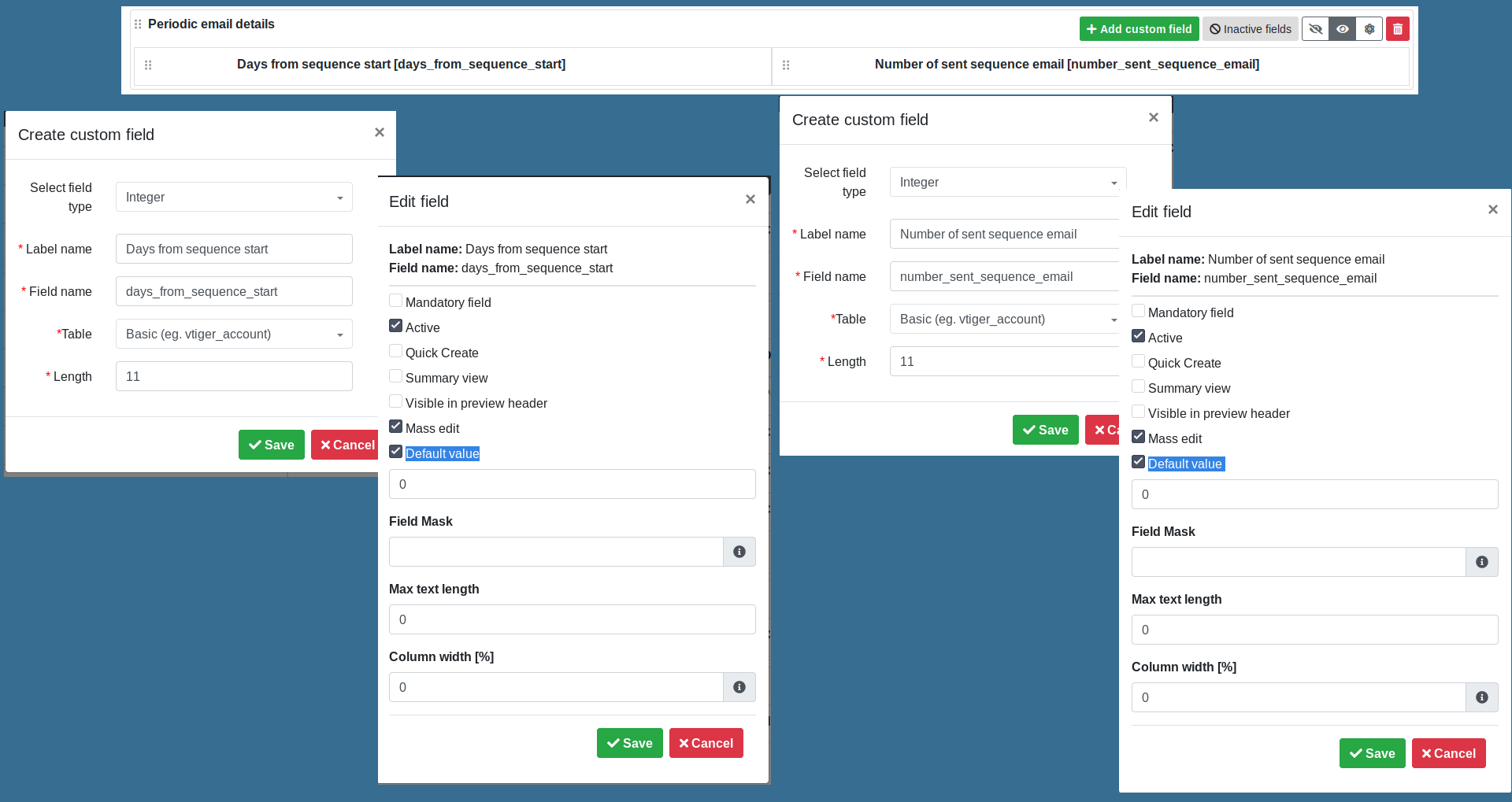
- import email template (xml) one by one
- import workflow one by one
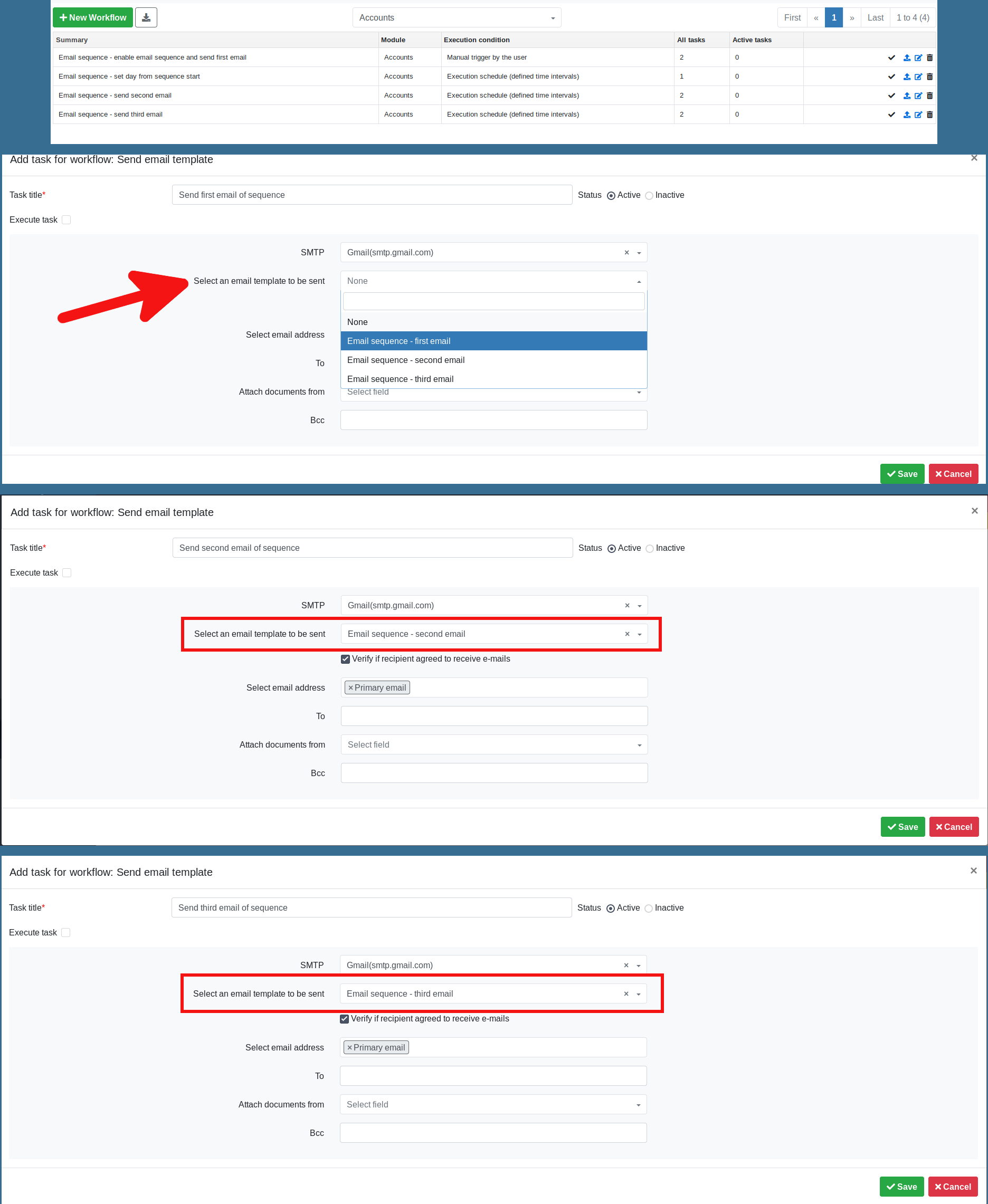
- map each Send email template task with relative email template
- Email sequence - enable email sequence and send first email > Send first email of sequence (task)
Select an email template to be sent = Email sequence - first email - Email sequence - send second email > Send second email of sequence (task)
Select an email template to be sent = Email sequence - second email - Email sequence - send third email > Send third email of sequence (task)
Select an email template to be sent = Email sequence - third email
davide-alghi
on 31 Jul 2019
very clever ! thank you very much ! @davide-alghi
Giorgos-Hellene
on 4 Aug 2019
Related issues
 ldgbc
·
3Comments
ldgbc
·
3Comments
 liberox
·
3Comments
liberox
·
3Comments
 Raggazzoo
·
3Comments
Raggazzoo
·
3Comments
 PDMeira
·
3Comments
PDMeira
·
3Comments
 scsikid
·
3Comments
scsikid
·
3Comments
Most helpful comment
Ok, now is clear: you need an email sequence.
Yes you can do that via workflow and email templating
I uploaded a simple example to show you a guideline
Email_templates.zip
workflows.zip
What it does (Accounts module)
Sequence is activated by YF user manually (you can set it on creation or modify)
the sequence is activable only if
If account denies Permission to send emails, sequence stops to send emails
My example is a 3mail-sequence: the 1st one is sent by user (manually), the 2nd one is sent after 5 days at 11.00 o'clock, the 3rd one after 10 days at 11.00
Days are incremented at 00.30 o'clock
Steps
Select an email template to be sent = Email sequence - first email
Select an email template to be sent = Email sequence - second email
Select an email template to be sent = Email sequence - third email