Yetiforcecrm: [bug] PDF table size
Hello everyone, i am facing a situation with the pdf invoice.
To reproduce just create two products, one with a small name and one with a big one, then export an invoice pdf. The template is only $(custom : ProductsTableLongVersion)$
Using the small name it works nicely

but with the big name this happens
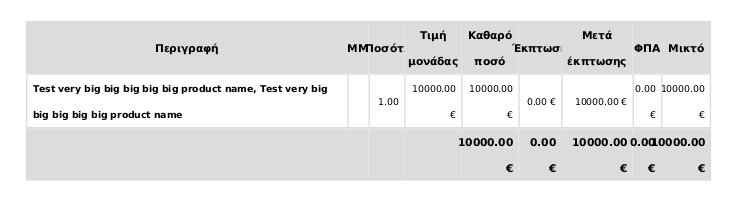
Are there any suggestions on how to resolve this?
 panos-stavrianos
All 6 comments
I confirm, when some text inside a table cell is wrapped, for example, by <strong>, the width of this cell field is not calculated quite well.
 rafalpospiech
on 23 Apr 2019
rafalpospiech
on 24 Apr 2019
rafalpospiech
on 23 Apr 2019
rafalpospiech
on 24 Apr 2019
Awesome! Thank you so much!
panos-stavrianos
on 24 Apr 2019
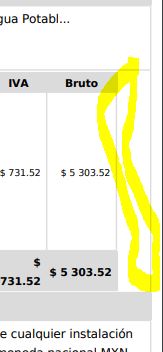
Hello, can some one help me please? im goint nuts with this same issue. I uploaded latest yetiforcepdf folder to the 5.1.0 online yeticrm version but this keeps happening. I dont know how to update with this issue fixed in #10245
I also have another problem just like the screenshot i send. Table dosent get full width. If i fix this, content may be better displayed too. It also looks better to have full width as all tables.
Please help. Thanks
 rtorrescodes
on 15 Aug 2019
rtorrescodes
on 15 Aug 2019
I noticed it only happens with long descriptions or product titles. How can i try this fixed version?
rtorrescodes
on 15 Aug 2019
The width problem happened to me also... I did a clean install after the fix and it worked nicely.
Side-note: I also try to update first but since I had a really old version and I probably didn't follow the update procedure correctly, i mess everything up. So make sure you follow all the steps and take backups
panos-stavrianos
on 15 Aug 2019
Related issues
 skramanzia
·
3Comments
skramanzia
·
3Comments
 ezbank
·
3Comments
ezbank
·
3Comments
 johntonji
·
3Comments
johntonji
·
3Comments
 vovpff
·
3Comments
vovpff
·
3Comments
 ldgbc
·
3Comments
ldgbc
·
3Comments
Most helpful comment
fixed in https://github.com/YetiForceCompany/YetiForceCRM/pull/10245