Yetiforcecrm: Filter Does NOT Work ERR_NO_PERMITTED_TO_VIEW-- How to Enable Cron
I am new with both programming and yetiforce.
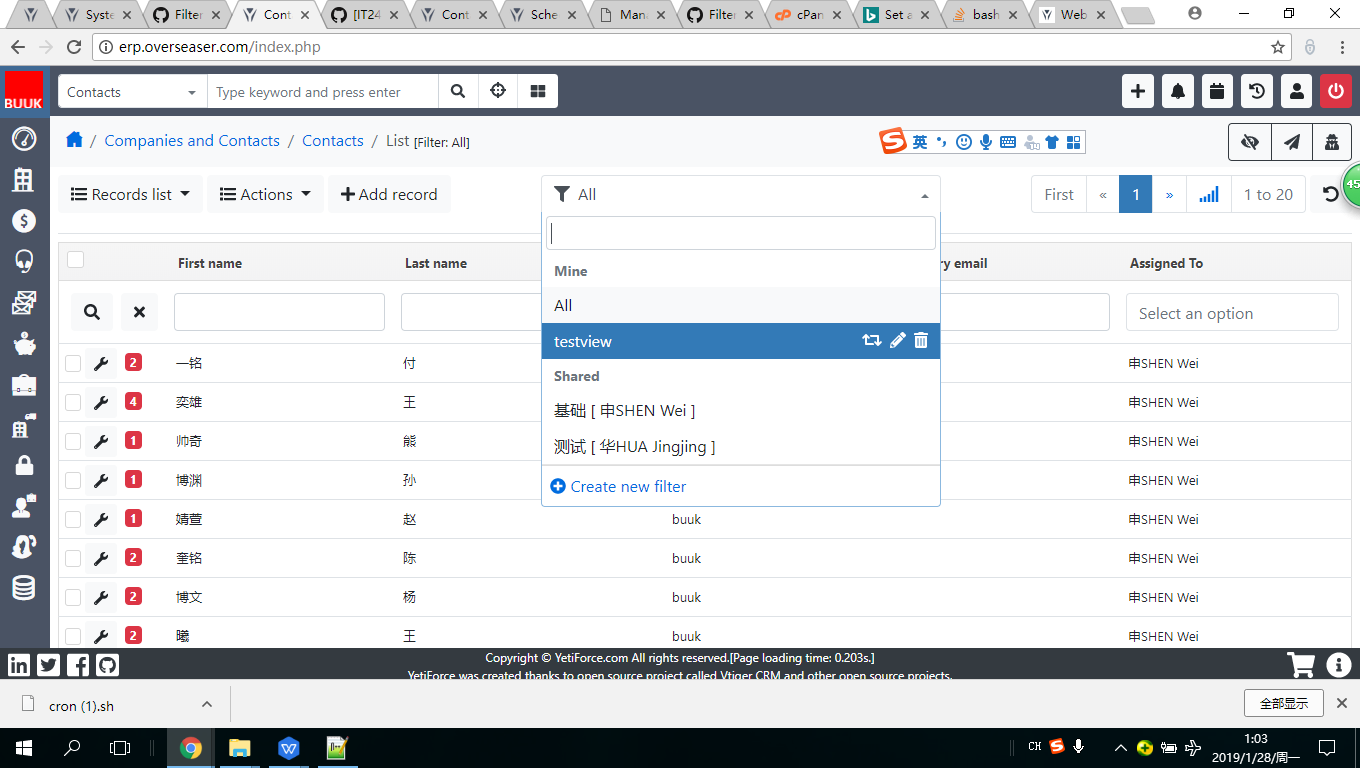
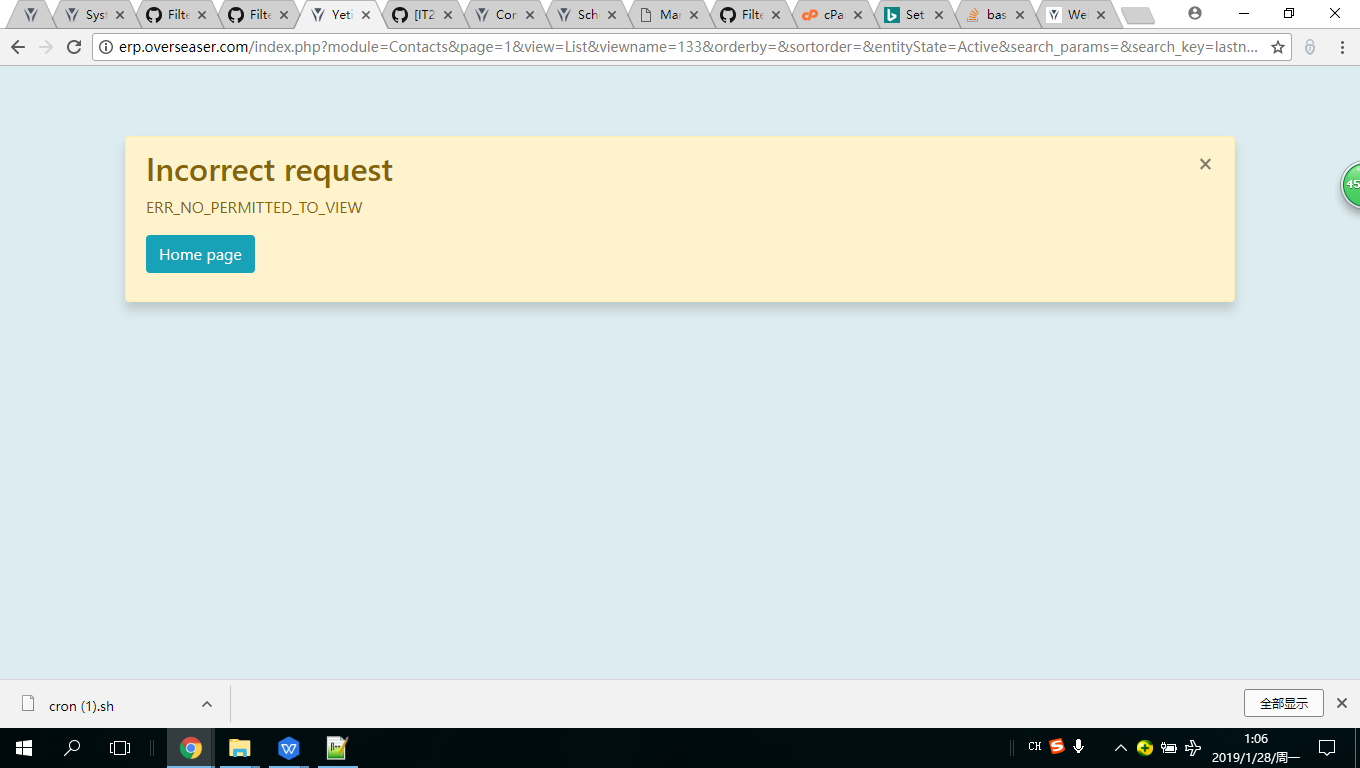
I do not know what is wrong with the setting, but non-admin users can are locked to see newly configed filter. It says: Incorrect request ERR_NO_PERMITTED_TO_VIEW. I then found the tickets Filter not working #6258 https://github.com/YetiForceCompany/YetiForceCRM/issues/6258 and https://yetiforce.com/en/knowledge-base/documentation/administrator-documentation/item/enable-cron, but I do not understand much :
- Add a file to the crontab, e.g. in such format:
- /5 * * * * sh /var/www/cron/cron.sh > /var/www/cache/logs/cron.log 2>&1 [pay attention to a correct path to the YetiForce system],
- /5 * * * * php /var/www/cron.php > /var/www/cache/logs/cron.log 2>&1
- Change file permissions /var/www/crm/cron/cron.sh to 775 [or to other permissions that are compatible with an internal security policy in a company].
- Set a path in the file /var/www/crm/cron/vtigercron.sh to PHP: export USE_PHP=/usr/local/php56/bin/php [here it is also required to pay attention to the file, because it can be located differently on each server and also keep an eye on a path to PHP that is different for various servers. An administrator can provide information about this path or it can be checked in phpinfo].
- Pay attention to the end of line because it should be Unix (LF). If it is Windows on Linux servers, it may cause errors and the system won't be able to run the SH file.
Best regards,
Chao
Generated by YetiforceCRM ver. 4.4.0
PHP: 7.1.18
Server configuration errors:
session.gc_maxlifetime: 1440
auto_detect_line_endings: Off
Library errors:
ldap_connect
opcache_get_configuration
apcu
Generated by YetiforceCRM ver. 4.4.0
PHP: 7.1.18
Server configuration errors:
session.gc_maxlifetime: 1440
auto_detect_line_endings: Off
Library errors:
ldap_connect
opcache_get_configuration
apcu
 andrewchaosun
All 63 comments
andrewchaosun
on 27 Jan 2019
andrewchaosun
on 27 Jan 2019
andrewchaosun
on 27 Jan 2019
Logs
 mariuszkrzaczkowski
on 27 Jan 2019
mariuszkrzaczkowski
on 27 Jan 2019
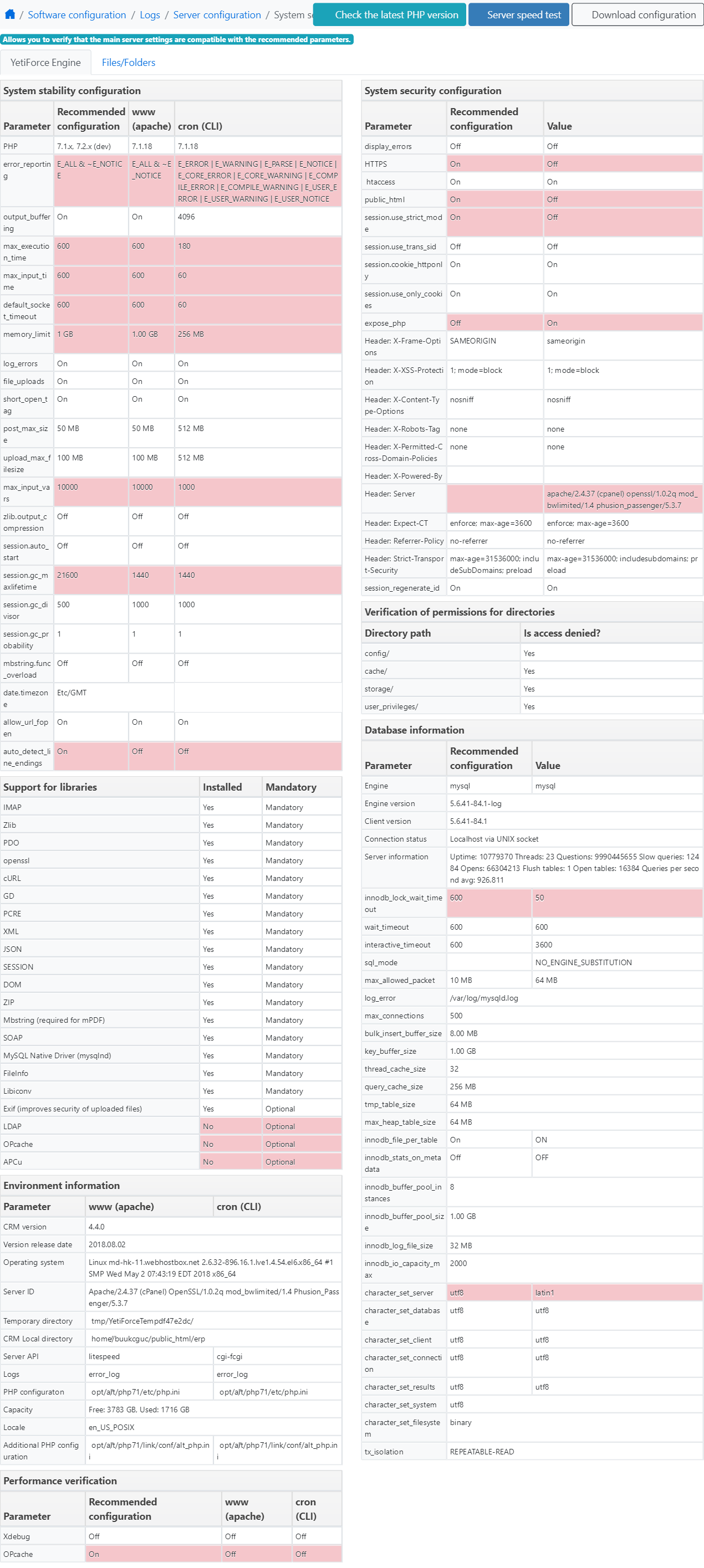
configuration verification screen shot
mariuszkrzaczkowski
on 27 Jan 2019
Dear Mariusz, Many thanks for the swift reply. So, where to config the Screenshop Verification, please.
andrewchaosun
on 28 Jan 2019
https://github.com/YetiForceCompany/YetiForceCRM/issues/4457 I found a bit more here.
andrewchaosun
on 28 Jan 2019
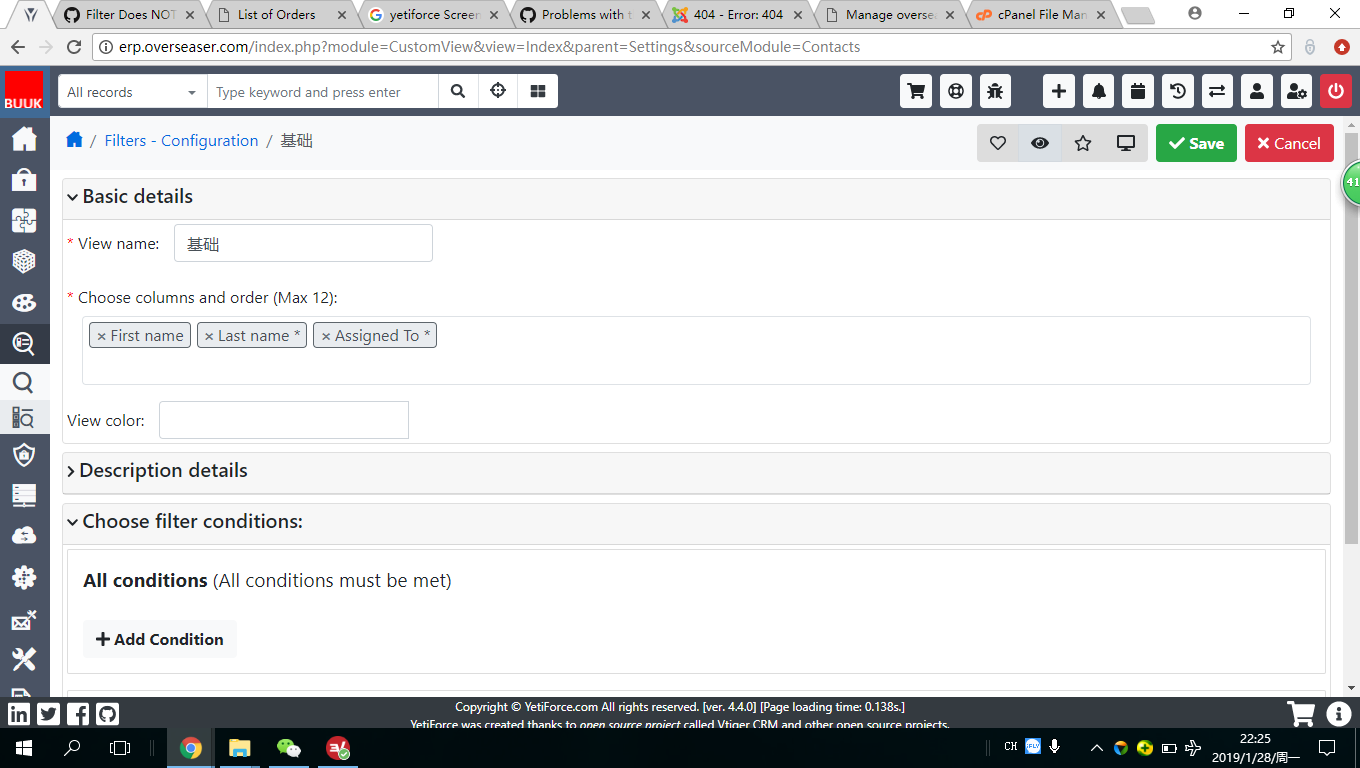
Just found out that in Filters Configuration, if set the new filter as Public, then I can be used by non-admin users.
andrewchaosun
on 28 Jan 2019
should I follow this: https://yetiforce.com/en/knowledge-base/documentation/administrator-documentation/item/enable-cron
andrewchaosun
on 28 Jan 2019
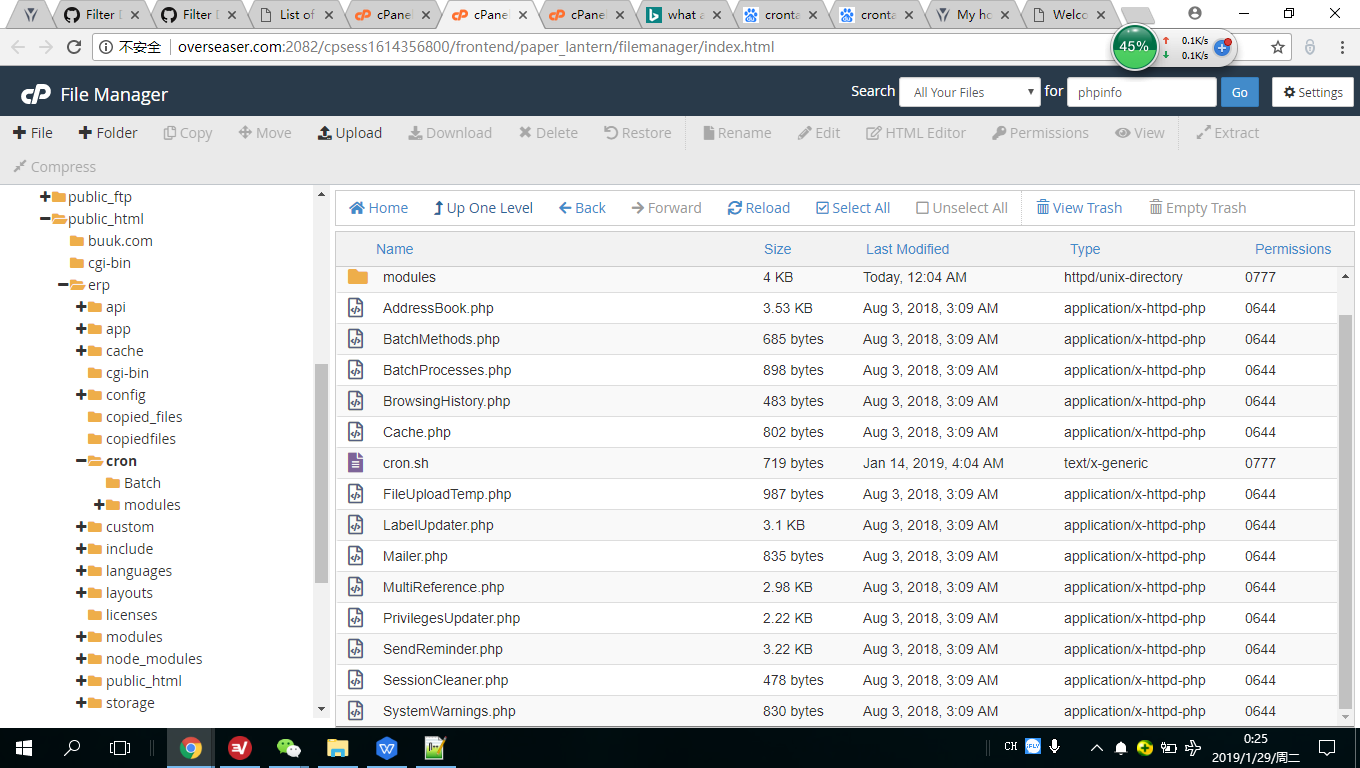
Set a path in the file */cron/vtigercron.sh: Can not find the VTIGERCRON.SH in the CRON folder.
andrewchaosun
on 28 Jan 2019
Look for cron.sh.
vtigercron.sh available up to ver. 4.2.
 vovpff
on 28 Jan 2019
vovpff
on 28 Jan 2019
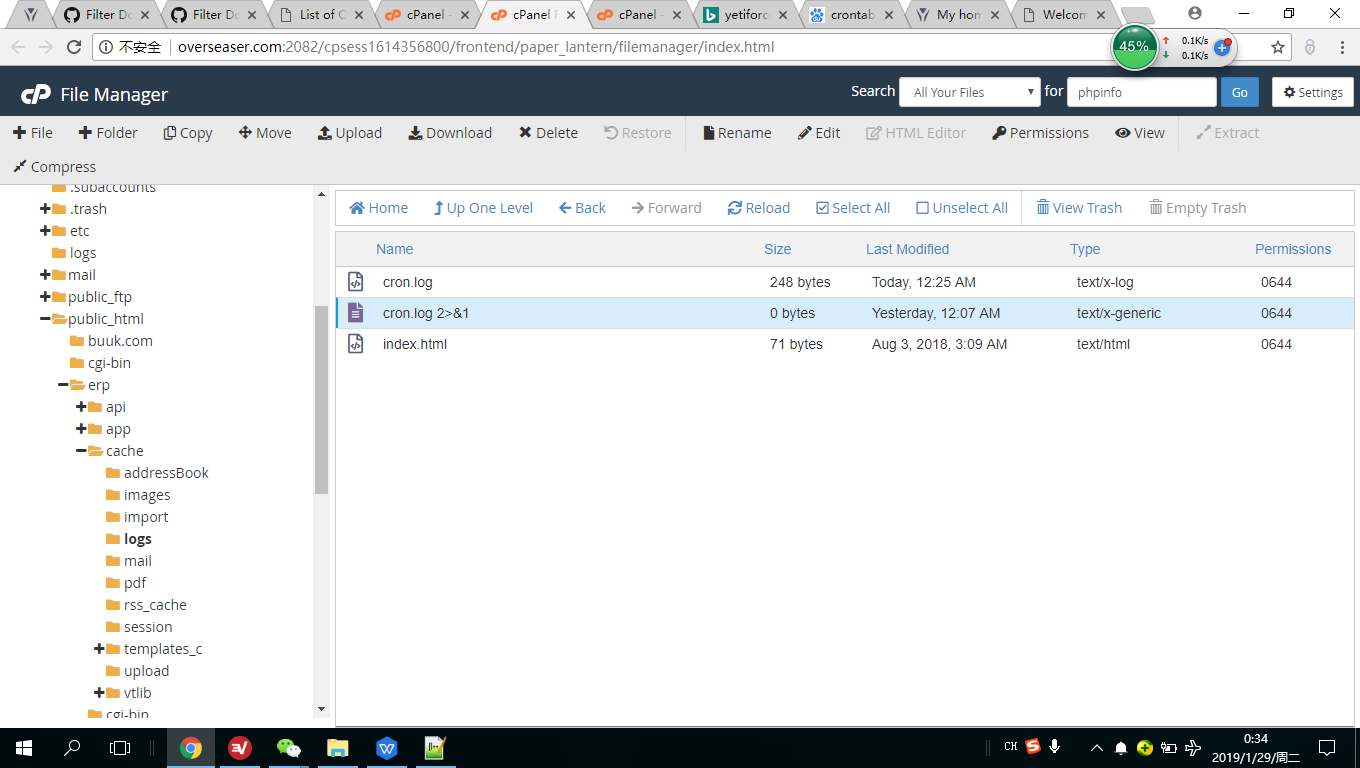
PS: I did not find the cron.log 2>&1 file, so I just added one in the Cache/logs foler, but it is empty.
andrewchaosun
on 28 Jan 2019
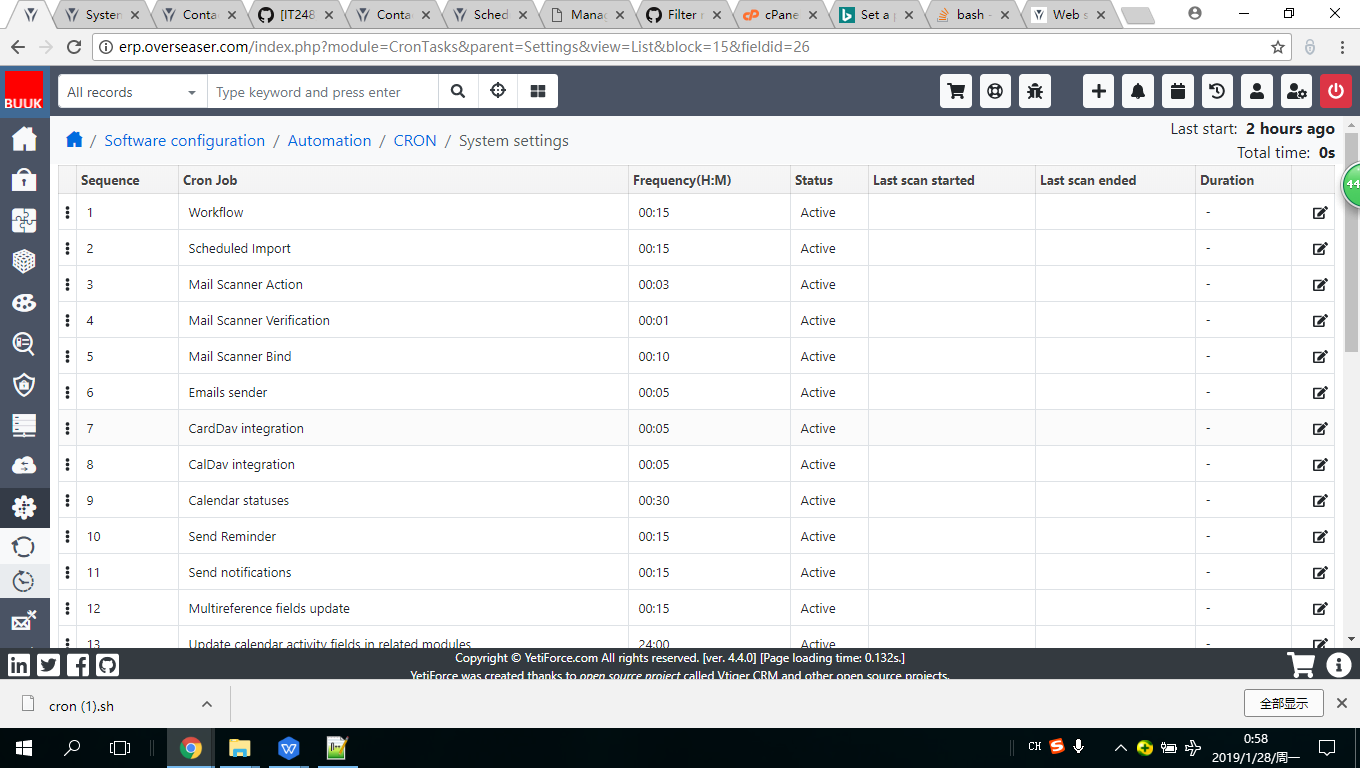
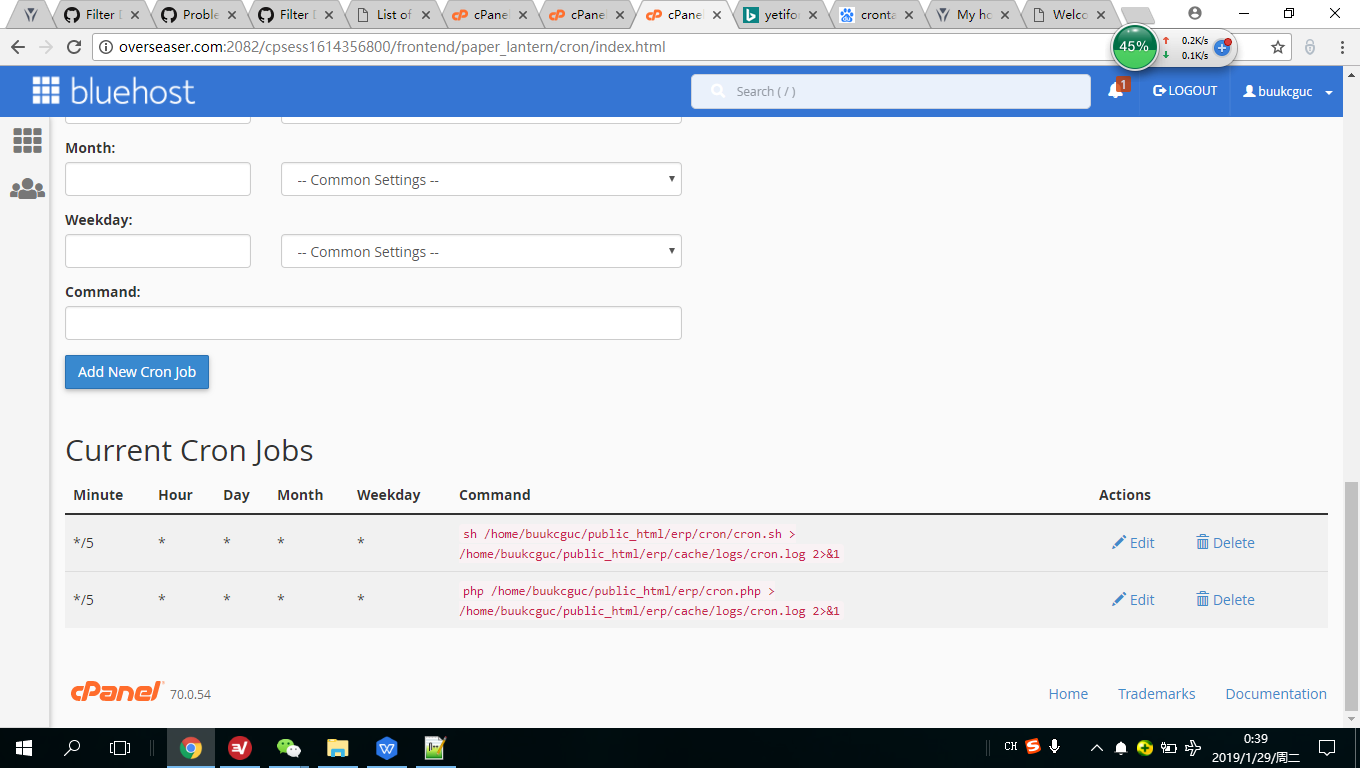
This is the setted cron jobs:
andrewchaosun
on 28 Jan 2019
cron.log 2>&1 command for logging. Php cron string also not needed.
vovpff
on 28 Jan 2019
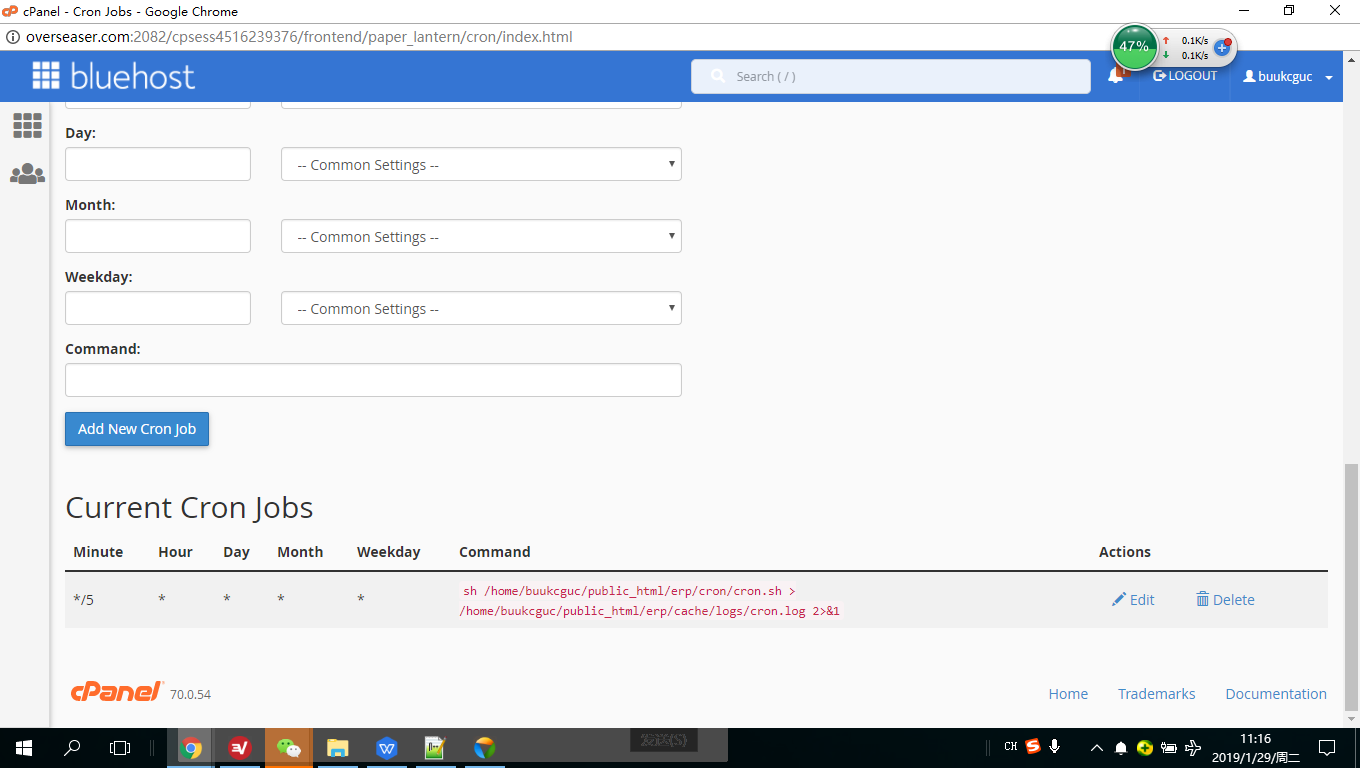
deleted the PHP cron string
andrewchaosun
on 29 Jan 2019
Now it should work. File cron.log 2>&1 not needed.
File cron.sh should be confired too
vovpff
on 29 Jan 2019
Run cron manually by URL, you must be logged in to CRM
example: https://gitdeveloper.yetiforce.com/cron.php
mariuszkrzaczkowski
on 29 Jan 2019
i have tried as suggested, unfortunately the cron is till NOT working. It is great, however, Marius is working on Yetiforce 5.0 and it is almost completed.
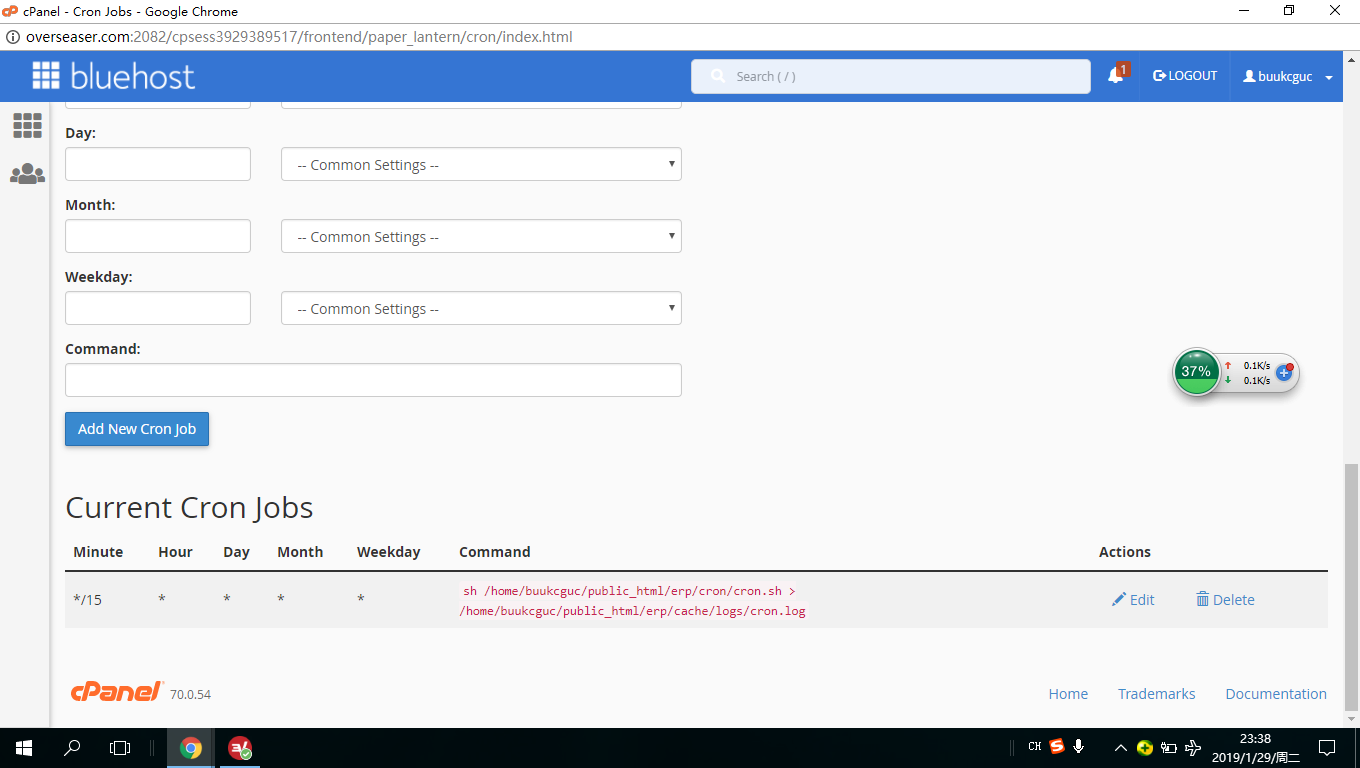
- crontab seems to be in the right format. This was done through bluehost.com Cron Jobs:
*/15 | * | * | * | * | sh /home/buukcguc/public_html/erp/cron/cron.sh > /home/buukcguc/public_html/erp/cache/logs/cron.log
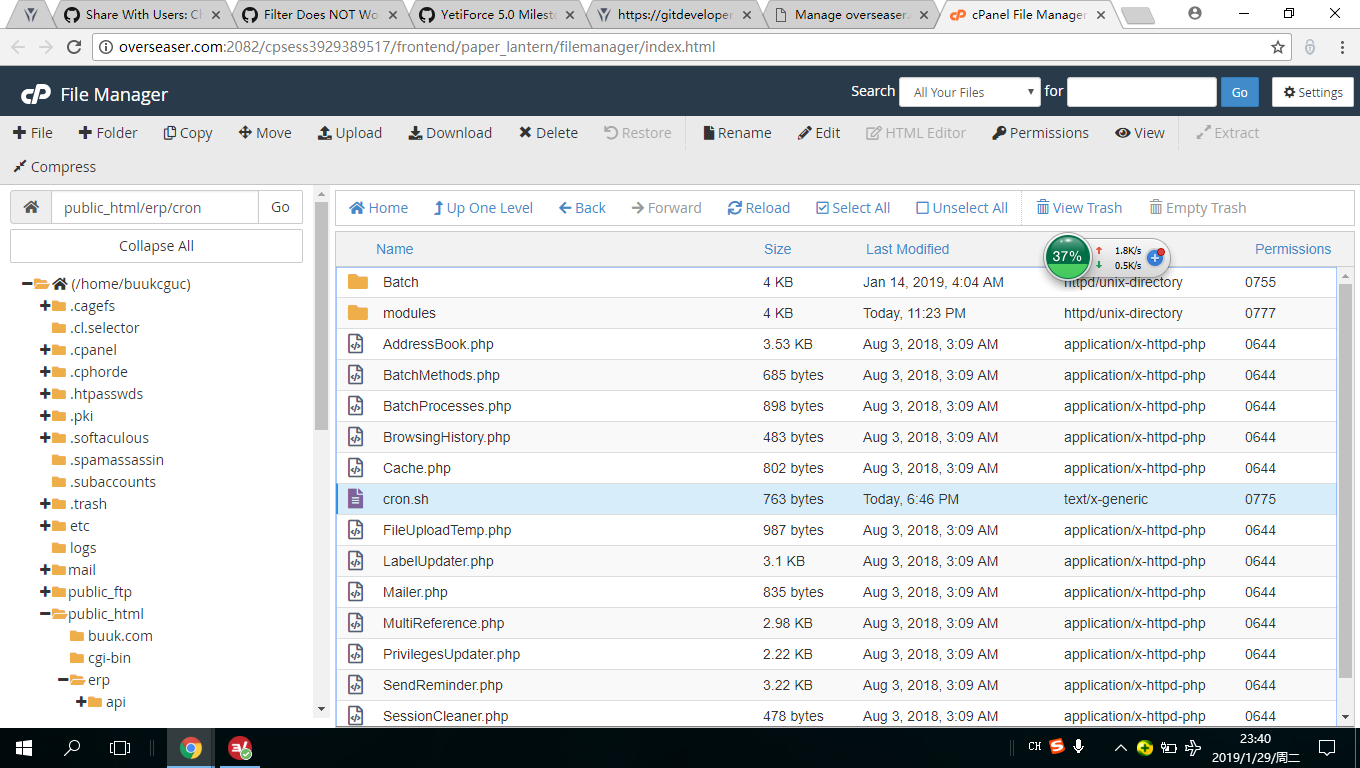
The file permission is changed to 775. As the image below:
The path is set as:

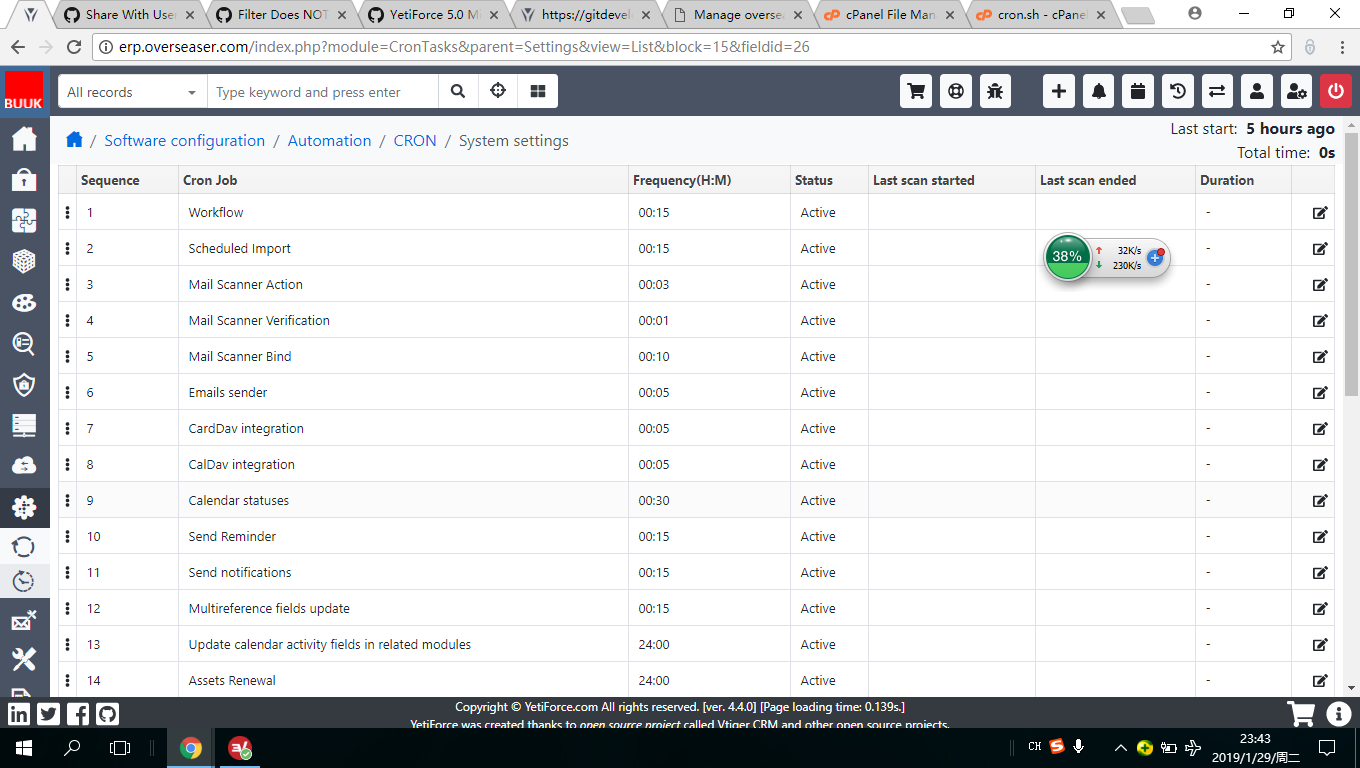
The result:
andrewchaosun
on 29 Jan 2019
Run cron manually by URL, you must be logged in to CRM
example: https://gitdeveloper.yetiforce.com/cron.php
I am happy to give you the user name and password of my yetiforce, if this can be helpful. Pls kindly send a quick email to [email protected] OR any other info that you need about the server or yetiforce admin, pls let me know.
andrewchaosun
on 29 Jan 2019
Look for cron.sh.
vtigercron.sh available up to ver. 4.2.
Many thanks. Yes, I found cron.sh.
andrewchaosun
on 29 Jan 2019
Your cron.sh file incorrect: you two times use USE_PHP variable. I'm not sure but I think 2nd one overrides 1st.
2nd php path targets to php 5.6 but this php version not applicable for 4.2+ versions of yetiforce
vovpff
on 29 Jan 2019
Your cron.sh file incorrect: you two times use USE_PHP variable. I'm not sure but I think 2nd one overrides 1st.
2nd php path targets to php 5.6 but this php version not applicable for 4.2+ versions of yetiforce
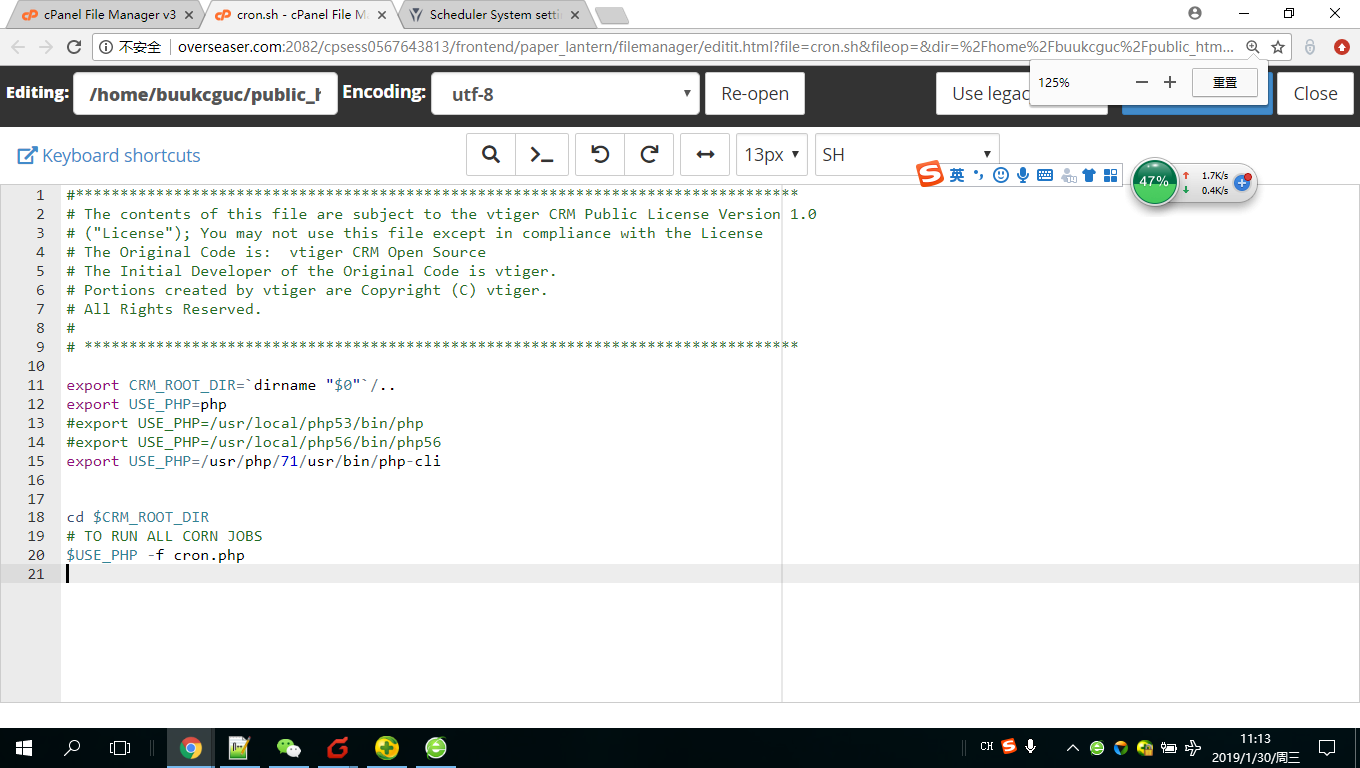
SO, VOV, how do I set the path here, pls? The info. below is on the cron.sh file.
#*********************************************************************************
# The contents of this file are subject to the vtiger CRM Public License Version 1.0
# ("License"); You may not use this file except in compliance with the License
# The Original Code is:  vtiger CRM Open Source
# The Initial Developer of the Original Code is vtiger.
# Portions created by vtiger are Copyright (C) vtiger.
# All Rights Reserved.
#
# ********************************************************************************

export CRM_ROOT_DIR=`dirname "$0"`/..
export USE_PHP=php
#export USE_PHP=/usr/local/php53/bin/php
#export USE_PHP=/usr/local/php56/bin/php56
export USE_PHP=/usr/local/php56/bin/php
cd $CRM_ROOT_DIR
# TO RUN ALL CORN JOBS
$USE_PHP -f cron.php
You can request correct php path from your hoster.
If you have acess to terminal/ssh, you can try whereis php command
vovpff
on 29 Jan 2019
php path
Great. I will send to the hoster a ticket.
andrewchaosun
on 29 Jan 2019
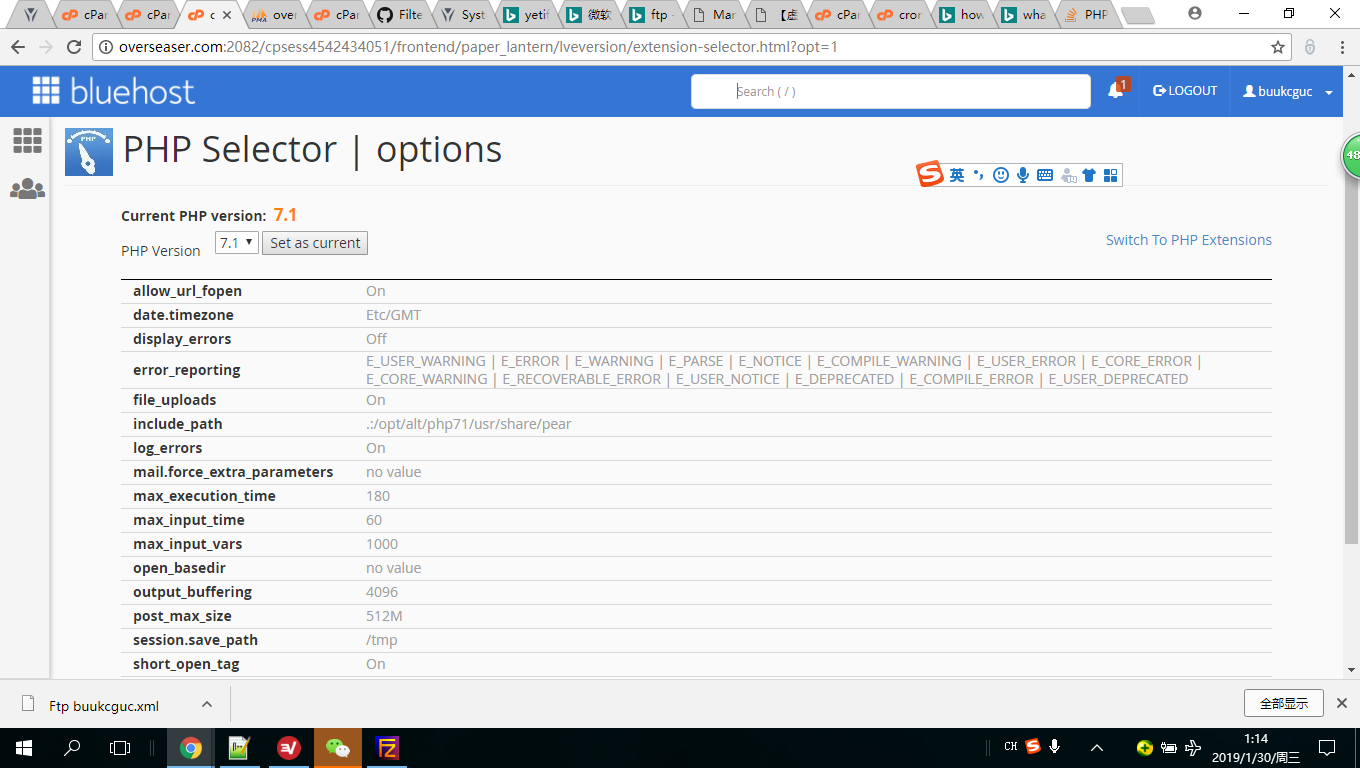
Can this be the PHP Path?
include_path | .:/opt/alt/php71/usr/share/pear
andrewchaosun
on 29 Jan 2019
I'm not sure. Try this /usr/php/71/usr/bin/php-cli
vovpff
on 29 Jan 2019
if you do not run the cron by url when you are logged in, then running SH and CLI will not work either.
let's start with the essential things
- logs
- Screenshots verification verification
without this, we will not move on, this is usually the cause of the error because it works everywhere
mariuszkrzaczkowski
on 29 Jan 2019
if you do not run the cron by url when you are logged in, then running SH and CLI will not work either.
let's start with the essential things
- logs
- Screenshots verification verification
without this, we will not move on, this is usually the cause of the error because it works everywhere
Many thanks for the reply. So, first thing: what do you want me to do with the logs? Can you pls give me a bit more detailed instruction?
andrewchaosun
on 30 Jan 2019
I'm not sure. Try this
/usr/php/71/usr/bin/php-cli
Still not working, I am waiting for the reply from the hoster. Hopefully soon.
andrewchaosun
on 30 Jan 2019
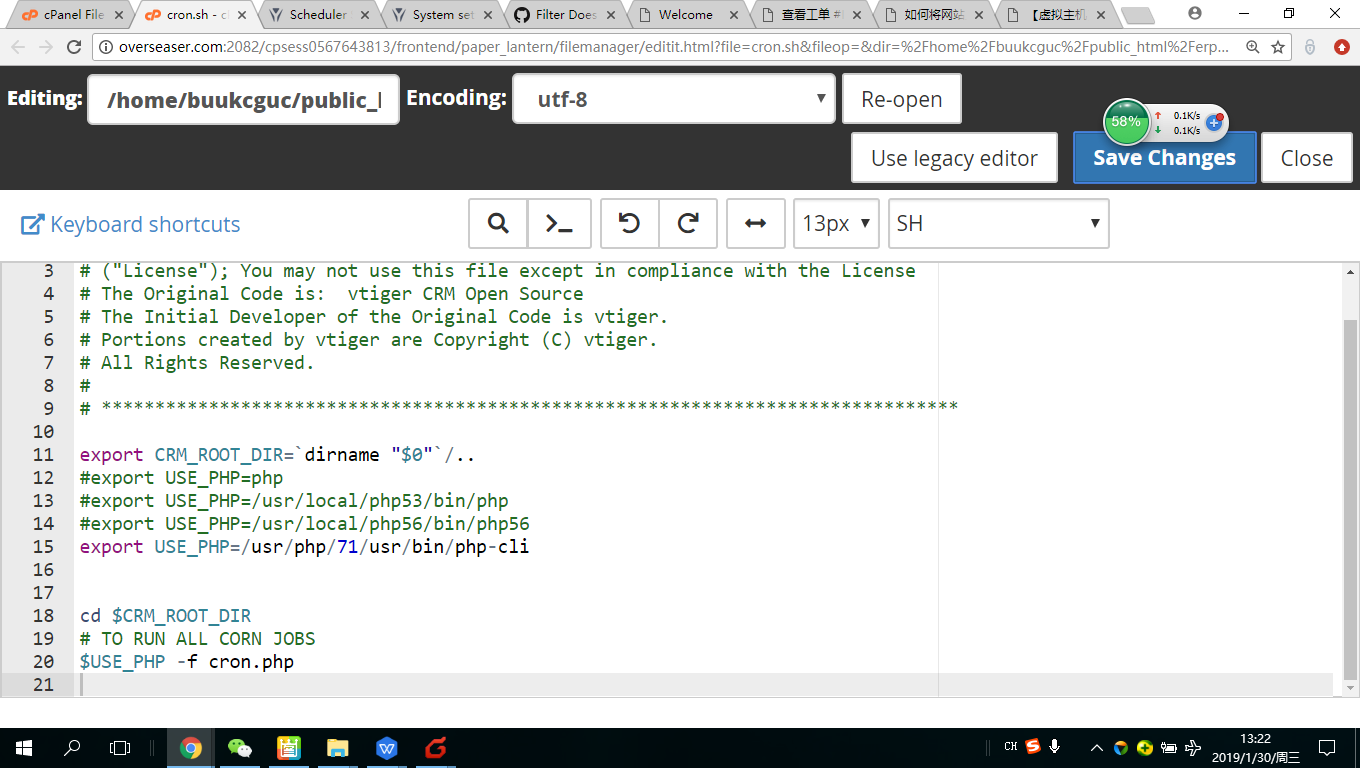
Put # before line 12 and try
vovpff
on 30 Jan 2019
Put
#before line 12 and try
Tried, but still not functioning.
andrewchaosun
on 30 Jan 2019
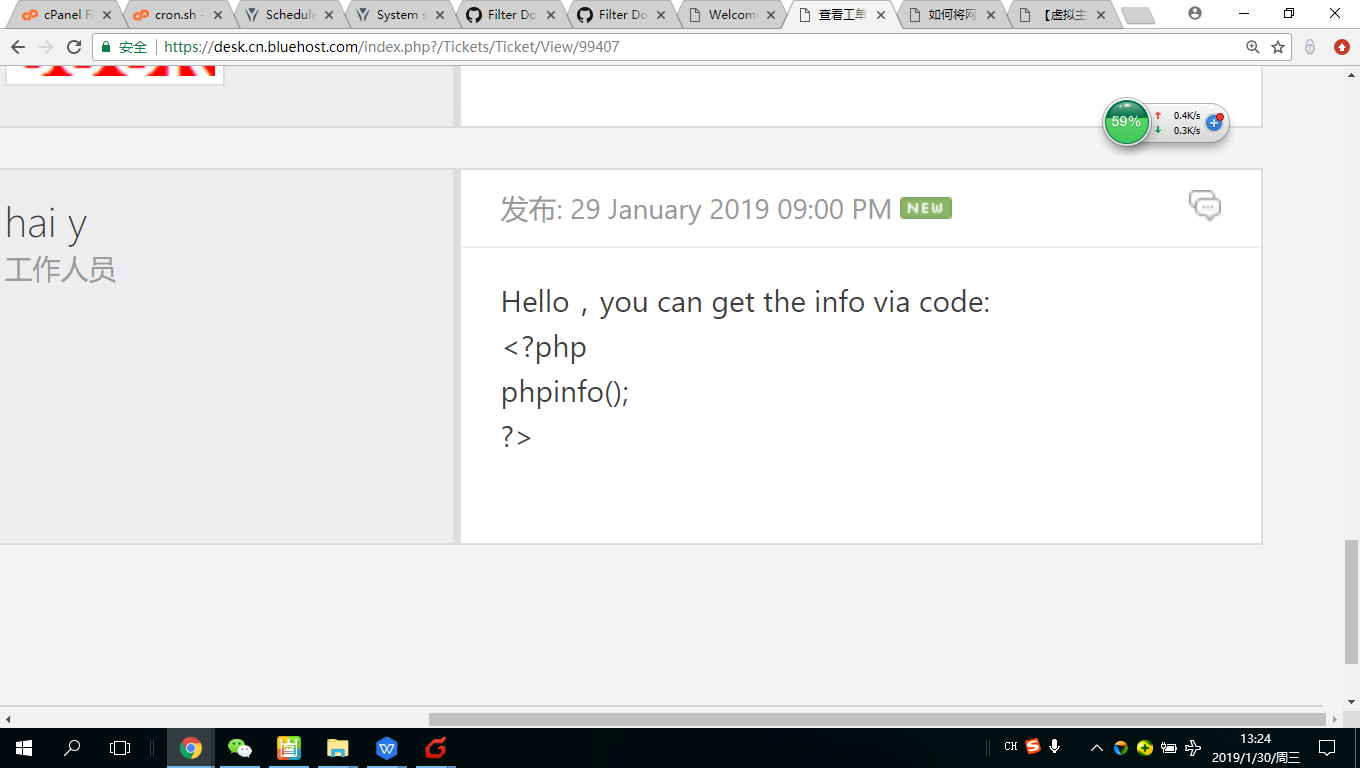
the reply from the hoster, but I still have no idea about how to get that.
andrewchaosun
on 30 Jan 2019
PHP/Apache/Nginx/Browser/CRM Logs
Please include a part of logs which describes when the error occurred. The more info you provide, the quicker we will be able to solve your problem. Description how to enable logs can be found here: https://yetiforce.com/en/knowledge-base/documentation/developer-documentation/item/debugging Additionally, include a screenshot of your browser’s console (e.g. press F12 in Google Chrome).
ex. cache/logs/phpError.log, cache/logs/system.log,
mariuszkrzaczkowski
on 30 Jan 2019
enable full logs and run cron via url and cli
mariuszkrzaczkowski
on 30 Jan 2019
Copy code from hoster reply from < to>. Create file info.php in your crm root and put there this code. Open this file by url yourdomain.com/info.php
vovpff
on 30 Jan 2019
Therefore, the system has a built-in tool to verify the configuration so that you do not need a phpinfo. verification shows much more than phpinfo
mariuszkrzaczkowski
on 30 Jan 2019
PHP/Apache/Nginx/Browser/CRM Logs
Please include a part of logs which describes when the error occurred. The more info you provide, the quicker we will be able to solve your problem. Description how to enable logs can be found here: https://yetiforce.com/en/knowledge-base/documentation/developer-documentation/item/debugging Additionally, include a screenshot of your browser’s console (e.g. press F12 in Google Chrome).
ex. cache/logs/phpError.log, cache/logs/system.log,
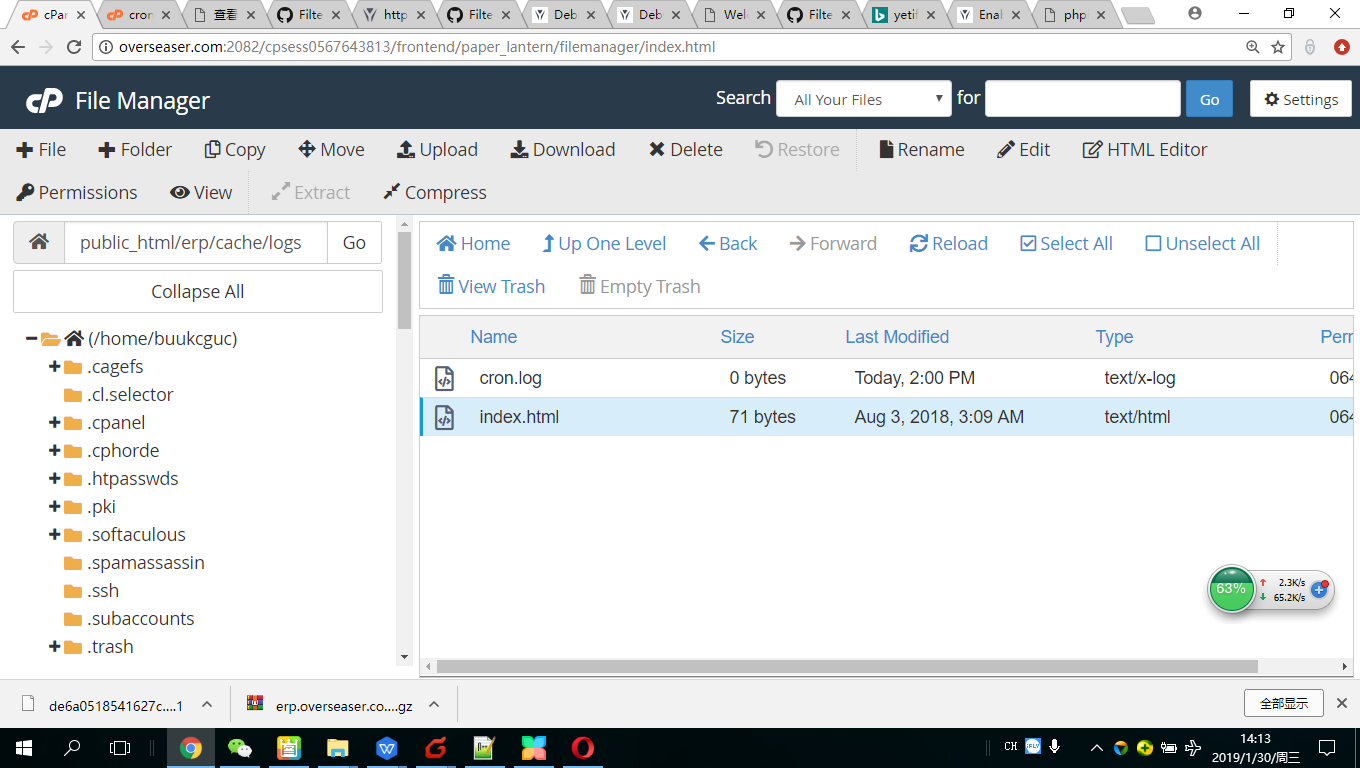
my **/cache/logs file is pretty much empty. There are only two files, i.e., cron.log and index.html and the Cron.log file is empty. Guess there is something wrong somewhere.
andrewchaosun
on 30 Jan 2019
PHP/Apache/Nginx/Browser/CRM Logs
Please include a part of logs which describes when the error occurred. The more info you provide, the quicker we will be able to solve your problem. Description how to enable logs can be found here: https://yetiforce.com/en/knowledge-base/documentation/developer-documentation/item/debugging Additionally, include a screenshot of your browser’s console (e.g. press F12 in Google Chrome).
ex. cache/logs/phpError.log, cache/logs/system.log,
when the error occourred:
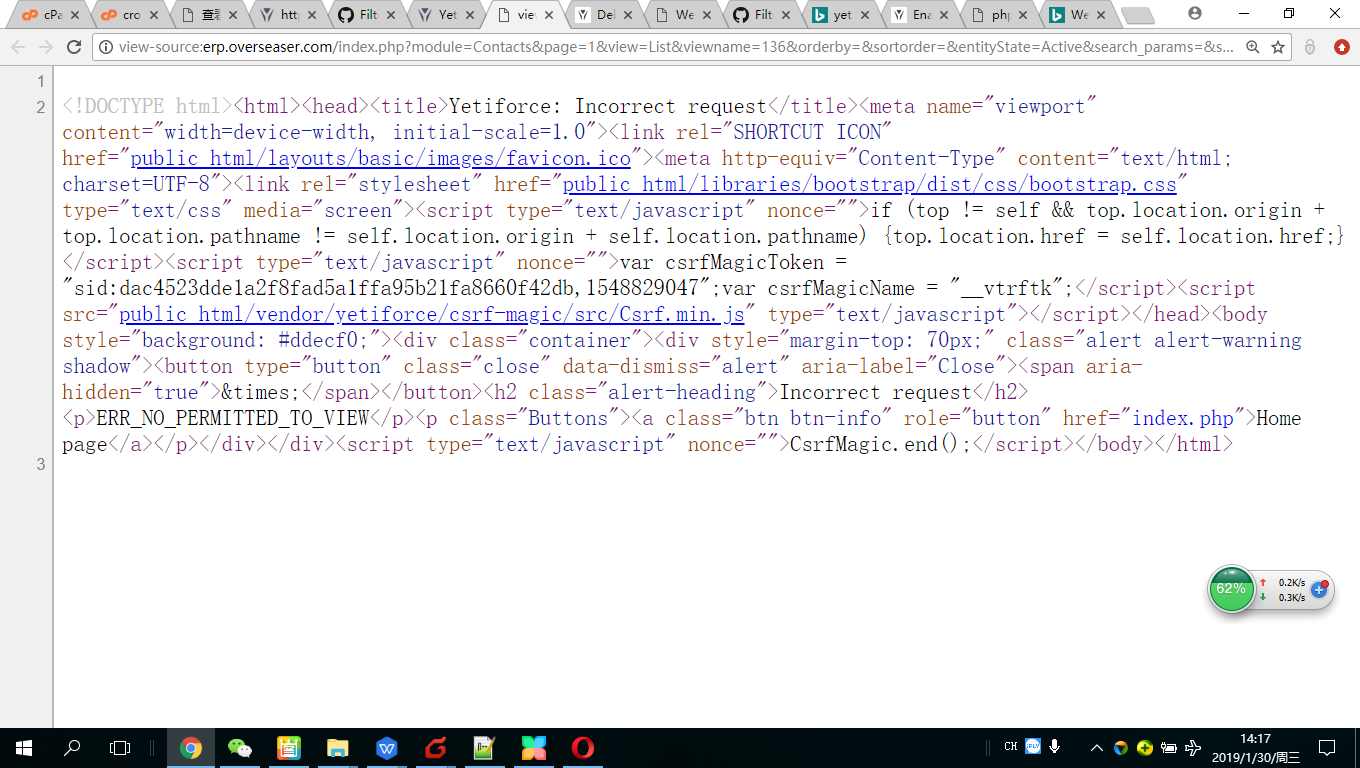
andrewchaosun
on 30 Jan 2019
https://github.com/YetiForceCompany/YetiForceCRM/issues/9022#issuecomment-451073137
https://github.com/YetiForceCompany/YetiForceCRM/blob/6bb53abeddd56543e815ca46f94961f8a7252e21/config/debug.php#L9-L77
Set the configuration so and try to call error
'LOG_TO_FILE' => true,
'LOG_LEVELS' => ['error', 'warning'],
'LOG_TRACE_LEVEL' => 9,
'SQL_DIE_ON_ERROR' => true,
'DEBUG_CRON' => true,
'SMARTY_ERROR_REPORTING' => E_ALL & ~E_NOTICE,
'JS_DEBUG' => true,
'DISPLAY_EXCEPTION_BACKTRACE' => true,
'DISPLAY_EXCEPTION_LOGS' => true,
'EXCEPTION_ERROR_LEVEL' => E_ALL & ~E_NOTICE,
'DAV_DEBUG_EXCEPTIONS' => true,
'DAV_DEBUG_PLUGIN' => true,
'WEBSERVICE_SHOW_ERROR' => true,
'WEBSERVICE_DEBUG' => true,
'MAILER_DEBUG' => true,
If there are no logs then changle this code
// Turn on the error handler
'EXCEPTION_ERROR_HANDLER' => true,
// Save logs to file (cache/logs/errors.log)
'EXCEPTION_ERROR_TO_FILE' => true,
// Display errors
'EXCEPTION_ERROR_TO_SHOW' => true,
attach all files from the catalog "cache/logs"
mariuszkrzaczkowski
on 30 Jan 2019
roger that.
andrewchaosun
on 30 Jan 2019
here is it, the error code:
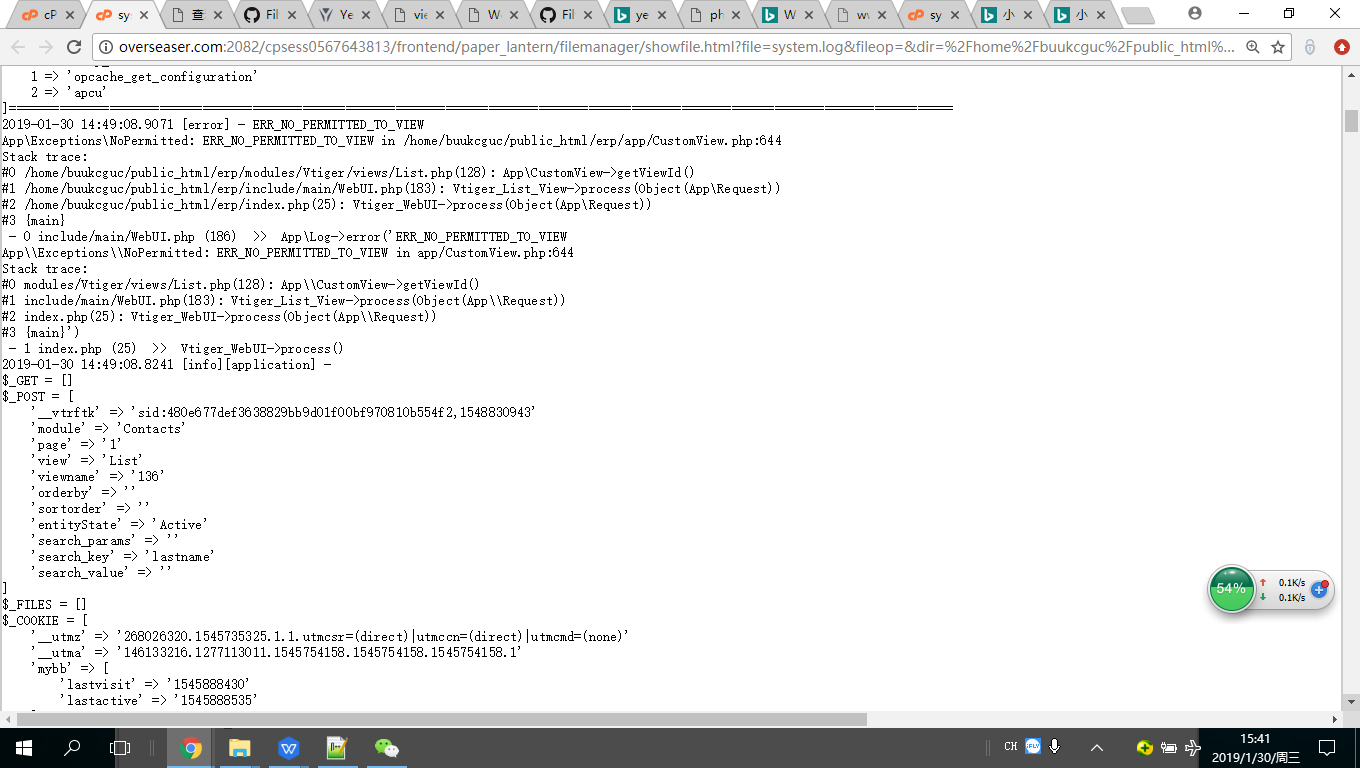
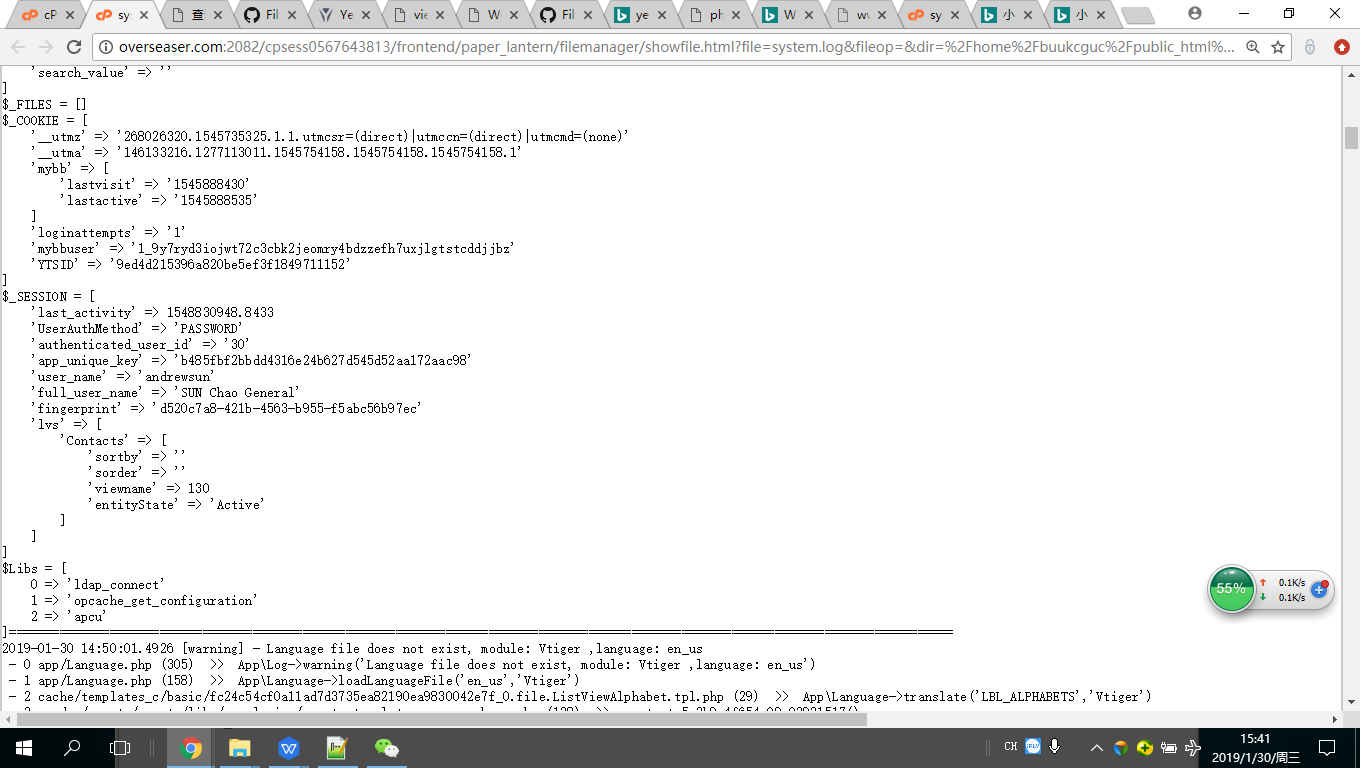
]====================================================================================================================================
2019-01-30 14:49:08.9071 [error] - ERR_NO_PERMITTED_TO_VIEW
App\Exceptions\NoPermitted: ERR_NO_PERMITTED_TO_VIEW in /home/buukcguc/public_html/erp/app/CustomView.php:644
Stack trace:
0 /home/buukcguc/public_html/erp/modules/Vtiger/views/List.php(128): App\CustomView->getViewId()
1 /home/buukcguc/public_html/erp/include/main/WebUI.php(183): Vtiger_List_View->process(Object(App\Request))
2 /home/buukcguc/public_html/erp/index.php(25): Vtiger_WebUI->process(Object(App\Request))
3 {main}
- 0 include/main/WebUI.php (186) >> App\Log->error('ERR_NO_PERMITTED_TO_VIEW
App\Exceptions\NoPermitted: ERR_NO_PERMITTED_TO_VIEW in app/CustomView.php:644
Stack trace:
0 modules/Vtiger/views/List.php(128): App\CustomView->getViewId()
1 include/main/WebUI.php(183): Vtiger_List_View->process(Object(App\Request))
2 index.php(25): Vtiger_WebUI->process(Object(App\Request))
3 {main}')
- 1 index.php (25) >> Vtiger_WebUI->process()
2019-01-30 14:49:08.8241 [info][application] -
$_GET = []
$_POST = [
'__vtrftk' => 'sid:480e677def3638829bb9d01f00bf970810b554f2,1548830943'
'module' => 'Contacts'
'page' => '1'
'view' => 'List'
'viewname' => '136'
'orderby' => ''
'sortorder' => ''
'entityState' => 'Active'
'search_params' => ''
'search_key' => 'lastname'
'search_value' => ''
]
$_FILES = []
$_COOKIE = [
'__utmz' => '268026320.1545735325.1.1.utmcsr=(direct)|utmccn=(direct)|utmcmd=(none)'
'__utma' => '146133216.1277113011.1545754158.1545754158.1545754158.1'
'mybb' => [
'lastvisit' => '1545888430'
'lastactive' => '1545888535'
]
'loginattempts' => '1'
'mybbuser' => '1_9y7ryd3iojwt72c3cbk2jeomry4bdzzefh7uxjlgtstcddjjbz'
'YTSID' => '9ed4d215396a820be5ef3f1849711152'
]
$_SESSION = [
'last_activity' => 1548830948.8433
'UserAuthMethod' => 'PASSWORD'
'authenticated_user_id' => '30'
'app_unique_key' => 'b485fbf2bbdd4316e24b627d545d52aa172aac98'
'user_name' => 'andrewsun'
'full_user_name' => 'SUN Chao General'
'fingerprint' => 'd520c7a8-421b-4563-b955-f5abc56b97ec'
'lvs' => [
'Contacts' => [
'sortby' => ''
'sorder' => ''
'viewname' => 130
'entityState' => 'Active'
]
]
]
$Libs = [
0 => 'ldap_connect'
1 => 'opcache_get_configuration'
2 => 'apcu'
andrewchaosun
on 30 Jan 2019
more: the below appeared when i chose the filter.
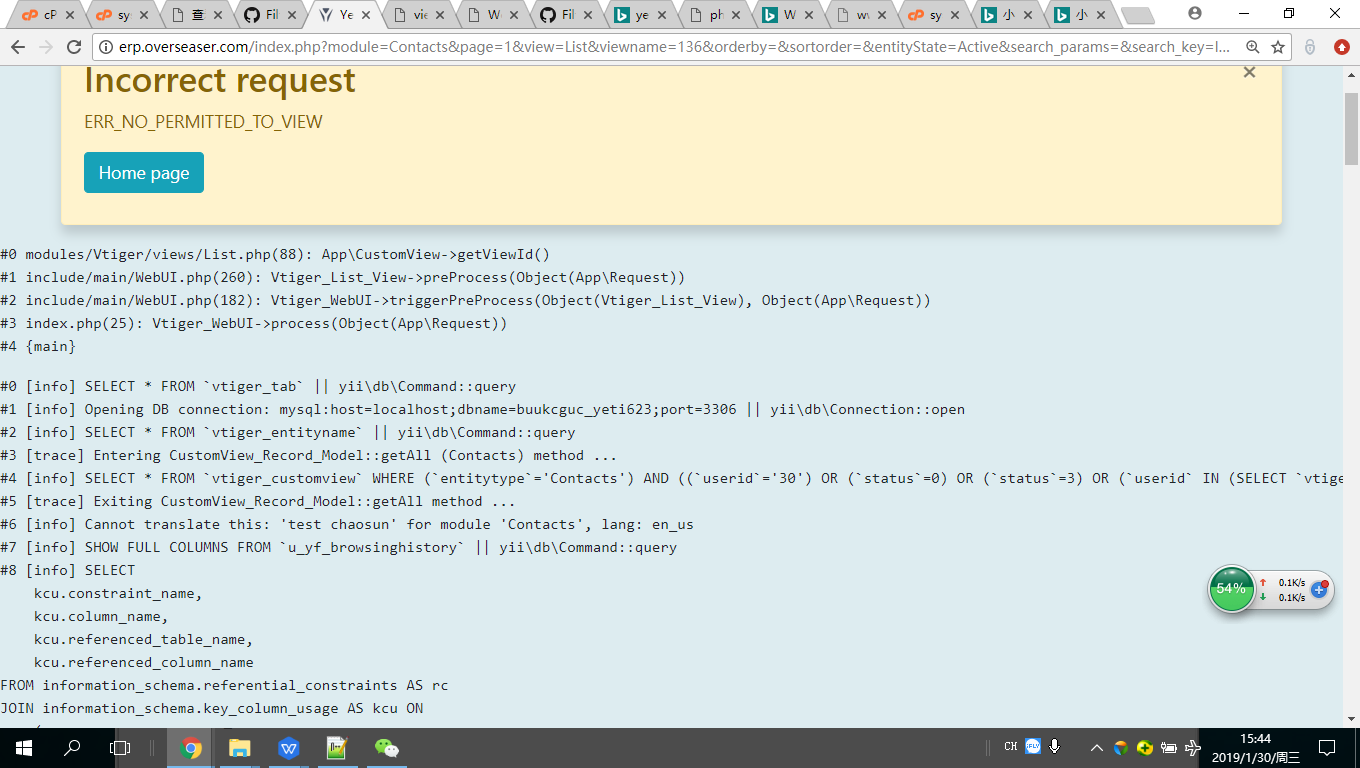
×
Incorrect request
ERR_NO_PERMITTED_TO_VIEW
0 modules/Vtiger/views/List.php(88): App\CustomView->getViewId()
1 include/main/WebUI.php(260): Vtiger_List_View->preProcess(Object(App\Request))
2 include/main/WebUI.php(182): Vtiger_WebUI->triggerPreProcess(Object(Vtiger_List_View), Object(App\Request))
3 index.php(25): Vtiger_WebUI->process(Object(App\Request))
4 {main}
0 [info] SELECT * FROM vtiger_tab || yii\db\Command::query
1 [info] Opening DB connection: mysql:host=localhost;dbname=buukcguc_yeti623;port=3306 || yii\db\Connection::open
2 [info] SELECT * FROM vtiger_entityname || yii\db\Command::query
3 [trace] Entering CustomView_Record_Model::getAll (Contacts) method ...
4 [info] SELECT * FROM vtiger_customview WHERE (entitytype='Contacts') AND ((userid='30') OR (status=0) OR (status=3) OR (userid IN (SELECT vtiger_user2role.userid FROM vtiger_user2role INNER JOIN vtiger_users ON vtiger_users.id = vtiger_user2role.userid INNER JOIN vtiger_role ON vtiger_role.roleid = vtiger_user2role.roleid WHERE vtiger_role.parentrole LIKE 'H1::H2::H38::%'))) ORDER BY sequence || yii\db\Command::query
5 [trace] Exiting CustomView_Record_Model::getAll method ...
6 [info] Cannot translate this: 'test chaosun' for module 'Contacts', lang: en_us
7 [info] SHOW FULL COLUMNS FROM u_yf_browsinghistory || yii\db\Command::query
8 [info] SELECT
kcu.constraint_name,
kcu.column_name,
kcu.referenced_table_name,
kcu.referenced_column_name
FROM information_schema.referential_constraints AS rc
JOIN information_schema.key_column_usage AS kcu ON
(
kcu.constraint_catalog = rc.constraint_catalog OR
(kcu.constraint_catalog IS NULL AND rc.constraint_catalog IS NULL)
) AND
kcu.constraint_schema = rc.constraint_schema AND
kcu.constraint_name = rc.constraint_name
WHERE rc.constraint_schema = database() AND kcu.table_schema = database()
AND rc.table_name = 'u_yf_browsinghistory' AND kcu.table_name = 'u_yf_browsinghistory' || yii\db\Command::query
9 [info] INSERT INTO u_yf_browsinghistory (userid, date, title, url) VALUES (30, '2019-01-30 15:43:32', 'Contacts List [Filter: test chaosun]', 'index.php?module=Contacts&page=1&view=List&viewname=136&orderby=&sortorder=&entityState=Active&search_params=&search_key=lastname&search_value=') || yii\db\Command::execute
10 [trace] Entering CustomView_Record_Model::getAll (Contacts) method ...
11 [info] Cannot translate this: 'test chaosun' for module 'Contacts', lang: en_us
12 [info] SELECT * FROM vtiger_links || yii\db\Command::query
13 [info] SELECT * FROM s_yf_companies WHERE default=1 LIMIT 1 || yii\db\Command::query
14 [trace] Start DateTimeField::__convertToUserFormat a:1:{i:0;s:9:"2019-1-30";} | yyyy-mm-dd
15 [trace] End DateTimeField::__convertToUserFormat
16 [info] SELECT * FROM u_yf_browsinghistory WHERE userid='30' ORDER BY id DESC LIMIT 20 || yii\db\Command::query
17 [trace] Start DateTimeField::convertToUserTimeZone(today) method ...
18 [trace] Start DateTimeField::convertTimeZone(today, Asia/Taipei, Asia/Brunei)
19 [trace] End DateTimeField::convertTimeZone
20 [trace] End DateTimeField::convertToUserTimeZone
21 [trace] Start DateTimeField::convertToUserTimeZone(yesterday) method ...
22 [trace] Start DateTimeField::convertTimeZone(yesterday, Asia/Taipei, Asia/Brunei)
23 [trace] End DateTimeField::convertTimeZone
24 [trace] End DateTimeField::convertToUserTimeZone
25 [trace] Start DateTimeField::convertToUserTimeZone(2019-01-30 15:43:32) method ...
26 [trace] Start DateTimeField::convertTimeZone(2019-01-30 15:43:32, Asia/Taipei, Asia/Brunei)
27 [trace] End DateTimeField::convertTimeZone
28 [trace] End DateTimeField::convertToUserTimeZone
29 [trace] Start DateTimeField::getDisplayTime(2019-01-30 15:43:32)
30 [trace] Start DateTimeField::convertToUserTimeZone(2019-01-30 15:43:32) method ...
31 [trace] Start DateTimeField::convertTimeZone(2019-01-30 15:43:32, Asia/Taipei, Asia/Brunei)
32 [trace] End DateTimeField::convertTimeZone
33 [trace] End DateTimeField::convertToUserTimeZone
34 [trace] End DateTimeField::getDisplayTime
35 [trace] Start DateTimeField::convertToUserTimeZone(2019-01-30 15:42:59) method ...
36 [trace] Start DateTimeField::convertTimeZone(2019-01-30 15:42:59, Asia/Taipei, Asia/Brunei)
37 [trace] End DateTimeField::convertTimeZone
38 [trace] End DateTimeField::convertToUserTimeZone
39 [trace] Start DateTimeField::getDisplayTime(2019-01-30 15:42:59)
40 [trace] Start DateTimeField::convertToUserTimeZone(2019-01-30 15:42:59) method ...
41 [trace] Start DateTimeField::convertTimeZone(2019-01-30 15:42:59, Asia/Taipei, Asia/Brunei)
42 [trace] End DateTimeField::convertTimeZone
43 [trace] End DateTimeField::convertToUserTimeZone
44 [trace] End DateTimeField::getDisplayTime
45 [trace] Start DateTimeField::convertToUserTimeZone(2019-01-30 15:37:01) method ...
46 [trace] Start DateTimeField::convertTimeZone(2019-01-30 15:37:01, Asia/Taipei, Asia/Brunei)
47 [trace] End DateTimeField::convertTimeZone
48 [trace] End DateTimeField::convertToUserTimeZone
49 [trace] Start DateTimeField::getDisplayTime(2019-01-30 15:37:01)
50 [trace] Start DateTimeField::convertToUserTimeZone(2019-01-30 15:37:01) method ...
51 [trace] Start DateTimeField::convertTimeZone(2019-01-30 15:37:01, Asia/Taipei, Asia/Brunei)
52 [trace] End DateTimeField::convertTimeZone
53 [trace] End DateTimeField::convertToUserTimeZone
54 [trace] End DateTimeField::getDisplayTime
55 [trace] Start DateTimeField::convertToUserTimeZone(2019-01-30 15:04:21) method ...
56 [trace] Start DateTimeField::convertTimeZone(2019-01-30 15:04:21, Asia/Taipei, Asia/Brunei)
57 [trace] End DateTimeField::convertTimeZone
58 [trace] End DateTimeField::convertToUserTimeZone
59 [trace] Start DateTimeField::getDisplayTime(2019-01-30 15:04:21)
60 [trace] Start DateTimeField::convertToUserTimeZone(2019-01-30 15:04:21) method ...
61 [trace] Start DateTimeField::convertTimeZone(2019-01-30 15:04:21, Asia/Taipei, Asia/Brunei)
62 [trace] End DateTimeField::convertTimeZone
63 [trace] End DateTimeField::convertToUserTimeZone
64 [trace] End DateTimeField::getDisplayTime
65 [trace] Start DateTimeField::convertToUserTimeZone(2019-01-30 15:03:54) method ...
66 [trace] Start DateTimeField::convertTimeZone(2019-01-30 15:03:54, Asia/Taipei, Asia/Brunei)
67 [trace] End DateTimeField::convertTimeZone
68 [trace] End DateTimeField::convertToUserTimeZone
69 [trace] Start DateTimeField::getDisplayTime(2019-01-30 15:03:54)
70 [trace] Start DateTimeField::convertToUserTimeZone(2019-01-30 15:03:54) method ...
71 [trace] Start DateTimeField::convertTimeZone(2019-01-30 15:03:54, Asia/Taipei, Asia/Brunei)
72 [trace] End DateTimeField::convertTimeZone
73 [trace] End DateTimeField::convertToUserTimeZone
74 [trace] End DateTimeField::getDisplayTime
75 [trace] Start DateTimeField::convertToUserTimeZone(2019-01-30 14:17:27) method ...
76 [trace] Start DateTimeField::convertTimeZone(2019-01-30 14:17:27, Asia/Taipei, Asia/Brunei)
77 [trace] End DateTimeField::convertTimeZone
78 [trace] End DateTimeField::convertToUserTimeZone
79 [trace] Start DateTimeField::getDisplayTime(2019-01-30 14:17:27)
80 [trace] Start DateTimeField::convertToUserTimeZone(2019-01-30 14:17:27) method ...
81 [trace] Start DateTimeField::convertTimeZone(2019-01-30 14:17:27, Asia/Taipei, Asia/Brunei)
82 [trace] End DateTimeField::convertTimeZone
83 [trace] End DateTimeField::convertToUserTimeZone
84 [trace] End DateTimeField::getDisplayTime
85 [trace] Start DateTimeField::convertToUserTimeZone(2019-01-30 14:17:21) method ...
86 [trace] Start DateTimeField::convertTimeZone(2019-01-30 14:17:21, Asia/Taipei, Asia/Brunei)
87 [trace] End DateTimeField::convertTimeZone
88 [trace] End DateTimeField::convertToUserTimeZone
89 [trace] Start DateTimeField::getDisplayTime(2019-01-30 14:17:21)
90 [trace] Start DateTimeField::convertToUserTimeZone(2019-01-30 14:17:21) method ...
91 [trace] Start DateTimeField::convertTimeZone(2019-01-30 14:17:21, Asia/Taipei, Asia/Brunei)
92 [trace] End DateTimeField::convertTimeZone
93 [trace] End DateTimeField::convertToUserTimeZone
94 [trace] End DateTimeField::getDisplayTime
95 [trace] Start DateTimeField::convertToUserTimeZone(2019-01-30 13:50:55) method ...
96 [trace] Start DateTimeField::convertTimeZone(2019-01-30 13:50:55, Asia/Taipei, Asia/Brunei)
97 [trace] End DateTimeField::convertTimeZone
98 [trace] End DateTimeField::convertToUserTimeZone
99 [trace] Start DateTimeField::getDisplayTime(2019-01-30 13:50:55)
100 [trace] Start DateTimeField::convertToUserTimeZone(2019-01-30 13:50:55) method ...
101 [trace] Start DateTimeField::convertTimeZone(2019-01-30 13:50:55, Asia/Taipei, Asia/Brunei)
102 [trace] End DateTimeField::convertTimeZone
103 [trace] End DateTimeField::convertToUserTimeZone
104 [trace] End DateTimeField::getDisplayTime
105 [trace] Start DateTimeField::convertToUserTimeZone(2019-01-30 13:50:01) method ...
106 [trace] Start DateTimeField::convertTimeZone(2019-01-30 13:50:01, Asia/Taipei, Asia/Brunei)
107 [trace] End DateTimeField::convertTimeZone
108 [trace] End DateTimeField::convertToUserTimeZone
109 [trace] Start DateTimeField::getDisplayTime(2019-01-30 13:50:01)
110 [trace] Start DateTimeField::convertToUserTimeZone(2019-01-30 13:50:01) method ...
111 [trace] Start DateTimeField::convertTimeZone(2019-01-30 13:50:01, Asia/Taipei, Asia/Brunei)
112 [trace] End DateTimeField::convertTimeZone
113 [trace] End DateTimeField::convertToUserTimeZone
114 [trace] End DateTimeField::getDisplayTime
115 [trace] Start DateTimeField::convertToUserTimeZone(2019-01-30 13:48:14) method ...
116 [trace] Start DateTimeField::convertTimeZone(2019-01-30 13:48:14, Asia/Taipei, Asia/Brunei)
117 [trace] End DateTimeField::convertTimeZone
118 [trace] End DateTimeField::convertToUserTimeZone
119 [trace] Start DateTimeField::getDisplayTime(2019-01-30 13:48:14)
120 [trace] Start DateTimeField::convertToUserTimeZone(2019-01-30 13:48:14) method ...
121 [trace] Start DateTimeField::convertTimeZone(2019-01-30 13:48:14, Asia/Taipei, Asia/Brunei)
122 [trace] End DateTimeField::convertTimeZone
123 [trace] End DateTimeField::convertToUserTimeZone
124 [trace] End DateTimeField::getDisplayTime
125 [trace] Start DateTimeField::convertToUserTimeZone(2019-01-28 01:49:22) method ...
126 [trace] Start DateTimeField::convertTimeZone(2019-01-28 01:49:22, Asia/Taipei, Asia/Brunei)
127 [trace] End DateTimeField::convertTimeZone
128 [trace] End DateTimeField::convertToUserTimeZone
129 [trace] Start DateTimeField::__convertToUserFormat s:19:"2019-01-28 01:49:22"; | yyyy-mm-dd
130 [trace] End DateTimeField::__convertToUserFormat
131 [trace] Start DateTimeField::convertToUserTimeZone(2019-01-28 01:49:09) method ...
132 [trace] Start DateTimeField::convertTimeZone(2019-01-28 01:49:09, Asia/Taipei, Asia/Brunei)
133 [trace] End DateTimeField::convertTimeZone
134 [trace] End DateTimeField::convertToUserTimeZone
135 [trace] Start DateTimeField::__convertToUserFormat s:19:"2019-01-28 01:49:09"; | yyyy-mm-dd
136 [trace] End DateTimeField::__convertToUserFormat
137 [trace] Start DateTimeField::convertToUserTimeZone(2019-01-28 01:36:15) method ...
138 [trace] Start DateTimeField::convertTimeZone(2019-01-28 01:36:15, Asia/Taipei, Asia/Brunei)
139 [trace] End DateTimeField::convertTimeZone
140 [trace] End DateTimeField::convertToUserTimeZone
141 [trace] Start DateTimeField::__convertToUserFormat s:19:"2019-01-28 01:36:15"; | yyyy-mm-dd
142 [trace] End DateTimeField::__convertToUserFormat
143 [trace] Start DateTimeField::convertToUserTimeZone(2019-01-28 01:36:04) method ...
144 [trace] Start DateTimeField::convertTimeZone(2019-01-28 01:36:04, Asia/Taipei, Asia/Brunei)
145 [trace] End DateTimeField::convertTimeZone
146 [trace] End DateTimeField::convertToUserTimeZone
147 [trace] Start DateTimeField::__convertToUserFormat s:19:"2019-01-28 01:36:04"; | yyyy-mm-dd
148 [trace] End DateTimeField::__convertToUserFormat
149 [trace] Start DateTimeField::convertToUserTimeZone(2019-01-28 01:35:29) method ...
150 [trace] Start DateTimeField::convertTimeZone(2019-01-28 01:35:29, Asia/Taipei, Asia/Brunei)
151 [trace] End DateTimeField::convertTimeZone
152 [trace] End DateTimeField::convertToUserTimeZone
153 [trace] Start DateTimeField::__convertToUserFormat s:19:"2019-01-28 01:35:29"; | yyyy-mm-dd
154 [trace] End DateTimeField::__convertToUserFormat
155 [trace] Start DateTimeField::convertToUserTimeZone(2019-01-28 01:06:01) method ...
156 [trace] Start DateTimeField::convertTimeZone(2019-01-28 01:06:01, Asia/Taipei, Asia/Brunei)
157 [trace] End DateTimeField::convertTimeZone
158 [trace] End DateTimeField::convertToUserTimeZone
159 [trace] Start DateTimeField::__convertToUserFormat s:19:"2019-01-28 01:06:01"; | yyyy-mm-dd
160 [trace] End DateTimeField::__convertToUserFormat
161 [trace] Start DateTimeField::convertToUserTimeZone(2019-01-28 01:02:46) method ...
162 [trace] Start DateTimeField::convertTimeZone(2019-01-28 01:02:46, Asia/Taipei, Asia/Brunei)
163 [trace] End DateTimeField::convertTimeZone
164 [trace] End DateTimeField::convertToUserTimeZone
165 [trace] Start DateTimeField::__convertToUserFormat s:19:"2019-01-28 01:02:46"; | yyyy-mm-dd
166 [trace] End DateTimeField::__convertToUserFormat
167 [trace] Start DateTimeField::convertToUserTimeZone(2019-01-28 01:02:25) method ...
168 [trace] Start DateTimeField::convertTimeZone(2019-01-28 01:02:25, Asia/Taipei, Asia/Brunei)
169 [trace] End DateTimeField::convertTimeZone
170 [trace] End DateTimeField::convertToUserTimeZone
171 [trace] Start DateTimeField::__convertToUserFormat s:19:"2019-01-28 01:02:25"; | yyyy-mm-dd
172 [trace] End DateTimeField::__convertToUserFormat
173 [trace] Start DateTimeField::convertToUserTimeZone(2019-01-28 00:49:20) method ...
174 [trace] Start DateTimeField::convertTimeZone(2019-01-28 00:49:20, Asia/Taipei, Asia/Brunei)
175 [trace] End DateTimeField::convertTimeZone
176 [trace] End DateTimeField::convertToUserTimeZone
177 [trace] Start DateTimeField::__convertToUserFormat s:19:"2019-01-28 00:49:20"; | yyyy-mm-dd
178 [trace] End DateTimeField::__convertToUserFormat
179 [trace] Start DateTimeField::convertToUserTimeZone(2019-01-28 00:17:16) method ...
180 [trace] Start DateTimeField::convertTimeZone(2019-01-28 00:17:16, Asia/Taipei, Asia/Brunei)
181 [trace] End DateTimeField::convertTimeZone
182 [trace] End DateTimeField::convertToUserTimeZone
183 [trace] Start DateTimeField::__convertToUserFormat s:19:"2019-01-28 00:17:16"; | yyyy-mm-dd
184 [trace] End DateTimeField::__convertToUserFormat
185 [info] SELECT * FROM vtiger_actionmapping || yii\db\Command::query
186 [trace] Entering CustomView_Record_Model::getAll (Contacts) method ...
187 [trace] App\CustomView::getViewId
188 [trace] App\CustomView::isPermittedCustomView
189 [trace] App\CustomView::getStatusAndUserid
190 [info] SELECT * FROM vtiger_customview WHERE cvid=136 LIMIT 1 || yii\db\Command::query
191 [info] SELECT vtiger_users.id FROM vtiger_customview INNER JOIN vtiger_users WHERE (vtiger_customview.cvid=136) AND (vtiger_customview.userid IN (SELECT vtiger_user2role.userid FROM vtiger_user2role INNER JOIN vtiger_users ON vtiger_user2role.userid = vtiger_users.id INNER JOIN vtiger_role ON vtiger_user2role.userid = vtiger_role.roleid WHERE vtiger_role.parentrole LIKE '%H1::H2::H38::%')) || yii\db\Command::query
192 [info] SHOW FULL COLUMNS FROM o_yf_access_for_user || yii\db\Command::query
193 [info] Opening DB connection: mysql:host=localhost;dbname=buukcguc_yeti623;port=3306 || yii\db\Connection::open
194 [info] SELECT
kcu.constraint_name,
kcu.column_name,
kcu.referenced_table_name,
kcu.referenced_column_name
FROM information_schema.referential_constraints AS rc
JOIN information_schema.key_column_usage AS kcu ON
(
kcu.constraint_catalog = rc.constraint_catalog OR
(kcu.constraint_catalog IS NULL AND rc.constraint_catalog IS NULL)
) AND
kcu.constraint_schema = rc.constraint_schema AND
kcu.constraint_name = rc.constraint_name
WHERE rc.constraint_schema = database() AND kcu.table_schema = database()
AND rc.table_name = 'o_yf_access_for_user' AND kcu.table_name = 'o_yf_access_for_user' || yii\db\Command::query
195 [info] INSERT INTO o_yf_access_for_user (username, date, ip, module, url, agent, request, referer) VALUES ('SUN Chao General', '2019-01-30 15:43:32', '223.104.170.113(HTTP_X_FORWARDED_FOR: 137.59.148.201)', 'Contacts', 'http://erp.overseaser.com/index.php?module=Contacts&page=1&view=List&viewname=136&orderby=&sortorder=&entityState=Active&search_params=&search_key=lastname&search_value=', 'Mozilla/5.0 (Windows NT 10.0; Win64; x64) AppleWebKit/537.36 (KHTML, like Gecko) Chrome/65.0.3325.146 Safari/537.36', '{\"module\":\"Contacts\",\"page\":\"1\",\"view\":\"List\",\"viewname\":\"136\",\"orderby\":\"\",\"sortorder\":\"\",\"entityState\":\"Active\",\"search_params\":\"\",\"search_key\":\"lastname\",\"search_value\":\"\",\"__utmz\":\"268026320.1545735325.1.1.utmcsr=(direct)|utmccn=(direct)|utmcmd=(none)\",\"__utma\":\"146133216.1277113011.1545754158.1545754158.1545754158.1\",\"mybb\":{\"lastvisit\":\"1545888430\",\"lastactive\":\"1545888535\"},\"loginattempts\":\"1\",\"mybbuser\":\"1_9y7ryd3iojwt72c3cbk2jeomry4bdzzefh7uxjlgtstcddjjbz\",\"YTSID\":\"9ed4d215396a820be5ef3f1849711152\"}', '-') || yii\db\Command::execute
196 [error] ERR_NO_PERMITTED_TO_VIEW
App\Exceptions\NoPermitted: ERR_NO_PERMITTED_TO_VIEW in app/CustomView.php:644
Stack trace:
0 modules/Vtiger/views/List.php(88): App\CustomView->getViewId()
1 include/main/WebUI.php(260): Vtiger_List_View->preProcess(Object(App\Request))
2 include/main/WebUI.php(182): Vtiger_WebUI->triggerPreProcess(Object(Vtiger_List_View), Object(App\Request))
3 index.php(25): Vtiger_WebUI->process(Object(App\Request))
4 {main}
andrewchaosun
on 30 Jan 2019
More in system.log:
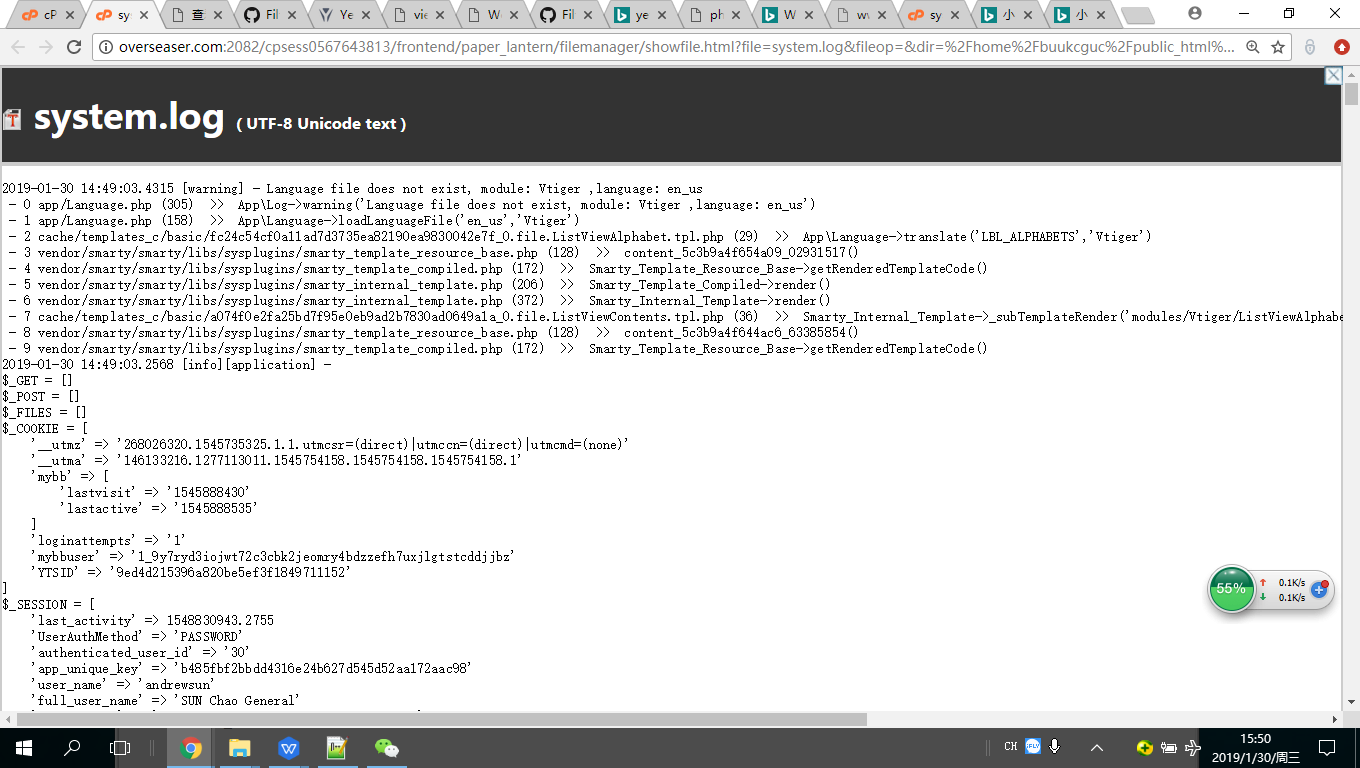
2019-01-30 14:49:03.4315 [warning] - Language file does not exist, module: Vtiger ,language: en_us
- 0 app/Language.php (305) >> App\Log->warning('Language file does not exist, module: Vtiger ,language: en_us')
- 1 app/Language.php (158) >> App\Language->loadLanguageFile('en_us','Vtiger')
- 2 cache/templates_c/basic/fc24c54cf0a11ad7d3735ea82190ea9830042e7f_0.file.ListViewAlphabet.tpl.php (29) >> App\Language->translate('LBL_ALPHABETS','Vtiger')
- 3 vendor/smarty/smarty/libs/sysplugins/smarty_template_resource_base.php (128) >> content_5c3b9a4f654a09_02931517()
- 4 vendor/smarty/smarty/libs/sysplugins/smarty_template_compiled.php (172) >> Smarty_Template_Resource_Base->getRenderedTemplateCode()
- 5 vendor/smarty/smarty/libs/sysplugins/smarty_internal_template.php (206) >> Smarty_Template_Compiled->render()
- 6 vendor/smarty/smarty/libs/sysplugins/smarty_internal_template.php (372) >> Smarty_Internal_Template->render()
- 7 cache/templates_c/basic/a074f0e2fa25bd7f95e0eb9ad2b7830ad0649a1a_0.file.ListViewContents.tpl.php (36) >> Smarty_Internal_Template->_subTemplateRender('modules/Vtiger/ListViewAlphabet.tpl',NULL,NULL,0,3600,[],0,true)
- 8 vendor/smarty/smarty/libs/sysplugins/smarty_template_resource_base.php (128) >> content_5c3b9a4f644ac6_63385854()
- 9 vendor/smarty/smarty/libs/sysplugins/smarty_template_compiled.php (172) >> Smarty_Template_Resource_Base->getRenderedTemplateCode()
2019-01-30 14:49:03.2568 [info][application] -
$_GET = []
$_POST = []
$_FILES = []
$_COOKIE = [
'__utmz' => '268026320.1545735325.1.1.utmcsr=(direct)|utmccn=(direct)|utmcmd=(none)'
'__utma' => '146133216.1277113011.1545754158.1545754158.1545754158.1'
'mybb' => [
'lastvisit' => '1545888430'
'lastactive' => '1545888535'
]
'loginattempts' => '1'
'mybbuser' => '1_9y7ryd3iojwt72c3cbk2jeomry4bdzzefh7uxjlgtstcddjjbz'
'YTSID' => '9ed4d215396a820be5ef3f1849711152'
]
$_SESSION = [
'last_activity' => 1548830943.2755
'UserAuthMethod' => 'PASSWORD'
'authenticated_user_id' => '30'
'app_unique_key' => 'b485fbf2bbdd4316e24b627d545d52aa172aac98'
'user_name' => 'andrewsun'
'full_user_name' => 'SUN Chao General'
'fingerprint' => 'd520c7a8-421b-4563-b955-f5abc56b97ec'
'lvs' => [
'Contacts' => [
'sortby' => ''
'sorder' => ''
'viewname' => 130
'entityState' => 'Active'
]
]
]
$Libs = [
0 => 'ldap_connect'
1 => 'opcache_get_configuration'
2 => 'apcu'
andrewchaosun
on 30 Jan 2019
mariuszkrzaczkowski
on 30 Jan 2019
andrewchaosun
on 30 Jan 2019
Copy code from hoster reply from < to>. Create file info.php in your crm root and put there this code. Open this file by url yourdomain.com/info.php
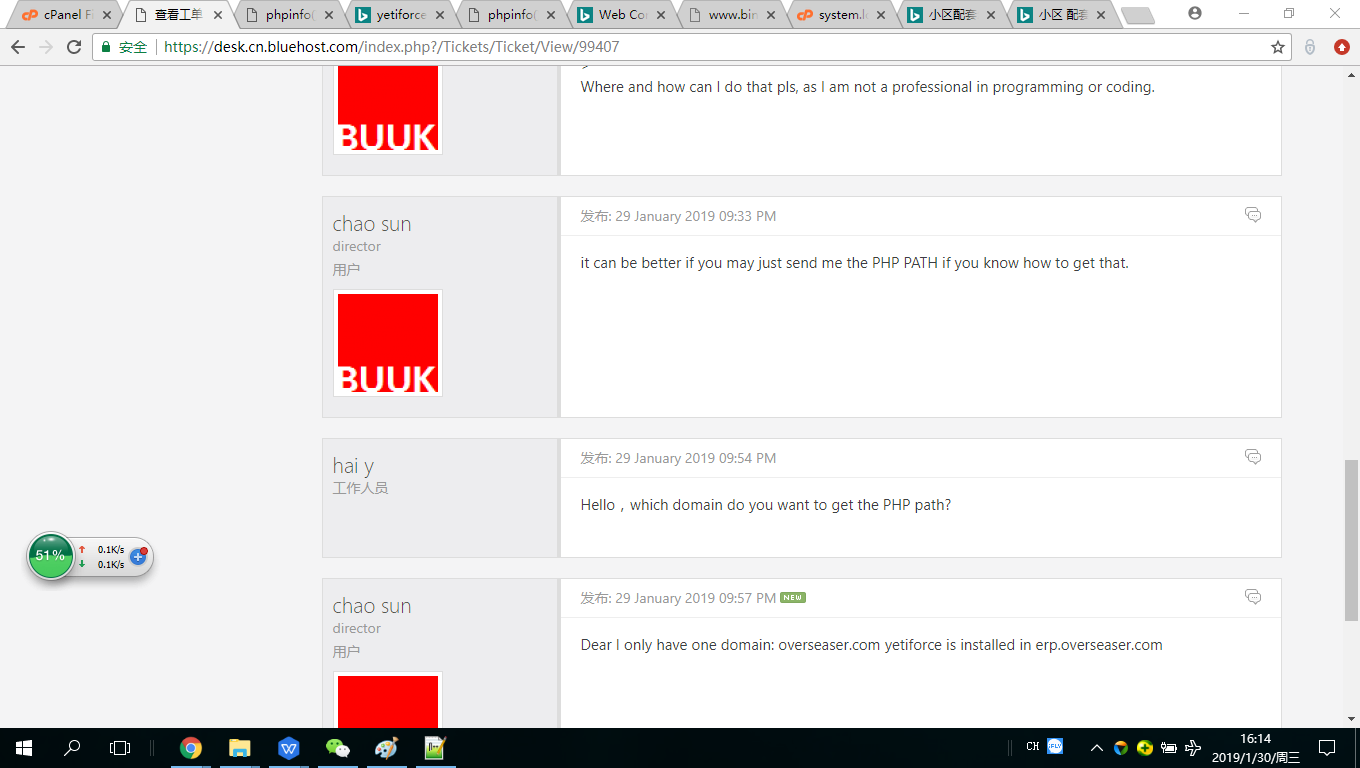
hoster suggested this: open URL http://erp.overseaser.com/phpinfo.php, then find the Path, but I did not seem to find the PHP PATH.
andrewchaosun
on 30 Jan 2019
@andrewchaosun you need to look around this path /opt/alt/php71/
vovpff
on 30 Jan 2019
Dear All, Guess this CRON is still not working. But, when do you think that we could have the V5.0 published, pls?
andrewchaosun
on 11 Feb 2019
Keep in mind what you need working CRON for every version of system
vovpff
on 11 Feb 2019
Keep in mind what you need working CRON for every version of system
I tough the updating might sort that out. I am totally lost here with the cron, it just simply does not work.
andrewchaosun
on 12 Feb 2019
Run cron manually by URL, you must be logged in to CRM
example: https://gitdeveloper.yetiforce.com/cron.php
Pls give me more instructions, as the https://gitdeveloper.yetiforce.com/cron.php indicating a lot of coding.
andrewchaosun
on 12 Feb 2019
Just tried to enalbe cron through the URL https://gitdeveloper.yetiforce.com/cron.php?app_key=b485fbf2bbdd4316e24b627d545d52aa172aac98 following the instructions, but still NOT working.
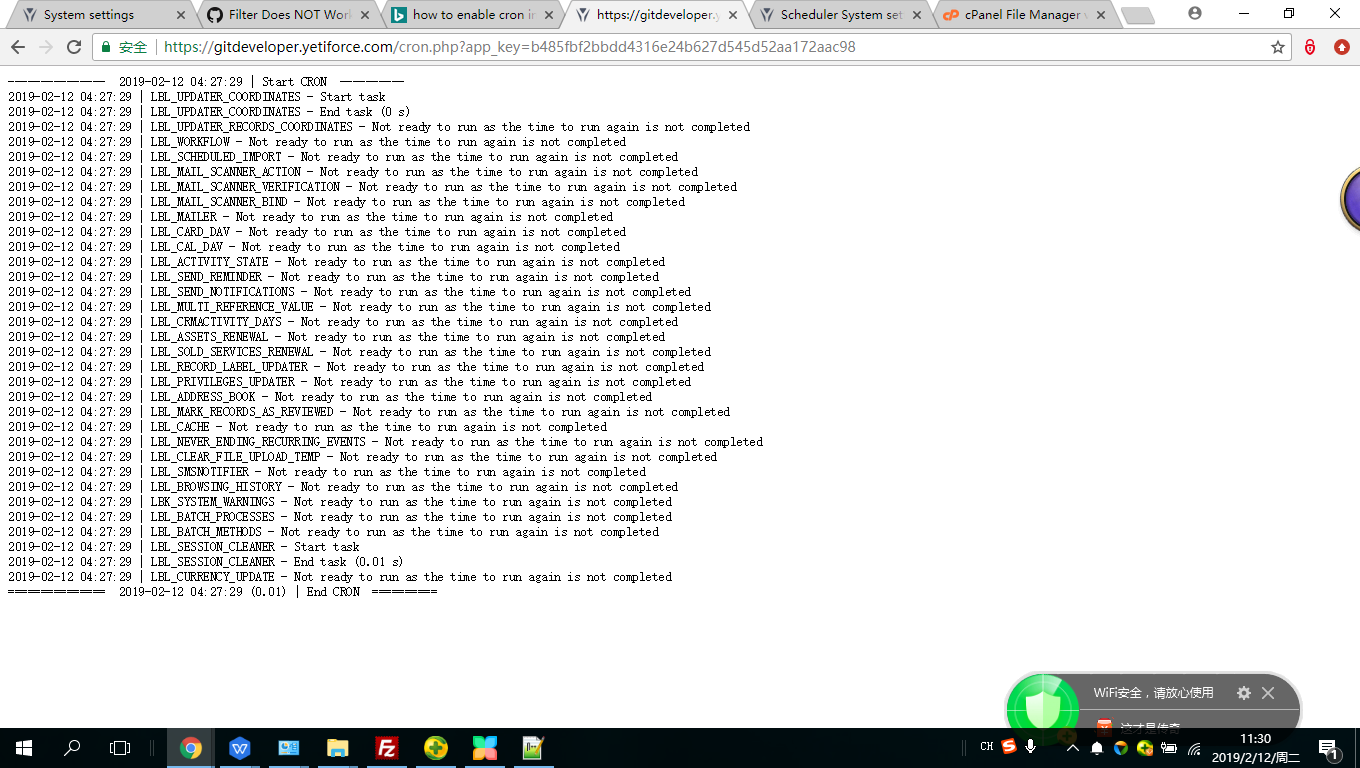 --------------- 2019-02-12 04:27:29 | Start CRON ----------
2019-02-12 04:27:29 | LBL_UPDATER_COORDINATES - Start task
2019-02-12 04:27:29 | LBL_UPDATER_COORDINATES - End task (0 s)
2019-02-12 04:27:29 | LBL_UPDATER_RECORDS_COORDINATES - Not ready to run as the time to run again is not completed
2019-02-12 04:27:29 | LBL_WORKFLOW - Not ready to run as the time to run again is not completed
2019-02-12 04:27:29 | LBL_SCHEDULED_IMPORT - Not ready to run as the time to run again is not completed
2019-02-12 04:27:29 | LBL_MAIL_SCANNER_ACTION - Not ready to run as the time to run again is not completed
2019-02-12 04:27:29 | LBL_MAIL_SCANNER_VERIFICATION - Not ready to run as the time to run again is not completed
2019-02-12 04:27:29 | LBL_MAIL_SCANNER_BIND - Not ready to run as the time to run again is not completed
2019-02-12 04:27:29 | LBL_MAILER - Not ready to run as the time to run again is not completed
2019-02-12 04:27:29 | LBL_CARD_DAV - Not ready to run as the time to run again is not completed
2019-02-12 04:27:29 | LBL_CAL_DAV - Not ready to run as the time to run again is not completed
2019-02-12 04:27:29 | LBL_ACTIVITY_STATE - Not ready to run as the time to run again is not completed
2019-02-12 04:27:29 | LBL_SEND_REMINDER - Not ready to run as the time to run again is not completed
2019-02-12 04:27:29 | LBL_SEND_NOTIFICATIONS - Not ready to run as the time to run again is not completed
2019-02-12 04:27:29 | LBL_MULTI_REFERENCE_VALUE - Not ready to run as the time to run again is not completed
2019-02-12 04:27:29 | LBL_CRMACTIVITY_DAYS - Not ready to run as the time to run again is not completed
2019-02-12 04:27:29 | LBL_ASSETS_RENEWAL - Not ready to run as the time to run again is not completed
2019-02-12 04:27:29 | LBL_SOLD_SERVICES_RENEWAL - Not ready to run as the time to run again is not completed
2019-02-12 04:27:29 | LBL_RECORD_LABEL_UPDATER - Not ready to run as the time to run again is not completed
2019-02-12 04:27:29 | LBL_PRIVILEGES_UPDATER - Not ready to run as the time to run again is not completed
2019-02-12 04:27:29 | LBL_ADDRESS_BOOK - Not ready to run as the time to run again is not completed
2019-02-12 04:27:29 | LBL_MARK_RECORDS_AS_REVIEWED - Not ready to run as the time to run again is not completed
2019-02-12 04:27:29 | LBL_CACHE - Not ready to run as the time to run again is not completed
2019-02-12 04:27:29 | LBL_NEVER_ENDING_RECURRING_EVENTS - Not ready to run as the time to run again is not completed
2019-02-12 04:27:29 | LBL_CLEAR_FILE_UPLOAD_TEMP - Not ready to run as the time to run again is not completed
2019-02-12 04:27:29 | LBL_SMSNOTIFIER - Not ready to run as the time to run again is not completed
2019-02-12 04:27:29 | LBL_BROWSING_HISTORY - Not ready to run as the time to run again is not completed
2019-02-12 04:27:29 | LBK_SYSTEM_WARNINGS - Not ready to run as the time to run again is not completed
2019-02-12 04:27:29 | LBL_BATCH_PROCESSES - Not ready to run as the time to run again is not completed
2019-02-12 04:27:29 | LBL_BATCH_METHODS - Not ready to run as the time to run again is not completed
2019-02-12 04:27:29 | LBL_SESSION_CLEANER - Start task
2019-02-12 04:27:29 | LBL_SESSION_CLEANER - End task (0.01 s)
2019-02-12 04:27:29 | LBL_CURRENCY_UPDATE - Not ready to run as the time to run again is not completed
=============== 2019-02-12 04:27:29 (0.01) | End CRON ==========
andrewchaosun
on 12 Feb 2019
As I can see in your last message your cron started.
vovpff
on 12 Feb 2019
As I can see in your last message your cron started.
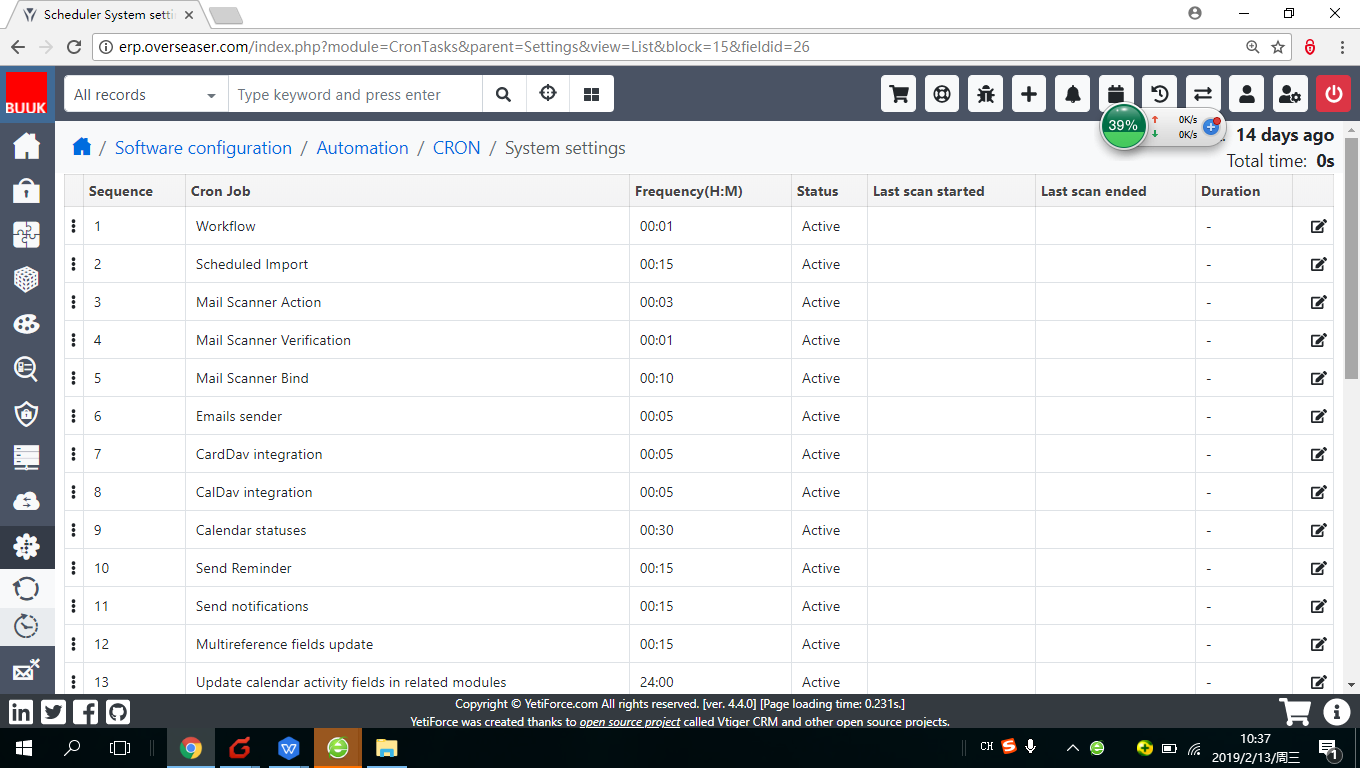
hi, VOV, NOT YET.
andrewchaosun
on 13 Feb 2019
Why you use gitdeveloper URl in previous message. Put your domain instead gitdeveloper. Yetiforce. Com
vovpff
on 13 Feb 2019
https://erp.overseaser.com/cron.php?app_key=b485fbf2bbdd4316e24b627d545d52aa172aac98
Why you use gitdeveloper URl in previous message. Put your domain instead gitdeveloper. Yetiforce. Com
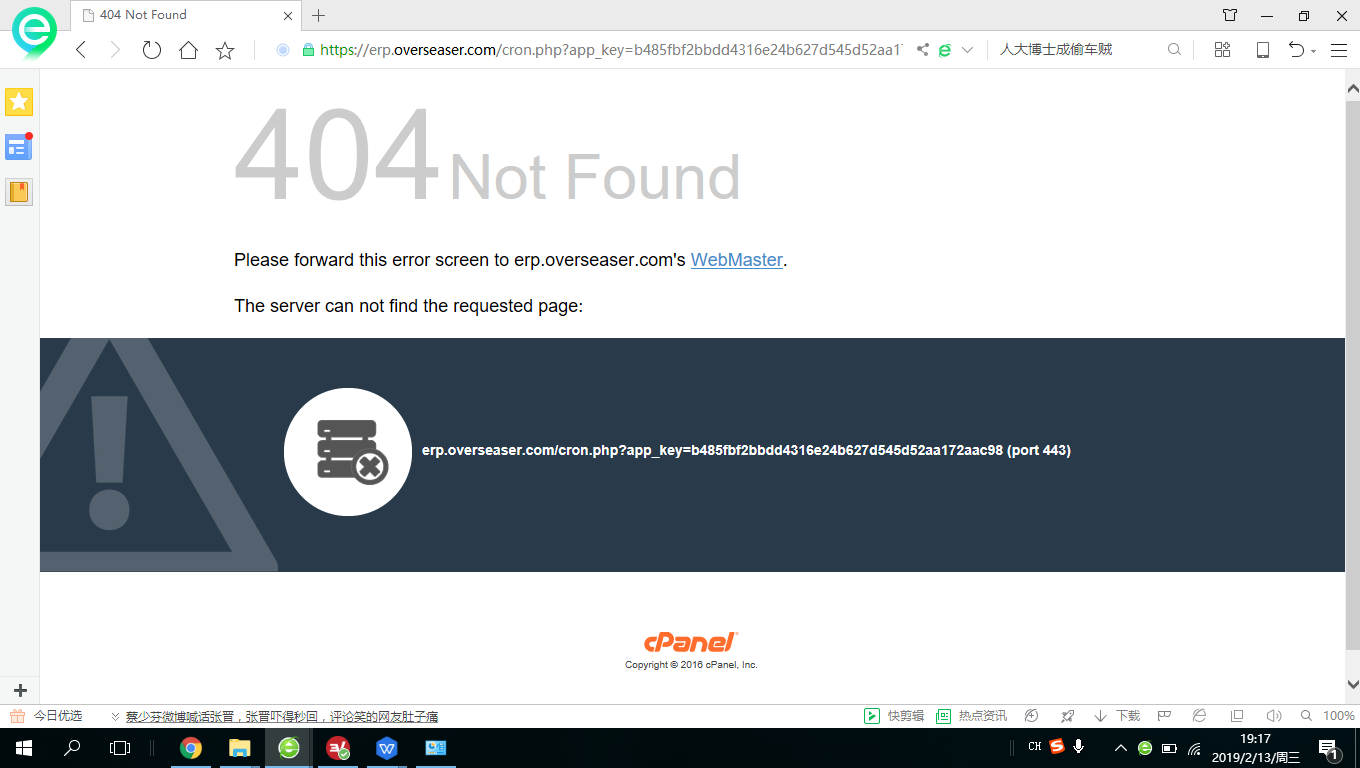
Just tried, but i says The server can not find the requested page:
andrewchaosun
on 13 Feb 2019
andrewchaosun
on 13 Feb 2019
it means that you do not have this file, that's why cron does not work
mariuszkrzaczkowski
on 13 Feb 2019
it means that you do not have this file, that's why cron does not work
If I update to v5.0, will the missing file be reinstalled?
andrewchaosun
on 15 Feb 2019
50/50
vovpff
on 15 Feb 2019
50/50
If there a way that i can sort that out? for example, i download a file, then upload it to a specific folder?
andrewchaosun
on 15 Feb 2019
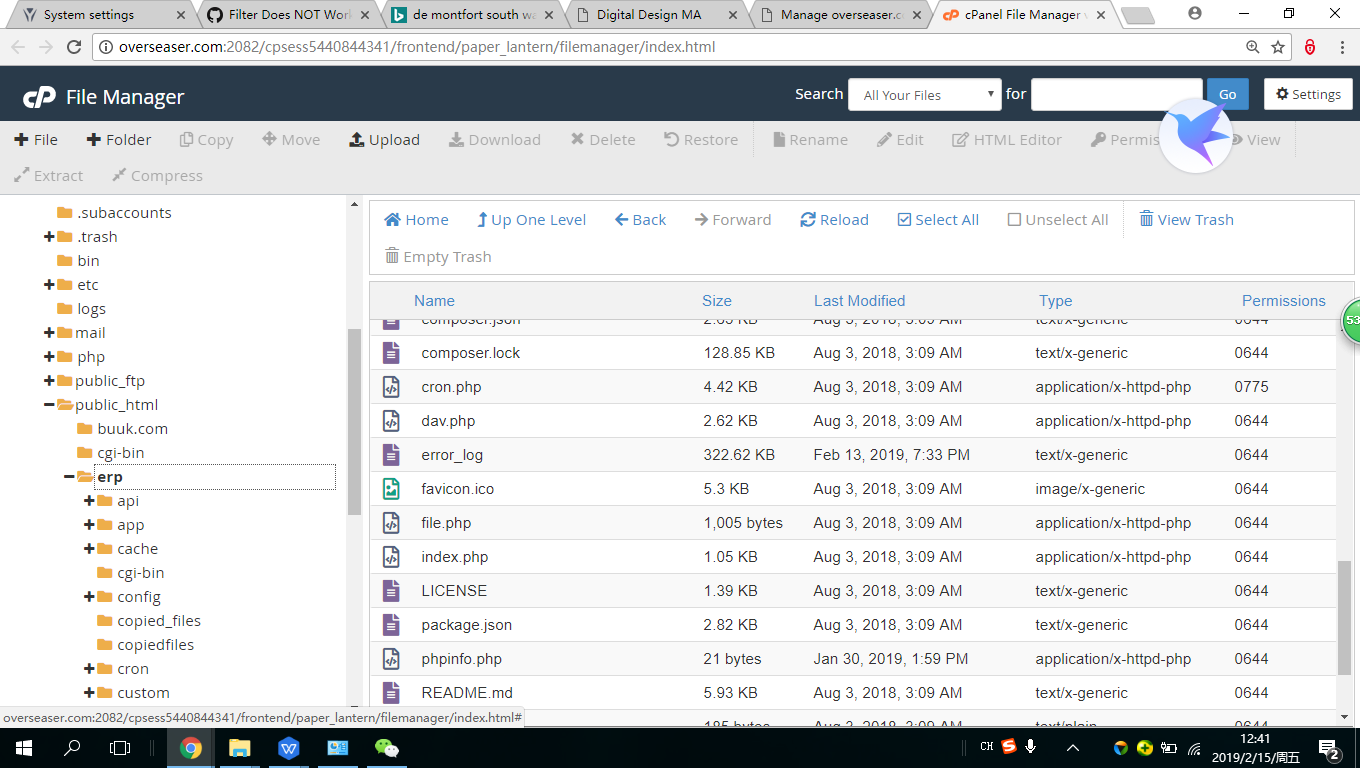
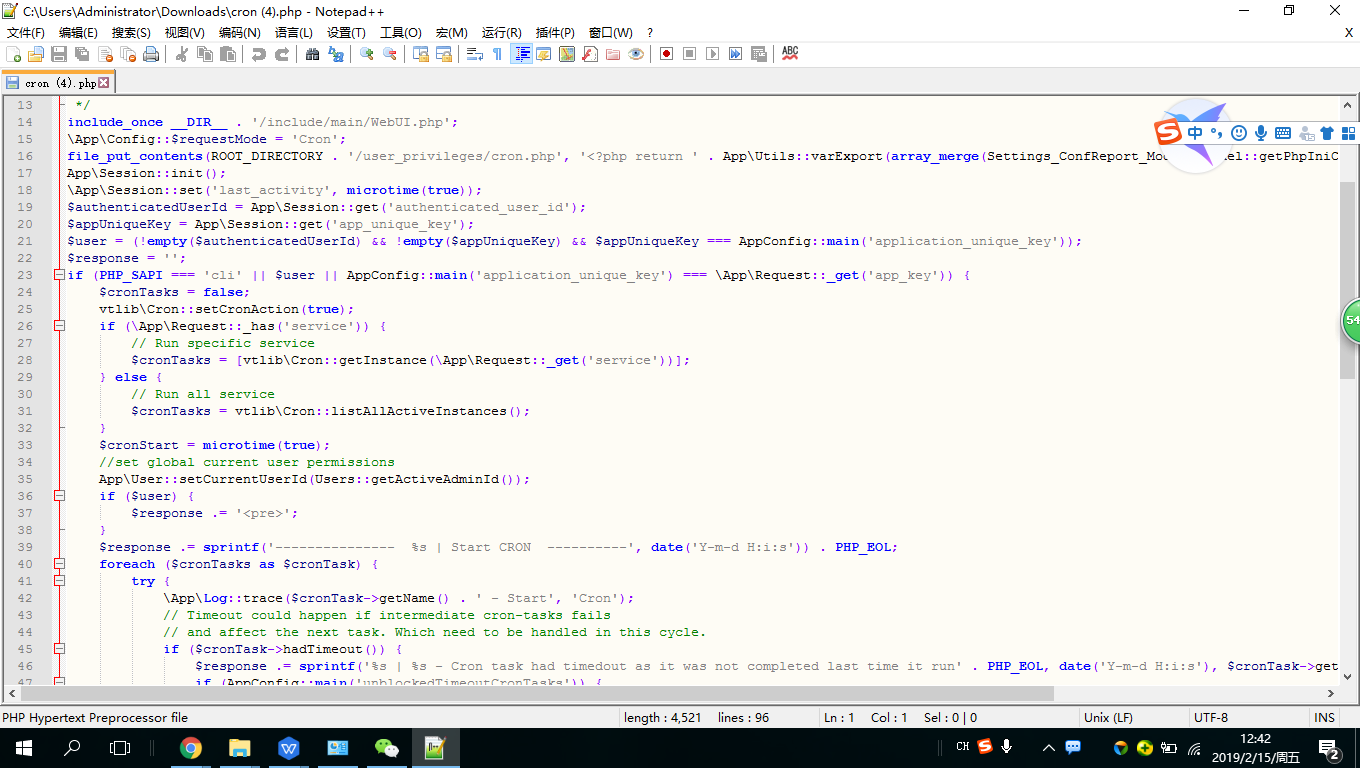
Is this The cron.php file? I have changed the permission to 775.
andrewchaosun
on 15 Feb 2019
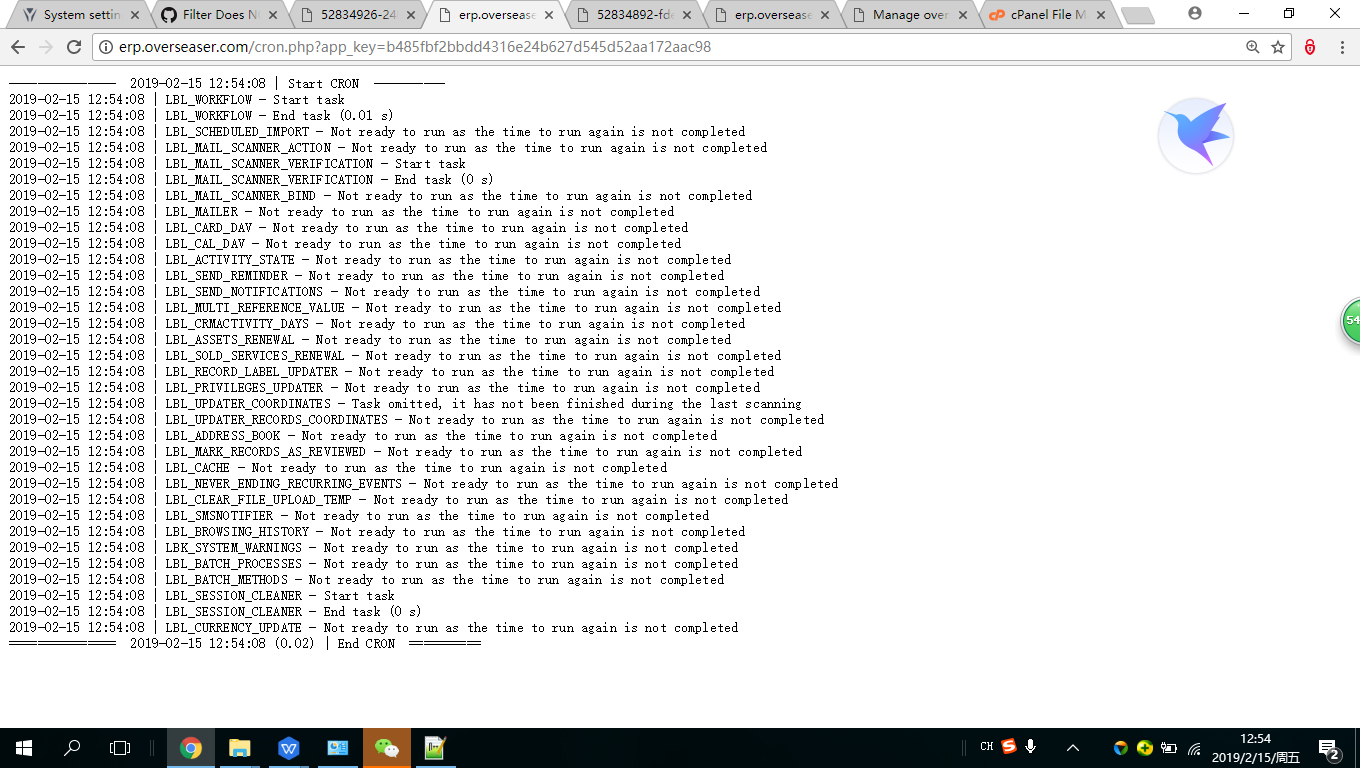
it works now. eventually. thank you all.
andrewchaosun
on 15 Feb 2019
Related issues
 rubysown
·
3Comments
rubysown
·
3Comments
 ldgbc
·
3Comments
ldgbc
·
3Comments
 Raggazzoo
·
3Comments
Raggazzoo
·
3Comments
 rskrzypczak
·
3Comments
ldgbc
·
3Comments
rskrzypczak
·
3Comments
ldgbc
·
3Comments