Yetiforcecrm: Column width [%] - Less than 10% [bug] [resolve-4.3.460]
Issue
There is a few field that I want a small as possible (checkbox for example). It seem that you can't go any lower than 10%, anything below 10% (1 2 3 ... 7 8 9) size is still same as 10%.
How can I make the column really small?
Actual Behavior
Size doesn't change.
Expected Behavior
Size change for 1% to 9% still work.
How to trigger the error
1.
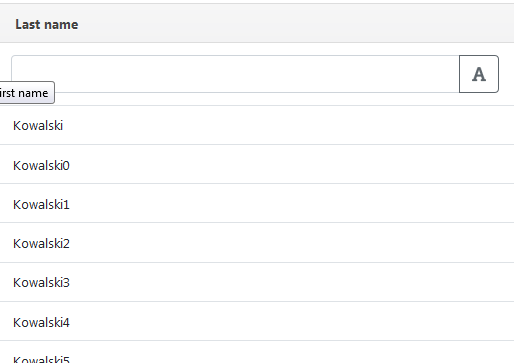
- Left image I use 10%, middle top show how it look like at 10%
- Right image I use 1%, middle bottom show how it look like at 1%.
- 1% and 10% is the same.
- Image below show Last Name column at 40% or something.
Your Environment
- YetiForce Version used: [ver. 4.3.453]
- Browser name and version: Firefox 61
- Environment name and version: Yetiforce
- Operating System and version: Yetiforce
 ldgbc
ldgbc
All 13 comments
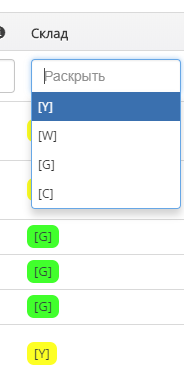
@ldgbc this is limitation of field template (not sure what this is correct name of cause). The same situation with picklists. I have picklist what contains 4 three symbols positions: [Y], [G], [C] and [W] but in list view column takes a tot of space:
Firstly I tried to change field name length (translation of field name) but there are limitation too.
My example:
 vovpff
on 27 Jul 2018
vovpff
on 27 Jul 2018
 poradz
on 27 Jul 2018
poradz
on 27 Jul 2018
@poradz Any ideas how to change width of Additional Information column for phone number fields. Usually this field filled with phone extension what contains 3-5 digits but for list view this takes too much space.
vovpff
on 27 Jul 2018
@poradz Checked on dev ver. 4.3.454. Looks like this fix not applied.
vovpff
on 27 Jul 2018
@vovpff Additional Information probably have to edit files for that one.
@vovpff dev ver. 4.3.454. Same. checked and it still look like it 10%. I think it because of this:
@mariuszkrzaczkowski mariuszkrzaczkowski merged commit cbf2732 into YetiForceCompany:developer 17 hours ago
4 of 7 checks passed
It need to wait till 7 of 7 checks passed before it get Committed into Developer(?). But this is great. Another good feature that we get to this in (we need to wait who know for how many month ;) )
ldgbc
on 28 Jul 2018
@vovpff Wait 3 days and I retry the 2% but it still big with the first name. Can you get it to work or it just me?
Can't seem to reproduce it like @poradz https://github.com/YetiForceCompany/YetiForceCRM/pull/7350
https://github.com/YetiForceCompany/YetiForceCRM/issues/7362
ldgbc
on 31 Jul 2018
@ldgbc looks like dev still not updated with this fix.
vovpff
on 31 Jul 2018
https://github.com/YetiForceCompany/YetiForceCRM/commit/f04768a00cc3762b87aad34da940a511e039e9d4 Seem to fixed it. @vovpff
ldgbc
on 1 Aug 2018
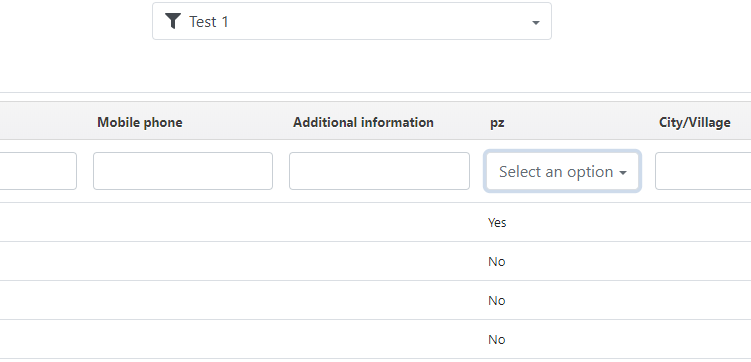
@ldgbc cool for text fields but not works with checkbox (Contacts - Permission to call checkbox)
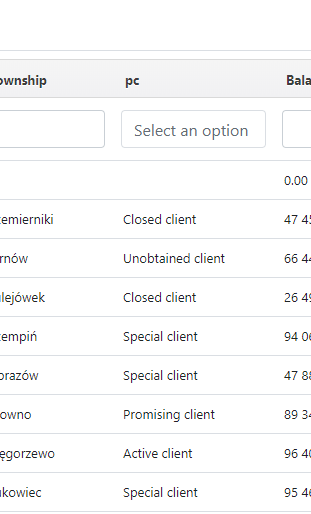
and picklists (Account - Status picklist)
vovpff
on 1 Aug 2018
@vovpff It still works, but you can't adjust narrower width because of the select's placeholder width ("Select an option").
poradz
on 1 Aug 2018
@poradz Sorry. My mistake. Cool!
vovpff
on 1 Aug 2018
@vovpff I suppose a workaround is to create another "English" translation and change the "Select an option" to "Select" and you can make the column thinner.
ldgbc
on 1 Aug 2018
@ldgbc you can use custom translation as standard English modification.
vovpff
on 1 Aug 2018
Related issues
 serbiaserbia
·
3Comments
serbiaserbia
·
3Comments
 liberox
·
3Comments
liberox
·
3Comments
 PDMeira
·
3Comments
vovpff
·
3Comments
PDMeira
·
3Comments
vovpff
·
3Comments
 skramanzia
·
3Comments
skramanzia
·
3Comments
Most helpful comment
https://github.com/YetiForceCompany/YetiForceCRM/pull/7350