Yetiforcecrm: Two days with YetiForce and I can't understand how the sales process works
This is more like feedback than a specific request. I like the product, The user interface is quite fast. But for the main problem that I would like to solve with a CRM and than is get a lead to a sale I still can not figure out how to do it
Here are some problems.
- Documentation does not exist - the site https://yetiforce.com/en/knowledge-base/documentation/user-documentation is practically empty. Two three pages there.
- I can not connect a single contact with two accounts
- I have an old customer. I enter as account. I've sold him a couple of product. I click Product on the Account page, Select Product Sold and Now I must add an Asset and it is totally not clear how the asset differs from the product.
- I could not add a single widget to the dashboard. It stays empty.
- I could not find how to make an opportunity and move it to a status of Purchase Order. It is probably there, but I cant do it. And I've spend 2 days with this.
- And many many other small things.
More things.
- I have a proforma invoice. How do I edit the number and how do I make this proforma an invoice.
I simple tutorial would be nice.
 thebravoman
All 11 comments
@thebravoman
- Documentation not perfect and can't be solved in short time.
- I think this is not possible without customisations.
- Asset can separate same product by serial numbers of product pieces.
- look for widgets page from admin panel
- look fom mapping from admin panel
- :)
- Record number not editable. you can change prefixes trough admin panel. Or add text field and put there PI number as you need. Look to point 5
 vovpff
on 3 Jun 2018
vovpff
on 3 Jun 2018
Hi @vovpff.
You are right. Every one last thing could be customized and we could make it work. My feedback is regarding the fact that yeti seems to be a very powerful product, but unnecessary difficult to start with. Simple tutorial on how:
- To enter a lead, then meet with the lead, that make this lead an account and create a opportunity for this account, prepare an order, fill with 1 product and 1 service and complete this order at the end would be great. I could personally try to write it myself but I am afraid I do not understand Yeti that much. Two-three pages tutorial. Just as a starter.
I've tried Yeti for 3-4 days. I've imported contacts, create about 20-30 accounts, some leads. I really tried to use it, and understand it, and follow its principles, and could share that this should be much easier for the people coming to Yeti.
thebravoman
on 4 Jun 2018
@thebravoman Будут вопросы, пишите на почту :)
vovpff
on 4 Jun 2018
@vovpff on which email?
thebravoman
on 4 Jun 2018
@thebravoman look to my profile!
vovpff
on 4 Jun 2018
@thebravoman
Hi welcome to to Yeti, some of your issue was raise probably over a year ago.
Especially with the One Contacts multiple relationship (Two Accounts), I think they added an option call 1:M meaning One to Many. I haven't test it yet as I left Yeti for about 1 year or longer now.
I finally decide to give Yeti another try see if the improvement has been made to allow for that. There is still some quirk based on the demo version that I used but atleast the project is alive so there is always hope.
I hope to provide some feedback and hoping that I can help you too once I return to full usage of Yeti. So Stick around.
Bear in minds that if you want certain thing to be available or request it back from being remove you have to pay for the support.
EDIT: I manage to go into the Admin setting of the demo. And tried the 1:M feature again and I believe I got it wrong.
It One to Module. Not One to Many. Meaning you can you this Field to create more linking, unfortunately you can only link 1 to 1.
Based on memory, the developer say that they won't be adding a 1 to Many link so only option left is to hope for the best or to pay them to add that feature.
From another perspective, I think their reasoning was either (1) the way their programming currently written it doesn't allow for that, (2) they don't know of a REASON why would people need link to 1 to many. (3) YetiDeveloper don't need it and therefore don't support it.
 ldgbc
on 5 Jun 2018
ldgbc
on 5 Jun 2018
Thanks for the clarifications @ldgbc
I will look at it.
I have absolutely no issues with paying for modifications, doing the modifications on my own and sharing the modifications on the yeti license. In fact I will be happy to do it.
My recommendation here is for a simple Hello World tutorial that I am certain will boost the people involved with Yeti. Enter Lead, Start sale, convert to account, complete sale, list last sales. This is currently next to impossible to do in a resonable time frame. Still can not understand how do I convert a Lead to Account and how do I list the Leads converted in the last 2 months.
thebravoman
on 5 Jun 2018
@thebravoman
Based on what I have seen it quite an expensive exercise whenever YetiForce give out quote. We talking $(E-Pound)4000 is the lowest I have seen on some of the issue. It not a cheap exercise for anything that isn't already added on the system.
With regards to Tutorials or Guide, it have to be done by User such as us. There isn't any documentation as comments. I did try to do a "small" fake wiki one one of the issue last year to outline so information I gather (which kinda help when I resume using Yetiforce this year).
As I get better at this Yeti will share them. For me, personally I don't use Lead at all so I can't help you.
Good news is that bpabisczak has added your issue to v4.4 so there might be something that get solve.
ldgbc
on 8 Jun 2018
Hello,
it is easier for everyone if you follow the rule "one question - one issue" :) Otherwise, the conversation gets messy after a while.
It is very simple to convert a Lead. All you need to do is to set a status "For conversion" and then a special button appears - look at the screenshot below.
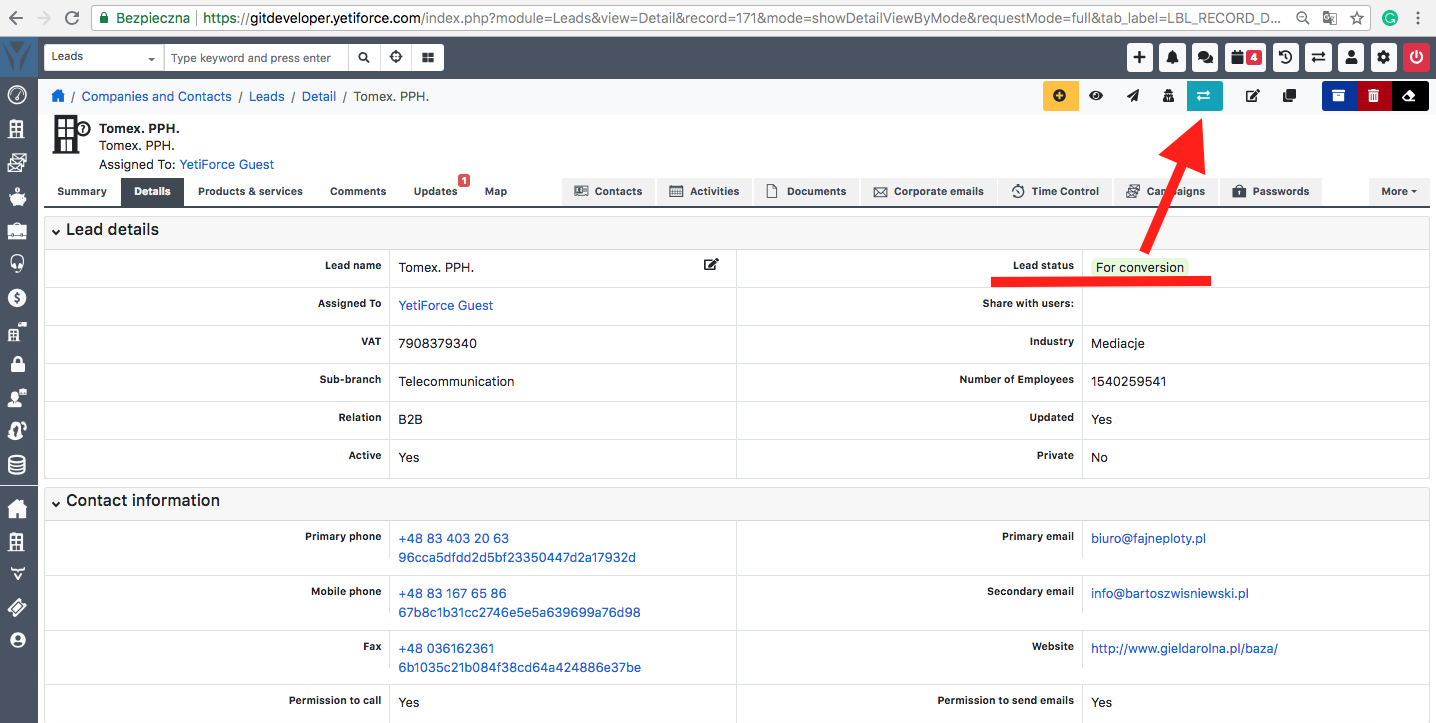
If you want the list of Leads converted in the last 2 months, it is possible to have something like that because it is saved in the database but it requires some programming as an additional field is required.
 KatarzynaUlichnowska
on 11 Jun 2018
KatarzynaUlichnowska
on 11 Jun 2018
Hi @KatarzynaUlichnowska ,
Probably most of the things are quite easy. But as a whole it is way to difficult. That's why I've posted this as feedback. It is not a single specific issue. It is a connection of things that make it difficult.
Hope this could get better. I would personally vote to do it myself, but I do not understand Yeti that much to be able to guide the user through the initial 1 hour with this system.
thebravoman
on 11 Jun 2018
I am also interested in investing some time and also giving back to community to help improve the project. Right now the sales process seems overly complicated. Trying to figure it out myself. Also most of my topics remain un answered and it seems that the support for this project is not very active.
 acoolov
on 29 Oct 2019
acoolov
on 29 Oct 2019
Related issues
ldgbc
·
3Comments
 michelmarquesrj
·
3Comments
vovpff
·
3Comments
michelmarquesrj
·
3Comments
vovpff
·
3Comments
 canomogollon
·
3Comments
canomogollon
·
3Comments
 serbiaserbia
·
3Comments
serbiaserbia
·
3Comments
Most helpful comment
Thanks for the clarifications @ldgbc
I will look at it.
I have absolutely no issues with paying for modifications, doing the modifications on my own and sharing the modifications on the yeti license. In fact I will be happy to do it.
My recommendation here is for a simple Hello World tutorial that I am certain will boost the people involved with Yeti. Enter Lead, Start sale, convert to account, complete sale, list last sales. This is currently next to impossible to do in a resonable time frame. Still can not understand how do I convert a Lead to Account and how do I list the Leads converted in the last 2 months.