Yetiforcecrm: How do I create an asset for an account?
Hello, I'm not sure how to label this as a question. I'm using yetiforce 4.0
I've used vtiger for years but really liked a lot of what yetiforce has to offer. I deal with a lot of support related questions and am wanting to keep track of them. What I use to do with vtiger is create an account and then add products or assets to that account with particulars about the asset the customer owned.
Lets say it's a printer, the type of printer, the ip address of the printer, links to an online manual, pictures, location in an office, etc. The greatest bit of this is that I could create tickets on said printer, so when I look at the asset I could see how many issues have occurred with the printer and find out if there is a common problem etc.
From what I understand in yetiforce, is that it uses assets, but I can't seem to find a way to create an asset for an account where I can record some of these details. I've tried to find whatever help I could online for this issue but can't find any mention of it.
 scsikid
All 4 comments
@scsikid
- Create product
- Create account
- Create asset with relation to product and account (there are field where you can select relative module and record from this module)
The same procedure like in vtiger
 vovpff
on 3 Sep 2017
vovpff
on 3 Sep 2017
I haven't used vtiger in probably 5 years and things may have changed. However I have a bit of confusion. So I did a quick create for a product. When I add it to the trouble ticket it only shows up under "product name". Asset is different, when clicking the plus sign I can create an asset but it wants a date it was sold etc. This wasn't something sold, should I just pick an arbitrary date?
Maybe I'm doing something incorrect? Thanks for the help, and sorry if I typo'd anything.
scsikid
on 5 Sep 2017
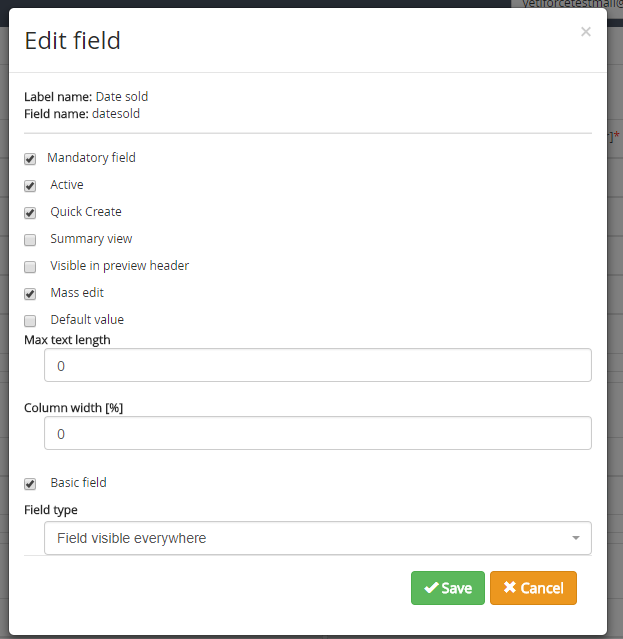
@scsikid uncheck mandatory from admin panel field parameters for fields what you don't plan to use.
Check here: Software configuration > Standard modules > Edit fields > Start
vovpff
on 5 Sep 2017
Thanks again.
scsikid
on 6 Sep 2017
Related issues
 serbiaserbia
·
3Comments
serbiaserbia
·
3Comments
 johntonji
·
3Comments
johntonji
·
3Comments
 rskrzypczak
·
3Comments
rskrzypczak
·
3Comments
 ezbank
·
3Comments
ezbank
·
3Comments
 ldgbc
·
3Comments
ldgbc
·
3Comments
Most helpful comment
@scsikid
The same procedure like in vtiger