yay v9.4
Upgrading from v9.3.3 to v9.4 is not smooth.
:: installing pacman (5.2.0-2) breaks dependency 'pacman<=5.1.3' required by yay
On any other package this would be fine, preventing the breaking of an existent but it's not taking into account that the new version will be satisfied once the build process begins.
This issue is present in 9.3.3 and we could have possibly patched it so it looked at the state of dependencies in the end and distributed a fix for pacman 5.1. But since users already have 5.2 waiting to be updated and partial updates are not a fun idea this is not a viable option.
This issue does not affect yay packaged in repositories.
Proposed workaround since a solution will need to be patched in the future:
For yay
yay -S yay-bin
sudo pacman -Syu
yay -S yay
For yay-bin
yay -S yay-bin
sudo pacman -Syu
For yay-git
yay -S yay-bin
sudo pacman -Syu
yay -S yay-git
EDIT: Applies only to Arch Linux and not derivatives such as Manjaro.
 Jguer
Jguer
All 18 comments
Hi,
You can use this workaround:
# Remove yay for update pacman
yay -R yay
# Update pacman
sudo pacman -S pacman
# Install yay from git
cd /tmp
git clone https://aur.archlinux.org/yay.git
cd yay
makepkg -si
cd ..
# clean /tmp folder
rm -rf yay
 gouvinb
on 23 Oct 2019
gouvinb
on 23 Oct 2019
@gouvinb As well that is a good workaround for people who don't like binary packages.
Jguer
on 23 Oct 2019
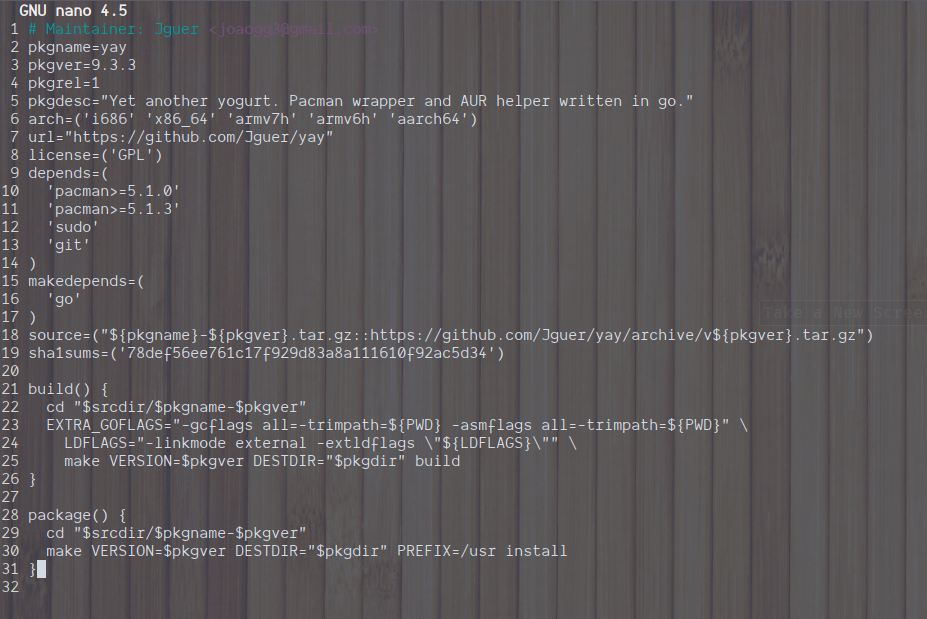
Changing like this is also not solving the issue :v
 aviezab
on 23 Oct 2019
aviezab
on 23 Oct 2019
I used the nodeps check option (-d, --nodeps)
That will update both.
yay -S yay -d
 Duckbuster
on 23 Oct 2019
Duckbuster
on 23 Oct 2019
I used the nodeps check option (-d, --nodeps)
That will update both.yay -S yay -d
You'd have to run yay -Sy to get the updated database with pacman 5.2 first, and then you could run that, it would be a partial upgrade. Also skipping dep checks is not the most proper solution.
https://wiki.archlinux.org/index.php/System_maintenance#Avoid_certain_pacman_commands
Even though that's a pretty simple solution, even if you know what you're doing is a valid solution and even if in this case I don't see how it could break other things (if you've updated lately).
I believe it would be irresponsible to advocate such a workaround.
Jguer
on 23 Oct 2019
You'd have to run
yay -Syto get the updated database withpacman 5.2first, and then you could run that, it would be a partial upgrade. Also skipping dep checks is not the most proper solution.
https://wiki.archlinux.org/index.php/System_maintenance#Avoid_certain_pacman_commandsEven though that's a pretty simple solution, even if you know what you're doing is a valid solution and even if in this case I don't see how it could break other things (if you've updated lately).
I believe it would be irresponsible to advocate such a workaround.
Yes I forgot to add that you first need to update your repositories (but anyone that reaches this issue will have done this already)
And you're right, I should have mentioned that you should only use that flag when you know what you're doing.
In this case it is no issue, but yes, it is kinda irresponsible to do this. (I followed it up with a -Syu)
Since it's also not recommended to update only 1 package, It's always recommended to upgrade whole system.
Duckbuster
on 23 Oct 2019
A fresh installation on Manjaro KDE with all updates applied is failing for me as well due to broken dependency pacman>=5.2
pacman -Syu > No updates left to install
git clone https://aur.archlinux.org/yay.git
cd yay
makepkg -si
Fails due to dependency pacman 5.2
Tried the workaround above with pacman -S pacman without success.
 veloc1ty
on 23 Oct 2019
veloc1ty
on 23 Oct 2019
Manjaro still hasn't updated pacman on their repositories I guess, therefore ignore the update until you get pacman5.2
Jguer
on 23 Oct 2019
They have yay in the offical repos anyway. So they can skip this issue.
 Morganamilo
on 23 Oct 2019
Morganamilo
on 23 Oct 2019
The workaround above was catastrophic for me ;-;
$ yay
[...]
error: failed to prepare transaction (could not satisfy dependencies)
:: installing pacman (5.2.0-2) breaks dependency 'pacman<=5.1.3' required by yay-bin
Error installing repo packages
$ yay -S yay-bin
[...]  # successful, no errors
$ sudo pacman -Syu
[...]
error: could not open file /var/cache/pacman/pkg/pacman-5.2.0-2-x86_64.pkg.tar.xz: No such file or directory
error: could not commit transaction
error: failed to commit transaction (transaction aborted)
Errors occurred, no packages were upgraded.
$ sudo pacman -Syu
sudo: pacman: command not found
 jennydaman
on 23 Oct 2019
jennydaman
on 23 Oct 2019
That's probably nothing to do with yay, and to do with you symlinking your pacman cachedir.
Morganamilo
on 23 Oct 2019
I used the nodeps check option (-d, --nodeps)
That will update both.yay -S yay -d
this works!
 jkotra
on 23 Oct 2019
jkotra
on 23 Oct 2019
Am I the only one having a build problem?
yay is not installed.
I have Pacman v5.2.0 - libalpm v12.0.0 . (Fully updated system)
I imagine my problem is related, but I am not seeing anyone above with the build error.
$ git clone https://aur.archlinux.org/yay.git
$ cd yay/
$ makepkg -si
==> WARNING: PACKAGER should have the format 'Example Name <[email protected]>'
==> Making package: yay 9.4.2-1 (Wed 23 Oct 2019 02:39:25 PM CDT)
==> Checking runtime dependencies...
==> Checking buildtime dependencies...
==> Retrieving sources...
  -> Downloading yay-9.4.2.tar.gz...
  % Total    % Received % Xferd  Average Speed   Time    Time     Time  Current
                                 Dload  Upload   Total   Spent    Left  Speed
100   117    0   117    0     0    546      0 --:--:-- --:--:-- --:--:--   544
100  351k  100  351k    0     0   673k      0 --:--:-- --:--:-- --:--:--  673k
==> Validating source files with sha1sums...
    yay-9.4.2.tar.gz ... Passed
==> Extracting sources...
  -> Extracting yay-9.4.2.tar.gz with bsdtar
==> Starting build()...
go build -v -mod=vendor -ldflags '-s -w -linkmode external -extldflags "-Wl,-O1,--sort-common,--as-needed,-z,relro,-z,now" -X "main.version=9.4.2"' -gcflags all=-trimpath=/tmp/yay/src/yay-9.4.2 -asmflags all=-trimpath=/tmp/yay/src/yay-9.4.2 -o yay
runtime
# runtime
/usr/lib/go/src/runtime/stubs_x86.go:10:6: stackcheck redeclared in this block
        previous declaration at /usr/lib/go/src/runtime/stubs_amd64x.go:10:6
/usr/lib/go/src/runtime/unaligned1.go:11:6: readUnaligned32 redeclared in this block
        previous declaration at /usr/lib/go/src/runtime/alg.go:321:40
/usr/lib/go/src/runtime/unaligned1.go:15:6: readUnaligned64 redeclared in this block
        previous declaration at /usr/lib/go/src/runtime/alg.go:329:40
make: *** [Makefile:47: yay] Error 2
==> ERROR: A failure occurred in build().
    Aborting...
 CurtisLeeBolin
on 23 Oct 2019
CurtisLeeBolin
on 23 Oct 2019
Am I the only one having a build problem?
yay is not installed.
I have Pacman v5.2.0 - libalpm v12.0.0 . (Fully updated system)
I imagine my problem is related, but I am not seeing anyone above with the build error.$ git clone https://aur.archlinux.org/yay.git $ cd yay/ $ makepkg -si ==> WARNING: PACKAGER should have the format 'Example Name <[email protected]>' ==> Making package: yay 9.4.2-1 (Wed 23 Oct 2019 02:39:25 PM CDT) ==> Checking runtime dependencies... ==> Checking buildtime dependencies... ==> Retrieving sources... -> Downloading yay-9.4.2.tar.gz... % Total % Received % Xferd Average Speed Time Time Time Current Dload Upload Total Spent Left Speed 100 117 0 117 0 0 546 0 --:--:-- --:--:-- --:--:-- 544 100 351k 100 351k 0 0 673k 0 --:--:-- --:--:-- --:--:-- 673k ==> Validating source files with sha1sums... yay-9.4.2.tar.gz ... Passed ==> Extracting sources... -> Extracting yay-9.4.2.tar.gz with bsdtar ==> Starting build()... go build -v -mod=vendor -ldflags '-s -w -linkmode external -extldflags "-Wl,-O1,--sort-common,--as-needed,-z,relro,-z,now" -X "main.version=9.4.2"' -gcflags all=-trimpath=/tmp/yay/src/yay-9.4.2 -asmflags all=-trimpath=/tmp/yay/src/yay-9.4.2 -o yay runtime # runtime /usr/lib/go/src/runtime/stubs_x86.go:10:6: stackcheck redeclared in this block previous declaration at /usr/lib/go/src/runtime/stubs_amd64x.go:10:6 /usr/lib/go/src/runtime/unaligned1.go:11:6: readUnaligned32 redeclared in this block previous declaration at /usr/lib/go/src/runtime/alg.go:321:40 /usr/lib/go/src/runtime/unaligned1.go:15:6: readUnaligned64 redeclared in this block previous declaration at /usr/lib/go/src/runtime/alg.go:329:40 make: *** [Makefile:47: yay] Error 2 ==> ERROR: A failure occurred in build(). Aborting...
I got the exact same problem, so not just you
 crh23
on 23 Oct 2019
crh23
on 23 Oct 2019
@CurtisLeeBolin @crh23 I believe this is unrelated, please create a new issue and I'll take a look at it. Please also include the output of go version and where go.
Try reinstalling go or use gcc-go if possible
Jguer
on 24 Oct 2019
Latest commit (f2a571d9ee3f942af08c703d7747ccc55fa7a9df) is working with Pacman 5.2, Go 1.13.3 and I am using ArcoLinux OS with KDE Plasma.
Great work! Thanks
aviezab
on 24 Oct 2019
yay -G yay #clones new yay from git
yay -R yay #removes old yay
sudo pacman -Syu
cd yay/
makepkg -si #install the yay you cloned
from https://www.reddit.com/r/archlinux/comments/dlpng7/cant_pacman_syu_because_of_yay/ in case one does not like binary packages ...
 soloturn
on 25 Oct 2019
soloturn
on 25 Oct 2019
@jennydaman I had the same issue but the original directory is still there. Only the symlink was deleted. You can unpack pacman-5.2.0-2-x86_64.pkg.tar.xz manually to restore it. Don't forget to back up your pacman.conf & makepkg.conf beforehand.
 ObserverOfTime
on 26 Oct 2019
ObserverOfTime
on 26 Oct 2019
Related issues
 pantuts
·
3Comments
pantuts
·
3Comments
 drrlvn
·
4Comments
drrlvn
·
4Comments
 tapir
·
3Comments
tapir
·
3Comments
 torvic9
·
4Comments
torvic9
·
4Comments
 parkerlreed
·
3Comments
parkerlreed
·
3Comments
Most helpful comment
I used the nodeps check option (-d, --nodeps)
That will update both.
yay -S yay -d