Yaru: Nautilus image border is too bright (dark theme)
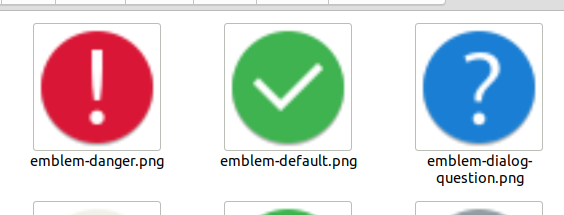
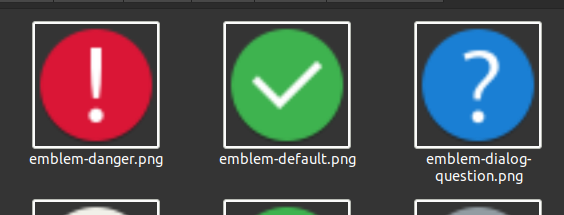
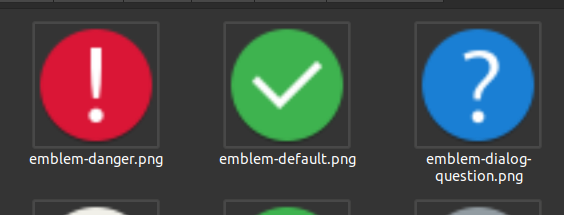
In Nautilus the border around image previews is light gray (#bbbeb7). In the dark theme the borders are pure white. Would it be possible to make the borders in the dark theme subtle like the light theme?
Current light theme:
Current dark theme:
Dark theme mockup:
 madsrh
All 6 comments
What do you think about this one @Feichtmeier @clobrano ?
madsrh
on 9 Jul 2020
It makes sense, Ill try to check if we can fix it
 clobrano
on 9 Jul 2020
clobrano
on 9 Jul 2020
🎉1
it's def. very bright :D
If it's an easy fix why not :+1: I guess some nautilus "canvas" stuff. I hope this won't break your very special selection :D fingers crossed
 Feichtmeier
on 9 Jul 2020
Feichtmeier
on 9 Jul 2020
I noticed this issue is reproducible on upstream as well, and opened a bug there to push eventually a fix on Nautilus itself
clobrano
on 24 Jul 2020
🎉1
👍1
Nice 👌
Soooo, should we close it here @clobrano ?
madsrh
on 24 Jul 2020
Yeah, why not :)
clobrano
on 24 Jul 2020
Was this page helpful?
0 / 5 - 0 ratings
Related issues
Feichtmeier
·
3Comments
Feichtmeier
·
3Comments
 mivoligo
·
3Comments
mivoligo
·
3Comments
 snydox
·
3Comments
snydox
·
3Comments
 eaglersdeveloper
·
3Comments
eaglersdeveloper
·
3Comments
Most helpful comment
I noticed this issue is reproducible on upstream as well, and opened a bug there to push eventually a fix on Nautilus itself
https://gitlab.gnome.org/GNOME/nautilus/-/issues/1558