To render the custom icon
(What you were trying to do)
I was trying to render a costume icon made with the blank template.
I have the latest version of Inkscape and OptiPng.
Actual Behavior
(What happened instead)
There was no output. No text output and no final image output.
Steps to Reproduce the Problem
- Try to render a costume icon using the render service
 rares45
All 25 comments
Hi @rares45, thanks for reporting this issue. Could you copy the exact command you used?
 clobrano
on 18 Jun 2020
clobrano
on 18 Jun 2020
Hi @clobrano . I tried these commands:
./render-bitmaps.py actions/system-hibernate.svg
and
./render-bitmaps.py system-hibernate.svg
the folder tree is like this:
.
├── actions
│ └── system-hibernate.svg
├── render-bitmaps.py
└── system-hibernate.svg
rares45
on 18 Jun 2020
render-bitmaps.py uses the name of the file without the extension, have you tried that already?
If it works, we better update the doc to make it clearer
clobrano
on 18 Jun 2020
@clobrano I just tried it, but there is another problem. Output:
Fontconfig warning: "/etc/fonts/fonts.conf", line 5: unknown element "its:rules"
Fontconfig warning: "/etc/fonts/fonts.conf", line 6: unknown element "its:translateRule"
Fontconfig error: "/etc/fonts/fonts.conf", line 6: invalid attribute 'translate'
Fontconfig error: "/etc/fonts/fonts.conf", line 6: invalid attribute 'selector'
Fontconfig error: "/etc/fonts/fonts.conf", line 7: invalid attribute 'xmlns:its'
Fontconfig error: "/etc/fonts/fonts.conf", line 7: invalid attribute 'version'
Fontconfig warning: "/etc/fonts/fonts.conf", line 9: unknown element "description"
verbs_action: Invalid verb: ./actions/system-hibernate.svg --export-dpi 96 -i rect16x16 -e ../../Suru/16x16/actions/system-hibernate.png
.verbs_action: Invalid verb: ./actions/system-hibernate.svg --export-dpi 192 -i rect16x16 -e ../../Suru/16x16@2x/actions/system-hibernate.png
.verbs_action: Invalid verb: ./actions/system-hibernate.svg --export-dpi 96 -i rect24x24 -e ../../Suru/24x24/actions/system-hibernate.png
.verbs_action: Invalid verb: ./actions/system-hibernate.svg --export-dpi 192 -i rect24x24 -e ../../Suru/24x24@2x/actions/system-hibernate.png
.verbs_action: Invalid verb: ./actions/system-hibernate.svg --export-dpi 96 -i rect32x32 -e ../../Suru/32x32/actions/system-hibernate.png
.verbs_action: Invalid verb: ./actions/system-hibernate.svg --export-dpi 192 -i rect32x32 -e ../../Suru/32x32@2x/actions/system-hibernate.png
.verbs_action: Invalid verb: ./actions/system-hibernate.svg --export-dpi 96 -i rect48x48 -e ../../Suru/48x48/actions/system-hibernate.png
.verbs_action: Invalid verb: ./actions/system-hibernate.svg --export-dpi 192 -i rect48x48 -e ../../Suru/48x48@2x/actions/system-hibernate.png
.verbs_action: Invalid verb: ./actions/system-hibernate.svg --export-dpi 96 -i rect3951 -e ../../Suru/256x256/actions/system-hibernate.png
.verbs_action: Invalid verb: ./actions/system-hibernate.svg --export-dpi 192 -i rect3951 -e ../../Suru/256x256@2x/actions/system-hibernate.png
Could it be because I changed the location of Inkscape to /snap/bin/inkscape?
rares45
on 18 Jun 2020
Hi @rares45
I don't think that you can use text inside an SVG, so before you render it, you may have to make it into a path.
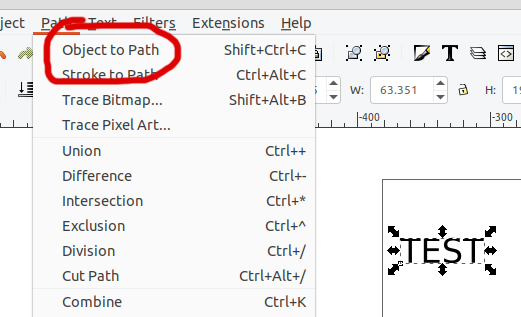
 madsrh
on 21 Jun 2020
madsrh
on 21 Jun 2020
@madsrh The only text is in the baseplate and it is hidden. I did try converting text to path, but now I get:
Traceback (most recent call last):
File "render-bitmaps.py", line 219, in
main(args, SRC)
File "render-bitmaps.py", line 203, in main
xml.sax.parse(open(file), handler)
File "/usr/lib/python3.8/xml/sax/__init__.py", line 33, in parse
parser.parse(source)
File "/usr/lib/python3.8/xml/sax/expatreader.py", line 111, in parse
xmlreader.IncrementalParser.parse(self, source)
File "/usr/lib/python3.8/xml/sax/xmlreader.py", line 125, in parse
self.feed(buffer)
File "/usr/lib/python3.8/xml/sax/expatreader.py", line 217, in feed
self._parser.Parse(data, isFinal)
File "../Modules/pyexpat.c", line 459, in EndElement
File "/usr/lib/python3.8/xml/sax/expatreader.py", line 336, in end_element
self._cont_handler.endElement(name)
File "render-bitmaps.py", line 144, in endElement
assert self.icon_name
AssertionError
rares45
on 21 Jun 2020
Just to rule some problems out, if you run the script on the repository without any change, does it work?
clobrano
on 23 Jun 2020
@clobrano The only change I made is changing "/usr/bin/inkscape" to "/snap/bin/inkscape", but it still doesn't work on the repository. The output is similar to the output in this comment.
rares45
on 25 Jun 2020
Sorry for the delay, but I couldn't find the time to look at this from my pc :sad:
clobrano
on 30 Jun 2020
Hi @rares45,
Don't convert the text in the baseplate to an object because the script needs to be able to read the category and icon name as text :)
To be clear, do you get these error messages if you run the unaltered script on an unaltered (existing) icon using the following command:
cd ~/yaru/icons/src/fullcolor && python render-bitmaps.py application-x-lmms-project
??
 ubuntujaggers
on 11 Jul 2020
ubuntujaggers
on 11 Jul 2020
Hi,
The error occurs even when trying to render script without any change to repository. I tried running script first with Snap's Inkscape and then with Flatpak's Inkscape and got the same ouptut as @rares45:
Traceback (most recent call last):
File "render-bitmaps.py", line 219, in
main(args, SRC)
File "render-bitmaps.py", line 203, in main
xml.sax.parse(open(file), handler)
File "/usr/lib/python3.8/xml/sax/init.py", line 33, in parse
parser.parse(source)
File "/usr/lib/python3.8/xml/sax/expatreader.py", line 111, in parse
xmlreader.IncrementalParser.parse(self, source)
File "/usr/lib/python3.8/xml/sax/xmlreader.py", line 125, in parse
self.feed(buffer)
File "/usr/lib/python3.8/xml/sax/expatreader.py", line 217, in feed
self._parser.Parse(data, isFinal)
File "../Modules/pyexpat.c", line 459, in EndElement
File "/usr/lib/python3.8/xml/sax/expatreader.py", line 336, in end_element
self._cont_handler.endElement(name)
File "render-bitmaps.py", line 144, in endElement
assert self.icon_name
AssertionError
However, I do not get this issue and the script renders when I use the Ubuntu-repository Inkscape
Does it have something to do with the latest version of Inkscape ?
Versions tried on:
Snap Version: v1.0-6e3e5246a0-2020-05-07 (latest/stable)
Flatpak Version: v1.0 -stable (org.inkscape.Inkscape)
Ubuntu Version: v0.92.5 (2060ec1f9f, 2020-04-08)
Thanks!
 Muqtxdir
on 12 Jul 2020
Muqtxdir
on 12 Jul 2020
However, I do not get this issue and the script renders when I use the Ubuntu-repository Inkscape
This considered, I think it has something to do with the version indeed. We must investigate to see if it's a regression or not. If the latter, we shall fix either the svgs or the script
clobrano
on 13 Jul 2020
Hi again,
I had a look at the script and found the following:
the script needs a lot or rework, but it seems to work fine with inkscape, from the repository, when provided with the proper input, as example:
icons/src/fullcolor $ ./render-bitmaps.py window-closethat is, the script needs the name of the file without the full path and without the
.svgextensionsnap version of inkscape does not work for me, because of missing permission to access hidden directories under $HOME (see https://askubuntu.com/questions/1049587/permissions-for-home-config-for-snap)
clobrano
on 24 Jul 2020
Likewise, when I got my new laptop I originally installed the snap and realised that the script didn't work. Installed non-snap inkscape from terminal and it did.
ubuntujaggers
on 24 Jul 2020
Leaving aside the snap-missing permissions,
I installed Inkscape-latest from their ppa (https://inkscape.org/release/inkscape-1.0/gnulinux/ubuntu/ppa/dl/) and I have the same trouble with rendering as with Inkscape-snap
Muqtxdir
on 24 Jul 2020
Could you post the output, including the command you issued?
clobrano
on 24 Jul 2020
command and output in screenshot:
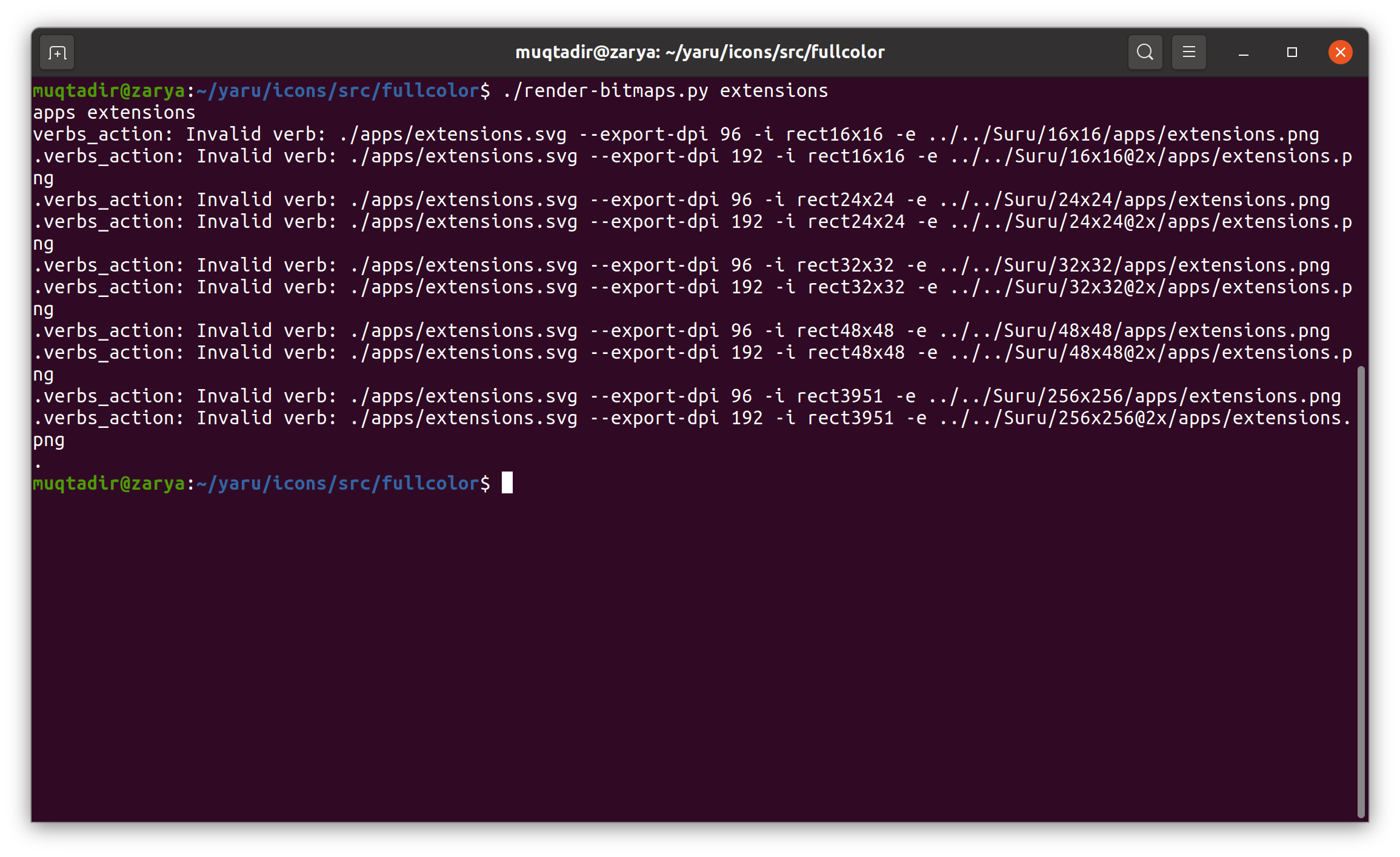
Inkscape version: Inkscape 1.0 (1.0+r73+1)
Muqtxdir
on 24 Jul 2020
command : ./render-bitmaps.py extensions
output:
apps extensions
verbs_action: Invalid verb: ./apps/extensions.svg --export-dpi 96 -i rect16x16 -e ../../Suru/16x16/apps/extensions.png
.verbs_action: Invalid verb: ./apps/extensions.svg --export-dpi 192 -i rect16x16 -e ../../Suru/16x16@2x/apps/extensions.png
.verbs_action: Invalid verb: ./apps/extensions.svg --export-dpi 96 -i rect24x24 -e ../../Suru/24x24/apps/extensions.png
.verbs_action: Invalid verb: ./apps/extensions.svg --export-dpi 192 -i rect24x24 -e ../../Suru/24x24@2x/apps/extensions.png
.verbs_action: Invalid verb: ./apps/extensions.svg --export-dpi 96 -i rect32x32 -e ../../Suru/32x32/apps/extensions.png
.verbs_action: Invalid verb: ./apps/extensions.svg --export-dpi 192 -i rect32x32 -e ../../Suru/32x32@2x/apps/extensions.png
.verbs_action: Invalid verb: ./apps/extensions.svg --export-dpi 96 -i rect48x48 -e ../../Suru/48x48/apps/extensions.png
.verbs_action: Invalid verb: ./apps/extensions.svg --export-dpi 192 -i rect48x48 -e ../../Suru/48x48@2x/apps/extensions.png
.verbs_action: Invalid verb: ./apps/extensions.svg --export-dpi 96 -i rect3951 -e ../../Suru/256x256/apps/extensions.png
.verbs_action: Invalid verb: ./apps/extensions.svg --export-dpi 192 -i rect3951 -e ../../Suru/256x256@2x/apps/extensions.png
.
Muqtxdir
on 24 Jul 2020
The FontConfig issue seems similar to this bug : "that's likely to happen only when you are running something with older library with new config". Maybe a packaging problem in the snap?
The other one is a problem. Basically inkscape 1.0 does not work anymore with the command that was working until 0.96. We shall find a substitute command :cry:
$ /usr/bin/inkscape --shell
Inkscape 0.92.5 (2060ec1f9f, 2020-04-08) interactive shell mode. Type 'quit' to quit.
>./actions/window-close.svg --export-dpi 96 -i rect16x16 -e ../../Suru/16x16/actions/window-close.png
DPI: 96
Background RRGGBBAA: ffffff00
Area 320:48:336:64 exported to 16 x 16 pixels (96 dpi)
Bitmap saved as: ../../Suru/16x16/actions/window-close.png
while
$ /snap/bin/inkscape --shell
config warning: "/etc/fonts/fonts.conf", line 5: unknown element "its:rules"
Fontconfig warning: "/etc/fonts/fonts.conf", line 6: unknown element "its:translateRule"
Fontconfig error: "/etc/fonts/fonts.conf", line 6: invalid attribute 'translate'
Fontconfig error: "/etc/fonts/fonts.conf", line 6: invalid attribute 'selector'
Fontconfig error: "/etc/fonts/fonts.conf", line 7: invalid attribute 'xmlns:its'
Fontconfig error: "/etc/fonts/fonts.conf", line 7: invalid attribute 'version'
Fontconfig warning: "/etc/fonts/fonts.conf", line 9: unknown element "description"

** (org.inkscape.Inkscape:524346): WARNING **: 23:14:59.936: Fonts dir '/home/carlo/snap/inkscape/7809/../../../.config/inkscape/fonts' does not exist and will be ignored.
Inkscape interactive shell mode. Type 'action-list' to list all actions. Type 'quit' to quit.
Input of the form:
action1:arg1; action2;arg2; verb1; verb2; ...
Only verbs that don't require a desktop may be used.
> ./actions/window-close.svg --export-dpi 96 -i rect16x16 -e ../../Suru/16x16/actions/window-close.png
Unable to find: ./actions/window-close.svg --export-dpi 96 -i rect16x16 -e ../../Suru/16x16/actions/window-close.png
verbs_action: Invalid verb: ./actions/window-close.svg --export-dpi 96 -i rect16x16 -e ../../Suru/16x16/actions/window-close.png
>
hi,
the adwaita-icon theme also had the same problem with the release of inkscape-v1
the rendering script was fixed by modifiing these:

Adwaita's render script: https://gitlab.gnome.org/GNOME/adwaita-icon-theme/-/blob/master/render-icon-theme.py
thanks!
Muqtxdir
on 5 Oct 2020
Thanks @Muqtxdir, I'll check how to integrate this
clobrano
on 6 Oct 2020
On Ubuntu 20.10, I can say this problem exists !
Will this be fixed before Ubuntu-20.10 releases?
 fouzan14
on 12 Oct 2020
fouzan14
on 12 Oct 2020
Since this is a build script, we're not bounded by the releases, which means that as soon as it is fixed it will be available to anyone.
clobrano
on 12 Oct 2020
I'm experiencing the same issue, is there any workaround?
EDIT
Sorry for the noise, I was not using the latest version of the script. The version of 23 Oct 2020 works fine :+1: .
 leinardi
on 24 Jan 2021
leinardi
on 24 Jan 2021
Hey @leinardi, thank you for the feedback, I forgot to close the ticket :)
clobrano
on 25 Jan 2021
Related issues
 YamiYukiSenpai
·
3Comments
YamiYukiSenpai
·
3Comments
 Feichtmeier
·
3Comments
Feichtmeier
·
3Comments
 eaglersdeveloper
·
3Comments
Feichtmeier
·
3Comments
eaglersdeveloper
·
3Comments
Feichtmeier
·
3Comments
 CDrummond
·
3Comments
CDrummond
·
3Comments
Most helpful comment
hi,
the adwaita-icon theme also had the same problem with the release of inkscape-v1
the rendering script was fixed by modifiing these:
Adwaita's render script: https://gitlab.gnome.org/GNOME/adwaita-icon-theme/-/blob/master/render-icon-theme.py
thanks!