Yaru: Icon Request: Difference between iso and img file
Expected Behavior
iso(application/x-cd-image) and img (application/x-raw-disk-image) are almost similar archival formats. They both should have the same or similar type of icon.
Actual Behavior
Both do have some connection with cd and the icon of ISO looks good but the IMG icon has the same icon as of plain text.
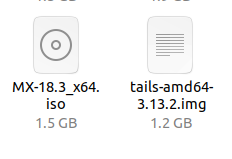
Also, object file (application/x-object) contains machine code and it does have an icon similar to the document type which looks little misplaced. An Icon like this will look better for binary files.

I do not know if it is a good idea but what do you about making mime type icon colorful like this.
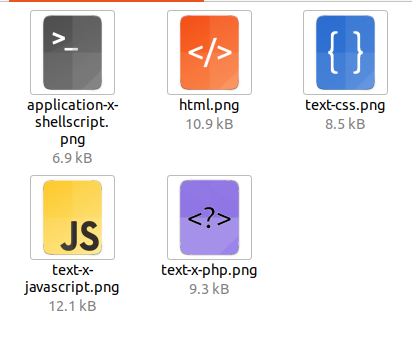
I do know all these are non-necessary things and Yaru team does have lots of important work to do but I wonder if someone with a few spare time can do some of the things.
Anyways thank you, everyone, for making Yaru wonderful.
 avil25
All 11 comments
iso(application/x-cd-image) and img (application/x-raw-disk-image) are almost similar archival formats. They both should have the same or similar type of icon.
Actually they have exactly the same icon 😄 but sure, we could do something similar to the audio files like:
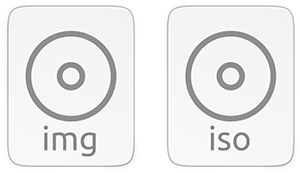
...what do you about making mime type icon colorful like this.
I'm not sure it's a good idea. Any comments @ubuntujaggers @Feichtmeier @clobrano ?
Also, object file (application/x-object) contains machine code and it does have an icon similar to the document type which looks little misplaced. An Icon like this will look better for binary files.
So, use the binary icon for object files (application/x-object) too?
Anyways thank you, everyone, for making Yaru wonderful.
😃 Thank you for providing this feedback @avil25. I see you've made .png mockups, but can you create the icons in Inkscape too?
 madsrh
on 29 Apr 2020
madsrh
on 29 Apr 2020
Thanks @avil25 for the feedback, really appreciate it.
I am unsure about colorful mime icons, not against, but I do prefer the ones we have I think
 clobrano
on 29 Apr 2020
clobrano
on 29 Apr 2020
Thank you for your quick reply.
But I do see different icons for img and iso is it the problem with my version?
apt show yaru-theme-icon
Package: yaru-theme-icon
Version: 20.04.6
also don't get you about object files is it also using the binary icon currently I am seeing it like this

I can create icons in Inkscape but I have never thought these simple-looking icons have this much shades. Do we have any guide that we can follow?
avil25
on 29 Apr 2020
I like the idea :+1: I like colorful icons
 Feichtmeier
on 29 Apr 2020
Feichtmeier
on 29 Apr 2020
But I do see different icons for img and iso is it the problem with my version?
how did you create the .img file? As far as I know, to let the system understand what mimetype a file is, the extension of the filename is not enough
clobrano
on 29 Apr 2020
I also quite like colourful mimetypes 👍
 ubuntujaggers
on 29 Apr 2020
ubuntujaggers
on 29 Apr 2020
how did you create the
.imgfile?
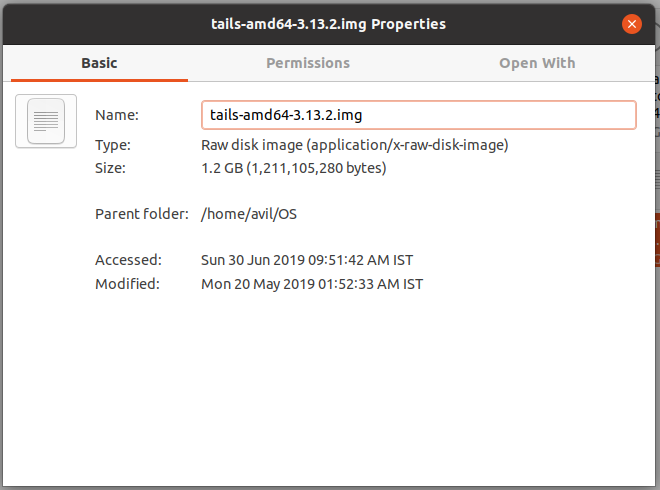
I have not created .img file I know changing extensions does not change mimetype I have downloaded Tails os long time ago and instead of iso they provide img file. You can check its mime type.
And thank you everyone on your views.
avil25
on 30 Apr 2020
I think it would have been better to make two issues here. One for the IMG file and one for the color request
Feichtmeier
on 30 Apr 2020
thanks for your feedback let this one for img file and I will open a new issue for color icon request.
avil25
on 30 Apr 2020
Ninja assigning Mr. Mimetype alias @madsrh to this 😄
Feichtmeier
on 25 May 2020
Fixed by @madsrh with #2213
Feichtmeier
on 9 Jul 2020
Related issues
Feichtmeier
·
3Comments
 matthewpaulthomas
·
3Comments
matthewpaulthomas
·
3Comments
 8none1
·
3Comments
8none1
·
3Comments
 YamiYukiSenpai
·
3Comments
Feichtmeier
·
3Comments
YamiYukiSenpai
·
3Comments
Feichtmeier
·
3Comments
Most helpful comment
I think it would have been better to make two issues here. One for the IMG file and one for the color request