Expected Behavior
Normal icon sizes.
Actual Behavior
Enlarged icons.
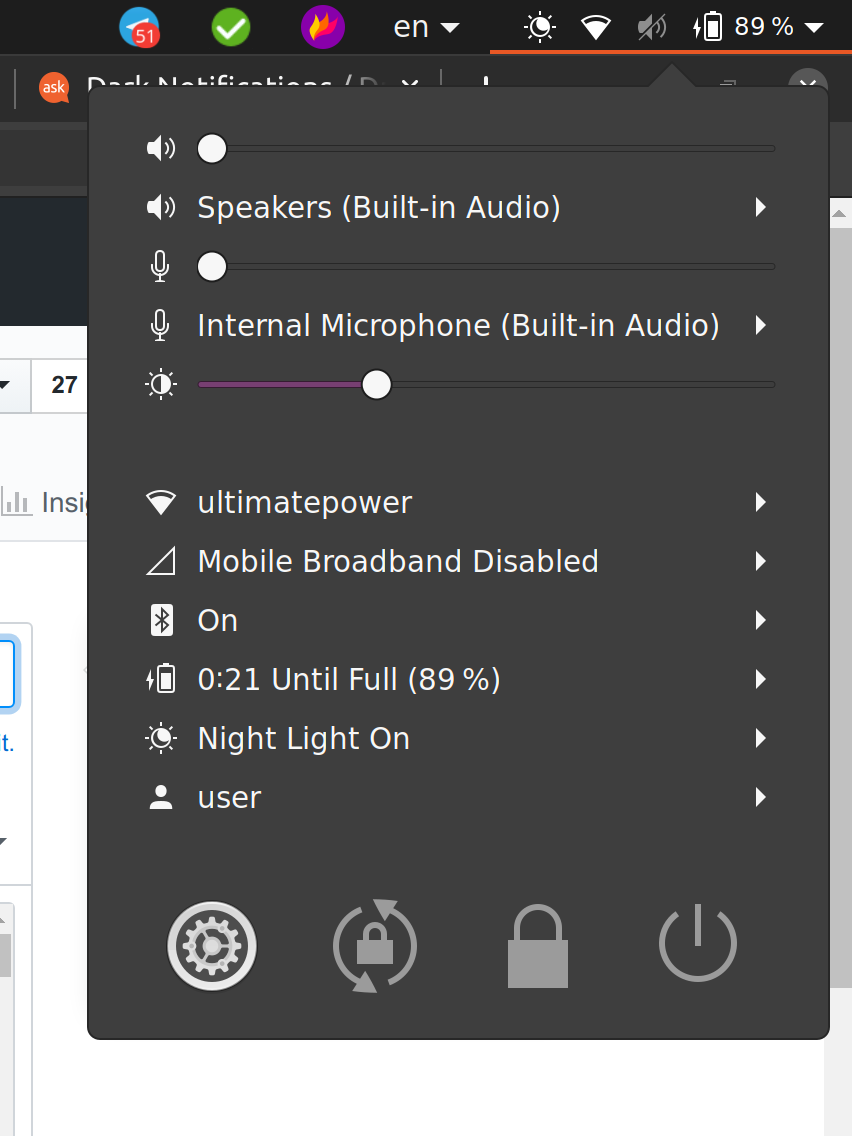
Steps to Reproduce the Problem
sudo apt install git meson sassc libglib2.0-dev libxml2-utilsgit clone https://github.com/ubuntu/yarucd yarugit checkout 20.04.5meson buildcd buildsudo ninja install- reboot and now icons are enlarged
Yaru version
git: 20.04.5
Thanks!
 lgg
lgg
All 4 comments
it looks like you have the wrong version of Gnome shell
that old system menu is no longer having the round buttons and is instead a menu button so upstream and we don't style it anymore
could you check which version of gnome shell you use?
 Feichtmeier
on 16 Apr 2020
Feichtmeier
on 16 Apr 2020
user@laptop:~$ gnome-shell --version
GNOME Shell 3.34.3
user@laptop:~$ lsb_release -a
No LSB modules are available.
Distributor ID: Ubuntu
Description:    Ubuntu 19.10
Release:    19.10
Codename:   eoan
user@laptop:~$ uname -a
Linux laptop 5.3.0-46-generic #38-Ubuntu SMP Fri Mar 27 17:37:05 UTC 2020 x86_64 x86_64 x86_64 GNU/Linux
user@laptop:~$
Hi @lgg, tag 20.04.x are not supposed to work in 19.10 because the gnome-shell version is too old (you'll need version 3.36)
 clobrano
on 16 Apr 2020
clobrano
on 16 Apr 2020
❤1
👍1
@clobrano thank you!
lgg
on 16 Apr 2020
👍1
Was this page helpful?
0 / 5 - 0 ratings
Related issues
 pojntfx
·
3Comments
pojntfx
·
3Comments
 8none1
·
3Comments
8none1
·
3Comments
 CDrummond
·
3Comments
CDrummond
·
3Comments
 eaglersdeveloper
·
3Comments
eaglersdeveloper
·
3Comments
 matthewpaulthomas
·
3Comments
matthewpaulthomas
·
3Comments
Most helpful comment
Hi @lgg, tag 20.04.x are not supposed to work in 19.10 because the gnome-shell version is too old (you'll need version 3.36)