Yaru: Huge padding between menu action in top bar
On Ubuntu 19.10 there are huge paddings between menu actions which making the menu with 3 actions cover a lot of space in screen. I don't know why these random padding are added at first place. this is either coming from gnome shell theme or from gtk theme which is set to yaru.
 keshavbhatt
All 11 comments
Screenshot please
 Feichtmeier
on 9 Dec 2019
Feichtmeier
on 9 Dec 2019
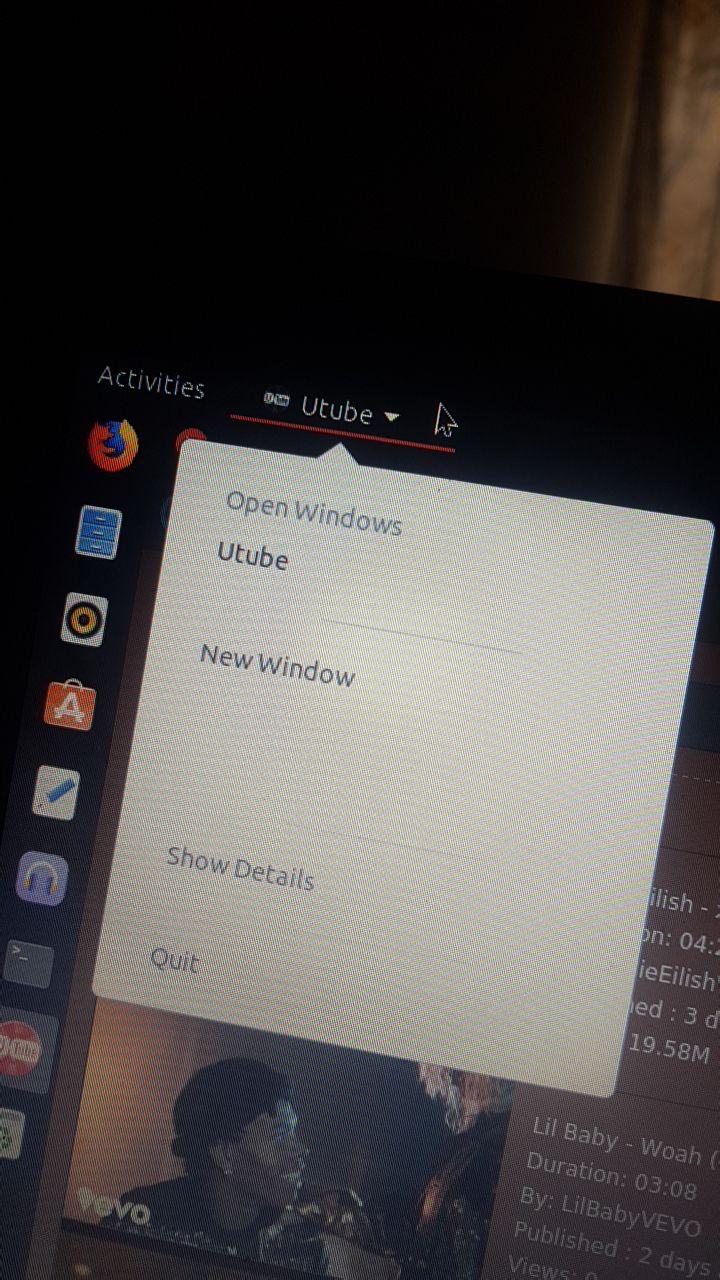
keshavbhatt
on 9 Dec 2019
Uhm, I'm pretty sure this doesn't happen on a fresh installation but can't check until tonight.
@clobrano can you confirm this?
Feichtmeier
on 9 Dec 2019
I can't reproduce this on "normal" apps like Nautilus
 clobrano
on 9 Dec 2019
clobrano
on 9 Dec 2019
@clobrano this thing is coming from gnome shell, with yaru theme on ubuntu 19.10 with no external extension enabled. i will check with other apps tonight and update.
keshavbhatt
on 9 Dec 2019
It seems not reproducible with gnome-session, so it might be indeed something we do in Yaru or in ubuntu session
Sorry, it does not happen immediately, but I reproduced it on gnome-session as well, so I think it doesn't depend on Yaru. It sounds weird, but It seems to happen if utube is opened after another application or when a second application is opened after utube, e.g.
- open utube soon after system boot up: no problem
- open firefox/nautilus/whatever, then go back to utube: problem reproduced
I suggest to ask first to the developer whether they can understand what's happening.
clobrano
on 9 Dec 2019
i think the height of that widget is somehow somewhere is being set to fixed. In qt we do widget->adjustSize() to update widget height to minimum required.
keshavbhatt
on 9 Dec 2019
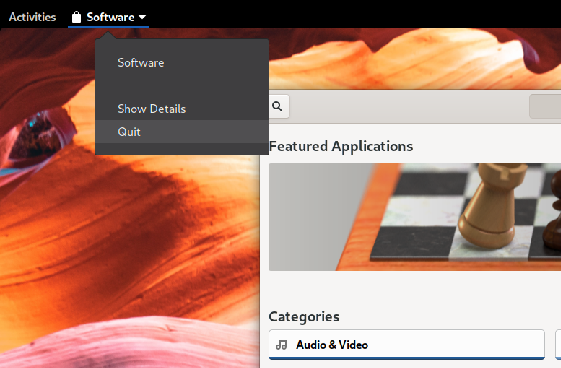
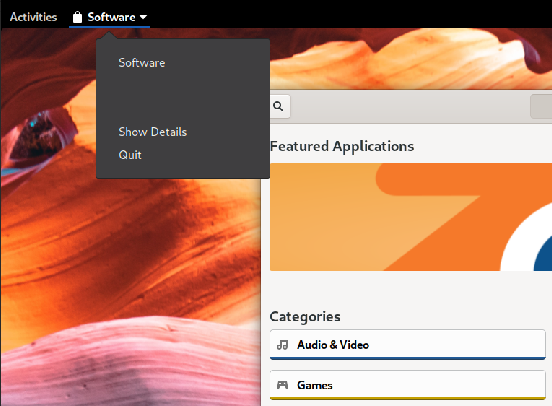
It is reproducible with gnome software too, very strange
clobrano
on 9 Dec 2019
Ok, reproduced it also on Fedora, this is very likely a gnome-shell thing. Thanks for discovering it :wink:
clobrano
on 9 Dec 2019
Gnome-software opened as first application
Gnome-software after Nautilus has been opened as well
clobrano
on 9 Dec 2019
clobrano
on 9 Dec 2019
Related issues
Feichtmeier
·
3Comments
 pojntfx
·
3Comments
pojntfx
·
3Comments
 matthewpaulthomas
·
3Comments
matthewpaulthomas
·
3Comments
 CDrummond
·
3Comments
CDrummond
·
3Comments
 eaglersdeveloper
·
3Comments
eaglersdeveloper
·
3Comments