I just need to know the CSS class where I can change the colour of these icons. Thanks.
------ ISSUE TEMPLATE starts HERE ------
Expected Behavior
Visible icons
(What you were trying to do)
Actual Behavior
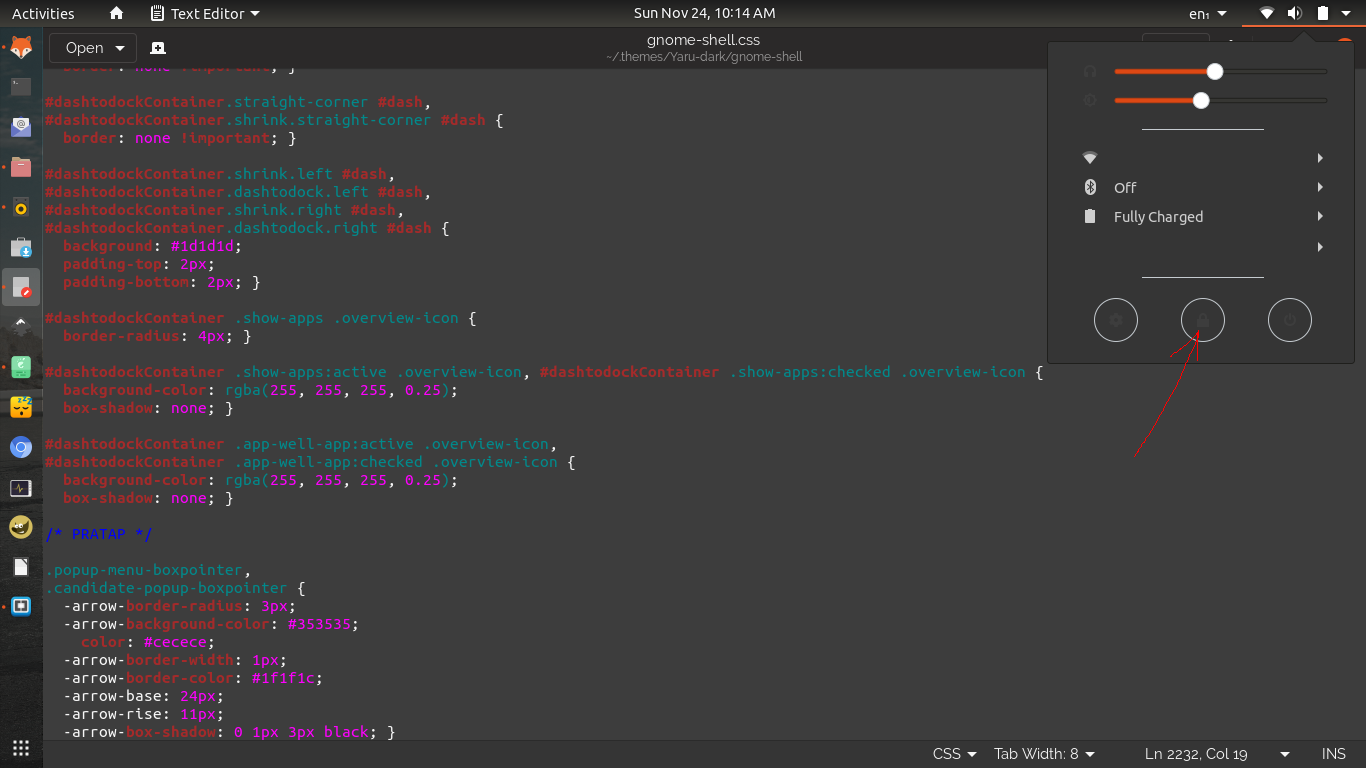
(What happened instead)
Steps to Reproduce the Problem
- Use gnome-shell.css for 19.10 in yaru-dark > gnome-shell
1.
1.
Software that presents the issue
- Name: Ubuntu
- Version: 18.04
Yaru version
Took from a live session in 19.10
Please report the Yaru version in your system using one of the following commands
If you installed Yaru from PPA
$ apt show communithemeIf you installed Yaru via Snap
$ snap info communithemeI you installed from the sources, go the Yaru folder and copy the output of the following terminal command instead
$ git describe
 meetdilip
All 17 comments
.system-menu-action {
-st-icon-style: symbolic;
color: $fg_color;
border-radius: 32px; /* wish we could do 50% */
padding: 13px;
border: 1px solid $_bubble_borders_color;
&:hover, &:focus {
background-color: $_hover_bg_color;
color: $fg_color;
border: none;
padding: 14px;
}
&:active {
background-color: $_active_bg_color;
color: $fg_color;
}
& > StIcon { icon-size: 16px; }
}
but just toggle the version to dark in gnome-shell/src/gnome-shell.scss
then $fg_color and $bg_color inverts
 Feichtmeier
on 24 Nov 2019
Feichtmeier
on 24 Nov 2019
I think it went well. But the brightness and headphone buttons did go as planned. I am happy with this one though :) Thanks @Feichtmeier

meetdilip
on 24 Nov 2019
I would change stuff in the CSS files AT ALL :)
Rather change
https://github.com/ubuntu/yaru/blob/bionic/gnome-shell/src/gnome-shell.scss#L1
This to dark
Feichtmeier
on 24 Nov 2019
The files I am using are from my previous snap installation. I was facing frequent keyboard and mouse freeze while using communiTheme snap in 18.04. I reported a bug, but nothing happened. Now only chance of using Yaru is to use those copied files and make changes to them.
I was not sure which branch was Bionic. I tried not to trouble you guys much :)
Thanks.
meetdilip
on 24 Nov 2019
I am pretty sure the theme has nothing to do with your keyboard stuck :D
I would rather remove the snap, reboot, re install the snap (from edge) and reboot again and login into the session
Or you could remove the snap alltogether, clone this repo, switch to the bionic branch, exchange "light" to "dark" in the file I linked and then build from src and log into the Yaru session
Feichtmeier
on 24 Nov 2019
You are right. The freeze bug is there in default Ubuntu as well for some users like me. But it is severe when I use communiTheme session. I have reinstalled 18.04 a couple of times after that.
meetdilip
on 24 Nov 2019
Now that you mentioned, I would like to try. How can I get the bionic branch ?
meetdilip
on 24 Nov 2019
sudo apt install libgtk-3-dev git meson sassc
git clone https://github.com/ubuntu/yaru.git
cd yaru
git checkout bionic
meson build
cd build
sudo ninja install
Thanks. At which point should I edit the SCSS file ?
meetdilip
on 24 Nov 2019
Before the last step
Feichtmeier
on 24 Nov 2019
Everything went well. Thanks a lot :)
meetdilip
on 24 Nov 2019
I don't get startup and shutdown sounds. Is there anything we can do ?
meetdilip
on 26 Nov 2019
I don't get startup and shutdown sounds. Is there anything we can do ?
https://github.com/ubuntu/yaru/blob/master/CONTRIBUTING.md#testing-desktop-login-sound
Feichtmeier
on 26 Nov 2019
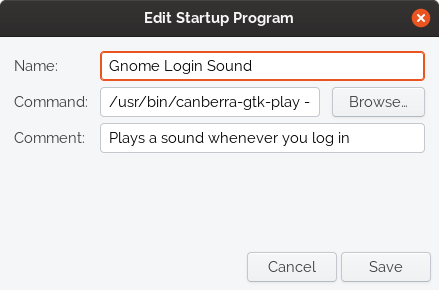
Tried twice. No sound on login :(
meetdilip
on 27 Nov 2019
Have you tried executing below command in a shell?
/usr/bin/canberra-gtk-play --id="desktop-login" --description="GNOME Login"
does it work?
 clobrano
on 28 Nov 2019
clobrano
on 28 Nov 2019
Forgive me, by shell you mean as command in the startup window posted above ?
meetdilip
on 29 Nov 2019
This one on Terminal helped
gsettings set org.gnome.desktop.sound theme-name Yaru
Thanks. :)
meetdilip
on 29 Nov 2019
Related issues
Feichtmeier
·
3Comments
 chrisjbillington
·
3Comments
chrisjbillington
·
3Comments
 madsrh
·
3Comments
madsrh
·
3Comments
 CDrummond
·
3Comments
CDrummond
·
3Comments
 YamiYukiSenpai
·
3Comments
YamiYukiSenpai
·
3Comments
Most helpful comment