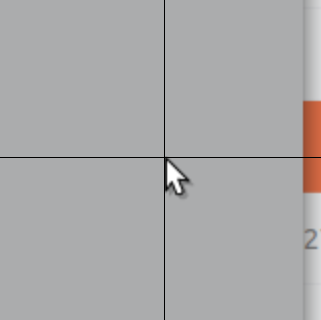
The normal cursor's point isn't at mouse's coordinates. It seems to be a few pixels too high and a bit to the left. See attached screenshot:

In the picture I have changed settings from Universal Access --> Zoom:
- Set zoom to 2.00
- Enabled cross hair and made it as thin as possible
It seems that other cursor types have similar issues as well.
Using Ubuntu 19.04 with the Yaru theme that came with it.
In the mean time I've switched to Hackneyed cursor theme (https://gitlab.com/Enthymeme/hackneyed-x11-cursors) as it seems to be better aligned. Here's for a comparison what the position probably should look like:
$ snap info communitheme
name:      communitheme
summary:   The next Ubuntu theme built by the community.
publisher: Didier Roche (didrocks)
license:   GPL-3.0
description: |
  Yaru, formerly known as Communitheme, is the new Ubuntu theme built by the
  community. Yaru will become the default Ubuntu theme in Ubuntu 18.10. This
  package allows you to try out the theme on Ubuntu 18.04 LTS.

  To try out the theme, install this package on Ubuntu 18.04 LTS, restart
  your computer and select the "Ubuntu with communitheme snap" session from
  the login screen.

  More information is available at
  https://community.ubuntu.com/t/faq-ubuntu-new-theme/1930.
snap-id: Yd6CISPIf6tEf3ZEJ0cqSoEg9rG2VkRi
channels:
  stable:    0.1 2019-03-13 (1768) 16MB -
  candidate: ↑
  beta:      ↑
  edge:      0.1 2019-07-06 (1823) 17MB -
 jhakonen
All 6 comments
Indeed, if one puts the mouse pointer all the way to the screen’s left edge, one can notice the missing border.
 fitojb
on 18 Jul 2019
fitojb
on 18 Jul 2019
I wish the cursor could be sharpened more.
 Amr-Ibra
on 8 Oct 2019
Amr-Ibra
on 8 Oct 2019
I can confirm that this is still an issue. I was investigating a mouse cursor intersection issue in another application. After a lot of debugging, I found that the Yaru mouse pointer was a couple of pixel two low relative to the visible tip of the cursor image. The Adwaita cursor which is similar in appearance does not have this problem.
 rustushki
on 16 Nov 2019
rustushki
on 16 Nov 2019
I think I know how to fix this 👍
 ubuntujaggers
on 30 Jan 2020
ubuntujaggers
on 30 Jan 2020
Isn't this fixed? @madsrh @ubuntujaggers ?
 Feichtmeier
on 18 Feb 2020
Feichtmeier
on 18 Feb 2020
Fixed with #1825
Feichtmeier
on 28 Feb 2020
Related issues
 sicklylife-jp
·
3Comments
Feichtmeier
·
3Comments
Feichtmeier
·
3Comments
sicklylife-jp
·
3Comments
Feichtmeier
·
3Comments
Feichtmeier
·
3Comments
 8none1
·
3Comments
Feichtmeier
·
3Comments
8none1
·
3Comments
Feichtmeier
·
3Comments
Most helpful comment
I think I know how to fix this 👍