gnome-control-center 3.31.90 (currently in disco-proposed) has a new Sound panel which promotes 4 different options for Alert Sound themes. Yaru isn't one of the choices but maybe it ought to be.
I filed https://launchpad.net/bugs/1815504 for the gnome-control-center Ubuntu side of this issue.
3.30
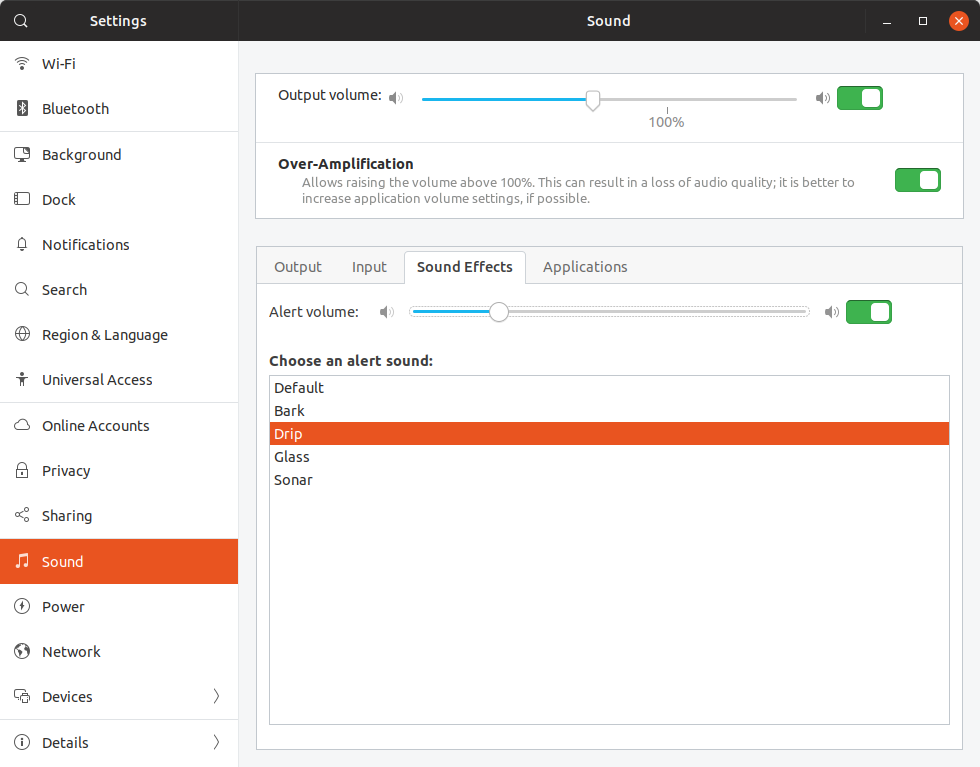
3.31.90

 jbicha
All 10 comments
Thanks for reporting!
Also that separator needs a fix
 Feichtmeier
on 11 Feb 2019
Feichtmeier
on 11 Feb 2019
@Feichtmeier ...and 'System Volume' is missing a border
 madsrh
on 12 Feb 2019
madsrh
on 12 Feb 2019
The implementation is interesting. If you select one of the choices (none are selected by default), it creates a __custom sound theme in ~/.local/share/sounds/ . The custom theme derives from your current sound theme (so Yaru) and it just overrides the alert sounds. So there isn't any coordination needed there.
GNOME is looking for help in updating their event sounds so Yaru contributors might like to help out:
https://gitlab.gnome.org/GNOME/gnome-control-center/issues/264
Feel free to close this issue since my original concern doesn't apply once I looked into what the Sound panel was doing. And maybe we don't need an issue here to track the GNOME request for help.
jbicha
on 13 Feb 2019
I added the frame (border) in 1:3.31.90-1ubuntu3 but I didn't see an obvious reason why there isn't a border or separator between the system volume slider list row and the Over-Amplification list row.
jbicha
on 14 Feb 2019
@jbicha the separator is a theming issue :) fix incoming in that pr
Feichtmeier
on 18 Feb 2019
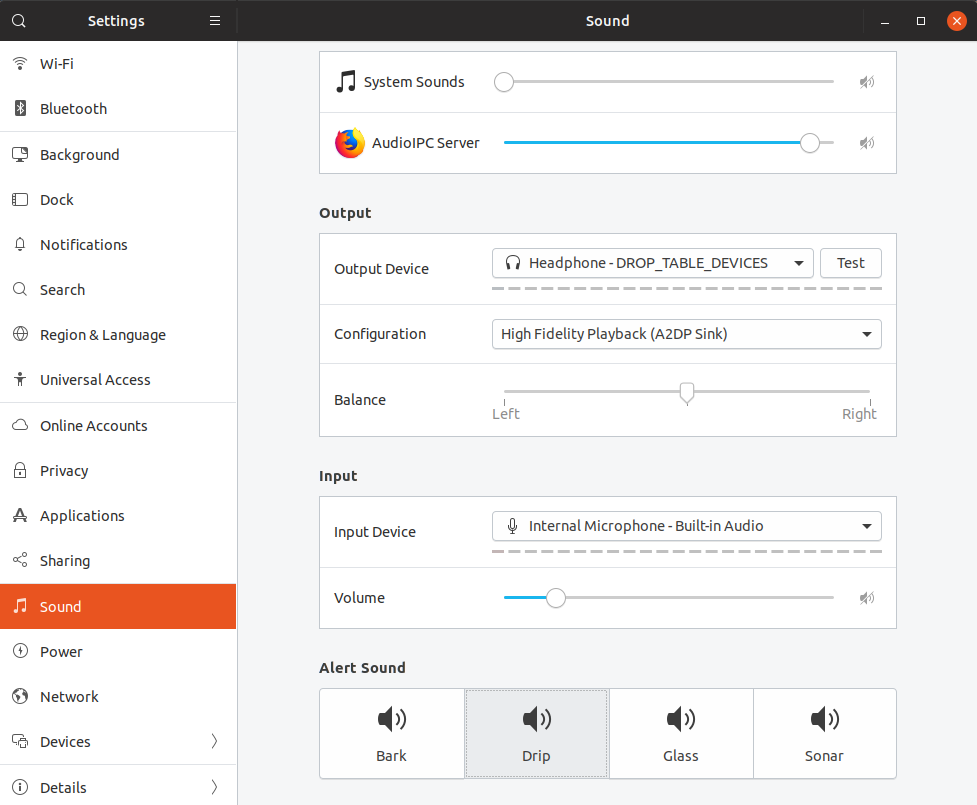
Ubuntu 19.04 was released today with this setup. It looks super good and works like a charm. Nice work @jbicha !
Yaru isn't one of the options yet. On a default install, none of the alert sounds are selected and the alert sound you hear is the Yaru one. From the moment you choose an alert sound in this menu, you're stuck to the options in the menu, no easy way to go back to Yaru.
 galgalesh
on 18 Apr 2019
galgalesh
on 18 Apr 2019
Ubuntu 19.04 was released today with this setup. It looks super good and works like a charm. Nice work @jbicha !
Yaru isn't one of the options yet. On a default install, none of the alert sounds are selected and the alert sound you hear is the Yaru one. From the moment you choose an alert sound in this menu, you're stuck to the options in the menu, no easy way to go back to Yaru.
Same for me. How can I set Yaru back? Its annoying a bit.
 mezeipetister
on 15 May 2019
mezeipetister
on 15 May 2019
You can set it back with
gsettings set org.gnome.desktop.sound theme-name Yaru
You can set it back with
gsettings set org.gnome.desktop.sound theme-name Yaru
Thank you! It worked for me!
mezeipetister
on 15 May 2019
Can we close this?
madsrh
on 13 Aug 2019
Related issues
 matthewpaulthomas
·
3Comments
matthewpaulthomas
·
3Comments
 mivoligo
·
3Comments
matthewpaulthomas
·
3Comments
mivoligo
·
3Comments
matthewpaulthomas
·
3Comments
 snydox
·
3Comments
Feichtmeier
·
3Comments
snydox
·
3Comments
Feichtmeier
·
3Comments
Most helpful comment
Ubuntu 19.04 was released today with this setup. It looks super good and works like a charm. Nice work @jbicha !
Yaru isn't one of the options yet. On a default install, none of the alert sounds are selected and the alert sound you hear is the Yaru one. From the moment you choose an alert sound in this menu, you're stuck to the options in the menu, no easy way to go back to Yaru.