Yaru: Bring the blue highlighting colour back, please
Hullo!
Recently the text highlighting and the Firefox tab highlighting colour has changed from blue to orange. I find the new colour to be very distracting :( There's plenty of orange in the Ubuntu/Yaru theme already... Would you kindly bring the blue colour to where it was before the last update? (Maybe consider forking the theme a bit moar: Team Red and Team ~Green~ Blue?)
This is how it used to be:


And now it's the same colour as you can see in, say, Nautilus (I couldn't capture the actual highlighting colour because it turns to grey when I try to make a screenshot):

Please, please, please, bring the blue colour back. It was easy on the eyes and dwelt only in few places of UI, and it looked very good.
 dasnorsep
All 9 comments
Hi @dasnorsep,
I am with you in this. I believe the blue selection was really good, unfortunately most of the applications default to selected background color for text selection, that is orange, and there is no standard way to enforce our text selection color, so we had to drop that.
 clobrano
on 19 Jan 2019
clobrano
on 19 Jan 2019
@clobrano I'm afraid I didn't quite understand why it is a problem to set the highlighting colour to blue :( Could you explain one more time, please?
most of the applications default to selected background color for text selection, that is orange,
The web page's background isn't dominantly orange. I changed my desktop wallpaper from the default orange one to a blue one, restarted the Gnome session, but the highlighting colour remained orange.
dasnorsep
on 19 Jan 2019
The problem was that we can only set the colours of pre-defined gtk classes.
When apps have their own classes and then must use a custom CSS file to theme those classes appropriate to adwaita they use specific colour variables.
Adding a second accent colour to those would mean to change adwaita since it's the default theme of gtk
We all loved the blue text selection but it's not possible when you want to be consistent in every app (currently)
Or did you mean to change the Orange to blue?
 Feichtmeier
on 19 Jan 2019
Feichtmeier
on 19 Jan 2019
(currently)
Are you aware of soon coming changes to the dev workflow that would make it easier for you to handle stuff like this?
Or did you mean to change the Orange to blue?
No, I like orange as the main accent colour. And blue was great as a secondary accent colour.
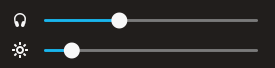
By the way, somehow it's still present in drop-down menu in the top right corner:
dasnorsep
on 19 Jan 2019
Are you aware of soon coming changes to the dev workflow that would make it easier for you to handle stuff like this?
which changes?
clobrano
on 19 Jan 2019
@clobrano I'm sorry it looked like I know of some coming changes. No, I was just asking, because of Feichtmeier's "currently": thought maybe he knew that something is on the horizon and soon I'll have my beloved blue highlighting back.
dasnorsep
on 19 Jan 2019
Ah, sorry I misread :D
No, no changes expected in a near future
clobrano
on 19 Jan 2019
Blue stays for "activities" like progress bars and sliders. The rest will stay orange until ... prbly forever :D
Only the textcolor is orange again since adwaita does not support a difference there (and thus no gtk app supports this)
Thanks for the heads up though and best regards!
Feichtmeier
on 19 Jan 2019
Okay, last comment from me: consider changing the contrast of the colour or whatever. Default Ubuntu orange is easier on the eyes:


I think it's important to change the colour, because it's what users look at for much of their time interacting with the system. It's a major bummer that having that blue colour costs much human-hours to maintain.
Anyways, thanks for your answers and for the theme itself :3
dasnorsep
on 19 Jan 2019
Related issues
Feichtmeier
·
3Comments
 8none1
·
3Comments
8none1
·
3Comments
 mivoligo
·
3Comments
mivoligo
·
3Comments
 madsrh
·
3Comments
Feichtmeier
·
3Comments
madsrh
·
3Comments
Feichtmeier
·
3Comments