Yaru: Dark menu with dark text in electron applications
Actual Behavior
I am using Yaru (not the dark one) on a fresh Ubuntu 18.10 installation. There are some applications not picking up the correct color for menus:
This is gnome-terminal (this is how it is supposed to be, I suppose):
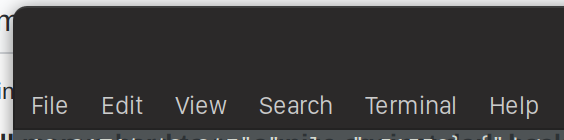
This is how Slack looks (not as it is expected to be, but readably):

And this is how Skype and Atom beta look like (not readable at all):

Atom at least shows the text of the menus when the window does not have the focus, while skype does not show them at all.
Is there a tweak I can do at the theme to change this menu color? Switching to Yaru dark fixes it, alle fonts are bright then and readable. But I'd prefer the light one.
Thanks!
 paulwellnerbou
All 12 comments
Hi there, I believe electron apps have some problems with reading the dark/light gtk themes currently. Could you check how other gtk themes behave? Thanks for reporting
 Feichtmeier
on 16 Nov 2018
Feichtmeier
on 16 Nov 2018
Atom 1.32.2 works just fine, considering the old issue with menubars #715

 clobrano
on 16 Nov 2018
clobrano
on 16 Nov 2018
There is nothing to do here except waiting for affected applications to update away from the buggy Electron version they’re using. It appears that the problem is fixed in Electron 3.0.1.
 fitojb
on 17 Nov 2018
fitojb
on 17 Nov 2018
Thanks @fitojb, closing this then. Feel free to reopen it if there are new info
clobrano
on 17 Nov 2018
@fitojb this might not fixed in Electron 3.0.1. according to https://github.com/electron/electron/issues/13381. That issue was fixed in 3.0.1. but it introduced a new issue. Can you confirm that the new issue is now also fixed?
it turns out, the electron change to honor GTK theme preferences was incomplete. Now electron honors the menubar background color but uses the incorrect foreground color. Instead, the menubar foreground color is sourced from the context menu foreground color. Since Yaru uses a black bg with white text for the menubar and a white bg with black text for the context menus, you get black text on a black bg.
See the following screenshots.
It also shows in the just released Mattermost desktop client (4.2.0) https://github.com/snapcrafters/mattermost-desktop/pull/16#event-1992299001
Before "fix"
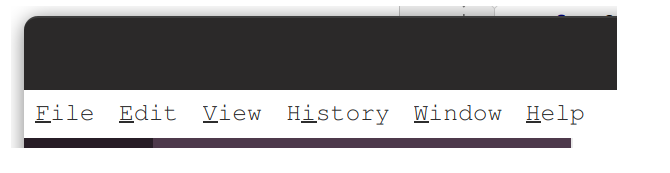
After "fix"

 galgalesh
on 28 Nov 2018
galgalesh
on 28 Nov 2018
@galgalesh No, I can’t confirm. I avoid Electron programs altogether. I was just reporting a finding.
fitojb
on 28 Nov 2018
I can confirm this using vscode!
Feichtmeier
on 28 Nov 2018
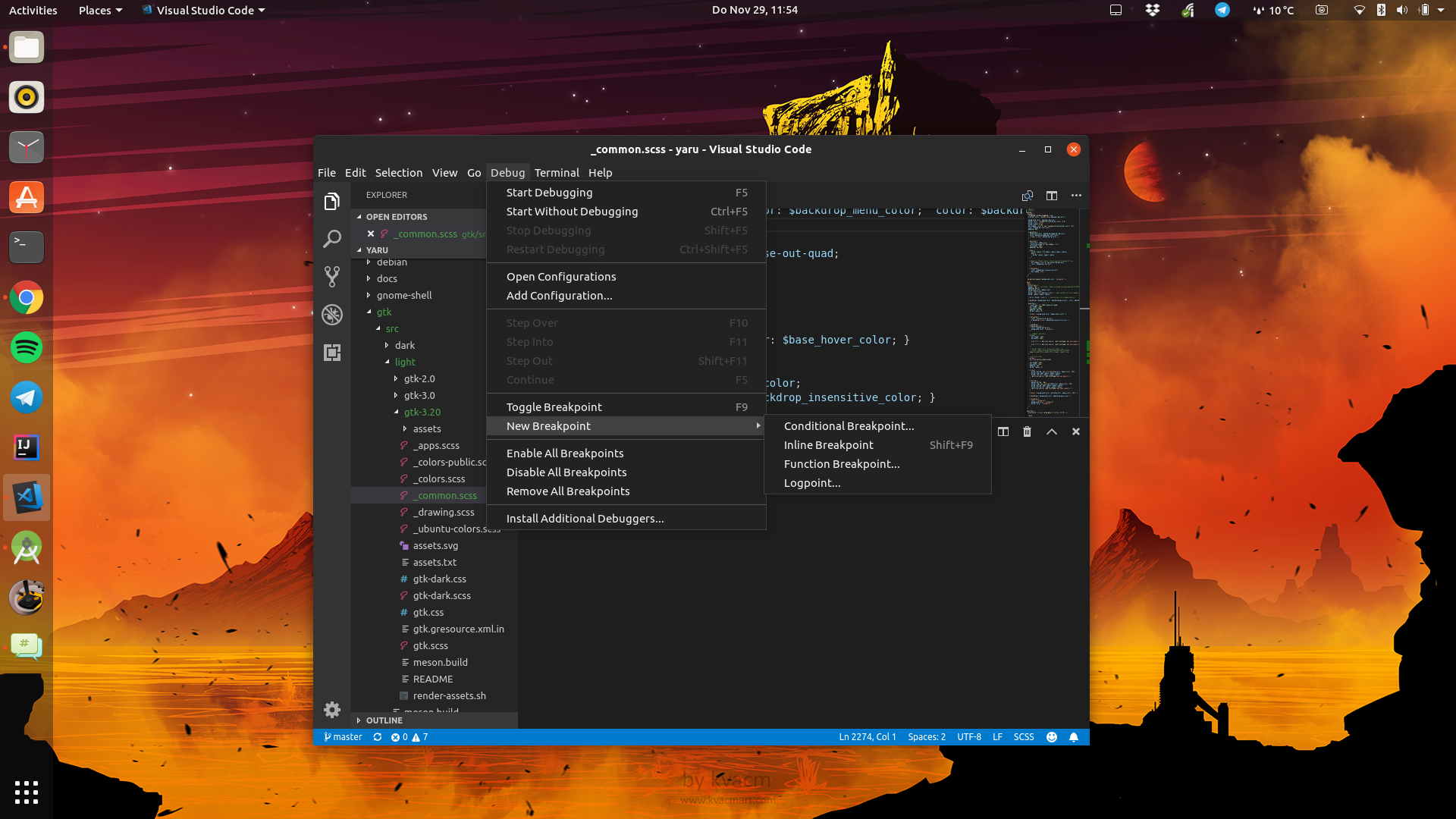
We could eventually fix this with the jet menus (not popovers) for the light theme, or by changing our menubar to white
Here test the branch: https://github.com/ubuntu/yaru/pull/989
Feichtmeier
on 29 Nov 2018
Update: proposed patch in electron: https://github.com/electron/electron/pull/15878
It will probably take a while for all the applications to use the updated electron version, so temporarily patching this in Yaru might be a good idea.
galgalesh
on 29 Nov 2018
We could eventually fix this with the jet menus (not popovers) for the light theme, or by changing our menubar to white
I would prefer the first
clobrano
on 29 Nov 2018
Ah never mind then if the fix is happening :) Maybe we should close it here? vscode is usally pretty fast with including the upstream code.
Black menus for the dark theme are a lot easier than black menus for the light theme so it would be a lot of hassle just for this issue.
Feichtmeier
on 3 Dec 2018
Maybe we should close it here?
Right, closing this now, thanks all!
clobrano
on 3 Dec 2018
Related issues
 madsrh
·
3Comments
madsrh
·
3Comments
Feichtmeier
·
3Comments
Feichtmeier
·
3Comments
madsrh
·
3Comments
madsrh
·
3Comments
Feichtmeier
·
3Comments
Feichtmeier
·
3Comments
 chrisjbillington
·
3Comments
chrisjbillington
·
3Comments
Most helpful comment
Update: proposed patch in electron: https://github.com/electron/electron/pull/15878
It will probably take a while for all the applications to use the updated electron version, so temporarily patching this in Yaru might be a good idea.