Yaru: Folder highlight in nautilus is too much
Selected folders in Nautilus look red with the Suru icon theme.
 godlyranchdressing
All 20 comments
Mads opened a bug on Nautilus to support a better folder selection https://gitlab.gnome.org/GNOME/nautilus/issues/202. The good is that there is an experimental feature (selectable in settings) that improves a lot this experience

 clobrano
on 12 Jan 2018
clobrano
on 12 Jan 2018
If it's only a gsettings key to change, we can do this in the ubuntu session without any problem.
 didrocks
on 12 Jan 2018
didrocks
on 12 Jan 2018
Yes! It's
gsettings set org.gnome.nautilus.preferences use-experimental-views true
clobrano
on 12 Jan 2018
Ok, I've looked at the code that is enabled via this option. I'm not really confortable enabling this on the LTS on the default session (if we switch this theme by default) as the code is indeed still new, not really tested and quite different from what we tested on for long.
No worry to do that in the separate session though. Let me add a PR for this.
didrocks
on 12 Jan 2018
The current design has a white overlay on hover that doesn't work well with textfiles and other bright icons. Perhaps the orange filename outline on hover could work?
In this mockup the selected icon is still colored outside the icon.
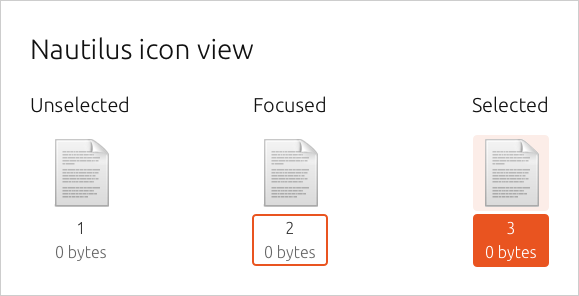
From here...
 madsrh
on 19 Jan 2018
madsrh
on 19 Jan 2018
As the issue title says, the colored icon is too much (especially on images). Would it be easy enough to spot the selected file without it? (it seems that icons on the 17.10 desktop works this way)
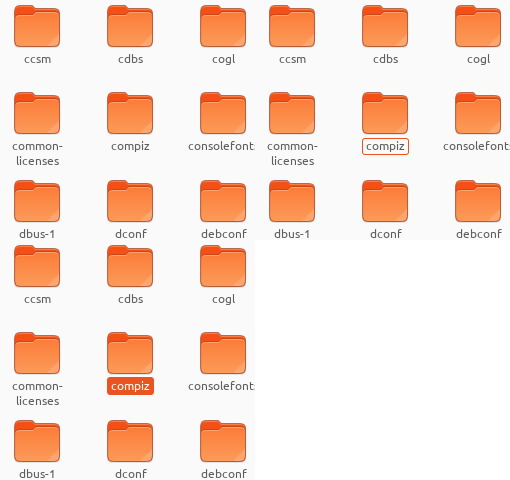
madsrh
on 24 Jan 2018
+1 on not "oranging" the icon. I think as well that on some icons, the selected color overlay can render especially badly.
didrocks
on 24 Jan 2018
@clobrano and @godlyranchdressing I see that Nautilus has changed as suggested by Carlo. Do you think we could give the above a try? In the gif it's: none, hover _(1 or 2px not sure)_, selected
madsrh
on 30 Jan 2018
fixed by #173
clobrano
on 21 Feb 2018
I'm not really comfortable enabling this on the LTS on the default session
@didrocks With 18.10 not being an LTS, can we use the experimental view feature mentioned above? 😃
madsrh
on 4 May 2018
@didrocks With 18.10 not being an LTS, can we use the experimental view feature mentioned above? smiley
@madsrh sounds like a good idea, but beforehand, it would be great if you can get in touch with csoriano on IRC (freenode, gimp.net…) who is the Nautilus upstream to know what he feels about that option, depending on which Nautilus version we ship, so that we can get some feedbacks on the current state from them.
didrocks
on 4 May 2018
Carlos Soriano writes:
...The new views won't be entirely ready for 3.30 and probably neither 3.32, so I recommend finding other solutions.
But that's fine if we can tweak the current a bit I would be very happy with that also.
@clobrano could we try one of the following (imagine the cursor 🙄 ). I really don't think the icon should change at all - it still looks weird on white document icons.
Hover gray:

Orange border:
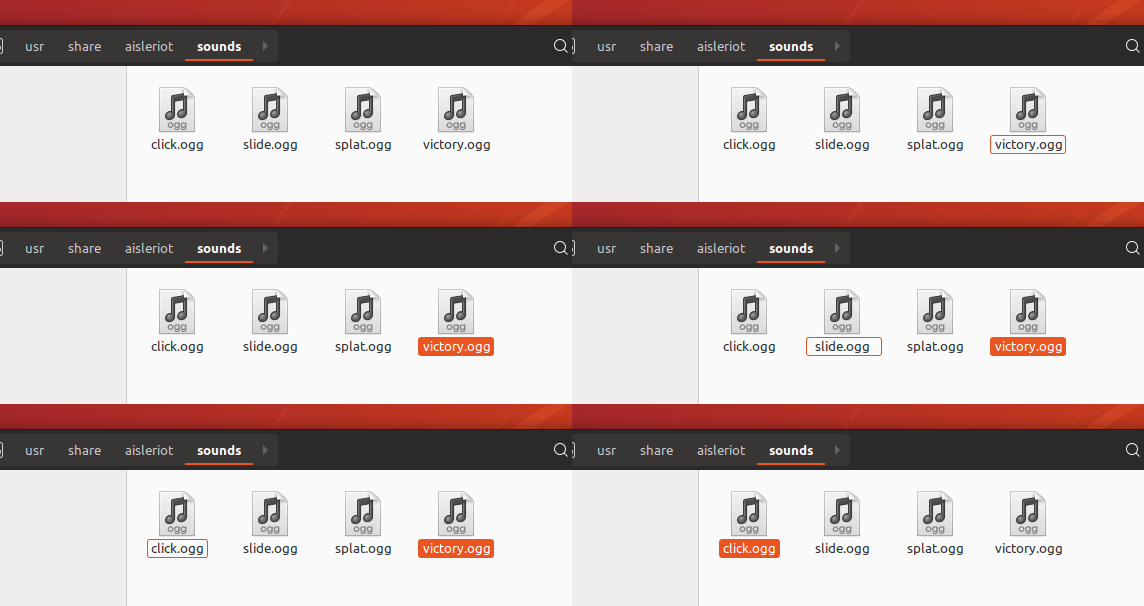
madsrh
on 4 May 2018
I asked help on IRC, since I can't find how to trigger changes on hover only
EDIT: just get the feedback. Canvas item hover is done in code, so no way to do it with css
clobrano
on 11 May 2018
Sad 😢 Do you mean that there's no way of removing the icon hover or do you mean that there's no way to add the label hover?
But basically you're saying that non of the above is possible?
madsrh
on 11 May 2018
But basically you're saying that non of the above is possible?
correct, on hover we can do nothing
Which is weird, because it is possible on select...
clobrano
on 11 May 2018
Closing this now, since it is not possible with current Nautilus view implementation
clobrano
on 14 May 2018
@clobrano I know that there's some technical limitentations at play here, but would it be possible to remove the orange selection color here and add the only label like below?
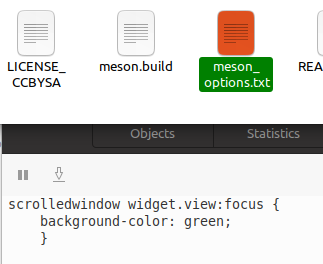
madsrh
on 11 Jan 2020
Looking at the messages above, it seems that only hover was a problem. I'll try
clobrano
on 11 Jan 2020
With that hope that this could be fixed before UI freeze for 20.04 🙏 👼
madsrh
on 20 Jan 2020
I had a look at this already, but very rapid, and I couldn't find a solution :disappointed:
clobrano
on 21 Jan 2020
Related issues
madsrh
·
3Comments
 mivoligo
·
3Comments
mivoligo
·
3Comments
 snydox
·
3Comments
snydox
·
3Comments
 Muqtxdir
·
3Comments
Muqtxdir
·
3Comments
 Feichtmeier
·
3Comments
Feichtmeier
·
3Comments
Most helpful comment
Carlos Soriano writes:
But that's fine if we can tweak the current a bit I would be very happy with that also.
@clobrano could we try one of the following (imagine the cursor 🙄 ). I really don't think the icon should change at all - it still looks weird on white document icons.
Hover gray:

Orange border:
