Yarn: Yarn 1.22.0 MSI fails Microsoft Defender SmartScreen
When downloading the release using the new Microsoft Edge Chromium browser, the download is blocked due to it failing Microsoft Defender SmartScreen. Unsure if this is a regression from previous signing, or just an overzealous analysis.
 Lego6245
All 18 comments
Same here, warnings on download and install attempt. Windows 10 1909. Might be SmartScreen being cautious on reputation of new binary. Can publisher provide a hash of the MSI for verification of the download?
 NoahStahl
on 9 Feb 2020
NoahStahl
on 9 Feb 2020
Same here, manual scan of the binary with both Windows Defender and Eset NOD32 didn't detect any threats.
 fvilers
on 13 Feb 2020
fvilers
on 13 Feb 2020
Looks like cert used for 1.21.1 expired and SmartScreen doesn't like new cert that was used to sign .msi for 1.22.0
 IllusionMH
on 4 Mar 2020
IllusionMH
on 4 Mar 2020
This is still an issue with 1.22.4 as well.
 polys
on 28 Mar 2020
polys
on 28 Mar 2020
Also hit this attempting to install v1.22.4. The same problem seems to occur when using Chrome, though the Windows 10 OS seems to be blocking it rather than the Browser. (I think Edge is blocking even downloading the .msi file.)
The message displayed when attempting to onstall a successfully downloaded .msi is:
Windows protected your PC
Microsoft Defender SmartScreen prevented an unrecognized app from starting. Running this app might put your PC at risk.
App: | yarn-1.22.4.msi
-- | --
Publisher: | Daniel Lo Nigro
Pinging @Daniel15 as his name is mentioned in the message
 BurtHarris
on 31 Mar 2020
BurtHarris
on 31 Mar 2020
Earlier this year, I switched from DigiCert to Sectigo for the Authenticode certificate as DigiCert became way too expensive. Unfortunately it seems like Windows doesn't like the Sectigo certificate as much as the DigiCert one. I'm not quite sure what to do to fix it 😕 Open to suggestions.
 Daniel15
on 31 Mar 2020
Daniel15
on 31 Mar 2020
Chromium-based Edge has this option to report an app as safe:
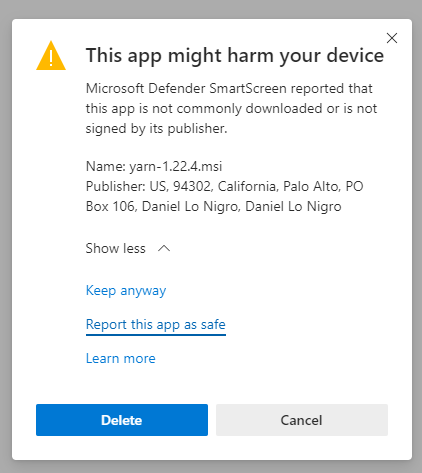
I'm going to try fill this out and see if Microsoft get back to me about it.
Daniel15
on 31 Mar 2020
Seems like we're not the only people hitting this... I found this thread with no useful answers: https://social.technet.microsoft.com/Forums/en-US/5f51a984-4a0a-490a-b2d8-a1370f498444/code-signing-standard-renewed-windows-defender-smartscreen-prevented-an-unrecognized-app-from?forum=WindowsDefenderATPPreview
Daniel15
on 31 Mar 2020
Sectigo is mentioned in official Microsoft documentation, so I'd be surprised if that's the problem.
I had an issue with certs a while ago, and it all boiled down to SHA256 vs SHA1, timestamping and some cut-off dates in Windows. I'm afraid I don't remember the specifics though.
What's described in this article is vaguely familiar though:
https://support.ksoftware.net/support/solutions/articles/215805-the-truth-about-sha1-sha-256-dual-signing-and-code-signing-certificates-
Could you maybe try signing your MSI with a SHA256 cert only (skip the SHA1)? I'm happy to give it a try if you want.
polys
on 31 Mar 2020
@Daniel15, I had a look at the cert on the 1.22.4 msi file, comparing it to one from the 1.21.1 msi. I noticed the new one has a bogus-looking e-mail address (Subject Alternative Name ) : [email protected] ! Checking a little further, it looks like it may be a valid e-mail, but the earlier cert didn't have one. I'm wondering if this name change may have caused Microsoft SmartScreen to loose track of reputation you previously gained.
I've gone ahead and installed anyway, perhaps that help you gain reputation, which may have been lost. According to this article, time and good-behavior will disarm the smartscreen "protection".
It might be a good idea to post something to the YARN blog to let people know it's not malware so they will have confidence to download and install in the mean time.
BurtHarris
on 1 Apr 2020
I noticed the new one has a bogus-looking e-mail address (Subject Alternative Name )
@BurtHarris, it's a real email address 😄
Checking a little further, it looks like it may be a valid e-mail, but the earlier cert didn't have one. I'm wondering if this name change may have caused Microsoft SmartScreen to loose track of reputation you previously gained.
It's possible. The DigiCert certificate had a lot less info in it, for example it didn't have an address.
Daniel15
on 1 Apr 2020
@Daniel15 Would it be possible to reissue the certificate with an email address like [email protected]?
PS: I would also suggest submitting the file here: https://www.microsoft.com/en-us/wdsi/filesubmission
PPS: Here's my submission: https://www.microsoft.com/en-us/wdsi/submission/5c69b75f-0d13-4229-9ff9-44dfd1a35d73
 caugner
on 1 Apr 2020
caugner
on 1 Apr 2020
Could you maybe try signing your MSI with a SHA256 cert only (skip the SHA1)?
@polys It was dual-signed to allow usage on older versions of Windows, but that's likely not relevant any more (it was more relevant a few years ago). The relevant code is here:
https://github.com/Daniel15/SecureSign/blob/547aaafd5f949fb4a792bd65710fc78a010bbcfb/src/SecureSign.Core/Signers/AuthenticodeSigner.cs#L172-L192
Here's a version of the Yarn installer signed just with SHA256, using Sectigo's timestamp server instead of DigiCert's (in case that makes a difference): yarn-1.22.4.zip (sorry, GitHub doesn't support direct uploads of .msi files)
Would it be possible to reissue the certificate with an email address like [email protected]?
I don't think we have email service @yarnpkg.com at the moment, and I think Sectigo need a notarized document for any reissues. I can try that when I get a chance though, if I can get email service at yarnpkg.com.
Daniel15
on 3 Apr 2020
Here's a version of the Yarn installer signed just with SHA256, using Sectigo's timestamp server instead of DigiCert's (in case that makes a difference): yarn-1.22.4.zip (sorry, GitHub doesn't support direct uploads of .msi files)
Thanks @Daniel15 ! That certainly did the trick for me; no SmartScreen warning anymore.
polys
on 3 Apr 2020
@polys It was dual-signed to allow usage on older versions of Windows, but that's likely not relevant any more (it was more relevant a few years ago). The relevant code is here:
https://github.com/Daniel15/SecureSign/blob/547aaafd5f949fb4a792bd65710fc78a010bbcfb/src/SecureSign.Core/Signers/AuthenticodeSigner.cs#L172-L192
I only have experience with the quirks of Microsoft's signtool... For example, for SHA1 signing with a timestamp, I used to just set /t http://timestamp.globalsign.com/scripts/timestamp.dll (/t instead of /tr), whereas for SHA256 I used /tr http://timestamp.digicert.com /td sha256 /fd sha256 (identical to your code). I remember other combinations either failed or produced invalid results.
polys
on 3 Apr 2020
I just tried your .zip version and it also fails the SmartScreen check.
 mbest
on 28 Apr 2020
mbest
on 28 Apr 2020
I'm not able to install yarn whatever the method because of this problem:
- through npm, it complains that the operation was rejected by the operation
- through choco, it won't let you execute yarn after installation
- and directly you get this defender warning
I'm surprised that there seems to be only a couple of persons facing this problem. Is the only solution for installing yarn to go through the .msi and discard the warning? Or am I missing something here?
 FredericLatour
on 3 May 2020
FredericLatour
on 3 May 2020
We have ourselves a winner Daniel15 FLAWLESS VICTORY!! I was not keen on the idea I came across on other sites suggesting I turn Windows Defender OFF.. searched for hours for an alternative.. gpedit.msc , tdsskiller.exe , enable_task_manager.reg , enable_folder_options.reg , show_hidden_folders.reg , (cmd.exe as administrator:gpupdate /force).. windows installer off (never) , regedit "installer" value change 0 , Man I tried everything to not turn my security off.. I even disabled my paid internet security.. nothing. Scrolling through the comments here.. seen the info about the signature and email differences throwing defender out of bounds.. came across the zip file link you provided.. got in position to remove my laptops battery just in case and opened the document (Nothing personal,0 Trust) Ran smooth as butter down a hot biscuit bud. Thank you Daniel15 anyone reading this needing Daniel15's link I copied and will paste it here but that man deserves the credit. Thanks once again Daniel FLAWLESS VICTORY! https://github.com/yarnpkg/yarn/files/4425577/yarn-1.22.4.zip
 VOLTRONSUPREME
on 31 Oct 2020
VOLTRONSUPREME
on 31 Oct 2020
Related issues
 FLGMwt
·
3Comments
FLGMwt
·
3Comments
 MunifTanjim
·
3Comments
MunifTanjim
·
3Comments
 ocolot
·
3Comments
ocolot
·
3Comments
 sanex3339
·
3Comments
sanex3339
·
3Comments
 davidmaxwaterman
·
3Comments
davidmaxwaterman
·
3Comments
Most helpful comment
@polys It was dual-signed to allow usage on older versions of Windows, but that's likely not relevant any more (it was more relevant a few years ago). The relevant code is here:
https://github.com/Daniel15/SecureSign/blob/547aaafd5f949fb4a792bd65710fc78a010bbcfb/src/SecureSign.Core/Signers/AuthenticodeSigner.cs#L172-L192
Here's a version of the Yarn installer signed just with SHA256, using Sectigo's timestamp server instead of DigiCert's (in case that makes a difference): yarn-1.22.4.zip (sorry, GitHub doesn't support direct uploads of .msi files)
I don't think we have email service
@yarnpkg.comat the moment, and I think Sectigo need a notarized document for any reissues. I can try that when I get a chance though, if I can get email service at yarnpkg.com.