Yarn fails to install scoped packages with the following errors:
Environment A (local server):
Arguments:
  /home/node/.nvs/node/8.15.0/x64/bin/node /usr/share/yarn/bin/yarn.js install --force

PATH:
  /home/node/.nvs/node/8.15.0/x64/bin:/usr/local/bin:/usr/bin:/bin:/usr/local/games:/usr/games:/snap/bin

Yarn version:
  1.13.0

Node version:
  8.15.0

Platform:
  linux x64

Trace:
  Error: https://registry.yarnpkg.com/@turf/clone/-/clone-6.0.2.tgz: Request failed "500 Internal Server Error"
      at ResponseError.ExtendableBuiltin (/usr/share/yarn/lib/cli.js:702:66)
      at new ResponseError (/usr/share/yarn/lib/cli.js:808:124)
      at Request.<anonymous> (/usr/share/yarn/lib/cli.js:66325:16)
      at emitOne (events.js:116:13)
      at Request.emit (events.js:211:7)
      at Request.module.exports.Request.onRequestResponse (/usr/share/yarn/lib/cli.js:130274:10)
      at emitOne (events.js:116:13)
      at ClientRequest.emit (events.js:211:7)
      at HTTPParser.parserOnIncomingClient (_http_client.js:558:21)
      at HTTPParser.parserOnHeadersComplete (_http_common.js:119:17)
Environment B (remote server, far away):
2019-01-24T10:46:13+03:00 Starting with Node version 8.15.0
2019-01-24T10:46:13+03:00 Installing dependencies..
2019-01-24T10:46:15+03:00 yarn install v1.12.3
2019-01-24T10:46:15+03:00 [1/5] Validating package.json...
2019-01-24T10:46:15+03:00 [2/5] Resolving packages...
2019-01-24T10:46:16+03:00 [3/5] Fetching packages...
2019-01-24T10:46:47+03:00 error https://registry.yarnpkg.com/@turf/line-arc/-/line-arc-5.1.5.tgz: Extracting tar content of undefined failed, the file appears to be corrupt: "Invalid tar header. Maybe the tar is corrupted or it needs to be gunzipped?"
2019-01-24T10:46:47+03:00 info Visit https://yarnpkg.com/en/docs/cli/install for documentation about this command.
2019-01-24T10:47:16+03:00 Error happened while running yarn install --production=false --no-progress. Please check your configuration
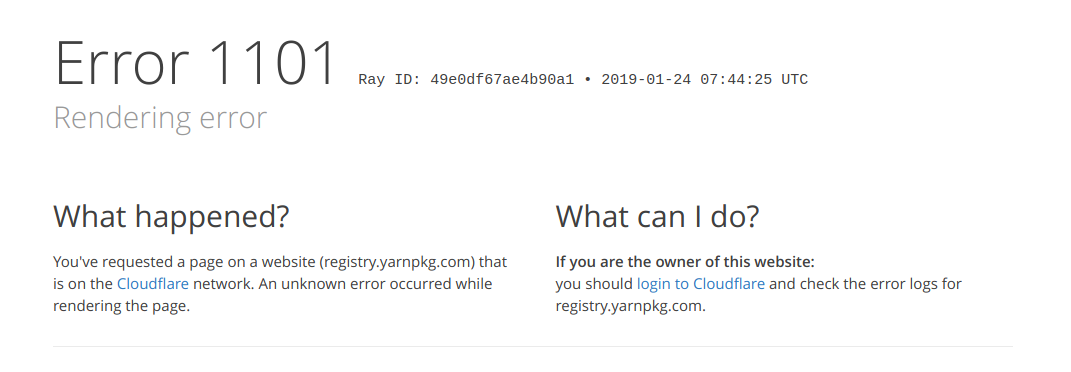
Requesting https://registry.yarnpkg.com/@turf/random/-/random-5.1.5.tgz manually resulted in error as well:
 dchekanov
All 10 comments
Same here. I've retried a few times, it's failing with one of these messages:
yarn add firebase-tools
error An unexpected error occurred: "https://registry.yarnpkg.com/@google-cloud/projectify/-/projectify-0.3.0.tgz: Request failed \"500 Internal Server Error\"".
error https://registry.yarnpkg.com/@google-cloud/pubsub/-/pubsub-0.20.1.tgz: Extracting tar content of undefined failed, the file appears to be corrupt: "Invalid tar header. Maybe the tar is corrupted or it needs to be gunzipped?"
error https://registry.yarnpkg.com/@google-cloud/paginator/-/paginator-0.1.2.tgz: Extracting tar content of undefined failed, the file appears to be corrupt: "Invalid tar header. Maybe the tar is corrupted or it needs to be gunzipped?"
 alexlouden
on 24 Jan 2019
alexlouden
on 24 Jan 2019
yep..same here
 AlexGreg
on 24 Jan 2019
AlexGreg
on 24 Jan 2019
There's an npm outage, could be related: https://status.npmjs.org/
We are investigating reports of website outages for logged in users.
alexlouden
on 24 Jan 2019
Same. Trying to do a yarn install and getting the following:
yarn install v1.12.3
[1/4] Resolving packages...
[2/4] Fetching packages...
info Visit https://yarnpkg.com/en/docs/cli/install for documentation about this command.
error https://registry.yarnpkg.com/@svgr/webpack/-/webpack-2.4.1.tgz: Extracting tar content of undefined failed, the file appears to be corrupt: "Invalid tar header. Maybe the tar is corrupted or it needs to be gunzipped?"
 anthonyhastings
on 24 Jan 2019
anthonyhastings
on 24 Jan 2019
There's an npm outage, could be related: https://status.npmjs.org/
We are investigating reports of website outages for logged in users.
Outage has nothing to do with registry.
And npm installs just fine. Yarn has different proxy for registry registry.yarnpkg.com
 O4epegb
on 24 Jan 2019
O4epegb
on 24 Jan 2019
It looks like the issue is fixed. Could someone confirm that?
 LukaszSkwara
on 24 Jan 2019
LukaszSkwara
on 24 Jan 2019
Our yarn-dependent builds are working again. 🎉
 krzysztof-miemiec
on 24 Jan 2019
krzysztof-miemiec
on 24 Jan 2019
Outage has nothing to do with registry.
And npm installs just fine. Yarn has different proxy for registry registry.yarnpkg.com
It has everything to do. The yarn "registry" is just a DNS redirection to the real npm registry. If you get 500s, it's because the npm registry returns 500. We simply don't have a backend to generate them otherwise 🙂
As for "why does it work with npm", two reasons:
The errors are random - one request out of a hundred might randomly break.
More importantly, the npm client retries 500 requests until they work. We tend to have a different approach where we prefer to fail early when the remote server starts to return internal errors. At least it lets you know about the solidity of the infrastructure you use.
Note that we recommend to use an offline mirror precisely to shield against cases like this.
 arcanis
on 24 Jan 2019
arcanis
on 24 Jan 2019
The yarn "registry" is just a DNS redirection
Hm, interesting.. Why would you do that if is "just" a redirect? I am sure there is something more about it.
O4epegb
on 24 Jan 2019
Simply because the Yarn domain name is guaranteed to exist as long as Yarn is being used, but the same isn't true for the npm domain name. It allows us to keep some latitude in case npm suddenly disappears (worst case scenario, of course) and we need to fallback to a different registry.
When the Yarn project started our domain name was also much faster than the original one because we were using Cloudflare. Now that npm switched to Cloudflare as well last year it should be the exact same performances.
(To keep things clear, we have absolutely no intention to ever build our own Yarn registry - this is purely a safety mechanism just in case. Better safe than sorry!)
arcanis
on 24 Jan 2019
Related issues
 torifat
·
3Comments
torifat
·
3Comments
 NonPolynomial
·
3Comments
NonPolynomial
·
3Comments
 davidmaxwaterman
·
3Comments
davidmaxwaterman
·
3Comments
 danez
·
3Comments
danez
·
3Comments
 baptistelebail
·
3Comments
baptistelebail
·
3Comments
Most helpful comment
It looks like the issue is fixed. Could someone confirm that?