Yarn: Yarn install never ends with (complex ?) workspaces
Do you want to request a feature or report a bug?
Bug
What is the current behavior?
When launching yarn install in workspace directory it never ends(waited all night). But if I rollback to v1.3.2 it completes in 42s.
If the current behavior is a bug, please provide the steps to reproduce.
The project is on a private repo so I can't provide a link.
What is the expected behavior?
Should end within minutes.
Please mention your node.js, yarn and operating system version.
node: v9.11.1
Yarn: 1.6.0, 1.5.1, 1.3.2
Os: Ubuntu v9.11.1 or windows 10
I'm not sure if it could be related but the packages are referenced as
"package-a": "git+ssh://[email protected]/companyname/package-a.git#0.1.1-beta.81",
 no-more
All 24 comments
I created a similar public repo on github:
I have the same issue, with version 1.3.2 installation completes in less than 30s (cache empty).
But with version 1.6.0 it does not seems to end.
no-more
on 25 Apr 2018
Trying to dig into this a bit but debugging all the recursion is tricky. The change that causes this to slow is somewhere between v1.3.2 and v1.4.0.
The code seems to just be cycling between package-request and pacakge-resolver recursively building up the entire tree, which gets very deep by the time you build test-m in the attached repro example. If you remove test-g through test-m then the install will finish, but you can also see it print out that it is resolving zone.js 3 or 4 times. It seems to be exponentially worse as you add back in the packages (test-f depends on test-e so all the resolves that happened for test-e happen again).
Just thinking through it, I suspect this might have something to do with resolutions because yarn always has to build the entire tree, just incase you had a resolution that said test-m/**/test-g/test-f/**/test-b/test-a: "v1.2.3" so the entire resolution tree building recursive thing can't be exited just because a lib has been resolved before. Just a thought anyway... no concrete evidence yet...
 rally25rs
on 30 Apr 2018
rally25rs
on 30 Apr 2018
I bisected the performance change back to [this commit] (https://github.com/yarnpkg/yarn/commit/6adbd472129b5410436ddefbd92093868bd98e49) which strangely is mine, yet I don't remember making these specific code changes when fixing peerDep warnings 😕
I'll... uh... guess I'l try to figure out what I did here...
rally25rs
on 30 Apr 2018
Oh, yeah, based on my comments in the original PR https://github.com/yarnpkg/yarn/pull/5088
The code used to return when it had already resolved a package, and only build a partial dependency tree, so finding peerDeps wouldnt work if that part of the dep tree wasn't filled out.
If we put that logic back, then it's going to break peerDep resolution and I'm pretty sure will break resolutions in the way I mentioned above.
We might need to find some more efficient way to build the entire dep tree...
rally25rs
on 30 Apr 2018
Hi, thanks for your investigation.
This example is only representing a portion of the project I'm working with which contains much more dependencies between packages (but no cycling). I submitted this one because it's the smallest case which reproduce the issue.
Do you think that removing resolution section would change something ? I'm not sure but I think I've tried this case with no more success. But maybe I'm wrong. Could you please confirm if you think that's related I could create another test case without resolution sections.
Thanks.
no-more
on 30 Apr 2018
Do you think that removing resolution section would change something?
I don't think the resolutions would matter.
rally25rs
on 30 Apr 2018
oops, clicked wrong button, accidental close :embarrassed:
rally25rs
on 30 Apr 2018
@rally25rs resolutions definitely DO matter. The same behavior occurs for workspaces and/or using resolutions. See https://github.com/yarnpkg/yarn/issues/5648 & https://github.com/yarnpkg/yarn/issues/5628 (both I believe are the same issue as this).
 hulkish
on 11 Jun 2018
hulkish
on 11 Jun 2018
@no-more I opened PR #5970 if you want to give it a try in your actual project.
rally25rs
on 11 Jun 2018
@rally25rs Hi, thanks a lot but could you tell me how to install the PR for testing ?
no-more
on 12 Jun 2018
hey @rally25rs , I'd say my mono-repo using workspaces could be said to be and the larger side (over 200 packages). I just tried your pr locally, so thanks for that!
...unfortunately it wasn't any faster 😞
workspaces

test results
yarn-local
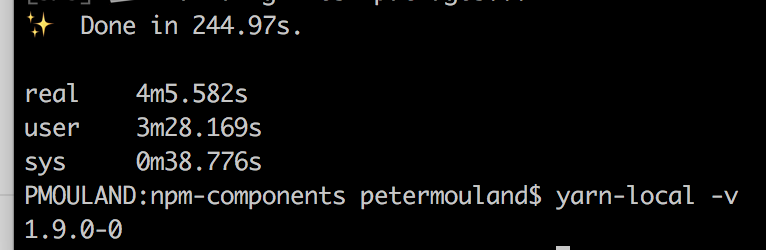
yarn-1.7.0 (1.4.0+ are all slower than 1.3.2)

yarn-1.3.2
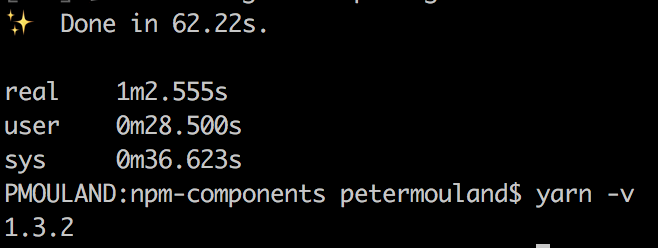
 peter-mouland
on 13 Jun 2018
peter-mouland
on 13 Jun 2018
@peter-mouland @no-more sorry to waste your time. I discovered last night that my PR appeared fast to me because I had a yarn.lock in place from a previous run, and the lockfile makes it fast.
@hulkish and I are continuing to look into this and think we have a couple ideas on what's still not working.
rally25rs
on 13 Jun 2018
no worries, happy to try and help. fyi: the above runs all had a yarnlock file - i just made sure i removed the node_modules before each install.
peter-mouland
on 13 Jun 2018
@no-more while debugging some yarn code today I noticed a couple things using your example;
1) your workspace deps are specified as github repos:
"dependencies": {
    ...
    "nomore-test-l": "git+https://[email protected]/no-more/nomore-test-l.git#master",
    "nomore-test-j": "git+https://[email protected]/no-more/nomore-test-j.git#master",
    "nomore-test-i": "git+https://[email protected]/no-more/nomore-test-i.git#master",
    "nomore-test-h": "git+https://[email protected]/no-more/nomore-test-h.git#master",
    "nomore-test-g": "git+https://[email protected]/no-more/nomore-test-g.git#master",
    "nomore-test-f": "git+https://[email protected]/no-more/nomore-test-f.git#master",
    "nomore-test-e": "git+https://[email protected]/no-more/nomore-test-e.git#master",
    "nomore-test-d": "git+https://[email protected]/no-more/nomore-test-d.git#master",
    "nomore-test-c": "git+https://[email protected]/no-more/nomore-test-c.git#master",
    "nomore-test-b": "git+https://[email protected]/no-more/nomore-test-b.git#master",
    "nomore-test-a": "git+https://[email protected]/no-more/nomore-test-a.git#master",
This is causing a major issue as yarn decides if a project in your workspace matches a dependency request not just by checking the name ('nomore-test-a' for example) but also checks that the version specified in packages/nomore-test-a/package.json matches the requested semver range.
Since your semver range is a github url, it always returns false, which tells yarn that this nomore-test-a is not part of the workspace, so it goes and fetches it from github instead.
I'm not sure if this is intentional, or just that no one thought anyone would use a github url as a workspace ref. For now, you should stick to a semver range, or "*".
2) You have resolutions to the same thing as the depenency
  "dependencies": {
    "nomore-test-a": "git+https://[email protected]/no-more/nomore-test-a.git#master",
    ...
  },
  "resolutions": {
    "nomore-test-a": "git+https://[email protected]/no-more/nomore-test-a.git#master",
    ...
  }
As far as I can tell, this would serve no purpose. I don't think it is hurting performance, except for them being github urls so it falls into the same problem as above.
If I change your example and make all the dependencies "*", and remove the resolutions, for example:
    "nomore-test-l": "*",
    "nomore-test-j": "*",
    "nomore-test-i": "*",
    "nomore-test-h": "*",
    "nomore-test-g": "*",
    "nomore-test-f": "*",
    "nomore-test-e": "*",
    "nomore-test-d": "*",
    "nomore-test-c": "*",
    "nomore-test-b": "*",
    "nomore-test-a": "*",
    ...
  },
  "resolutions": {},
then it takes yarn 1.7.0 about 11 seconds for me:
~/Projects/nomore-test-workspace 🐒   rm -rf node_modules/ yarn.lock && yarn
yarn install v1.7.0
info No lockfile found.
[1/4] 🔍  Resolving packages...
warning workspace-aggregator-1413c862-3062-445e-a792-bb3bfad6f0dc > nomore-test-c > @types/uglify-js > @types/[email protected]: This is a stub types definition for source-map (https://github.com/mozilla/source-map). source-map provides its own type definitions, so you don't need @types/source-map installed!
warning workspace-aggregator-1413c862-3062-445e-a792-bb3bfad6f0dc > nomore-test-c > [email protected]: Typings is deprecated in favor of NPM @types -- see README for more information
warning workspace-aggregator-1413c862-3062-445e-a792-bb3bfad6f0dc > nomore-test-d > [email protected]: Typings is deprecated in favor of NPM @types -- see README for more information
warning workspace-aggregator-1413c862-3062-445e-a792-bb3bfad6f0dc > nomore-test-e > [email protected]: Typings is deprecated in favor of NPM @types -- see README for more information
warning workspace-aggregator-1413c862-3062-445e-a792-bb3bfad6f0dc > nomore-test-f > [email protected]: Typings is deprecated in favor of NPM @types -- see README for more information
warning workspace-aggregator-1413c862-3062-445e-a792-bb3bfad6f0dc > nomore-test-g > [email protected]: Typings is deprecated in favor of NPM @types -- see README for more information
warning workspace-aggregator-1413c862-3062-445e-a792-bb3bfad6f0dc > nomore-test-h > [email protected]: Typings is deprecated in favor of NPM @types -- see README for more information
warning workspace-aggregator-1413c862-3062-445e-a792-bb3bfad6f0dc > nomore-test-i > [email protected]: Typings is deprecated in favor of NPM @types -- see README for more information
warning workspace-aggregator-1413c862-3062-445e-a792-bb3bfad6f0dc > nomore-test-j > [email protected]: Typings is deprecated in favor of NPM @types -- see README for more information
warning workspace-aggregator-1413c862-3062-445e-a792-bb3bfad6f0dc > nomore-test-k > [email protected]: Typings is deprecated in favor of NPM @types -- see README for more information
warning workspace-aggregator-1413c862-3062-445e-a792-bb3bfad6f0dc > nomore-test-l > [email protected]: Typings is deprecated in favor of NPM @types -- see README for more information
warning workspace-aggregator-1413c862-3062-445e-a792-bb3bfad6f0dc > nomore-test-m > [email protected]: Typings is deprecated in favor of NPM @types -- see README for more information
[2/4] 🚚  Fetching packages...
[3/4] 🔗  Linking dependencies...
warning "workspace-aggregator-1413c862-3062-445e-a792-bb3bfad6f0dc > nomore-test-h > [email protected]" has incorrect peer dependency "@angular/core@^2.0.0".
warning "workspace-aggregator-1413c862-3062-445e-a792-bb3bfad6f0dc > nomore-test-h > [email protected]" has incorrect peer dependency "@angular/http@^2.0.0".
warning "workspace-aggregator-1413c862-3062-445e-a792-bb3bfad6f0dc > nomore-test-h > @angular/[email protected]" has unmet peer dependency "@angular/[email protected]".
warning "workspace-aggregator-1413c862-3062-445e-a792-bb3bfad6f0dc > nomore-test-h > [email protected]" has incorrect peer dependency "tslint@^3.5.0".
warning "workspace-aggregator-1413c862-3062-445e-a792-bb3bfad6f0dc > nomore-test-h > [email protected]" has incorrect peer dependency "typescript@~1.8.0".
warning "workspace-aggregator-1413c862-3062-445e-a792-bb3bfad6f0dc > nomore-test-h > [email protected]" has unmet peer dependency "hapi@>=13.0.0".
[4/4] 📃  Building fresh packages...
success Saved lockfile.
✨  Done in 10.05s.
That said, there are a few other performance issues that we've uncovered over days of digging through this. There is some duplication of work going on in a few places that we're working on a PR for, but I thought I would at least point these things out since they seem to make your example at least run in a fairly quick amount of time.
rally25rs
on 16 Jun 2018
Hi, thanks for your response but I can't switch to semver only because I'm using this on private repos hosted at bitbucket. That's why I have to use "git+https" syntax. It's only for this example that I was able to create public repos and publish them on npm.
I used to use "nomore-test-a": "git+https://[email protected]/no-more/nomore-test-a.git#0.1.5" syntax before but this does not seems to change the installation time.
Isn't there another solution ?
Thanks
no-more
on 16 Jun 2018
@no-more I opened a PR above that should let yarn resolve the workspace packages correctly.
rally25rs
on 22 Jun 2018
I have been having a similar issue where yarn install never completes. I have spent a lot of time trying to figure out what I did wrong and could be causing this as it just seemed to hang indefinitely without any messaging in the console. I tried running it over night and I got "FATAL ERROR: CALL_AND_RETRY_LAST Allocation failed - JavaScript heap out of memory".
We are not using any resolutions or any packages straight from github. We use our own NPM server and using "latest" version for all our internal workspace packages.
I was able to get it to run when I took all but 11 packages out of the workspace project. But as soon as I added more I ran into issues.
 spoldman
on 13 Jul 2018
spoldman
on 13 Jul 2018
Sorry for the late response.
I have tried the PR with no success, the process fails after about 2 hours :
<--- Last few GCs --->

[20184:0000015EBFB96B20]  1541532 ms: Scavenge 1386.8 (1420.6) -> 1386.7 (1421.6) MB, 5.2 / 0.0 ms  (average mu = 0.169, current mu = 0.076) allocation failure
[20184:0000015EBFB96B20]  1541542 ms: Scavenge 1387.3 (1421.6) -> 1387.2 (1422.1) MB, 5.6 / 0.0 ms  (average mu = 0.169, current mu = 0.076) allocation failure
[20184:0000015EBFB96B20]  1541547 ms: Scavenge 1387.7 (1422.1) -> 1387.6 (1423.1) MB, 3.6 / 0.0 ms  (average mu = 0.169, current mu = 0.076) allocation failure


<--- JS stacktrace --->

==== JS stack trace =========================================

    0: ExitFrame [pc: 0000008C747DC6C1]
    1: StubFrame [pc: 0000008C74E65B16]
Security context: 0x03a0e579e549 <JSObject>
    2: GetThirdIndex(aka GetThirdIndex) [000003EC02275111] [native array.js:1] [bytecode=000000F5A6E2A761 offset=63](this=0x01331eb826f1 <undefined>,o=0x0101d5ce5741 <JSArray[17809856]>,ay=1,az=17809855)
    3: QuickSort(aka QuickSort) [000003EC022751A1] [native array.js:1] [bytecode=0000029329AEE5C1 offset=68](this=...

FATAL ERROR: Ineffective mark-compacts near heap limit Allocation failed - JavaScript heap out of memory
 1: 00007FF7A9FE3D05
 2: 00007FF7A9FBDD46
 3: 00007FF7A9FBE610
 4: 00007FF7AA4248DE
 5: 00007FF7AA42480F
 6: 00007FF7AA3701A4
 7: 00007FF7AA366747
 8: 00007FF7AA364CBC
 9: 00007FF7AA36DCC7
10: 00007FF7AA36DD46
11: 00007FF7AA493557
12: 00007FF7AA56C58A
13: 0000008C747DC6C1
I have also tried the latest yarn version 1.9.4 it was very long (11103.69s) but it successfully installed my workspace
no-more
on 19 Aug 2018
For anyone who is interested, I think this issue can probably be closed. Our repo which uses yarn workspaces now has 500+ packages and no longer hangs on the latest version of yarn.
Assuming no regressions, Yarn 1.10.x seems to be super speedy again
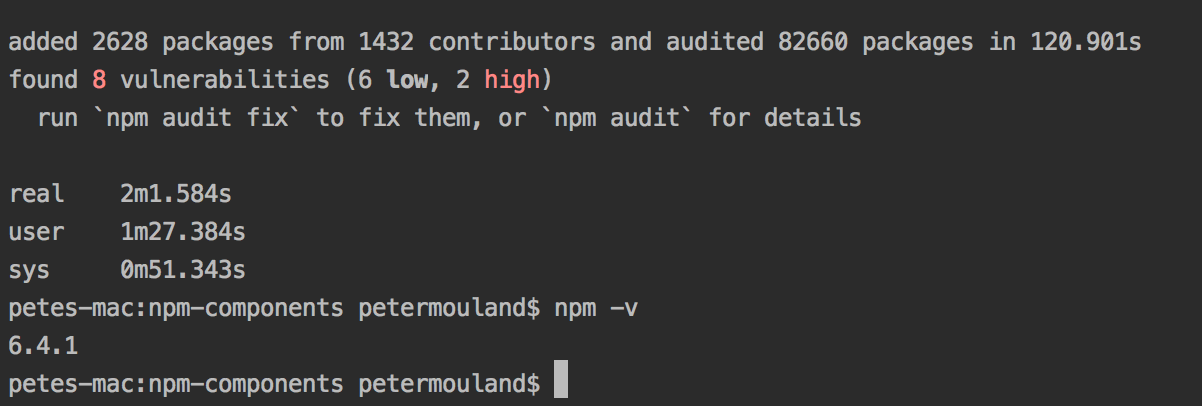
Here is the latest comparisons:
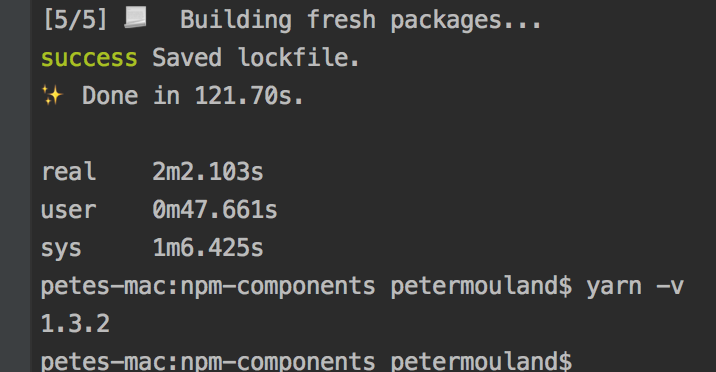
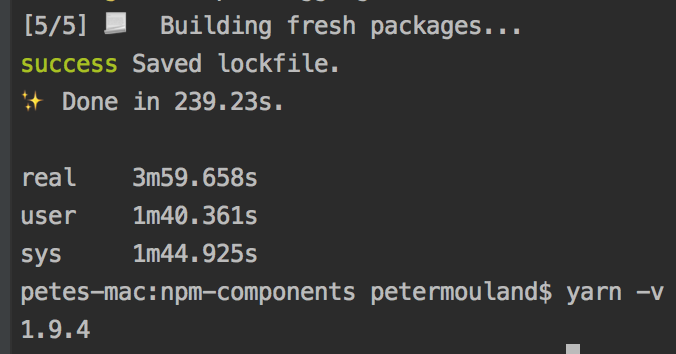
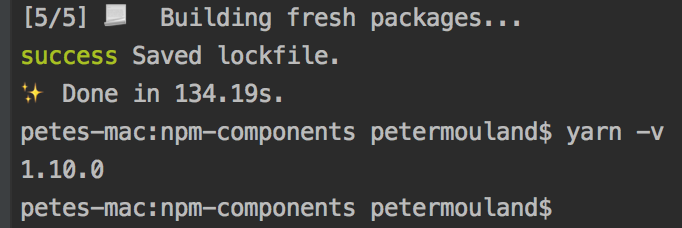
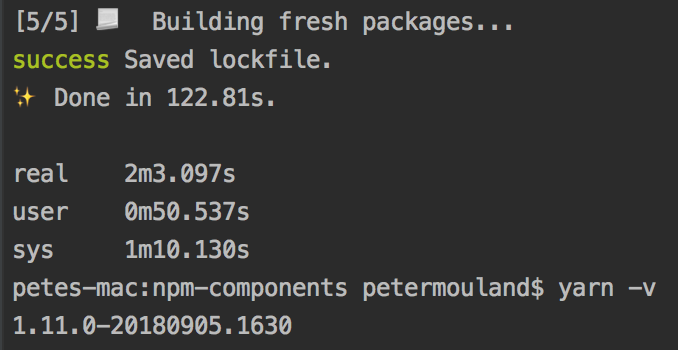
and to complete the story, compared to npm:
peter-mouland
on 15 Sep 2018
I still have this issue.
 mschipperheyn
on 18 Apr 2019
mschipperheyn
on 18 Apr 2019
@mschipperheyn could you leave the yarn version number, maybe give an idea of if you use workspaces, how packages are being installed and how long it takes?
the version number also the same timings compared with a previous, fast, version which demonstrates a possible regression like I have done above?
peter-mouland
on 18 Apr 2019
Hey @peter-mouland I use yarn workspaces which includes react-native, web and 2 common packages.
yarn 1.15.2
node 10.15.1
I can't install packages without running into the out of memory error. I use yarn --ignore-scripts to get everything installed (which creates other issues). Running a regular yarn build on the server package that includes the react-native web frontend, regular front end and server, creates out of memory. dev builds work fine.
yarn workspace server build --verbose
verbose 0.225 Checking for configuration file "/Users/mschipperheyn/development/projects/funcional/social-front/.npmrc".
verbose 0.226 Checking for configuration file "/Users/mschipperheyn/.npmrc".
verbose 0.226 Found configuration file "/Users/mschipperheyn/.npmrc".
verbose 0.226 Checking for configuration file "/Users/mschipperheyn/.nvm/versions/node/v10.15.1/etc/npmrc".
verbose 0.227 Checking for configuration file "/Users/mschipperheyn/development/projects/funcional/social-front/.npmrc".
verbose 0.227 Checking for configuration file "/Users/mschipperheyn/development/projects/funcional/.npmrc".
verbose 0.227 Checking for configuration file "/Users/mschipperheyn/development/projects/.npmrc".
verbose 0.227 Checking for configuration file "/Users/mschipperheyn/development/.npmrc".
verbose 0.227 Checking for configuration file "/Users/mschipperheyn/.npmrc".
verbose 0.227 Found configuration file "/Users/mschipperheyn/.npmrc".
verbose 0.228 Checking for configuration file "/Users/.npmrc".
verbose 0.23 Checking for configuration file "/Users/mschipperheyn/development/projects/funcional/social-front/.yarnrc".
verbose 0.23 Checking for configuration file "/Users/mschipperheyn/.yarnrc".
verbose 0.231 Found configuration file "/Users/mschipperheyn/.yarnrc".
verbose 0.231 Checking for configuration file "/Users/mschipperheyn/.nvm/versions/node/v10.15.1/etc/yarnrc".
verbose 0.231 Checking for configuration file "/Users/mschipperheyn/development/projects/funcional/social-front/.yarnrc".
verbose 0.231 Checking for configuration file "/Users/mschipperheyn/development/projects/funcional/.yarnrc".
verbose 0.231 Checking for configuration file "/Users/mschipperheyn/development/projects/.yarnrc".
verbose 0.231 Checking for configuration file "/Users/mschipperheyn/development/.yarnrc".
verbose 0.232 Checking for configuration file "/Users/mschipperheyn/.yarnrc".
verbose 0.232 Found configuration file "/Users/mschipperheyn/.yarnrc".
verbose 0.232 Checking for configuration file "/Users/.yarnrc".
verbose 0.235 current time: 2019-04-18T13:49:42.761Z
warning package.json: No license field
$ razzle build --verbose
Creating an optimized production build...
Compiling client...
Webpack Bundle Analyzer saved report to /Users/mschipperheyn/development/projects/funcional/social-front/packages/server/build/public/report.html
Compiled client successfully.
Compiling server...

<--- Last few GCs --->

[66145:0x103800000]    69633 ms: Mark-sweep 1301.0 (1421.2) -> 1300.2 (1421.2) MB, 641.8 / 0.0 ms  (average mu = 0.087, current mu = 0.005) allocation failure scavenge might not succeed
[66145:0x103800000]    70300 ms: Mark-sweep 1301.1 (1421.2) -> 1300.3 (1421.7) MB, 663.4 / 0.0 ms  (average mu = 0.048, current mu = 0.006) allocation failure scavenge might not succeed


<--- JS stacktrace --->

==== JS stack trace =========================================

    0: ExitFrame [pc: 0x109641a5be3d]
Security context: 0x20d2e2d9e6e1 <JSObject>
    1: SourceMapGenerator_addMapping [0x20d285abecb9] [/Users/mschipperheyn/development/projects/funcional/social-front/node_modules/source-map/lib/source-map-generator.js:~103] [pc=0x1096427b364d](this=0x20d2b50ddb29 <SourceMapGenerator map = 0x20d2c75f28d9>,aArgs=0x20d223a99289 <Object map = 0x20d2c6afff59>)
    2: /* anonymous */(aka /* anonymous */) [0x2...

FATAL ERROR: Ineffective mark-compacts near heap limit Allocation failed - JavaScript heap out of memory
 1: 0x10003b1db node::Abort() [/Users/mschipperheyn/.nvm/versions/node/v10.15.1/bin/node]
 2: 0x10003b3e5 node::OnFatalError(char const*, char const*) [/Users/mschipperheyn/.nvm/versions/node/v10.15.1/bin/node]
 3: 0x1001a86b5 v8::internal::V8::FatalProcessOutOfMemory(v8::internal::Isolate*, char const*, bool) [/Users/mschipperheyn/.nvm/versions/node/v10.15.1/bin/node]
 4: 0x100573ad2 v8::internal::Heap::FatalProcessOutOfMemory(char const*) [/Users/mschipperheyn/.nvm/versions/node/v10.15.1/bin/node]
 5: 0x1005765a5 v8::internal::Heap::CheckIneffectiveMarkCompact(unsigned long, double) [/Users/mschipperheyn/.nvm/versions/node/v10.15.1/bin/node]
 6: 0x10057244f v8::internal::Heap::PerformGarbageCollection(v8::internal::GarbageCollector, v8::GCCallbackFlags) [/Users/mschipperheyn/.nvm/versions/node/v10.15.1/bin/node]
 7: 0x100570624 v8::internal::Heap::CollectGarbage(v8::internal::AllocationSpace, v8::internal::GarbageCollectionReason, v8::GCCallbackFlags) [/Users/mschipperheyn/.nvm/versions/node/v10.15.1/bin/node]
 8: 0x10057cebc v8::internal::Heap::AllocateRawWithLigthRetry(int, v8::internal::AllocationSpace, v8::internal::AllocationAlignment) [/Users/mschipperheyn/.nvm/versions/node/v10.15.1/bin/node]
 9: 0x10057cf3f v8::internal::Heap::AllocateRawWithRetryOrFail(int, v8::internal::AllocationSpace, v8::internal::AllocationAlignment) [/Users/mschipperheyn/.nvm/versions/node/v10.15.1/bin/node]
10: 0x10054c884 v8::internal::Factory::NewFillerObject(int, bool, v8::internal::AllocationSpace) [/Users/mschipperheyn/.nvm/versions/node/v10.15.1/bin/node]
11: 0x1007d4894 v8::internal::Runtime_AllocateInNewSpace(int, v8::internal::Object**, v8::internal::Isolate*) [/Users/mschipperheyn/.nvm/versions/node/v10.15.1/bin/node]
12: 0x109641a5be3d
A workaround that works for me is yarn install --ignore-scripts && npm rebuild
I'm wondering what parts I'm inadvertently skipping using this scenario?
mschipperheyn
on 6 Aug 2019
Trying to migrate to workspaces - @mschipperheyn --ignore-scripts did the trick, but after some digging I found that in one of my workspaces I had a preinstall script that would cd into a relative path and run yarn install, this was the cause of the hanging, but Yarn was swallowing any errors that might have ocurred in that script, this could be improved.
 melloc01
on 28 Aug 2019
melloc01
on 28 Aug 2019
Related issues
 AzGoalie
·
3Comments
AzGoalie
·
3Comments
 torifat
·
3Comments
torifat
·
3Comments
 baptistelebail
·
3Comments
baptistelebail
·
3Comments
 sebmck
·
3Comments
sebmck
·
3Comments
 NonPolynomial
·
3Comments
NonPolynomial
·
3Comments
Most helpful comment
Trying to migrate to workspaces - @mschipperheyn
--ignore-scriptsdid the trick, but after some digging I found that in one of my workspaces I had apreinstallscript that wouldcdinto a relative path and runyarn install, this was the cause of the hanging, but Yarn was swallowing any errors that might have ocurred in that script, this could be improved.